1. Киришүү
This manual provides essential information for setting up, operating, and maintaining your VIZIO 32-inch V-Series Smart HD TV, model VHD32M-0810. This television features a 720p Full Array LED display, integrated smart TV capabilities, Bluetooth connectivity, and built-in support for Apple AirPlay 2 and Chromecast.

Сүрөт 1.1: Алдыңкы view of the VIZIO 32-inch V-Series Smart HD TV showcasing анын акылдуу интерфейси.
2. Кутуда эмне бар
Verify that all the following components are included with your VIZIO TV:
- VIZIO 32-inch V-Series Smart HD TV
- Электр кабели
- Алыстан башкаруу
- Телевизор (2 даана)
3. Орнотуу
3.1 Физикалык орнотуу
Your VIZIO TV can be placed on a flat surface using the included stand or mounted on a wall (wall mount sold separately).
Телевизордун отургучун бекитүү:
- Экрандын бузулуп калышына жол бербөө үчүн, телевизорду бетин ылдый каратып жумшак, таза бетке этияттык менен коюңуз.
- Ар бир стенд бөлүгүн телевизордун түбүндөгү тиешелүү уячаларга тууралаңыз.
- Берилген бурамалар менен тирөөч бөлүктөрүн бекитиңиз. Алардын бекем тартылганын текшериңиз.

Image 3.1: VIZIO TV with its stand attached, ready for placement.
Дубалга орнотуу:
If you plan to wall-mount your TV, refer to the instructions provided with your specific wall mount kit. Ensure the mount is compatible with VESA standards for a 32-inch television.
3.2 Кубат туташтыруу
Connect the power cable to the AC IN port on the back of the TV, then plug the other end into a working electrical outlet.

Image 3.2: Rear panel of the VIZIO TV with input ports visible.
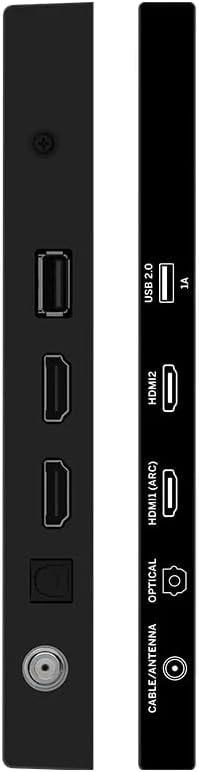
Сүрөт 3.3: Каптал view of the VIZIO TV highlighting connectivity ports.
3.3 Баштапкы орнотуу
Биринчи жолу күйгүзүлгөндө, сыналгы сизди баштапкы орнотуу процессине жетектейт. Буга төмөнкүлөр кирет:
- Тил тандоо: Өзүңүзгө жаккан тилди тандаңыз.
- Тармак туташуусу: Connect to your home Wi-Fi network using the built-in WiFi 5 dual-band technology for faster and more reliable streaming.
- Каттоо эсебин орнотуу: Follow on-screen prompts to set up or log in to your VIZIO account to access smart features and apps.
- Каналды сканерлөө: If using an antenna, perform a channel scan to find available over-the-air broadcasts.
4. Иштөө нускамалары
4.1 Алыстан башкаруу
The included remote control provides full functionality for navigating your VIZIO Smart TV. It features dedicated buttons for popular streaming services, input selection, and menu access.
Негизги алыстан башкаруу функциялары:
- Кубат баскычы: Телевизорду күйгүзөт же өчүрөт.
- Киргизүү баскычы: Cycles through available input sources (HDMI, USB, etc.).
- Навигация панели (жебе баскычтары жана OK): Менюлар боюнча жылдыруу жана параметрлерди тандоо үчүн колдонулат.
- Үнүн жогорулатуу/төмөндөтүү: Аудионун үнүн тууралайт.
- Канал өйдө/төмөн: Changes TV channels (if applicable).
- Колдонмонун атайын баскычтары: Quick access to services like Netflix, Prime Video, Hulu, etc.
- Menu/Settings Button: Сыналгынын орнотуулар менюсуна кирет.
Video 4.1: Demonstration of the VIZIO TV remote control and user interface navigation.
4.2 Smart TV өзгөчөлүктөрү
Your VIZIO V-Series TV offers a comprehensive smart platform for entertainment:
- Агымдуу колдонмолор: Access a wide range of pre-installed and downloadable applications such as Netflix, Prime Video, Disney+, Hulu, YouTube, and more.
- VIZIO WatchFree+: Enjoy hundreds of free channels and movies without subscription fees.
- Apple AirPlay 2: Мазмунду түздөн-түз Apple түзмөктөрүңүздөн сыналгыга агымыңыз.
- Chromecast камтылган: Cast your favorite entertainment from your phone, tablet, or laptop directly to the TV.
4.3 Байланыш
The TV provides various connectivity options:
- Bluetooth: Pair wireless headphones or speakers for a personalized audio experience.
- USB: Медиа ойнотуу үчүн USB түзмөктөрүн туташтырыңыз.
- HDMI: Multiple HDMI ports for connecting external devices like gaming consoles, Blu-ray players, or cable boxes.
- Wi-Fi 5: High-speed wireless internet connection for streaming and smart features.
4.4 Сүрөт жана үн орнотуулары
Сиздин жекелештирүү viewсыналгынын орнотуулар менюсу аркылуу угуу жана угуу тажрыйбасы:
- Сүрөт режимдери: Select from various preset picture modes (e.g., Vivid, Calibrated Dark, Game, Sports) or customize settings like brightness, contrast, and color.
- Үн режимдери: Adjust audio settings, including presets for different content types, and leverage DTS Virtual X for an enhanced audio experience.
5. Техникалык шарттар
| Өзгөчөлүк | Деталь |
|---|---|
| Бренд | VIZIO |
| Модель номери | VHD32M-0810 |
| Screen Size | 32 дюйм |
| Дисплей технологиясы | LED (Full Array) |
| Резолюция | 720p |
| Жаңыртуу ылдамдыгы | 60 Гц |
| Байланыш технологиясы | Bluetooth, USB, Wi-Fi |
| Өзгөчөлүктөр | Chromecast Built-in, Apple AirPlay 2, DTS Virtual X |
| Элемент Салмагы | 12.27 фунт |
| Продукциянын өлчөмдөрү | 6.6 x 28.18 x 18.9 дюйм |
6. Техникалык тейлөө
- Экранды тазалоо: Use a soft, lint-free cloth specifically designed for electronics. Avoid harsh chemicals or abrasive materials.
- Рамканы тазалоо: Wipe the TV frame with a soft, damp кездеме.
- Программалык камсыздоо жаңыртуулары: Ensure your TV's software is up-to-date for optimal performance and security. Updates are typically downloaded automatically when connected to the internet.
7. Кыйынчылыктарды
If you encounter issues with your VIZIO TV, try the following steps:
- Кубат жок:
- Check if the power cable is securely connected to both the TV and the electrical outlet.
- Розетка иштеп жатканын башка түзмөккө сайып текшериңиз.
- Сүрөт/үн жок:
- Сыналгыда туура киргизүү булагы тандалганын текшериңиз.
- Check all HDMI or other video/audio cables for secure connections.
- Үндүн үнү өчүп же өтө төмөн коюлбагандыгын текшериңиз.
- Тармакка туташуу маселелери:
- Wi-Fi роутериңизди жана модемиңизди өчүрүп күйгүзүңүз.
- Check the TV's network settings to ensure it's connected to the correct network.
- Move the TV closer to the router if signal strength is weak.
- Алыстан башкаруу жооп бербейт:
- Пульттагы батарейкаларды алмаштырыңыз.
- Пульт менен сыналгынын IR сенсорунун ортосунда эч кандай тоскоолдуктар жок экенин текшериңиз.
- Жалпы аткаруу маселелери:
- Perform a soft reset by unplugging the TV from the power outlet for 60 seconds, then plugging it back in.
- If issues persist, consider performing a factory reset (refer to the TV's on-screen settings for this option, as it will erase all personalized settings).
8. Кепилдик жана колдоо
This VIZIO TV is offered as an Amazon Renewed product. Amazon Renewed products are backed by the Amazon Renewed Guarantee, which provides a replacement or refund within 90 days of receipt if the product does not work as expected.
For further assistance, please refer to the VIZIO support website or contact Amazon customer service for Amazon Renewed product inquiries.
Additional protection plans may be available for purchase separately, offering extended coverage beyond the Amazon Renewed Guarantee.


