Introduction
Thank you for choosing the Hama Smartwatch 7010. This manual provides essential information for setting up, operating, and maintaining your smartwatch. Please read it carefully to ensure proper use and to maximize the device's features.

The Hama Smartwatch 7010, a versatile device for daily use and sports activities.
1. Орнотуу
1.1 Кутуда эмне бар
- 1 Hama Smartwatch 7010
- 1 USB кубаттоо кабели
- 1 Ыкчам орнотуу колдонмосу
1.2 Акылдуу саатты кубаттоо
Before first use, fully charge your smartwatch. Connect the supplied magnetic USB charging cable to the charging contacts on the back of the watch and to a USB power source. The watch display will indicate charging status.
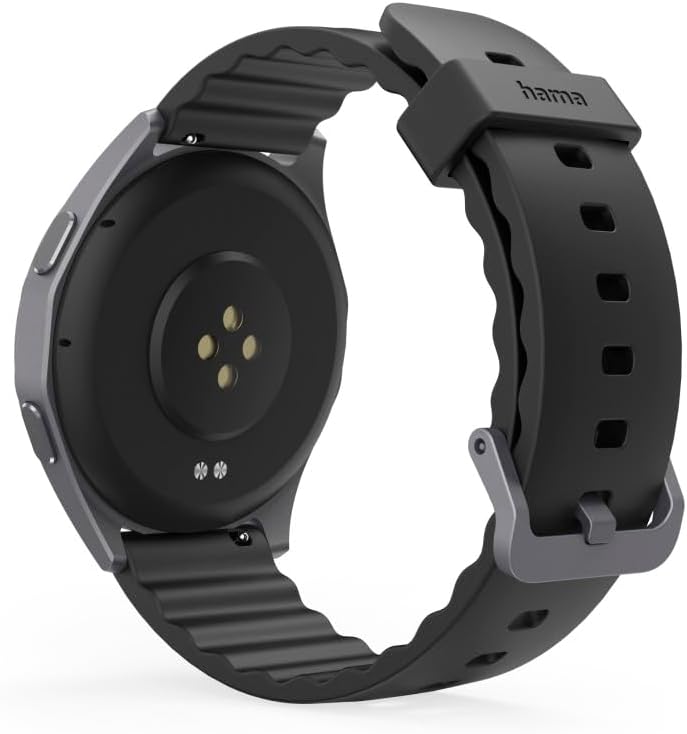
Арткы view of the smartwatch, highlighting the magnetic charging contacts and sensors.
A full charge typically provides 6 to 8 days of battery life, depending on usage.
1.3 Баштапкы жупташтыруу жана колдонмону туташтыруу
- Колдонмону жүктөп алыңыз: Издөө the official Hama smartwatch app on your smartphone's app store (compatible with Google Fit, Apple Health, and Strava).
- Bluetooth иштетүү: Смартфонуңузда Bluetooth иштеп турганын текшериңиз.
- Колдонмону ачуу: Жаңы түзмөк кошуу үчүн колдонмонун ичиндеги экрандагы көрсөтмөлөрдү аткарыңыз.
- Саатты жупташтыруу: Select 'Hama Smartwatch 7010' from the list of available devices. Confirm the pairing request on both your phone and the watch.
- Толук орнотуу: The app will guide you through initial settings, including personal profile, notification preferences, and voice assistant integration (Siri/Google Assistant).
2. Иштөө нускамалары
2.1 Дисплей жана навигация
The Hama Smartwatch 7010 features a 1.43-inch AMOLED touchscreen display with adjustable brightness (up to 450 nits) for clear visibility in various lighting conditions. You can customize the watch face from over 100 designs or use personal wallpapers. The screen can be activated by a wrist movement, and an Always-On-Display mode is available.

The 1.43-inch AMOLED display offers a clear and vibrant interface.
2.2 Чакыруу функциясы
Make and receive calls directly from your wrist. The integrated call function allows for hands-free communication, ideal for when your phone is not readily accessible.

The smartwatch displaying an incoming call, with options to answer or decline.
2.3 Үн жардамчысы
Access your smartphone's voice assistant (Siri or Google Assistant) directly from the smartwatch. Use voice commands to make calls, reply to messages, or ask questions.

The voice assistant interface on the smartwatch, ready for voice commands.
2.4 GPS көзөмөлдөө
The integrated GPS allows for precise route recording during outdoor activities, even without your smartphone. Track your distance, speed, and route details.

The smartwatch and a smartphone showing a detailed GPS-tracked hiking route.
2.5 Спорт режимдери жана активдүүлүктү көзөмөлдөө
The smartwatch supports over 20 sport modes, allowing you to record various activities directly on the device. It tracks key metrics such as heart rate, duration, calories burned, and speed. Set daily goals and use the timer or stopwatch for quick workouts.

The smartwatch display showing real-time activity tracking data during a workout.

A user engaging in cycling, demonstrating the smartwatch's use during sports.
2.6 Ден соолуктун мониторинги
Monitor your body functions with features like heart rate tracking, blood oxygen saturation, pedometer, and sleep analysis (sleep score and stages). The watch also provides stress monitoring and breathing exercises for relaxation.

The smartwatch tracking sleep patterns while the user rests.

The smartwatch displaying a real-time heart rate graph.
2.7 Notifications and Reminders
Receive notifications from your smartphone directly on your watch. Set reminders for appointments, hydration, movement, and even your menstrual cycle. The watch can also alert you to low blood oxygen saturation.
2.8 Кошумча функциялар
- Аба ырайы: Integrated weather forecasts keep you informed.
- Pomodoro Timer & Do Not Disturb Mode: For focused work or training sessions.
- Телефон функциясын табуу: Locate your phone, even if it's in silent mode.
- Камеранын алыстан башкаруусу: Саатыңызды телефонуңуздун камерасы үчүн алыстан жапкыч катары колдонуңуз.
- Музыкалык башкаруу: Смартфонуңузда музыканы ойнотууну көзөмөлдөңүз.

The smartwatch showing music playback controls, indicating its water resistance.
3. Техникалык тейлөө
3.1 Тазалоо
Акылдуу саатыңызды жана боону жумшак, d менен үзгүлтүксүз тазалап туруңузamp кездеме. Катуу химиялык заттарды же абразивдүү материалдарды колдонуудан алыс болуңуз. Заряддоодон мурун заряддоо контакттары таза жана кургак экенин текшериңиз.
3.2 Сууга туруктуулук
The Hama Smartwatch 7010 is IP68 rated and water-resistant up to 3 ATM. This means it is protected against dust ingress and can withstand immersion in water. It is suitable for swimming in shallow water but not for diving or high-pressure water activities.
3.3 Программалык камсыздоо жаңыртуулары
Keep your smartwatch's software updated through the companion app to ensure optimal performance and access to new features. Follow the app's instructions for any available updates.
4. Кыйынчылыктарды
4.1 Жалпы маселелер жана чечимдер
- Күйгүзүлбөй жаткан саат: Сааттын толук заряддалганын текшериңиз. Аны кубаттагычка туташтырып, бир нече мүнөт күтө туруңуз.
- Смартфон менен жупташуу мүмкүн эмес: Make sure Bluetooth is enabled on your phone and the watch. Restart both devices and try pairing again through the app.
- GPS так байкабай жатат: Ачык жерде экениңизди тактаңыз view of the sky. Check the app for any GPS-related settings or updates.
- Эскертмелер көрүнбөй жатат: Verify notification permissions in your smartphone's settings for the Hama app, and check the app's notification settings.
- Заряддоо маселелери: Clean the magnetic charging contacts on both the watch and the cable. Ensure the cable is securely connected to a working USB power source.
4.2 Заводдук абалга кайтаруу
If you experience persistent issues, a factory reset may resolve them. This will erase all data on your watch and restore it to its original settings. Consult the app or the quick installation guide for specific instructions on how to perform a factory reset.
5. Техникалык шарттар
| Бренд | Хама |
| Модель номери | 00178618 |
| Дисплей түрү | AMOLED |
| Дисплей өлчөмү | 1.43 дюйм |
| Дисплей жарыктыгы | 450 нит |
| Байланыш | Bluetooth 5.3 |
| Суу каршылык | IP68, 3 ATM |
| Батарея сыйымдуулугу | 300 мАч литий-полимер |
| Батареянын иштөө мөөнөтү | 6 күндөн 8 күнгө чейин |
| Заряддоо түрү | Магниттик |
| Сенсорлор | Integrated GPS, Heart Rate, Blood Oxygen, Pedometer |
| Операция системасы | Wear OS |
| Өлчөмдөрү (H x W x L) | 1.2 см х 4.6 см х 5.3 см |
| Боо туурасы | 2.2 см |
| Салмагы | 45 г |
6. Кепилдик жана колдоо
6.1 Өндүрүүчүнүн кепилдиги
The Hama Smartwatch 7010 comes with a 2-year manufacturer's warranty. Please retain your proof of purchase for any warranty claims.
6.2 Кардарларды колдоо
For further assistance, technical support, or warranty inquiries, please contact Hama customer service. Refer to the quick installation guide or the Hama webбайланыш маалыматы үчүн сайт.