1. Киришүү
This manual provides detailed instructions for the installation, operation, and maintenance of your Jansite MT10 Motorcycle Carplay & Android Auto System. This device integrates a 7-inch display with wireless Carplay/Android Auto functionality and a dual 2K dash camera system, designed for enhanced navigation, communication, and recording during motorcycle rides. Please read this manual thoroughly before using the product to ensure proper function and safety.
2. Коопсуздук боюнча маанилүү маалымат
Observe the following safety precautions to prevent damage to the device or injury to yourself and others:
- Орнотуу: Ensure the device is securely mounted and all cables are properly routed to avoid interference with motorcycle controls or moving parts. Improper installation can lead to accidents.
- Кубат туташуу: Connect the device to the motorcycle's power supply according to the instructions. Incorrect wiring can cause electrical shorts or damage.
- Operation While Riding: Avoid operating the device or making complex adjustments while riding. Focus on the road and traffic conditions. Use voice commands or the wired remote for essential functions.
- Суу каршылык: The device is IP67 waterproof. However, avoid submerging it in water or exposing it to high-pressure water jets. Ensure all ports are securely covered when not in use.
- Температура: Аппаратты экстремалдуу температурага дуушар кылбаңыз.
- Тейлөө: Аппаратты өз алдынча бөлүүгө же оңдоого аракет кылбаңыз. Бардык оңдоо иштери үчүн квалификациялуу тейлөө кызматкерлерине кайрылыңыз.
3. Пакеттин мазмуну
Пакетте бардык буюмдар бар экенин текшериңиз:
- Jansite MT10 Display Unit (7-inch)
- Front Camera (2K)
- Rear Camera (2K)
- Camera Cables
- 64 ГБ TF картасы (алдын ала орнотулган же өзүнчө)
- Монтаждоо кронштейнинин комплекти
- Электр кабели
- Зымдуу алыстан башкаруу
- Орнотуу куралдары
- User Manual

Image 1: Jansite MT10 system components including the main display, cameras, remote, and mounting hardware.
4. Продукт бүтүп калдыview
The Jansite MT10 is an integrated system designed to enhance your motorcycle riding experience. Key features include:
- 7 дюймдук HD IPS сенсордук экраны: Provides clear visuals and responsive touch control.
- Wireless Carplay & Android Auto: Навигация, музыка жана чалуулар үчүн смартфонуңуз менен үзгүлтүксүз интеграция.
- Dual 2K Dash Cameras: Simultaneous front and rear recording for comprehensive coverage.
- IP67 суу өткөрбөйт дизайн: Ар кандай аба ырайынын шарттарында ишенимдүү иштөөнү камсыз кылат.
- Кош Bluetooth 5.0: Stable connection to your phone and Bluetooth helmet/earphones.
- Зымдуу алыстан башкаруу: Safe and convenient access to essential functions while riding.
- Камтылган WiFi: Чыныгы убакыт режиминде viewing, playback, and downloading of dash cam footage.
- Циклдик жаздыруу жана G-сенсор: Automatic recording management and emergency video locking.

Image 2: Illustration of the dual 2K cameras providing 150-degree coverage for front and rear recording.

Image 3: Key features including loop recording, G-sensor for emergency video locking, and built-in WiFi for video management.
5. Орнотуу жана орнотуу
Proper installation is crucial for the device's performance and your safety. It is recommended to have this installed by a professional if you are unsure.
5.1 Дисплей блогун орнотуу
- Attach the mounting bracket to the display unit.
- Securely fasten the display unit with the bracket to your motorcycle's handlebar. Ensure it does not obstruct your view же башкаруу элементтерине кийлигишүү.
- тууралаңыз viewоптималдуу көрүү үчүн бурч.
5.2 Камераны орнотуу
- Алдыңкы камераны ачык жана тоскоолдуксуз абалда орнотуңуз view алдыдагы жолдун.
- Сүрөткө тартуу үчүн арткы камераны орнотуңуз view мотоциклдин артында.
- Route the camera cables securely along the motorcycle frame, away from hot or moving parts, and connect them to the main display unit.
5.3 Кубат туташтыруу
- Connect the power cable to the main display unit.
- Connect the red wire (ACC) to the motorcycle's ignition power source (switched 12V).
- Connect the black wire (GND) to a suitable ground point on the motorcycle chassis.
- Бардык туташуулардын бекем жана суу өткөрбөй тургандыгын текшериңиз.
5.4 Wired Remote Control Installation
- Mount the wired remote control in an easily accessible location on your handlebar, ensuring it does not interfere with riding.
- Connect the remote control cable to the designated port on the main display unit.

Image 4: Detailed installation diagram showing connections for front camera, rear camera, wired controller, dash cam, power, and ground.
6. Иштөө нускамалары
6.1 Күйгүзүү/өчүрүү
The device will power on automatically when the motorcycle ignition is turned on and power is supplied. It will power off when the ignition is turned off.
6.2 Wireless Carplay & Android Auto Connection
- Смартфонуңузда Bluetooth жана Wi-Fi иштетилгенин текшериңиз.
- On the MT10 display, navigate to the Carplay or Android Auto icon and tap it.
- On your smartphone, search for and connect to the MT10's Bluetooth signal.
- Follow the on-screen prompts on both the MT10 and your phone to establish the wireless connection.
- Once connected, your phone's Carplay or Android Auto interface will appear on the MT10 display, allowing access to navigation, music, and communication apps.
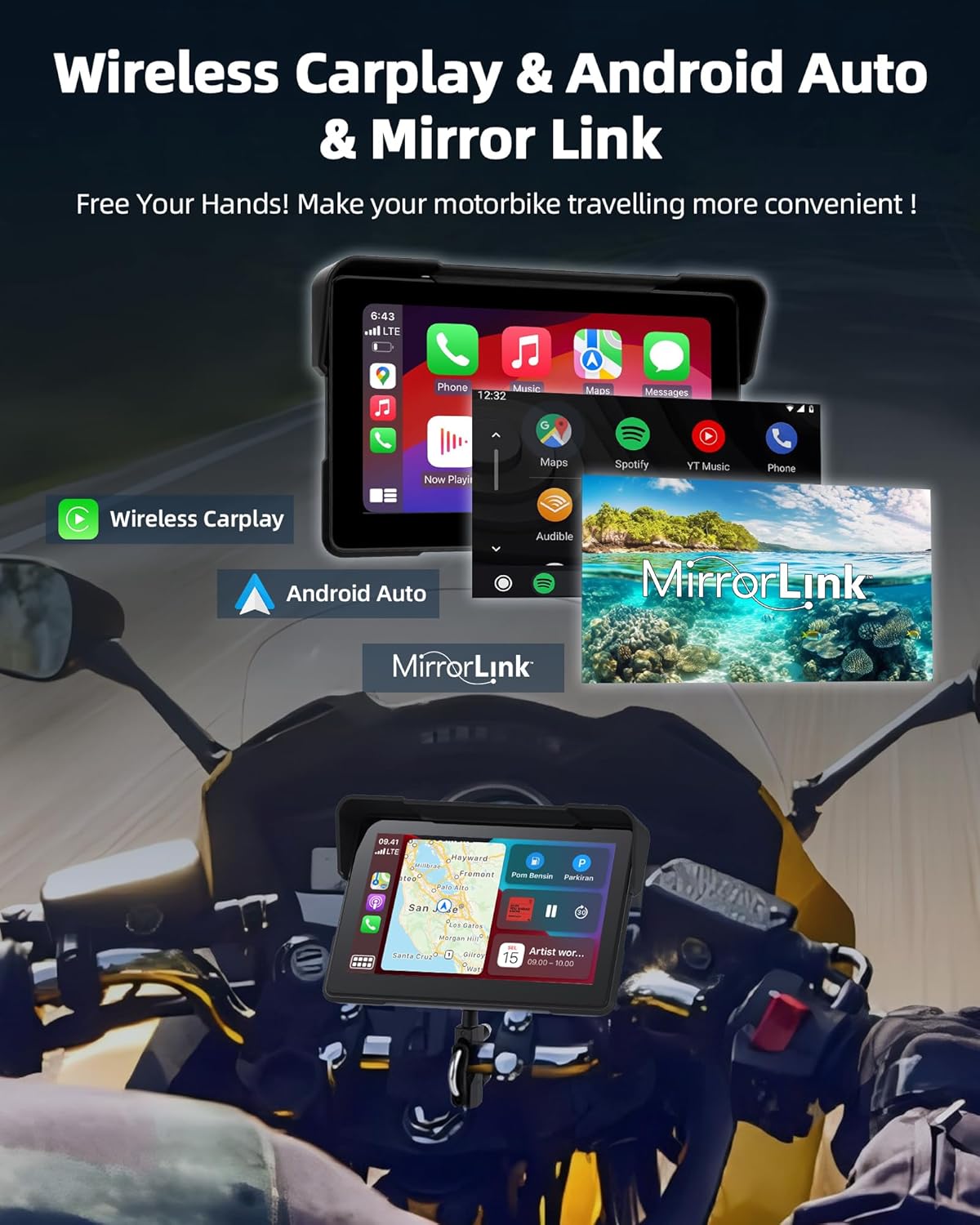
Image 5: Display showing wireless Carplay, Android Auto, and Mirror Link options for smartphone integration.
6.3 Кош Bluetooth байланышы
The MT10 supports dual Bluetooth connections for enhanced audio and communication.
- Connect Phone to MT10: Pair your smartphone to the MT10 via Bluetooth for Carplay/Android Auto functionality (as described in 6.2).
- Connect MT10 to Bluetooth Helmet/Earphones: On the MT10, go to Bluetooth settings and pair with your Bluetooth-enabled helmet or earphones.
- Once both connections are established, audio from your phone (music, navigation prompts, calls) will be routed through the MT10 to your helmet/earphones. You can manage volume and calls hands-free.

Image 6: Diagram illustrating the dual Bluetooth connection process: phone to Carplay screen, then Carplay screen to Bluetooth helmet or earphones.
6.4 Камера менен иштөө
The integrated dual 2K dash cameras automatically begin recording when the device powers on.
- Цикл жаздыруу: The system continuously records, overwriting the oldest files when the 64GB TF card is full. Important footage кайра жазууну алдын алуу үчүн кулпуланган болот.
- G-сенсор: In the event of a sudden impact or collision, the built-in G-sensor will automatically lock the current recording, protecting it from being overwritten.
- WiFi Function: Connect your smartphone to the MT10's Wi-Fi network to access the dash cam app. From the app, you can view жаша фооtage, жаздырылган видеолорду ойнотуу жана жүктөп алуу fileтүздөн-түз телефонуңузга.
6.5 Зымдуу алыстан башкаруу функциялары
The wired remote control provides convenient access to key functions without needing to touch the main display.
- Сүрөткө тартуу: Capture still images from the dash cam.
- Switch Monitors: Toggle between front camera, rear camera, or split-screen views.
- Чалууларга жооп берүү/чокко чыгаруу: Manage incoming phone calls.
- Menu Switcher: Navigate through device menus.
- GPS жайгашкан жери: Access GPS-related functions.

Image 7: Wired remote control with buttons for taking pictures, switching monitors, answering calls, and menu navigation.
6.6 Үн менен башкаруу
When connected to Carplay or Android Auto, you can utilize your smartphone's voice assistant (Siri or Google Assistant) for hands-free control. Activate the voice assistant through the display or a dedicated button on your phone/helmet, then issue commands for navigation, music playback, calls, and more.
7. Техникалык тейлөө
- Тазалоо: жумшак колдонуу, damp cloth to clean the display and camera lenses. Avoid abrasive cleaners or solvents.
- Гидроизоляция: While IP67 rated, regularly inspect all cable connections and port covers to ensure they are secure and free from damage, maintaining the waterproof seal.
- TF картасы: Periodically format the 64GB TF card (e.g., once a month) through the device settings to maintain optimal recording performance and prevent data corruption. Back up any important footage форматтоодон мурун.
- Сактагыч: If storing the motorcycle for an extended period, consider disconnecting the device or storing it in a cool, dry place.

Image 8: Illustration highlighting the IP67 waterproof rating of the display unit, durable cameras, and waterproof power supply route.
8. Кыйынчылыктарды
| Көйгөй | Мүмкүн себеп | Чечим |
|---|---|---|
| Түзмөк күйбөйт. | Электр энергиясы жок; зымдар туура эмес туташтырылган; сактагыч күйүп кеткен. | Check power cable connections. Verify ACC and GND are correctly wired. Check motorcycle's fuse box. |
| Carplay/Android Auto туташпай жатат. | Bluetooth/Wi-Fi off on phone; phone not compatible; incorrect pairing steps. | Ensure phone's Bluetooth/Wi-Fi is on. Confirm phone supports wireless Carplay/Android Auto. Re-attempt pairing process. Restart both devices. |
| No camera recording or footagд маселелер. | TF card full or corrupted; cameras disconnected; incorrect settings. | Format the TF card (back up data first). Check camera cable connections. Verify recording settings in the device menu. |
| Bluetooth helmet/earphones not pairing. | Helmet/earphones in pairing mode; MT10 Bluetooth off; interference. | Ensure helmet/earphones are in pairing mode. Check MT10 Bluetooth settings. Try pairing in a location with less interference. |
| Time needs to be reset after each start. | Internal battery issue or specific firmware behavior. | This may indicate a specific operational characteristic or a need for a firmware update. Consult customer support if persistent. |
9. Техникалык шарттар
| Өзгөчөлүк | Деталь |
|---|---|
| Бренд | Jansite |
| Модель аты | MT10 |
| Screen Size | 7 дюйм |
| Экран түрү | HD IPS Capacitive Touch Screen (1920 x 600 resolution) |
| Байланыш технологиясы | Bluetooth 5.0 (Dual Mode), Wi-Fi |
| Камеранын чечилиши | Dual 2K (Front & Rear) |
| Сактоо сыйымдуулугу | 64 ГБ TF картасы (кошулган) |
| Суу өткөрбөйт рейтинги | IP67 |
| Унаа кызматынын түрү | Мотоцикл |
| Монтаж түрү | Рул монтажы |
| Камтылган компоненттер | Display, 2 Cameras with cables, 64GB SD Card, Mounting Bracket, Power Cable, Wired Remote Control, Installation Tools, User Manual |
10. Кепилдик жана колдоо
Specific warranty information for the Jansite MT10 is not provided in this manual. Please refer to the product packaging, the seller's website, or contact Jansite customer support for details regarding warranty coverage and technical assistance.
For support, you may visit the official Jansite webсайтына кириңиз же сатып алууңуз менен берилген байланыш маалыматын колдонуп, алардын кардарларды тейлөө бөлүмүнө кайрылыңыз.


