1. Киришүү
This manual provides detailed instructions for the installation, operation, and maintenance of your ARREGUI PL200EN Electronic Key Cabinet. This security cabinet is designed for organized key storage, featuring adjustable hooks and a robust electronic locking system. Please read this manual thoroughly before use to ensure proper functionality and safety.

Figure 1: ARREGUI PL200EN Electronic Key Cabinet, open view.
This image displays the ARREGUI PL200EN key cabinet in an open state, revealing its interior. The cabinet is equipped with 200 numbered hooks, organized across multiple rows and panels, designed to hold individual keys with colored key tags. A document holder is visible in the center.
2. Продукциянын өзгөчөлүктөрү
- Сыйымдуулугу: Designed to hold up to 200 keys.
- Курулуш: Manufactured from durable lacquered steel for enhanced resistance.
- Adjustable Hooks: Key hook bars are height-adjustable, allowing for flexible key organization. Each hook includes a reference number, and numbering strips are provided.
- Электрондук кулпу: Features an electronic lock with fully programmable codes.
- Dual Code System: Supports two distinct opening codes: a master code and a user code.
- IP65 Certified Lock: The lock is certified with an IP65 hermetic protection rating, making it resistant to dust and water droplets.
- Шашылыш ачкыч: An emergency key is included for access in case of forgotten codes or depleted batteries.
- Электр камсыздоо: Operated by a CR2450 3V battery (included).
- Төмөн батарея көрсөткүчү: A red LED indicator provides a warning for low battery status.
- Негизги идентификация: Includes plastic key tags for easy identification of each key.
- Документ ээси: A document holder is provided for key lists or other relevant papers.

Figure 2: Adjustable Key Hooks with Numbering.
This close-up image shows the adjustable key hooks, each with a corresponding number on a strip, and green key tags attached to the hooks.

Figure 3: Internal Document Holder.
This image highlights the transparent document holder located inside the key cabinet, suitable for storing key lists or other important papers.
3. Орнотуу жана орнотуу
The ARREGUI PL200EN key cabinet is designed for wall mounting. Secure installation is crucial to prevent tipping and ensure safety.
3.1. таңгактан чыгаруу
Carefully remove all components from the packaging. Verify that all included items are present (refer to Section 7: What's Included).
3.2. Дубалга орнотуу
- Жайгашкан жерди тандоо: Select a suitable wall location that is structurally sound and can support the weight of the cabinet and its contents.
- Бургулоо пункттарын белгилөө: The cabinet has 4 pre-drilled holes on its back. Use the cabinet as a template to mark the corresponding drilling points on the wall.
- Бургулоо тешиктери: Дубалыңыздын түрүнө ылайыктуу бургу учун колдонуп, белгиленген жерлерде тешиктерди бургулаңыз.
- Дубалга сайгычтарды салуу: Insert the provided wall plugs (or suitable alternatives for your wall type) into the drilled holes.
- Тоолуу кабинет: Align the cabinet's pre-drilled holes with the wall plugs and secure it firmly to the wall using the provided mounting screws. Ensure the cabinet is level and securely fastened to prevent any risk of tipping.

4-сүрөт: Арткы View with Mounting Holes.
This image shows the back panel of the key cabinet, highlighting the four pre-drilled holes intended for wall mounting.

Figure 5: Cabinet with Mounting Hardware and Emergency Key.
This image displays the closed key cabinet alongside the emergency key and the screws and wall plugs required for wall mounting.
4. Иштөө нускамалары
The ARREGUI PL200EN key cabinet features an electronic lock for secure access.
4.1. Initial Battery Installation
The electronic lock is powered by a CR2450 3V battery. Install the battery according to the markings in the battery compartment, typically located on the inside of the lock mechanism.
4.2. Programming Codes
The lock supports a master code and a user code. Refer to the specific instructions provided with the lock mechanism for detailed steps on how to program or change these codes. It is recommended to change the default codes immediately after installation.
4.3. Opening the Cabinet
- Enter your programmed user code or master code on the keypad.
- Once the code is accepted (usually indicated by a green light or beep), turn the knob to unlock and open the cabinet door.
4.4. Closing the Cabinet
Close the cabinet door and turn the knob to the locked position. The lock will automatically engage.
4.5. Шашылыш ачылыш
In case you forget your code or the battery is depleted, use the provided emergency key to open the cabinet. Insert the emergency key into the designated keyhole (usually hidden or covered) and turn it to unlock. Replace the battery immediately if it was depleted.

Figure 6: Electronic Lock Keypad.
Бул сүрөт майда-чүйдөсүнө чейин камсыз кылат view of the electronic lock's keypad, showing the numerical buttons (0-9) and special function keys (* and #).
5. Техникалык тейлөө
- Тазалоо: Clean the cabinet exterior with a soft, damp кездеме. Абразивдүү тазалагычтардан же эриткичтерден качыңыз.
- Батареяны алмаштыруу: When the red LED low battery indicator illuminates, replace the CR2450 3V battery promptly to ensure continuous operation.
- Кулпу механизми: Do not attempt to lubricate or disassemble the electronic lock mechanism. If issues arise, consult the manufacturer.
6. Кыйынчылыктарды
- Cabinet does not open with code:
- Ensure the correct code is entered.
- Check if the battery is low (red LED indicator). Replace if necessary.
- If codes are forgotten, use the emergency key to open the cabinet.
- Red LED indicator is on:
- This indicates a low battery. Replace the CR2450 3V battery immediately.
- Keys are difficult to hang/remove:
- Ensure key tags are properly attached and not obstructing adjacent hooks.
- Adjust the height of the hook bars if needed for better clearance.
7. Эмнелер камтылган
The ARREGUI PL200EN Key Cabinet package includes the following components:
- ARREGUI PL200EN Key Cabinet
- Колдонуучунун Колдонмосу (бул документ)
- Пластик ачкыч Tags этикеткалар менен
- Документ ээси
- Numbering Strips for hooks
- Өзгөчө кырдаал ачкычы
- Wall Mounting Hardware (screws and wall plugs)
- CR2450 3V батарейка
8. Техникалык шарттар
| Өзгөчөлүк | Спецификация |
|---|---|
| Бренд | ARREGUI |
| Модель номери | PL200EN |
| Түс | Кара |
| Материал | Эритме болот |
| Өлчөмдөрү (H x W x D) | 55 см х 38 см х 14 см |
| Салмагы | 9.4 килограмм |
| Key Capacity | 200 ачкыч |
| Кулпу түрү | Electronic with Keypad |
| Коргоо рейтинги | IP65 (Dust and Water Droplet Resistant) |
| Power Source | CR2450 3V батарейка |
| Монтаж түрү | Дубалга орнотуу |
| Аяктоо түрү | Лакталган |
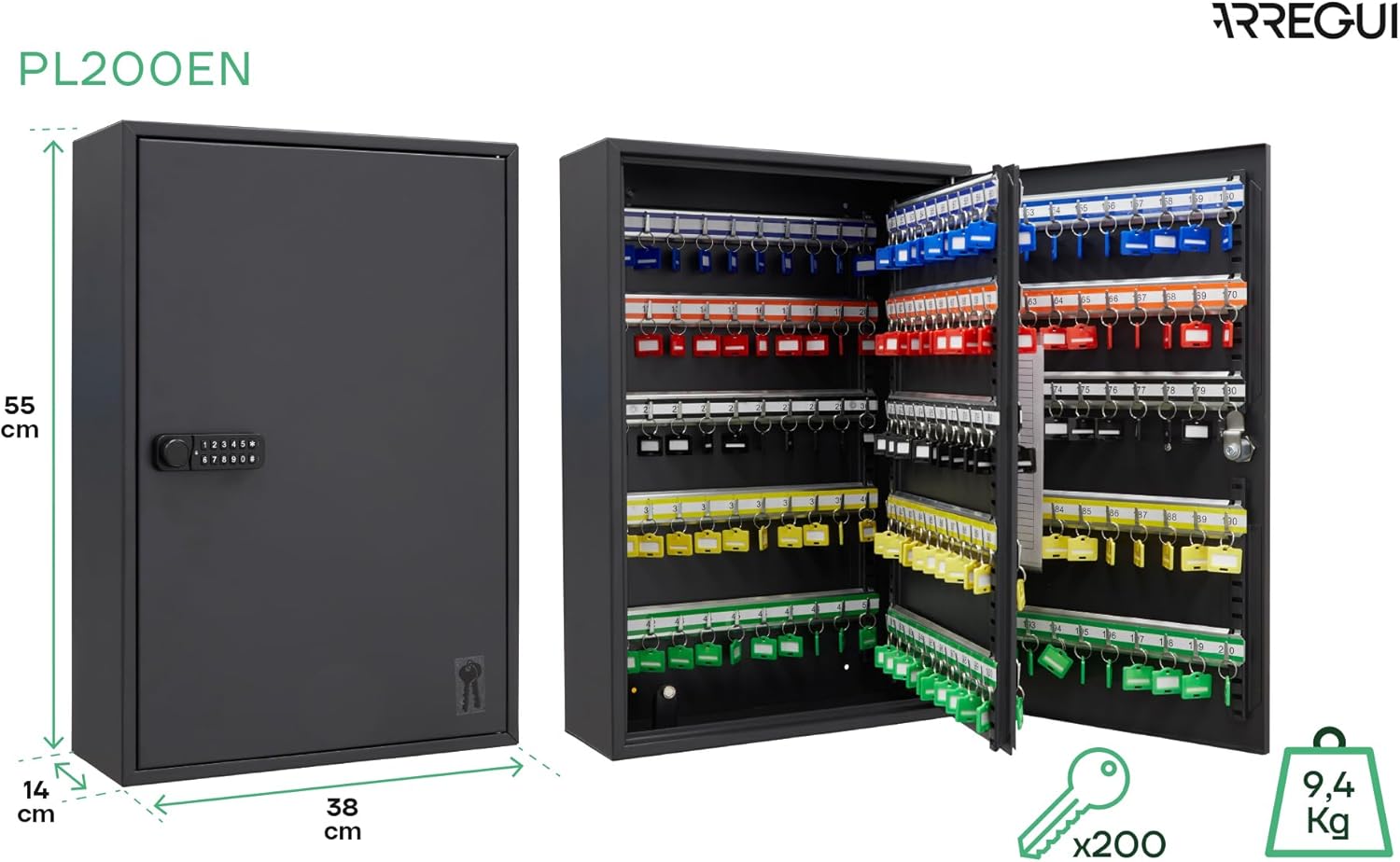
Figure 7: ARREGUI PL200EN Dimensions.
This image illustrates the physical dimensions of the ARREGUI PL200EN key cabinet, indicating its height (55 cm), width (38 cm), and depth (14 cm), along with its weight (9.4 kg).

Figure 8: Model Comparison (PL100EN vs. PL200EN).
This image provides a visual comparison between the ARREGUI PL100EN and PL200EN key cabinet models, highlighting their differing depths and key capacities while maintaining similar height and width.
9. Коопсуздук эскертүүлөрү
- Ашыкча жүктөө эмес: Avoid exceeding the cabinet's capacity of 200 keys. Overloading can stress mounting points and potentially compromise security.
- Дубалга коопсуз орнотуу: It is critical to securely fasten the cabinet to a sturdy wall using appropriate hardware to prevent any risk of tipping or falling.
- Handle Electronic Components with Care: Exercise caution when handling the electronic lock and batteries. Do not expose them to extreme temperatures or moisture beyond the IP65 rating.
- Keep Emergency Key Safe: Store the emergency key in a secure location, separate from the cabinet, and accessible only to authorized personnel.
10. Кепилдик жана колдоо
For warranty information, technical support, or service inquiries, please refer to the contact details provided on the ARREGUI official webсайт же сатып алуу документтери. Кепилдик дооматтар үчүн сатып алганыңыздын далилин сактаңыз.


