1. Киришүү
Кара түстү тандаганыңыз үчүн рахматview Smart Glasses. These innovative sunglasses combine stylish design with advanced audio technology, allowing you to enjoy music, make calls, and interact with your voice assistant while staying aware of your surroundings. This manual provides detailed instructions for setup, operation, and maintenance to ensure optimal performance and longevity of your device.

Сүрөт 1: Алдыңкы view Кара түстүүview Smart Glasses.
2. Продукциянын өзгөчөлүктөрү
- Bluetooth 5.3 технологиясы: Ensures faster and more stable signal transmission with low latency, offering a connection range of up to 12 meters.
- IP65 суу өткөрбөйт рейтинги: Protects against sweat and small raindrops, suitable for outdoor activities and gym use.
- Бир кадам жупташтыруу: After initial pairing, the glasses automatically reconnect to the last paired device upon opening.
- Кеңири шайкештик: Compatible with various devices including smartphones and computers.
- Immersive Open Ear Sound: Features an open headphone speaker design, dynamic drivers, and ultra-sensitive polymer diaphragms for rich, balanced audio without isolating you from your environment.
- Unparalleled Call Clarity: Advanced microphone design with noise reduction technology suppresses up to 90% of background noise for clear communication.
- Интуитивдик сенсордук башкаруулар: Manage playback, volume, calls, and voice assistant activation directly from the glasses.
- Узартылган иш сааттары: Equipped with 80mAh+80mAh rechargeable batteries, providing approximately 7 hours of communication, 6 hours of music playback, and 160 hours of standby time.
3. Продукт бүтүп калдыview
Familiarize yourself with the components of your Blackview Акылдуу көз айнек:

Figure 2: Key components of the Smart Glasses.
- Объектив: TAC+UV400 (UV resistant)
- Nose Bridge: Provides comfortable fit.
- Сенсордук баскыч: For various control functions.
- Stereo-speaker: Delivers open-ear audio.
- Кыналган мик: For clear call quality.
- Charging Indicator Port: For magnetic charging.
- Күзгү кадры: PC+light steel construction.
4. Техникалык шарттар
Refer to the following specifications for your Blackview Акылдуу көз айнек:
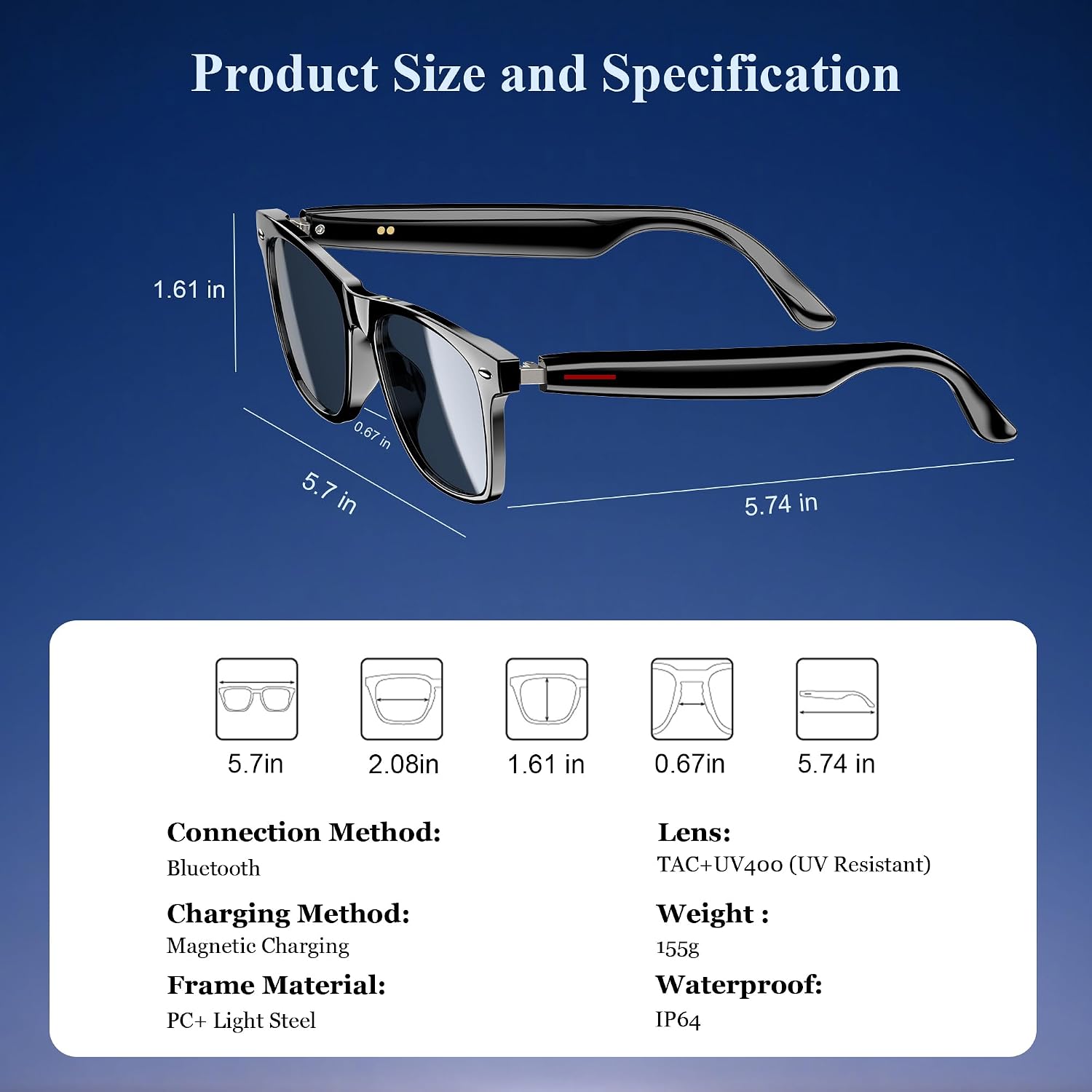
Сүрөт 3: Продукциянын өлчөмдөрү жана негизги мүнөздөмөлөрү.
| Спецификация | Нарк |
|---|---|
| Bluetooth версиясы | 5.3 |
| Суу өткөрбөйт рейтинги | IP65 |
| Батарея сыйымдуулугу | 80mAh+80mAh |
| Байланыш убактысы | Болжол менен 7 саат |
| Музыканы ойнотуу убактысы | Болжол менен 6 саат |
| Күтүү убактысы | Болжол менен 160 саат |
| Заряддоо убактысы | Approx. 1.2 hours (magnetic charge) |
| Линзанын түрү | TAC+UV400 (UV Resistant) |
| Frame Material | PC + Light Steel |
| Элемент Салмагы | 4.6 унция |
| Пакеттин өлчөмдөрү | 6.65 x 2.36 x 1.93 дюйм |
5. Кутуда эмне бар
Сиздин караңызview Smart Glasses package includes:
- Акылдуу очки
- Магниттик кубаттоочу кабель
- Тазалоочу кездеме
- User Manual
6. Орнотуу
6.1. Көз айнекти заряддоо
Биринчи жолу колдонуудан мурун, кара түстөгү телефонду толугу менен заряддаңызview Smart Glasses. Use the provided magnetic charging cable.
- Connect the magnetic charging cable to the charging port on the temple of the glasses.
- Кабелдин экинчи учун USB кубат булагына туташтырыңыз (мисалы, компьютер, дубал адаптер).
- The charging indicator light will illuminate (usually red) during charging and turn off or change color (usually blue/green) when fully charged.
- Толук кубаттоо болжол менен 1.2 саатты талап кылат.

Figure 4: Magnetic charging connection.
6.2. Күйгүзүү/өчүрүү
- Күйгүзүү: Long touch the touch button on the temple for 5 seconds until you hear a power-on prompt.
- Өчүрүү: Long touch the touch button for 5 seconds until you hear a power-off prompt.
6.3. Bluetooth Жупташтыруу
- Көз айнектин заряддалганын жана күйүп турганын текшериңиз.
- Смартфонуңузда же түзмөгүңүздө Bluetooth иштетиңиз жана жеткиликтүү түзмөктөрдү издеңиз.
- "Кара" дегенди тандаңызview Smart Glasses" (or similar name) from the list to pair.
- Once paired, the glasses will automatically reconnect to your device when powered on and within range.
7. Иштөө нускамалары
Сиздин караңызview Smart Glasses feature intuitive touch controls located on the temples:

5-сүрөт: Сенсордук башкаруу функциялары.
- Музыканы ойнотуу/тындыруу: One-tap the touch button on either temple.
- Кийинки трек: Twice-tap the touch button on the right temple.
- Мурунку трек: Twice-tap the touch button on the left temple.
- Үнүн жогорулатуу/төмөндөтүү: (Specific gesture not detailed in image, typically long press or swipe, refer to quick start guide if included).
- Чалууга жооп берүү/түп коюу: One-tap the touch button on either temple.
- Үн Жардамчысын жандыруу: Long touch the touch button for 2 seconds.
- Алыстан сүрөткө тартуу: Double click the touch button to trigger your phone's camera shutter.

Figure 6: Voice assistant activation example.
8. Кароо жана тейлөө
Акылдуу көз айнектериңиздин узак мөөнөттүү иштешин жана оптималдуу иштешин камсыз кылуу үчүн, төмөнкү кам көрүү көрсөтмөлөрүн аткарыңыз:
- Тазалоо: Use the provided cleaning cloth to gently wipe the lenses and frame. Avoid using abrasive materials or harsh chemicals.
- Суу каршылык: The glasses have an IP65 rating, meaning they are resistant to sweat and light splashes of water. Do not submerge them in water or expose them to heavy rain.
- Сактагыч: Store the glasses in a protective case when not in use to prevent scratches and damage. Avoid exposing them to extreme temperatures.
- Таасирден качуу: While the lenses are strong, avoid dropping the glasses or subjecting them to strong impacts.

Figure 7: Smart Glasses demonstrating water resistance.
9. Кыйынчылыктарды
Эгерде сиз кара тери менен кандайдыр бир көйгөйлөргө туш болсоңузview Smart Glasses, refer to the following common solutions:
- Кубат жок: Ensure the glasses are fully charged. Connect them to the magnetic charger and check the indicator light.
- Жупташуу мүмкүн эмес:
- Ensure Bluetooth is enabled on your device and the glasses are in pairing mode (usually indicated by a flashing light).
- Make sure the glasses are not already connected to another device. Turn off Bluetooth on other nearby devices.
- Restart both the glasses and your device, then attempt pairing again.
- Үн жок/Төмөн үнү:
- Check the volume levels on both the glasses and your connected device.
- Ensure the glasses are properly positioned on your ears for optimal open-ear audio.
- Verify that the glasses are correctly paired and selected as the audio output device on your phone.
- Чалуу сапаты маселелери:
- Микрофондун тоскоол болбогонун текшериңиз.
- Фон ызы-чуусу азыраак аймакка жылыңыз.
- Телефонуңуздун сигнал күчүн текшериңиз.
- Жооп бербеген тийүү башкаруулары:
- Манжаларыңыздын таза жана кургак экенине ынаныңыз.
- Көз айнекти кайра иштетиңиз.
Эгер бул кадамдар көйгөйдү чечпесе, Black компаниясына кайрылыңызview кошумча жардам үчүн кардарларды колдоо.
10. Расмий продукт Video
Үчүн расмий продукт видеосун көрүңүзview Каранынview Smart Glasses features and usage:
Видео 1: Караview Polarized Sport Smart Sunglasses for Men and Women. This video highlights the design and features of the smart sunglasses, including their polarized lenses and smart capabilities.


