1. Продукт бүтүп калдыview
The MXT SuperLive Plus 16CH Hybrid DVR is a robust surveillance solution designed for comprehensive video recording and monitoring. This system supports 16 channels of HD-TVI/CVI/AHD analog cameras up to 5MP Lite 1080p resolution, and additionally accommodates up to 8 channels of IP cameras. Equipped with a 4TB HDD, it utilizes H.265 compression for efficient storage and is NDAA compliant. Remote surveillance is facilitated through the SuperLive Plus mobile application for iOS and Android devices.

Сүрөт 1.1: Алдыңкы жана арткы view of the MXT 16CH Hybrid DVR, alongside a 4TB hard disk drive, illustrating the device's compact design and extensive connectivity options.
2. Кутуда эмне бар
Upon unboxing, verify that all components are present and in good condition:
- 1x MXT 16CH Hybrid DVR (with pre-installed 4TB HDD)
- Кубаттуу адаптер
- USB чычкан
- Quick Start Guide
- Screws for additional HDD installation (if applicable)
3. Продукциянын өзгөчөлүктөрү
The MXT 16CH Hybrid DVR offers a comprehensive set of features for advanced surveillance:
- Hybrid Video Input: Supports 16 channels of HD Analog (TVI/AHD/CVI) video input up to 5MP Lite 1080p, and up to 8 channels of IP video input.
- Сактоо сыйымдуулугу: Equipped with a 4TB HDD, expandable with 2x SATA ports (up to 10TB each) and 1x E-SATA port.
- Видео кысуу: Utilizes H.265 compression for efficient storage and high-quality video.
- NDAAга шайкеш келет: Adheres to the National Defense Authorization Act standards.
- Remote Surveillance: Free remote monitoring via the SuperLive Plus APP for iOS and Android devices.
- Видео чыгуулары: Multiple video outputs including 1x HDMI, 1x VGA, and 1x BNC for versatile display options.
- Аудио колдоо: 8x RCA audio inputs and 1x RCA audio output. Supports Audio-Over-Coax for HD-TVI cameras with built-in mics (requires manual activation).
- Ойнотуу: Simultaneous 16-channel playback.
- Ойготкуч: 16-канал сигнал киргизүү жана 4-канал сигнал чыгаруу.

Сүрөт 3.1: Алдыңкы view of the MXT 16CH Hybrid DVR, highlighting its sleek design and the NDAA Compliant certification.
4. Physical Components and Connections
Familiarize yourself with the DVR's front and rear panels to ensure proper setup and operation.
4.1 алдыңкы панели
The front panel typically includes status indicators (REC, NET, PWR) and a USB port for mouse or backup devices.
4.2 Арткы панелдин туташуулары
The rear panel provides all necessary ports for video input, audio, network, and display outputs.

Image 4.1: Detailed diagram of the MXT 16CH Hybrid DVR's rear panel, showing BNC video inputs, audio inputs/outputs, alarm terminals, network port, USB ports, VGA, HDMI, and power input.
- Video Inputs (BNC): 16 channels for analog HD-TVI/CVI/AHD cameras.
- Аудио киргизүүлөр (RCA): 8 channels for external microphones.
- Аудио чыгаруу (RCA): 1 channel for external speakers.
- Сигнализацияны киргизүү/чыгаруу: Terminals for connecting external alarm devices.
- VGA чыгаруу: VGA мониторуна туташуу.
- HDMI чыгышы: Жогорку сапаттагы дисплей үчүн HDMI мониторуна же телевизорго туташыңыз.
- BNC-CVBS Output: Composite video output (can be used as main or spot output).
- LAN порту (RJ45): Connect to your network router for remote access.
- USB порттору: For connecting a mouse, USB flash drive for backup, or external HDD.
- Кубат киргизүү: Connect the provided DC12V power adapter.
5. Орнотуу колдонмосу
Follow these steps to set up your MXT 16CH Hybrid DVR:
- Камераларды туташтыруу: Connect your analog HD-TVI/CVI/AHD cameras to the BNC video input ports on the rear panel. For IP cameras, connect them to your network via a PoE switch (not included) and ensure they are on the same network as the DVR.
- Мониторду туташтыруу: Мониторду DVRге HDMI же VGA порту аркылуу туташтырыңыз.
- Чычканды туташтыруу: USB чычканын алдыңкы же арткы панелдеги USB портторунун бирине сайыңыз.
- Тармакка туташуу: DVRдин LAN портунан Ethernet кабелин роутериңизге же тармак которгучуна туташтырыңыз.
- Туташуу кубаты: Connect the provided DC12V power adapter to the DVR's power input port, then plug the adapter into a power outlet. The DVR will power on automatically.
- Баштапкы орнотуу устасы: Upon first boot, the DVR will guide you through an initial setup wizard. Follow the on-screen prompts to configure basic settings such as language, date/time, network settings, and password.
- Катуу дискти инициализациялоо: If the pre-installed 4TB HDD is not recognized or if you install additional HDDs, you may need to format them through the DVR's menu system (System > Storage > HDD Management).
- Audio-Over-Coax Activation: If using HD-TVI cameras with built-in microphones, navigate to the DVR's menu to manually activate the Audio-Over-Coax feature for the respective channels.
6. Operating Instructions: SuperLive Plus Mobile APP
The SuperLive Plus mobile application allows you to remotely view live feeds, play back recordings, and manage your DVR from your smartphone or tablet.
6.1 Downloading and Installing the APP
- Жүктөп алуу: Издөө "SuperLive Plus" in the Apple App Store (for iOS devices) or Google Play Store (for Android devices).
- Орнотуу: Download and install the application on your mobile device.
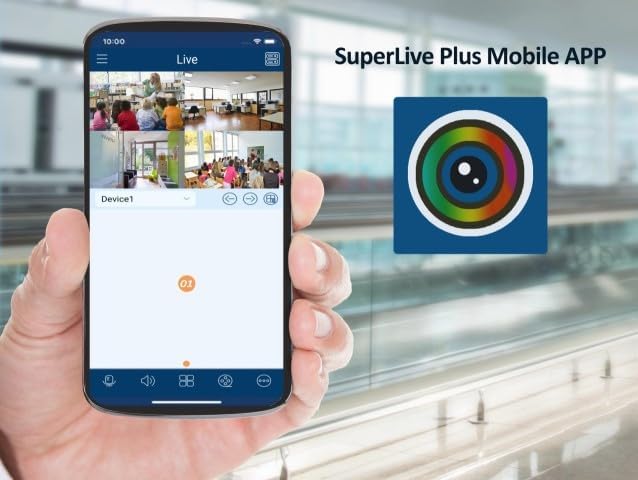
Image 6.1: A smartphone displaying the SuperLive Plus Mobile APP interface, showing multiple camera feeds, alongside the app's distinctive icon.
6.2 Adding Your DVR to the APP
- Колдонмону ачуу: Launch the SuperLive Plus application.
- Түзмөк кошуу: Tap on the "Add Device" or "+" icon.
- QR кодун сканерлөө: On your DVR, navigate to the network settings or P2P/Cloud menu to find the device's QR code. Use the app's scan function to scan this QR code. Alternatively, you can manually enter the device's serial number or IP address.
- Маалымат киргизүү: Provide a device name, username, and password for your DVR (the same credentials you set during the DVR's initial setup).
- Сактоо: Save the device configuration. Your DVR should now be listed in the app.
Image 6.2: The SuperLive Plus application's splash screen, featuring its logo and the motto "Secure the world with you," indicating the app is ready for use.
6.3 Basic APP Functions
- Live View: Tap on the added device to view live feeds from your connected cameras. You can switch between single and multi-channel views.
- Ойнотуу: Жазылган footage by selecting the playback option and choosing the desired date and time.
- Сүрөт/Жаздыруу: Capture still images or record video clips directly to your mobile device.
- PTZ башкаруу: If you have PTZ (Pan-Tilt-Zoom) cameras, use the app to control their movement and zoom.
- Аудио: Listen to audio from cameras with microphones and use two-way audio if supported.
7. Техникалык тейлөө
Үзгүлтүксүз техникалык тейлөө DVR системаңыздын оптималдуу иштешин жана узак мөөнөттүү иштешин камсыз кылат.
- Дайыма тазалоо: Dust can accumulate and cause overheating. Gently clean the DVR's exterior and ventilation openings with a soft, dry cloth. Do not use liquid cleaners.
- Программалык камсыздоонун жаңыртуулары: Мезгил-мезгили менен өндүрүүчүнүн текшерүү webмикропрограммалык камсыздоону жаңыртуу сайты. Микропрограммалык камсыздоону жаңыртуу иштин натыйжалуулугун жакшыртып, жаңы функцияларды кошуп, каталарды оңдой алат.
- HDD ден соолугун текшерүү: Monitor the health of your hard disk drives through the DVR's system menu. Replace failing HDDs promptly to avoid data loss.
- Камдык маанилүү Footage: Regularly back up critical video footagтышкы USB дискке же тармактык сактагычка.
- Power Cycle: If the DVR experiences minor issues, a simple power cycle (unplugging and replugging after a minute) can often resolve them.
8. Кыйынчылыктарды
Бул бөлүмдө сиз туш болушуңуз мүмкүн болгон жалпы көйгөйлөр каралат жана мүмкүн болгон чечимдер сунушталат.
| Көйгөй | Мүмкүн себеп | Чечим |
|---|---|---|
| Монитордо видео чыгаруу жок. | Кабелдик туташуу бош, монитордогу туура эмес киргизүү булагы, DVR күйгүзүлгөн эмес. | Check HDMI/VGA cable connections. Ensure monitor is set to correct input. Verify DVR power indicator is on. |
| Камералар видеолорду көрсөтпөй жатат. | Loose BNC connection, camera power issue, incorrect video format, IP camera not configured. | Check BNC connections. Ensure cameras are powered. Verify camera video format matches DVR settings. For IP cameras, ensure they are added and configured correctly in the DVR's IP camera management. |
| Cannot access DVR remotely via SuperLive Plus APP. | DVR not connected to network, network firewall blocking, incorrect APP settings, P2P service disabled. | Verify DVR's network cable is connected and network status is "Online". Check router settings for port forwarding if not using P2P. Ensure P2P/Cloud service is enabled on the DVR. Double-check device credentials in the APP. |
| Жаздыруу же HDD катасы жок. | HDD not initialized, HDD full, HDD failure, recording schedule not set. | Initialize/format HDD in DVR settings. Check HDD health. Configure recording schedule. Delete old footage or install larger HDD if full. |
9. Техникалык шарттар
Detailed technical specifications for the MXT 16CH Hybrid DVR.

Image 9.1: Diagram illustrating key features and physical dimensions of the MXT 16CH Hybrid DVR.
Image 9.2: Comprehensive table detailing the technical specifications of the MXT 16CH Hybrid DVR, including video, audio, record, playback, network, and general parameters.
| Категория | Спецификация |
|---|---|
| Модель номери | SPL5MP16CHDVR4TB |
| Видео киргизүү | 16CH HD Analog (TVI/AHD/CVI 5MP/4MP/1080p/720p/WD1) + up to 8CH IP (5MP/4MP/3MP/1080p/960p/720p) |
| Record Resolution | 5MP Lite/4MP Lite/1080p/1080p Lite/720p/WD1/D1 |
| Видеону кысуу | H.265 |
| Аудио киргизүү/чыгаруу | 8x RCA Input, 1x RCA Output |
| HDD сыйымдуулугу | 2x SATA (up to 10TB each), 1x E-SATA (4TB HDD pre-installed) |
| Video Output | 1x HDMI (1920x1080), 1x VGA (1920x1080), 1x BNC-CVBS |
| Тармак интерфейси | 1x RJ45 1000Mbps |
| USB интерфейси | 2x USB 2.0, 1x USB 3.0 |
| Электр камсыздоо | DC12V/4A |
| Өлчөмдөрү (W x D x H) | 380 x 268 x 45 мм (болжол менен 15 x 10.5 x 1.8 дюйм) |
| Иштөө температурасы | -10°Cден 50°Cге чейин (14°Fтен 122°Fге чейин) |
10. Кепилдик жана колдоо
This product comes with a manufacturer's warranty. For specific warranty terms and duration, please refer to the documentation included with your purchase or contact the seller directly.
Техникалык колдоо: US-based professional and experienced technical support is provided exclusively by the seller, Beyond Quantum Tech. For assistance with setup, configuration, or troubleshooting, please contact their support team.
For the most up-to-date support information, please visit the seller's page on Amazon or their official webсайт.


