Introduction
This manual provides comprehensive instructions for the installation, operation, and maintenance of your MXT SLP5MP16CHDVR 16-Channel 5MP Hybrid Digital Video Recorder. This DVR supports 16 channels of HD-TVI/CVI/AHD analog cameras up to 5MP Lite resolution and up to 8 channels of IP cameras. It features H.265 video compression, dual SATA drive bays for storage, and is NDAA compliant. Remote surveillance is available via the SuperLive Plus mobile application.
Кутуда эмне бар
- 1x MXT SLP5MP16CHDVR Hybrid Digital Video Recorder
- Кубаттуу адаптер
- USB чычкан
- SATA кабелдери (катуу дискти орнотуу үчүн)
- Quick Start Guide
Эскертүү: Hard Disk Drives (HDD) are not included and must be purchased separately. A PoE switch is required for IP cameras and is also sold separately.
Продукт бүттүview
Familiarize yourself with the physical components of your MXT SLP5MP16CHDVR.
Алдыңкы жана арткы панелдер
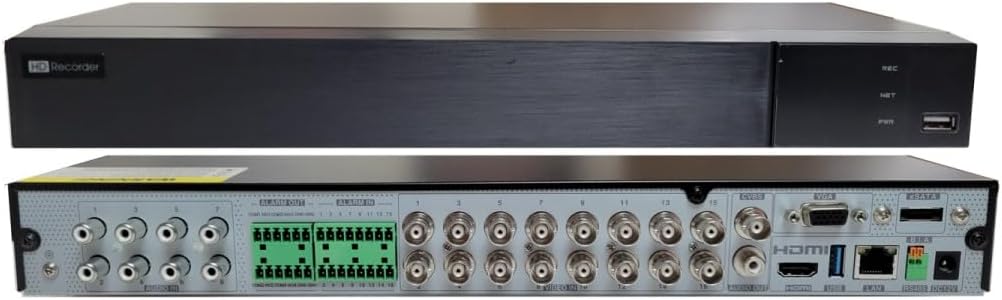
Сүрөттүн сүрөттөлүшү: This image displays both the front and rear panels of the MXT SLP5MP16CHDVR. The top view shows the sleek black front panel with "HD Recorder" branding, status indicator lights (REC, NET, PWR), and a USB port. The bottom view reveals the rear panel, which is densely populated with various ports including 16 BNC video inputs, alarm input/output terminals, RCA audio inputs/output, VGA, HDMI, Ethernet, USB ports, and power input.

Сүрөттүн сүрөттөлүшү: This diagram provides a detailed overview. The top left section lists key features such as 16-channel video input, H.265 compression, GUI, multi-mode recording, playback, remote control, and mobile surveillance. The top right section shows the DVR's dimensions (380mm width, 268mm depth, 48.1mm height). The bottom section is a clear, labeled diagram of the rear panel, indicating the position of each port, including video inputs (1-16), alarm I/O, audio I/O, VGA, HDMI, Ethernet, USB, and power.
Жайгашуу
1. Аппараттык камсыздоону орнотуу
- Катуу диск орнотуу:
Unscrew and remove the top cover of the DVR. Connect the SATA data and power cables from the DVR to your Hard Disk Drive(s). Secure the HDD(s) inside the DVR chassis using the provided screws. Replace the top cover.
- Камера туташуулары:
- Analog Cameras: Connect your HD-TVI/CVI/AHD analog cameras to the BNC video input ports (1-16) on the rear panel.
- IP камералар: Connect IP cameras to a separate PoE switch (not included). Then, connect the PoE switch to the DVR's Ethernet port. The DVR does not have built-in PoE ports.
- Аудио байланыштары: Connect audio input devices to the RCA audio input ports (up to 8 channels). Connect an audio output device to the RCA audio output port.
- Видео чыгаруу: Connect a monitor to the DVR using either the HDMI, VGA, or BNC (CVBS) output port. HDMI is recommended for optimal resolution.
- Тармак туташуусу: Connect an Ethernet cable from your router or network switch to the DVR's LAN port.
- USB түзмөктөрү: Connect the included USB mouse to a USB port on the front or rear panel. You can also connect a USB flash drive for backup purposes.
- Кубат туташуу: Connect the power adapter to the DVR's power input and then plug it into a power outlet.
2. Баштапкы конфигурация
Upon first boot, the DVR will guide you through a setup wizard. Follow the on-screen prompts to set up basic parameters such as language, date/time, network settings, and hard drive initialization.
- Hard Drive Formatting: Ensure your newly installed HDD(s) are formatted by the DVR for proper recording functionality.
- Тармак орнотуулары: Алыстан кирүү мүмкүнчүлүгүн жана IP камераны интеграциялоону иштетүү үчүн тармак жөндөөлөрүн (DHCP же статикалык IP) конфигурациялаңыз.
- Audio-Over-Coax: For HD-TVI cameras with built-in microphones, this feature requires manual activation in the DVR interface.
Иштөө нускамалары
1. Түз эфир View
Баштапкы орнотуудан кийин, DVR түз эфирди көрсөтөт view of connected cameras on the monitor. Use the USB mouse to navigate the Graphical User Interface (GUI).
- Канал дисплейи: Switch between single-channel view, multi-channel grid views (e.g., 4-channel, 9-channel, 16-channel).
- Digital Zoom: Use the mouse scroll wheel or on-screen controls to digitally zoom into live video feeds.
2. Жаздыруу
The DVR supports various recording modes. Access the recording settings via the main menu.
- Тынымсыз жаздыруу: Рекорддор 24/7.
- Кыймылды аныктоо жазуусу: Камерада кыймыл аныкталганда гана жаздырат view. Configure motion detection zones and sensitivity for each channel.
- Пландаштырылган жаздыруу: Жаздыруу үчүн атайын убакыттарды коюңуз.
- Ойготкуч жаздыруу: Тышкы сигнал киргизүү ишке киргизилгенде жаздырат.
3. Ойнотуу
Кайраview foo жазылганtage, navigate to the Playback menu.
- Издөө параметрлери: Search by date, time, event (motion, alarm), or tag.
- Ойнотуу башкаруулары: Standard controls include play, pause, fast forward, rewind, and frame-by-frame.
- Бир убакта ойнотуу: The DVR supports simultaneous playback of up to 16 channels.
4. Remote Access (SuperLive Plus App)
The SuperLive Plus mobile application allows you to view live feeds, play back recordings, and manage your DVR remotely from iOS and Android devices.
- Колдонмону жүктөп алыңыз: Издөө "SuperLive Plus" in the Apple App Store or Google Play Store and install it on your smartphone or tablet.
- Түзмөк кошуу: Open the app and follow the instructions to add your DVR. This typically involves scanning a QR code displayed on the DVR's monitor or manually entering the DVR's network details.
- Алыскы функциялар: Туташкандан кийин, сиз түз эфирге кире аласыз view, playback, PTZ control (if applicable), and configure certain DVR settings.
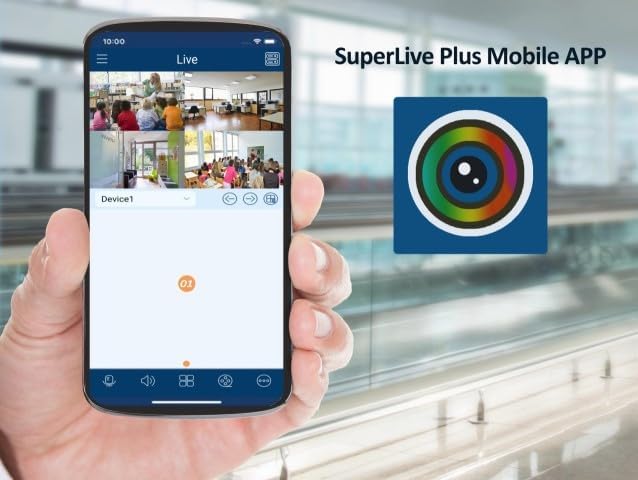
Сүрөттүн сүрөттөлүшү: This image shows a smartphone screen displaying the SuperLive Plus mobile application. The app interface is visible, showing a grid of four live camera feeds from a surveillance system. The app's branding and navigation elements are also present, indicating remote monitoring capabilities.
Сүрөттүн сүрөттөлүшү: This image displays the splash screen of the SuperLive Plus mobile application on a smartphone. The app's logo, featuring a camera lens icon, is prominently displayed against a blue background with a landscape silhouette. Below the logo, the text "SuperLive Plus" is visible, followed by the motto "Secure the world with you."
5. PTZ Control
If you have Pan-Tilt-Zoom (PTZ) cameras connected, you can control their movement and zoom functions directly from the DVR interface or through the SuperLive Plus app. The DVR supports PTZ preset and auto-cruise functions, with up to 255 presets and 8 cruises.
Техникалык тейлөө
- Катуу дискти башкаруу: Regularly check the status of your hard drives. The DVR can be configured to overwrite old footage automatically when the HDD is full. Consider backing up critical footagд мезгил-мезгили менен.
- Программалык камсыздоонун жаңыртуулары: Өндүрүүчүнү текшериңиз website for available firmware updates. Keeping your DVR's firmware up-to-date ensures optimal performance and security.
- Тазалоо: Ensure the DVR is kept in a clean, dust-free environment. Periodically clean the exterior with a soft, dry cloth. Do not use liquid cleaners directly on the unit.
Проблемаларды чечүү
| Көйгөй | Мүмкүн себеп | Чечим |
|---|---|---|
| Монитордо видео чыгаруу жок. | Видео кабель бошоп калды, монитордун туура эмес киргизүүсү, DVR күйгөн жок. | Check HDMI/VGA/BNC cable connections. Ensure monitor is set to correct input source. Verify DVR power. |
| Камера сүрөтү жок. | Camera not powered, loose BNC/network cable, incompatible camera type. | Check camera power supply and cable connections. Ensure camera type (TVI/CVI/AHD/IP) is supported and configured correctly. |
| Cannot access DVR remotely via app. | No network connection, incorrect network settings, firewall issues, app configuration error. | Verify DVR has internet access. Check network settings (DHCP/Static IP). Ensure port forwarding (if required) is configured on your router. Re-add device in SuperLive Plus app. |
| Жаздыруу жок. | No HDD installed, HDD not formatted, recording schedule not set, HDD full. | Install and format HDD. Configure recording schedule. Check HDD status and capacity. |
Техникалык шарттар
| Өзгөчөлүк | Деталь |
|---|---|
| Модель номери | SLP5MP16CHDVR |
| Видео киргизүү | 16-Channel HD-TVI/CVI/AHD (5MP/4MP/1080p/720p/WD1) + up to 8-Channel IP (5MP/4MP/3MP/1080p/960p/720p) |
| Видеону кысуу | H.265 |
| Playback Capability | 16 Channels simultaneously |
| Аудио киргизүү/чыгаруу | 8x RCA Input, 1x RCA Output |
| Сигнал киргизүү/чыгаруу | 16x Input, 4x Output |
| Resolution Recording | 5MP Lite/4MP Lite/1080p/1080p Lite/720p/WD1/D1 |
| өткөрүү жөндөмдүүлүгү | Incoming: 32Mbps, Outgoing: 96Mbps |
| HDD сыйымдуулугу | 2x SATA (up to 10TB each), 1x E-SATA |
| Video Output | 1x HDMI, 1x VGA, 1x BNC (CVBS) |
| Remote Access | Web Client, CMS, SuperLive Plus Mobile App (iOS/Android) |
| Шайкештик | NDAA менен шайкеш |
| Өлчөмдөрү (L x W x Y) | Болжол менен 18 x 14 x 5 дюйм (Таңгак) |
| Салмагы | 4 фунт |
Кепилдик жана колдоо
Warranty information and professional technical support for this MXT product are provided exclusively by the seller. Please refer to your purchase documentation or contact the seller directly for assistance with warranty claims or technical inquiries.
For the latest software, firmware, and additional resources, please visit the official MXT support webсайтка же кардарларды тейлөөгө кайрылыңыз.


