1. Продукт бүтүп калдыview
This manual provides detailed instructions for the installation, operation, and maintenance of your MXT SuperLive Plus 5MP 16CH Hybrid Digital Video Recorder (DVR). This DVR supports up to 16 channels of 5MP Lite 1080p HD-TVI/CVI/AHD analog video input and up to 8 channels of IP video input, featuring H.265 compression and a pre-installed 2TB HDD. It is NDAA compliant and offers free remote surveillance via the SuperLive Plus mobile application.

Сүрөт 1.1: Алдыңкы жана арткы view of the MXT 16CH Hybrid DVR, alongside a 2TB hard disk drive.

Сүрөт 1.2: Алдыңкы view of the MXT 16CH Hybrid DVR, highlighting its NDAA compliance.
2. Пакеттин мазмуну
Төмөндө тизмеленген нерселердин баары пакетиңизге камтылганын текшериңиз. Эгерде кандайдыр бир нерселер жок болсо же бузулса, кардарларды колдоо менен байланышыңыз.
- 1x MXT SuperLive Plus 16CH Hybrid DVR (with pre-installed 2TB HDD)
3. Негизги өзгөчөлүктөрү
- Hybrid Video Input: Supports 16 channels of 5MP Lite 1080p HD Analog (TVI/AHD/CVI) video input and up to 8 channels of IP video input.
- Сактагыч: Equipped with a 2TB HDD, expandable with 2x SATA ports (up to 10TB each) and 1x E-SATA port.
- Видео чыгаруу: Multiple display options including 1x HDMI, 1x VGA, and 1x BNC output.
- кысуу: Utilizes H.265 video compression for efficient storage and bandwidth usage.
- Remote Surveillance: Free remote monitoring via the SuperLive Plus mobile application for iOS and Android devices.
- Шайкештик: NDAA Compliant.
- Аудио колдоо: Supports Audio-Over-Coax for built-in mic cameras (HD-TVI format only) and RCA audio input/output.

Image 3.1: Visual representation of detailed features, dimensions, and rear panel layout.
4. Орнотуу колдонмосу
4.1 DVR туташтыруу
- Кубат туташуу: Connect the provided power adapter to the DVR's DC 12V input and then to a power outlet.
- Video Input: Connect your analog HD-TVI/CVI/AHD cameras to the BNC video input ports (1-16) on the rear panel.
- IP Camera Connection (Optional): For IP cameras, connect them to a separate PoE switch (not included). Then, connect the PoE switch to the DVR's LAN port using an Ethernet cable. The DVR does not have built-in PoE ports.
- Видео чыгаруу: Connect a monitor to the HDMI or VGA output port for local viewing.
- Тармак туташуусу: Алыстан кирүү үчүн DVRдин LAN портунан Ethernet кабелин роутериңизге же тармак которгучуна туташтырыңыз.
- Аудио киргизүү/чыгыш: Connect audio devices to the RCA audio input/output ports as needed.
- USB түзмөктөрү: Connect a USB mouse (included) to a USB port for local control. USB flash drives can be connected for backup.

Сүрөт 4.1: Детальдуу view of the rear panel connections on the MXT 16CH Hybrid DVR.
4.2 Баштапкы орнотуу жана конфигурациялоо
Upon first power-on, the DVR will guide you through an initial setup wizard. Follow the on-screen prompts to set up basic parameters such as date/time, network settings, and user accounts. It is highly recommended to change the default password for security purposes.
4.3 Activating Audio-Over-Coax
If using HD-TVI cameras with built-in microphones, the Audio-Over-Coax function requires manual activation within the DVR's interface. Navigate to the camera settings and enable the audio input for the respective channels.
5. Иштөө нускамалары
5.1 Жергиликтүү иш
Use the connected USB mouse to navigate the DVR's Graphical User Interface (GUI). The main menu provides access to live view, playback, recording settings, network configuration, and system management.
- Live View: Displays real-time video feeds from connected cameras.
- Ойнотуу: Жазылган footage. You can search by time, event, or tag.
- Жаздыруу: Configure recording schedules, motion detection, and alarm recording.
- PTZ башкаруу: If PTZ cameras are connected, control their pan, tilt, and zoom functions from the interface.
5.2 Remote Surveillance with SuperLive Plus APP
The SuperLive Plus mobile application allows you to remotely monitor your surveillance system from iOS and Android smartphones and tablets. This app enables live preview, playback of recorded footage, backup, PTZ control, and configuration adjustments.
- Колдонмону жүктөп алыңыз: Издөө "SuperLive Plus" in your device's app store and install it.
- Түзмөк кошуу: Open the app and follow the instructions to add your DVR. This typically involves scanning a QR code displayed on the DVR's monitor or manually entering the DVR's network details.
- Кирүү мүмкүнчүлүктөрү: Туташкандан кийин, мүмкүн view live feeds, play back recordings, and manage your system remotely.
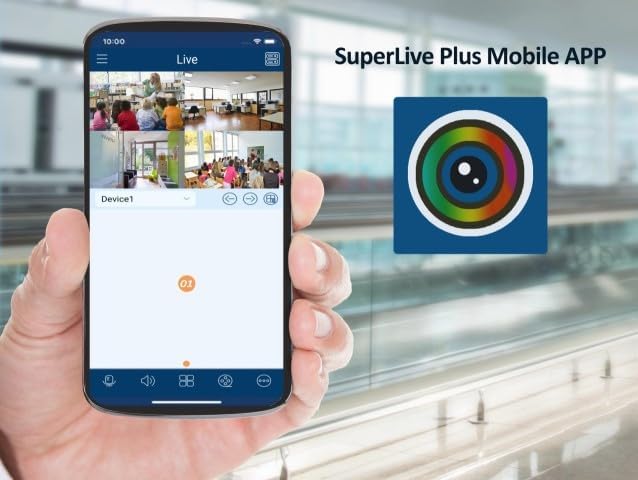
Image 5.1: SuperLive Plus Mobile App displaying multiple live camera feeds.
Image 5.2: The splash screen for the SuperLive Plus Mobile App.
6. Техникалык тейлөө
Regular maintenance ensures the longevity and optimal performance of your DVR system.
- Тазалоо: Periodically clean the exterior of the DVR with a soft, dry cloth. Do not use liquid cleaners or aerosols. Ensure ventilation openings are free from dust and obstructions.
- Вентиляция: Ensure the DVR is placed in a well-ventilated area to prevent overheating. Do not block the ventilation holes.
- Программалык камсыздоонун жаңыртуулары: Өндүрүүчүнү текшериңиз website periodically for firmware updates. Keeping the firmware updated can improve performance, add features, and address security vulnerabilities.
- Катуу дисктин ден соолугу: The DVR's hard drive is crucial for recording. Monitor its health through the DVR's system settings. Consider replacing the HDD if errors or warnings appear.
- Маалыматтын камдык көчүрмөсү: Маанилүү азык-түлүктөрдүн камдык көчүрмөсүн үзгүлтүксүз сактап туруңузtagтышкы USB дискке же тармактык сактагычка.
7. Кыйынчылыктарды
This section addresses common issues you might encounter with your DVR system.
- Видео чыгаруу жок:
- Check power connections to the DVR and monitor.
- Verify HDMI/VGA cable connections.
- Мониторуңузда туура киргизүү булагы тандалганын текшериңиз.
- Камера дисплейи жок:
- Check BNC cable connections for analog cameras.
- Камералар күйгүзүлгөнүн текшериңиз.
- For IP cameras, verify network connection and PoE switch functionality.
- Confirm camera compatibility and resolution settings in the DVR.
- Алыстан кирүүдө ката кетти:
- DVR интернетке туташкандыгын текшериңиз.
- Check network settings (DHCP, DNS, port forwarding if applicable).
- Verify the SuperLive Plus app is updated and the device is correctly added.
- Жаздыруу жок:
- Катуу дисктин абалын DVR жөндөөлөрүнөн текшериңиз.
- Verify recording schedule and motion detection settings.
- Ensure sufficient disk space is available.
8. Техникалык шарттар
Detailed technical specifications for the MXT SuperLive Plus 16CH Hybrid DVR.
| Категория | Спецификация |
|---|---|
| Системанын OS | Камтылган Linux |
| Аналогдук видео киргизүү | 16 BNC (1.0Vp-p, 75Ω) |
| Analog Video Resolution | 5MP/4MP/1080P/720P/WD1 (live) |
| IP видео киргизүү | Up to 8 channels, up to 5MP |
| Total Input Channels | 24 (16 Analog + 8 IP) |
| Video Output | 1x HDMI (1920x1080), 1x VGA (1920x1080), 1x BNC (CVBS) |
| Видеону кысуу | H.265, H.264 |
| Аудио киргизүү | 8x RCA |
| Аудио чыгаруу | 1x RCA |
| Record Resolution | 5MP Lite/4MP Lite/1080p/1080p Lite/720p/WD1/D1 |
| Кирүүчү өткөрүү жөндөмдүүлүгү | 32 Мбит/сек |
| Чыгуучу өткөрүү жөндөмдүүлүгү | 96 Мбит/сек |
| HDD сыйымдуулугу | 2x SATA (up to 10TB each), 1x E-SATA |
| Ойготкуч киргизүү | 16CH |
| Сигнал чыгаруу | 4CH |
| Тармак интерфейси | RJ45 1000Mbps |
| USB интерфейси | USB 2.0 x1, USB 3.0 x1 |
| Электр камсыздоо | DC12V/4A |
| Өлчөмдөрү (W×D×H) | 380 × 268 × 45 мм |
| Иштөө температурасы | -10°Cден 50°Cге чейин (14°Fтен 122°Fге чейин) |
| Иштөө нымдуулугу | 10% - 90% (конденсацияланбаган) |
9. Кепилдик жана колдоо
This product comes with a warranty provided exclusively by the seller. For any technical assistance, troubleshooting, or warranty claims, please contact the US-based Professional & Experienced Tech Support provided by the seller. Refer to your purchase documentation for specific warranty terms and contact information.


