Introduction
This manual provides detailed instructions for the setup, operation, and maintenance of your iSinbox Projector, Model GC357. Please read this manual thoroughly before using the product to ensure proper functionality and safety.
The iSinbox Projector is designed to provide a high-quality visual experience with its native 1080P resolution and 4K support. It features advanced connectivity options including WiFi 6 and Bluetooth 5.2, and incorporates smart automation for focus and keystone correction.
Продукт өзгөчөлүктөрү
- Full Automation: Features auto-focus, auto-keystone correction, auto-obstacle avoidance, and auto-screen alignment for simplified setup.
- High Visual Quality: Native 1080P resolution with 4K support and 850 ANSI lumens brightness for clear and vibrant images.
- Өркүндөтүлгөн байланыш: Dual-band 2.4G/5G WiFi 6 and Bidirectional Bluetooth 5.2 for stable streaming and audio connections.
- Мыкты аткаруу: Powered by the MTK9269 chip, supporting PPT playback and projection sizes up to 300 inches with 50-100% zoom.
- Жекелештирилген орнотуулар: Customizable image modes, brightness levels, and wallpapers, including a unique companion mode.
Кутуда эмне бар
Пакетти ачкандан кийин, төмөнкү нерселердин бардыгы камтылганын текшериңиз:
- iSinbox Projector (Model GC357)
- AV Cable
- HDMI кабели
- Электр кабели
- Алыстан башкаруу
- Колдонуучунун Колдонмосу (бул документ)
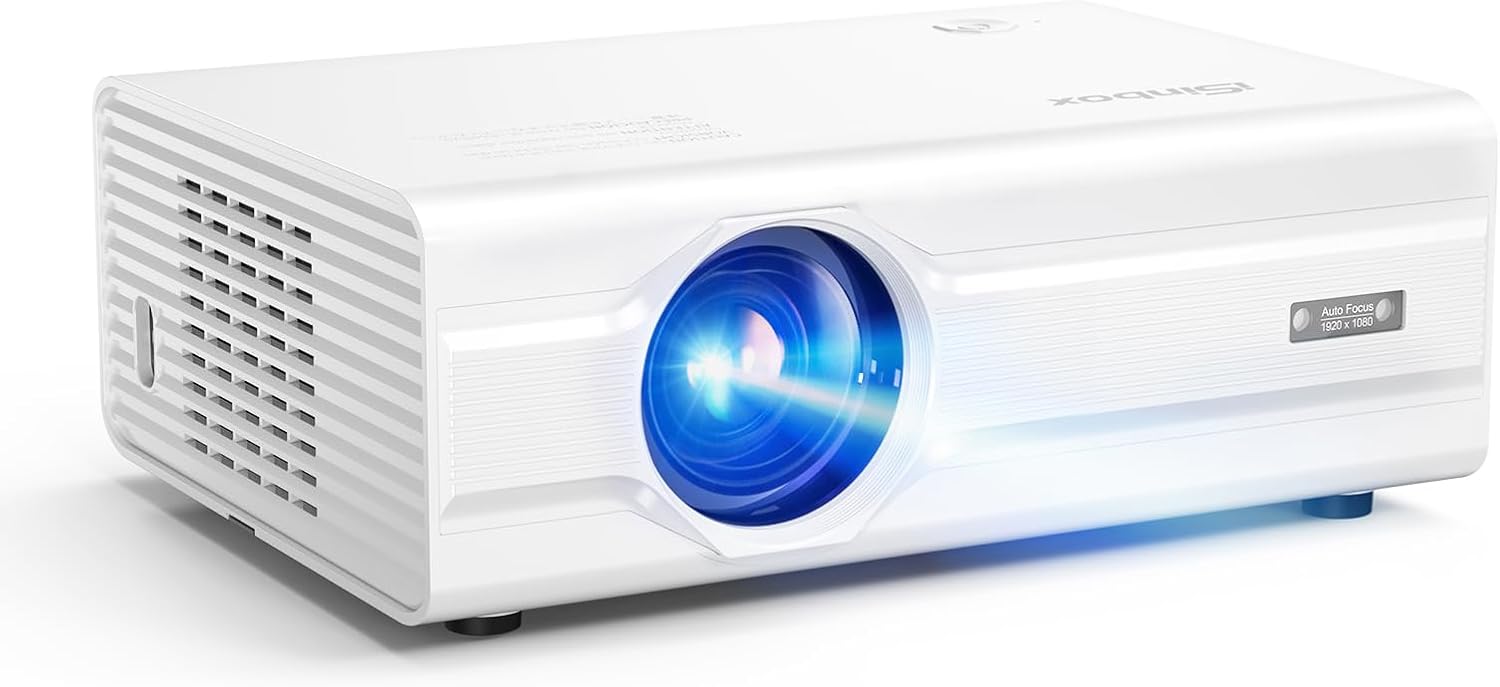
Image: The iSinbox Projector and its standard accessories, including cables, remote, and user manual.
Жайгашуу
1. Жайгаштыруу
Проекторду туруктуу, тегиз бетке коюңуз. Ашыкча ысып кетүүнүн алдын алуу үчүн проектордун айланасында жетиштүү желдетүү бар экенин текшериңиз. Оптималдуу viewing, position the projector directly in front of the screen or wall.

Image: Illustration of the projector's automatic focus and keystone correction features, demonstrating ideal placement for a clear image.
2. Power Connection
- Электр шнурун проектордун электр киргизүү портуна туташтырыңыз.
- Электр шнурунун экинчи учун розеткага сайыңыз.
- Аны күйгүзүү үчүн проектордун же пульттун кубат баскычын басыңыз.
3. Түзмөктөрдү туташтыруу
The projector supports various input sources. Use the appropriate cable to connect your device.
- HDMI: Connect a TV stick, laptop, gaming console, or Blu-ray player using an HDMI cable.
- USB: Insert a USB drive for direct media playback or office presentations (PPT, Word, Excel).
- OF: Use the provided AV cable for older devices.
- Bluetooth: Pair with external Bluetooth speakers or use the projector as a Bluetooth speaker.
- Wi-Fi: Connect to your wireless network for streaming content.

Image: The projector connected to a TV stick, illustrating its compatibility with various streaming devices and operating systems.

Image: The projector displaying an office presentation, highlighting its ability to read fileтүздөн-түз USB дискинен.
Иштөө нускамалары
1. Initial Power On and Auto-Adjustment
Once powered on, the projector will automatically perform auto-focus, auto-keystone correction, and auto-obstacle avoidance to optimize the image. Allow a few moments for these adjustments to complete.
2. Navigation and Input Selection
Use the remote control to navigate the projector's menu. Press the "Source" or "Input" button to select your desired input (HDMI, USB, AV, Wi-Fi).
3. Adjusting Image Settings
Access the "Settings" menu to customize image modes, brightness, contrast, and color. The projector supports personalized settings for an optimized viewтажрыйбасы.

Image: Diagram illustrating the MTK chip and various personalized settings available, such as DIY image brightness, image modes, and wallpaper.
4. Wi-Fi жана Bluetooth байланышы
- Wi-Fi: Go to Network Settings, select your Wi-Fi network, and enter the password. The projector supports 2.4G and 5G networks.
- Bluetooth: In Bluetooth settings, enable Bluetooth and search for devices. You can connect to external speakers (Bluetooth Output) or use the projector as a speaker (Bluetooth Input).

Image: The projector connected via WiFi 6, illustrating faster and smoother streaming capabilities compared to older Wi-Fi standards.

Image: The projector demonstrating its two-way Bluetooth 5.3 functionality, allowing it to connect to external speakers or act as a standalone Bluetooth speaker.
5. Чоңойтуу функциясы
The projector features a digital zoom function, allowing you to adjust the screen size from 50% to 100% without moving the projector. Access this setting in the image or display menu.
Техникалык тейлөө
1. Объективди тазалоо
Проектордун линзасын оптикалык беттер үчүн атайын жасалган жумшак, мамыксыз чүпүрөк менен акырын сүртүңүз. Абразивдүү тазалоочу каражаттарды же ашыкча күч колдонбоңуз, анткени бул линзаны чийип алышы мүмкүн.
2. Сырты тазалоо
Проектордун сыртын тазалоо үчүн жумшак, кургак чүпүрөктү колдонуңуз. Өжөр тактар үчүн бир аз сүртүңүз.amp cloth can be used, followed by a dry cloth. Avoid using harsh chemicals.
3. Вентиляция
Ensure that the ventilation vents are clear of dust and obstructions. Blocked vents can lead to overheating and reduce the lifespan of the projector. Periodically use compressed air to clear dust from the vents.
4. Сактоо
Проекторду узак убакыт бою колдонбогон учурда, аны салкын, кургак жерде, күндүн түз нурунан жана өтө жогорку температурадан алыс сактаңыз. Түпнуска таңгагын же коргоочу капты колдонуу сунушталат.
Проблемаларды чечүү
| Көйгөй | Мүмкүн себеп | Чечим |
|---|---|---|
| Сүрөт көрсөтүлгөн жок |
|
|
| Сүрөт бүдөмүк же фокуста эмес |
|
|
| Сүрөт бурмаланган (трапеция формасы) |
|
|
| Үн жок же үнү төмөн |
|
|
| Wi-Fi'га туташпай жатат |
|
|
Техникалык шарттар
| Өзгөчөлүк | Деталь |
|---|---|
| Бренд | iSinbox |
| Модель номери | GC357 |
| Display Resolution | Жергиликтүү 1920 x 1080 (1080P), 4K колдоосу |
| Жарыктык | 850 ANSI челинин |
| Байланыш технологиясы | Wi-Fi 6 (2.4G/5G), Bluetooth 5.2 (Bidirectional), HDMI, USB, 3.5mm Jack |
| Өзгөчөлүктөр | Auto Focus, Auto Keystone, Auto-obstacle avoidance, Auto Screen Alignment, Personalized User Experience, MTK9269 Chip |
| Сунушталган Колдонуулар | Home Cinema, Outdoor Movies, Gaming, Business Presentations, Education |
| Продукциянын өлчөмдөрү | 6.97 x 3.46 x 9.37 дюйм |
| Элемент Салмагы | 3.41 фунт |
| Түс | Ак |
Кепилдик жана колдоо
iSinbox provides comprehensive after-sales support to ensure your satisfaction. For any issues or inquiries regarding your projector, please refer to the following:
- Кепилдик маалыматы: Please refer to the warranty card included with your product for specific terms and conditions.
- Кардарларды тейлөө: For technical support or service requests, please contact iSinbox customer service through the contact information provided on the official iSinbox webсайт же сатып алуу платформаңыз.
- Онлайн ресурстар: Visit the official iSinbox store on Amazon for FAQs and additional product information: iSinbox Amazon Store.
Your satisfaction is our priority. We are committed to providing effortless and enjoyable experience with your iSinbox projector.


