1. Киришүү
Thank you for choosing the EvoFox Ronin Wired Mechanical Gaming Keyboard. This manual provides detailed instructions for setting up, operating, and maintaining your keyboard to ensure optimal performance and longevity. The EvoFox Ronin is designed for a superior typing and gaming experience, featuring advanced sound dampening, customizable switches, and dynamic RGB lighting.

Image 1.1: EvoFox Ronin Wired Mechanical Gaming Keyboard (Black)
Негизги өзгөчөлүктөрү:
- 9-Layer Gasket Structure: Advanced design for reduced noise, improved stability, and enhanced tactile feedback.
- Hot-Swappable Outemu Red Silent Switches: Customizable, durable, and smooth typing experience with included switch puller.
- Ар бир баскычка RGB арткы жарыктандыруу: 21 effects and Audio Sync Mode for personalized and immersive lighting.
- Атайын үн баскычы: Convenient control over audio levels.
- Powerful Windows Software: Program keys, create macros, control backlighting, and manage profiles with onboard memory.
- Платформалар аралык шайкештик: Easily switch between Windows and Mac modes.
- Detachable Braided USB-C Cable: Robust 1.5m cable with EMI ring for reliable connection and portability.
2. Пакеттин мазмуну
Пакетиңизде бардык буюмдар бар экенин текшериңиз:
- 1 x EvoFox Ronin Mechanical Gaming Keyboard
- 1 x Баскыч капкагын тарткыч
- 4 x Outemu Red Switches (Spare)
- 1 x User Manual
3. Продукт бүтүп калдыview
3.1 Gasket Structure
The EvoFox Ronin features an advanced 9-layer gasket structure. This design incorporates silicone gaskets, a mounting plate, and multiple layers of vibration and sound dampening materials to provide a stable, quiet, and comfortable typing experience by minimizing unwanted noise and resonance.
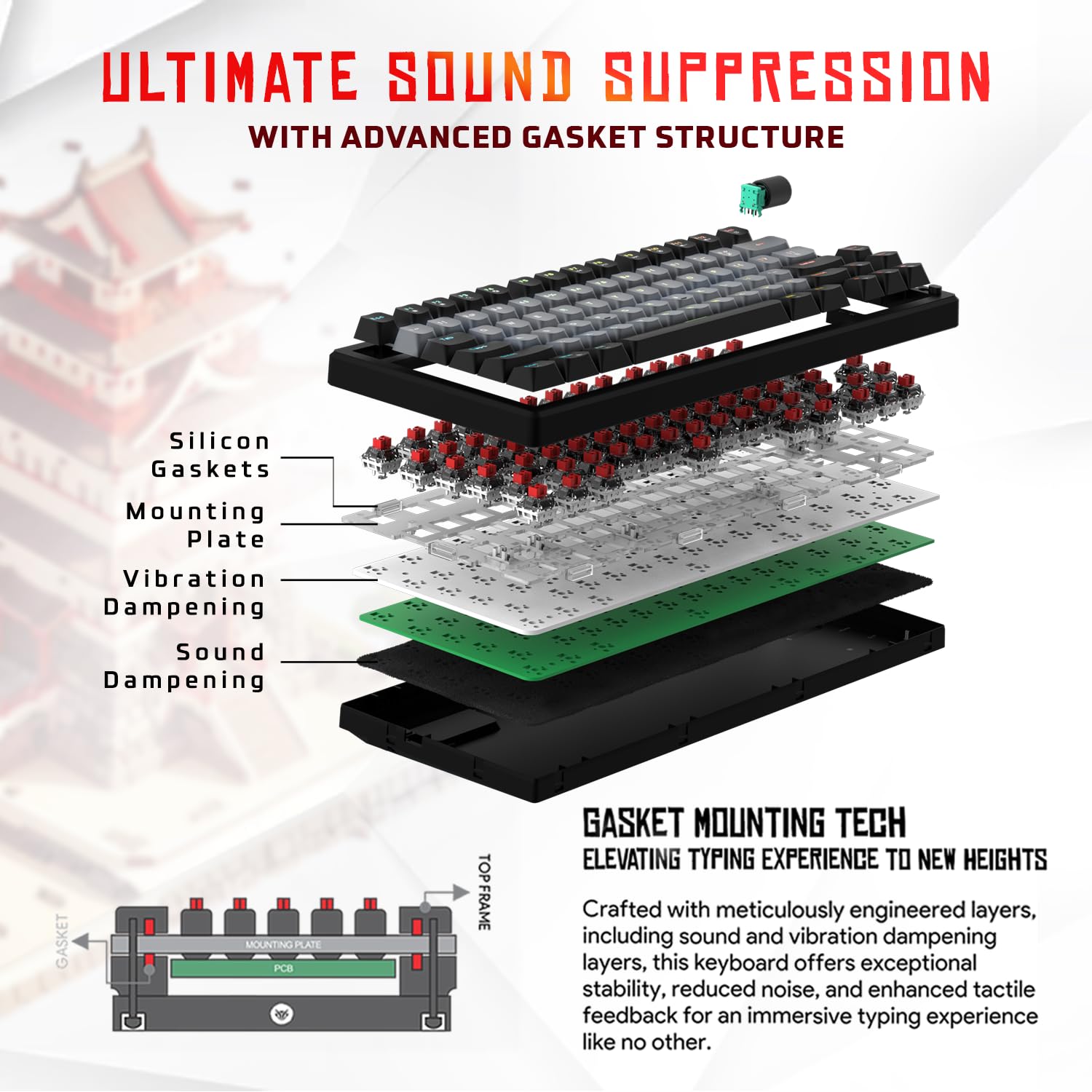
Сүрөт 3.1: Жарылып кеткен view of the 9-layer gasket structure, showing silicone gaskets, mounting plate, and dampжылмалоочу катмарлар.
3.2 Outemu Red Silent Switches
The keyboard is equipped with Outemu Red Dust Proof Switches, known for their linear and silent operation. These switches are hot-swappable, allowing users to easily replace them with other compatible 3-pin mechanical switches without soldering, enabling full customization of the typing feel.
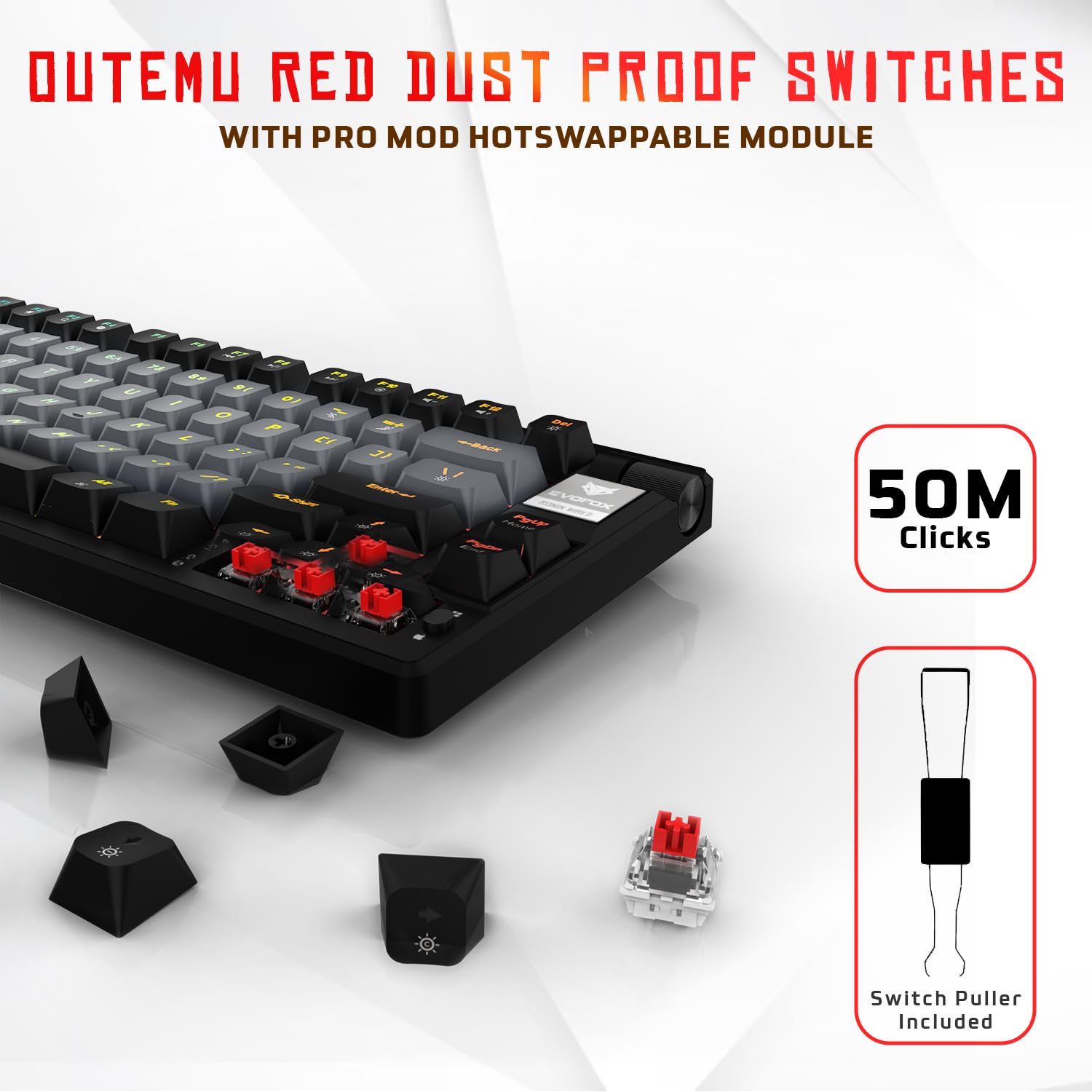
Image 3.2: Close-up of Outemu Red switches and the included switch puller, demonstrating hot-swappable functionality.
3.3 Ар бир баскыч үчүн RGB арткы жарыктандыруу
Each key on the EvoFox Ronin features individual RGB backlighting, offering 16 million colors and 21 pre-set lighting effects. The lighting can be customized directly on the keyboard or through the dedicated software, including an Audio Sync Mode that reacts to sound.

Image 3.3: The EvoFox Ronin keyboard showcasing its customizable per-key RGB backlighting.
3.4 Dedicated Volume Knob
A metal volume knob is integrated into the keyboard for quick and precise audio adjustments. Rotate to change volume, and press to mute/unmute.
3.5 Detachable USB-C Cable
The keyboard connects via a robust 1.5-meter braided USB-C cable, which is detachable for easy portability and storage. The cable includes an EMI ring to minimize signal interference.

Image 3.4: Features of the EvoFox Ronin, including the volume knob, detachable USB-C cable, and double-height adjustable legs.
4. Орнотуу нускамалары
Follow these steps to set up your EvoFox Ronin keyboard:
- Баскычтопту таңгактан чыгаруу: Баскычтопту жана бардык аксессуарларды таңгактан кылдаттык менен чыгарып алыңыз.
- USB-C кабелин туташтыруу: Insert the USB-C end of the provided cable into the port on the back of the keyboard.
- Компьютерге туташуу: Кабелдин USB-A учун компьютериңиздеги (PC же Mac) жеткиликтүү USB портуна сайыңыз.
- Драйверди орнотуу: The keyboard is plug-and-play. Your operating system should automatically detect and install the necessary drivers.
- Кошумча программалык камсыздоону орнотуу: For advanced customization, download the dedicated Windows software from the official EvoFox webсайт.
5. Иштөө нускамалары
5.1 Негизги ачкыч функциялары
The EvoFox Ronin functions as a standard TKL (Tenkeyless) keyboard. All keys perform their labeled functions. The keyboard supports N-Key Rollover, ensuring every key press is registered accurately, even during rapid input.
5.2 Мультимедиа жана функция баскычтары
Access multimedia and additional functions by pressing the Fn key in combination with the designated F-keys or other keys. Refer to the keycap legends for specific functions (e.g., Fn + F1 for media player, Fn + F2 for volume down).
5.3 RGB жарыкты башкаруу
You can control the RGB lighting directly from the keyboard:
- Эффекттерди өзгөртүү: Колдонуу Fn + \| 21 түрдүү жарыктандыруу эффекттерин айланып өтүү.
- Жарыктыкты жөндөө: Колдонуу Fn + Өйдө жебе жарыктыгын жогорулатуу жана Fn + Төмөн жебе жарыктыгын азайтуу үчүн.
- Ылдамдыкты жөндөө: Колдонуу Fn + Сол жебе таасир ылдамдыгын азайтуу жана Fn + Оңго жебе эффект ылдамдыгын жогорулатуу үчүн.
- Audio Sync Mode: Activate specific modes that react to audio input.
5.4 Программалык камсыздоону ыңгайлаштыруу
The dedicated Windows software allows for comprehensive customization:
- Негизги программалоо: Remap any key to a different function.
- Макро түзүү: Бир баскычка татаал баскыч ырааттуулугун жазыңыз жана дайындаңыз.
- Backlighting Effects: Fine-tune RGB colors, effects, brightness, and speed.
- Profile Башкаруу: Бир нече профессионал түзүңүз жана сактаңызfileар кандай колдонмолор же оюндар үчүн.
- Добуш берүү көрсөткүчү: Adjust the polling rate up to 1000Hz.

Image 5.1: Screenshot of the EvoFox Ronin's dedicated software, showing options for light settings, button settings, and macro management.
5.5 Cross-Platform Compatibility
The keyboard supports both Windows and Mac operating systems. Use the designated key combination (typically Fn+Win or similar, refer to keycap legends) to switch between modes, ensuring correct key mapping for your OS.
6. Техникалык тейлөө
6.1 Баскычтопту тазалоо
Клавиатураңыздын сырткы көрүнүшүн жана иштешин сактоо үчүн:
- Тазалоодон мурун клавиатураны компьютерден ажыратыңыз.
- Баскыч капкактарынын ортосундагы чаңды жана калдыктарды тазалоо үчүн кысылган аба банкасын колдонуңуз.
- Баскыч капкактарын жана клавиатуранын бетин жумшак, бир аз сүртүңүз damp кездеме. Ашыкча нымдуулуктан сактаныңыз.
- Катуу химиялык заттарды же абразивдүү тазалоочу каражаттарды колдонбоңуз.
6.2 Коммутаторлорду алмаштыруу
The EvoFox Ronin features hot-swappable switches, allowing for easy replacement without soldering:
- Компьютериңизден клавиатураны ажыратыңыз.
- Каалаган баскычтоптун капкагын акырын алып салуу үчүн комплекттеги баскычтоптун капкагын тартуучу каражатты колдонуңуз.
- Use the included switch puller to carefully grip the top and bottom clips of the switch and pull it straight up.
- Align the pins of the new switch with the holes on the PCB and gently press it down until it clicks into place. Ensure the pins are not bent.
- Баскыч капкагын алмаштырыңыз.

Image 6.1: A keycap being removed from the keyboard using a keycap puller.
7. Кыйынчылыктарды
If you encounter issues with your EvoFox Ronin keyboard, refer to the following common solutions:
- Баскычтоп жооп бербейт:
- USB-C кабели клавиатурага жана компьютерге бекем туташып турганын текшериңиз.
- Баскычтопту компьютериңиздин башка USB портуна туташтырууга аракет кылыңыз.
- Компьютерге тиешелүү маселени болтурбоо үчүн баскычтопту башка компьютерде сынап көрүңүз.
- Компьютериңизди өчүрүп күйгүзүңүз.
- RGB жарыгы иштебейт/туура эмес:
- Check the on-board lighting controls (Fn key combinations) to ensure brightness is not set to zero or an effect is not disabled.
- If using the software, ensure it is running and the correct profile активдүү.
- Reinstall the keyboard software if issues persist.
- Катталбаган ачкычтар:
- Ачкычтын капкагынын же которгучтун астында эч кандай таштанды калбаганын текшериңиз.
- If a specific key is not working, try replacing its switch (refer to Section 6.2).
- Check for bent pins on the switch if you recently replaced one.
- Software Issues (e.g., Antivirus Flagging):
- Ensure you download the software from the official EvoFox website to avoid unofficial versions.
- If your antivirus flags the software, you may need to add an exception for the software's executable file. Proceed with caution and only if you trust the source.
- Contact EvoFox support for the latest software version or assistance.
8. Техникалык шарттар
| Өзгөчөлүк | Деталь |
|---|---|
| Бренд | ЭвоФокс |
| Модель аты | EvoFox Ronin TKL Wired |
| Keyboard Description | Механикалык |
| Байланыш технологиясы | USB-C (Зымдуу) |
| Которгучтар | Outemu Red Silent Dust Proof Switches (Hot-Swappable) |
| Арткы жарыктандыруу | Per-Key RGB (16 Million Colors, 21 Effects, Audio Sync Mode) |
| Добуш берүү көрсөткүчү | 1000 Гц чейин |
| Key Rollover | N-Key Rollover (All Anti-Ghosting Keys) |
| Өзгөчөлүктөр | Advanced Gasket Structure, Compact TKL Design, Multimedia Keys, Pro Mod Hotswap Module, Powerful Windows Software, Dedicated Volume Controller |
| Шайкеш түзмөктөр | Ноутбук, компьютер |
| Аппараттык платформа | PC/Mac/Linux/Unix |
| Кабелдин узундугу | 1.5m Detachable Braided Type-C with EMI Ring |
| Материал | Пластик |
| Продукциянын өлчөмдөрү | 32 x 13.5 x 2.6 см |
| Элемент Салмагы | 640 г |
| Келип чыккан өлкө | Кытай |
9. Кепилдик жана колдоо
The EvoFox Ronin Mechanical Gaming Keyboard comes with a standard manufacturer's warranty. Please refer to the warranty card included in your package for specific terms and conditions, including warranty period and coverage details.
For technical support, troubleshooting assistance, or warranty claims, please contact EvoFox customer support. You can find contact information on the official EvoFox website or through the manufacturer, Allied Electronics & Magnetics Private Limited.
Өндүрүүчү: Allied Electronics & Magnetics Private Limited
Дарек: C-64/4, Okhla Phase - 2, New Delhi - 110020


