Продукт бүттүview
The Sharp 4T-C55FS1UR AQUOS OLED 4K Ultra HD Roku TV offers a premium viewing experience with its advanced display technology and integrated smart TV platform. This bundle includes a Walts TV Medium Full Motion Mount for flexible installation and a Walts HDTV Screen Cleaner Kit for optimal display maintenance.
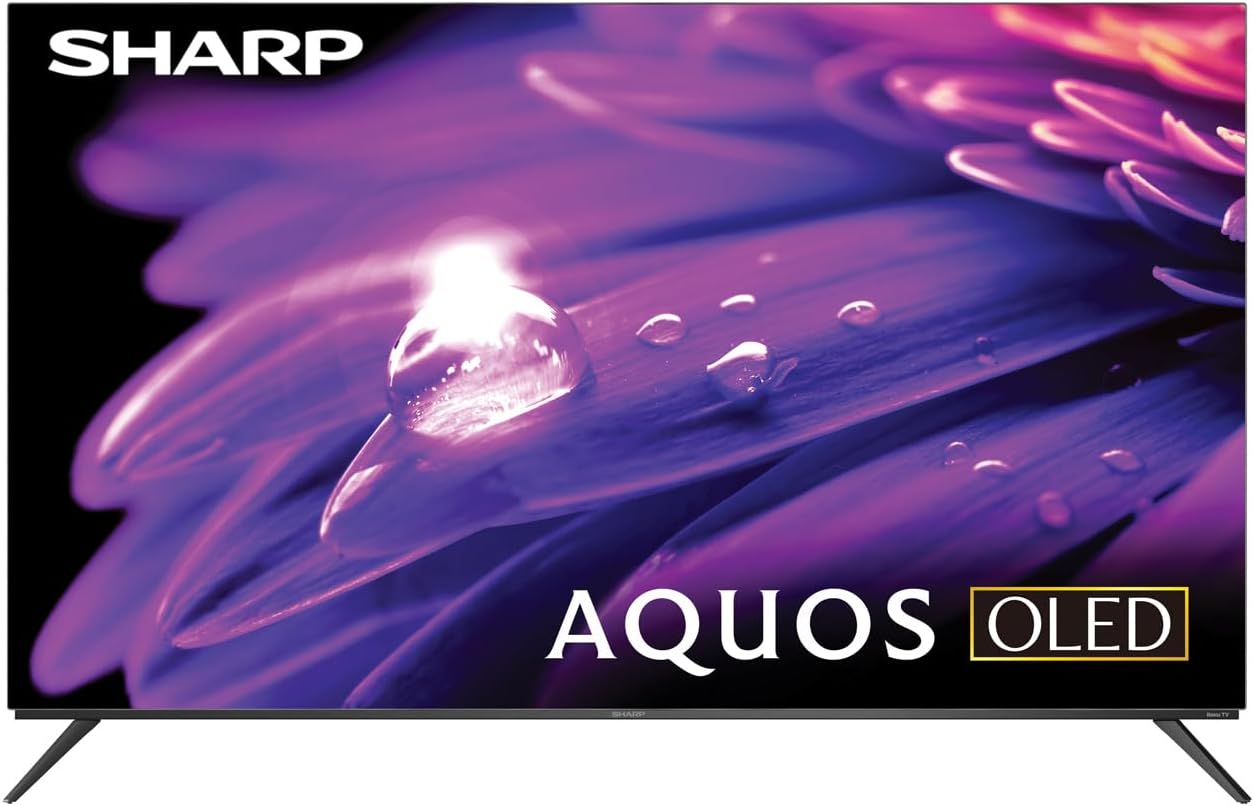
Сүрөт: алдыңкы view of the Sharp AQUOS OLED 4K Ultra HD Roku TV.
This image displays the sleek design of the Sharp AQUOS OLED TV, highlighting its thin bezels and modern aesthetic. The OLED technology ensures vibrant colors and deep blacks for an immersive viewтажрыйбасы.

Image: Sharp AQUOS OLED TV displaying the Roku TV home screen.
The TV features the intuitive Roku TV interface, providing access to a vast library of streaming services and apps directly from the home screen. This integration simplifies content discovery and navigation.
Video: Sharp FS1UR Series TV Product Review by Walts TV.
Бул видео кеңири маалымат беретview of the Sharp FS1UR Series TV, detailing its features, design, and performance. It offers visual demonstrations of the TV's capabilities and user interface.
Орнотуу нускамалары
1. Кутудан чыгаруу жана баштапкы жайгаштыруу
- Carefully remove all components from the packaging. Retain packaging for future transport or service.
- Place the TV on a stable, flat surface or prepare for wall mounting.
- Телевизордун айланасында жетиштүү желдетүүнү камсыз кылыңыз.
2. Стенд орнотуу (кошумча)
If using the included TV stand:
- Attach the two stand legs to the designated slots on the bottom of the TV using the provided screws.
- Ensure the legs are securely fastened. The stand provides 3.5 inches of clearance, suitable for soundbars.

Сүрөт: Side profile of the Sharp AQUOS OLED TV on its stand.
This image illustrates the slim profile of the TV and the design of its stand, which offers sufficient clearance for external audio devices.
3. Дубалга орнотуу (кошумча)
If using the Walts TV Medium Full Motion Mount:
- Refer to the separate instruction manual provided with the Walts TV mount for detailed installation steps.
- The mount is compatible with 32"-65" TVs and supports VESA mounting up to 400mm x 400mm.
- It features a +3 to -10 degree viewing angle adjustment and cable management.

Сүрөт: алдыңкы view of the Walts TV Medium Full Motion Mount.
This image shows the robust construction of the full motion TV mount, designed for secure and flexible wall mounting.
4. Перифериялык түзүлүштөрдү туташтыруу
The TV features side-angled ports for easy access:
- HDMI порттору: Connect up to 4 HDMI devices (e.g., gaming consoles, Blu-ray players). One port supports eARC for enhanced audio return.
- USB порттору: Connect USB devices (e.g., flash drives) to the 2 available USB ports.
- Антенна/Кабель: Антеннаны же кабелдик телеберүүнү туташтырыңыз.
- Ethernet порту: Зымдуу интернет байланышы үчүн.
- Digital Audio Out: Тышкы аудио системаларды туташтыруу үчүн.

Image: Close-up of the input/output ports on the back of the Sharp AQUOS OLED TV.
This image details the various connectivity options available on the TV, including multiple HDMI and USB ports, designed for convenient access whether wall-mounted or on a stand.
5. Күйгүзүү жана баштапкы орнотуу
- Электр шнурду сыналгыга жана розеткага туташтырыңыз.
- Пульттун же сыналгыдагы кубат баскычын басыңыз.
- Follow the on-screen instructions to complete the initial Roku TV setup, including network connection and channel scanning.
Иштөө нускамалары
1. Roku TV Interface Navigation
- Use the directional pad on the remote to navigate menus.
- басыңыз OK элементтерди тандоо үчүн баскычты басыңыз.
- The Үй button returns to the main Roku TV screen.
- Dedicated buttons for popular streaming services (e.g., Netflix, Disney+) provide quick access.
2. Сүрөт жана үн орнотуулары
Access picture and sound settings through the Roku TV menu to optimize your viewтажрыйбасы.
- Сүрөт режимдери: Select from various preset modes (e.g., Movie, Standard, Vivid) or customize settings like brightness, contrast, and color.
- HDR колдоо: The TV supports HDR10, HLG, and Dolby Vision IQ for enhanced contrast and color with compatible content.
- Жаңыртуу ылдамдыгы: Enjoy smooth motion with the 120Hz refresh rate, ideal for gaming and fast-paced action.
- Dolby Audio: Utilize Dolby Audio for rich, immersive sound. Adjust audio settings for different content types.
3. Оюн функциялары
For an optimal gaming experience:
- Өзгөрмө жаңыртуу ылдамдыгы (VRR): Automatically adjusts the display's refresh rate to match the game's frame rate, reducing screen tearing.
- Төмөн күтүү: Көбүрөөк жооп берүүчү оюн тажрыйбасы үчүн киргизүү артта калууларын азайтат.
- Connect your next-gen consoles to the HDMI ports for full utilization of these features.
Техникалык тейлөө
1. Экранды тазалоо
Use the Walts HDTV Screen Cleaner Kit for safe and effective cleaning:
- Ensure the TV is turned off and cool.
- Spray the non-ammonia, alcohol-free cleaning solution onto the included microfiber cloth, not directly onto the screen.
- Gently wipe the screen in a circular motion to remove dust, dirt, and fingerprints.
- The solution cleans without dripping, streaking, or staining, leaving no film or residue.

Image: Walts HDTV Screen Cleaner Kit packaging.
This image shows the Walts HDTV Screen Cleaner Kit, which is designed to safely clean various display screens without causing damage or leaving residue.
2. Жалпы кам көрүү
- Сыналгыга оор нерселерди коюудан алыс болуңуз.
- Телевизорду күн нурунан жана жылуулук булактарынан алыс кармаңыз.
- Желдетүүчү тешиктерди жаппаңыз.
- Чагылган бороондо же көпкө чейин пайдаланылбай турганда сыналгыдан ажыратыңыз.
Проблемаларды чечүү
| Көйгөй | Мүмкүн болгон себеп / Чечим |
|---|---|
| Күч жок |
|
| Сүрөт жок / Сүрөттүн сапаты начар |
|
| Үн жок / Үн сапаты начар |
|
| Пульт иштебейт |
|
| Тармакка туташуу маселелери |
|
For further assistance, please refer to the full user manual or contact Sharp customer support.
Техникалык шарттар
- Бренд: Sharp
- Модель аты: 4T-C55FS1UR
- Экрандын өлчөмү: 55 дюйм (Көрүнүүчү экран диагоналы: 55 дюйм/140 см)
- Дисплей технологиясы: AQUOS OLED
- Чечим: 4K Ultra HD (8.3 Million Pixels)
- Жаңыртуу ылдамдыгы: 120 Гц
- Өзгөчөлүктөр: HDR10, HLG, Dolby Vision IQ, Full Roku TV Experience Built-in, Dolby Digital Audio, Variable Refresh Rate (VRR) with Low Latency for Optimized Gaming, Voice Remote Control
- Байланыш: 4 HDMI (1 eARC), 2 USB, Wi-Fi Compatible, Ethernet
- Продукциянын өлчөмдөрү (D x W x Y): 9.84"D x 48.27"W x 31.18"H
- Элемент Салмагы: 38.5 фунт
- Түсү: Кара
- Колдоого алынган интернет кызматтары: Netflix, Disney+, Apple TV, Roku Channel, Discovery+, HBO Max, Paramount+, and More
Камтылган аксессуарлар:
- Sharp 4T-C55FS1UR 55" AQUOS OLED 4K Ultra HD with Dolby Audio Roku TV
- Walts TV Medium Full Motion Mount for 32-65 Inch Compatible TV's
- Walts HDTV Screen Cleaner Kit (6.8oz / 200ML, Non-Ammonia, No Alcohol)
Кепилдик жана колдоо
For warranty information, please refer to the documentation included with your product at the time of purchase or visit the official Sharp webсайт. Кепилдиктин конкреттүү шарттары жана шарттары ар кандай болушу мүмкүн.
Кардарларды колдоо үчүн дарегине кириңиз Amazon'догу Sharp дүкөнү же түздөн-түз кардарларды тейлөө менен байланышыңыз.


