Introduction
This manual provides essential information for the safe and efficient operation of your VONYX VMA106 6-Channel Powered PA Mixer. Please read these instructions carefully before use and retain them for future reference.
The VMA106 is a versatile 6-channel powered mixer designed for live performances, public speaking, and various audio applications. It features an integrated Class D amplifier, wireless microphones, Bluetooth connectivity, and a USB MP3 player, all housed in a durable ABS casing.
Коопсуздук нускамалары
- электр менен жабдууну камсыз кылуу voltage matches the rating on the unit.
- Электр тогуна урунбоо үчүн шайманды жамгырдын же нымдуулуктун таасирине дуушар кылбаңыз.
- Аппаратты жылуулук булактарынын жанына же тике күн нуруна коюудан алыс болуңуз.
- в ачпагылаasing; бардык тейлөөлөрдү квалификациялуу кызматкерлерге тапшырыңыз.
- Disconnect the power cord before cleaning or if the unit will not be used for an extended period.
- Өндүрүүчү тарабынан көрсөтүлгөн кошумча жабдууларды гана колдонуңуз.
Пакеттин мазмуну
Бардык буюмдар бар экенин жана жакшы абалда экендигин текшериңиз:
- VONYX VMA106 Powered PA Mixer
- 2x UHF Wireless Handheld Microphones
- Электр кабели
- Колдонуучунун Колдонмосу (бул документ)
Продукт бүттүview

Figure 1: VONYX VMA106 Powered PA Mixer in its durable ABS case, showcasing the mixer unit and the two included wireless microphones.

2-сүрөт: Детальдуу view of the VMA106 mixer's control panel, including channel faders, EQ knobs, and the integrated media player. The two wireless microphones are securely stored in their dedicated compartments within the case.
Алдыңкы панелдин башкаруу элементтери жана туташуулары:
- Channels 1-4 (MIC/INST): Combo Jack/XLR inputs for microphones, instruments, or line-level signals. Each channel includes gain, high, low, pan, and FX controls.
- 5-6 каналдары: Stereo input for line-level devices.
- Негизги чыгышы: Stereo balanced outputs for connecting to external PA speakers.
- Медиа ойноткуч: Integrated USB MP3 player and Bluetooth receiver with display and control buttons.
- Wireless Microphone Receivers: Built-in UHF receivers for the included wireless microphones.
- Башкы көзөмөл: Volume controls for main output, FX send, and media player.

Figure 3: The two UHF wireless handheld microphones included with the VMA106 mixer, featuring power switches and VONYX branding.
Арткы панелдин туташуулары:
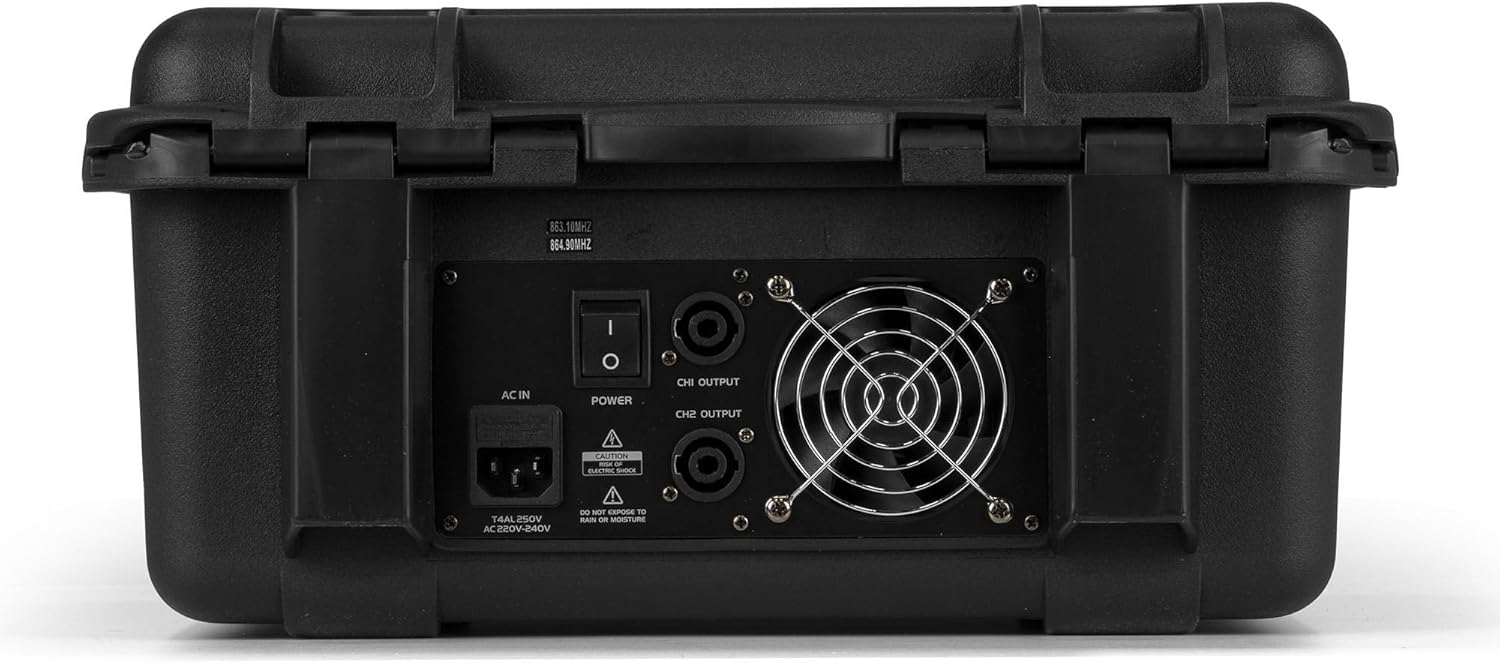
Figure 4: Rear panel of the VMA106 mixer, displaying the AC power input, main power switch, and CH1/CH2 speaker outputs. Safety warnings regarding electric shock and moisture are also visible.
- AC IN: Power input for the included power cable.
- POWER которуштуруу: Негизги күйгүзүү/өчүрүү баскычы.
- CH1/CH2 OUTPUT: Speaker outputs for connecting passive PA speakers.
Жайгашуу
- Жайгашкан жери: Миксерди туруктуу, тегиз бетке коюп, анын айланасында жетиштүү желдетүүнү камсыз кылыңыз.
- Кубат туташуу: Connect the supplied power cable to the AC IN port on the rear panel and then to a suitable power outlet. Ensure the POWER switch is in the OFF position before connecting.
- Динамик туташуу: Connect your passive PA speakers to the CH1 OUTPUT and CH2 OUTPUT ports on the rear panel using appropriate speaker cables. Ensure correct polarity.
- Киргизүү түзмөктөрү:
- Микрофондор/Инструменттер: Connect wired microphones or instruments to the Combo Jack/XLR inputs on Channels 1-4.
- Линиялык деңгээлдеги түзмөктөр: Connect line-level sources (e.g., keyboards, media players) to Channels 1-6.
- Зымсыз микрофондор: Insert batteries into the wireless microphones. Ensure they are switched off during initial setup.
- Баштапкы күйгүзүү: Once all connections are secure, switch the POWER button to the ON position.
Иштөө нускамалары
Негизги аралаштыруу:
- Канал кирешеси: Adjust the GAIN knob for each input channel to achieve an optimal input level without clipping (indicated by the PEAK LED).
- Теңдөө (EQ): Use the HIGH and LOW knobs on each channel to adjust the treble and bass frequencies.
- Пан: Adjust the PAN knob to position the sound source in the stereo field.
- FX жөнөтүү: Use the FX knob to send a portion of the channel signal to the internal effects processor.
- Канал Faders: Adjust the individual channel faders to set the volume balance between different inputs.
- Негизги чыгышы: Use the MAIN OUT faders to control the overall volume of the mix.
Зымсыз микрофондор:
- Switch on the wireless microphones using their power switches.
- The mixer's built-in receivers will automatically pair with the microphones.
- Adjust the volume for the wireless microphones using the dedicated volume controls (VOLUME A and VOLUME B) on the mixer.
Bluetooth байланышы:
- Press the MODE button on the media player until "BT" (Bluetooth) is displayed.
- On your Bluetooth-enabled device, search for "VONYX" or a similar device name and pair with it.
- Once paired, you can stream audio from your device to the mixer. Adjust the media player volume using its dedicated control.
USB MP3 ойноткуч:
- MP3 аудиосу бар USB флэш-дискти салыңыз files into the USB port on the media player.
- The player will automatically switch to USB mode or can be selected using the MODE button.
- Use the media player controls (Play/Pause, Next, Previous) to navigate and play tracks. Adjust the media player volume using its dedicated control.
Техникалык тейлөө
- Тазалоо: Use a soft, dry cloth to clean the exterior of the mixer. Do not use abrasive cleaners or solvents.
- Сактагыч: When not in use, store the mixer in its durable ABS case in a cool, dry place, away from direct sunlight and extreme temperatures.
- Батареяны алмаштыруу: Replace batteries in the wireless microphones when their performance degrades. Dispose of used batteries responsibly.
- Вентиляция: Ашыкча ысып кетүүнүн алдын алуу үчүн желдетүү тешиктерин чаңдан жана таштандыдан тазалаңыз.
Проблемаларды чечүү
| Көйгөй | Мүмкүн себеп | Чечим |
|---|---|---|
| Күч жок | Power cable disconnected; power switch off; faulty outlet. | Check power cable connection; ensure power switch is ON; test outlet with another device. |
| Динамиктерден үн жок | Speaker cables disconnected; main output faders down; channel faders down; speaker volume low. | Check speaker connections; raise MAIN OUT faders; raise individual channel faders; ensure speakers are powered and volume is up. |
| Зымсыз микрофон иштебейт | Microphone off; low batteries; out of range. | Switch microphone ON; replace batteries; move closer to the mixer. |
| Bluetooth туташпай жатат | Mixer not in BT mode; device not searching; incorrect pairing. | Press MODE button to select BT; ensure device Bluetooth is ON and searching; re-pair the device. |
| USB MP3 not playing | USB флешкасы туура эмес салынган; колдоого алынбайт file format; media player not in USB mode. | Re-insert USB drive; ensure files are MP3 format; press MODE button to select USB. |
Техникалык шарттар
| Өзгөчөлүк | Деталь |
|---|---|
| Модель номери | 172.670 |
| Бренд | VONYX |
| Каналдардын саны | 6 |
| Ampжашоочу түрү | Class D (600W per channel at 8 Ohms, as per product description) |
| Байланыш технологиясы | XLR, Jack, Bluetooth, USB |
| Аудио киргизүү | XLR, 6.35 мм уяча |
| Output Connector Type | XLR (for speakers) |
| Power Source | Электр кабели |
| Тtage | 220 вольт |
| Продукциянын өлчөмдөрү (L x W x Y) | 25 x 39.5 x 46.5 см |
| Элемент Салмагы | 8.65 килограмм |
| Зымсыз микрофондор | 2x UHF Handheld |
| Турак жай материалы | Туруктуу ABS |
Кепилдик жана колдоо
Specific warranty information is typically provided at the point of purchase or on the manufacturer's official website. Please refer to your purchase documentation for details regarding warranty coverage and terms.
For technical support or service inquiries, please contact your retailer or visit the official VONYX webбайланыш маалыматы үчүн сайт.


