Introduction
This instruction manual provides detailed guidance for the Anderic RR787T Replacement Remote Control. Designed as a direct replacement for RH787T and UC787T remotes, it offers comprehensive control for Casablanca DC motor ceiling fans and other compatible high-end models. Features include six fan speeds, reverse airflow, and dimmable light control (for incandescent bulbs). This remote is specifically engineered for ceiling fans utilizing receivers with 4 dip switches, including those originally paired with the RH786R receiver.
Пакеттин мазмуну
Пакетиңизде бардык буюмдар бар экенин текшериңиз:
- Anderic RR787T алыстан башкаруу пульту
- Дубалга орнотуу кронштейн
- Монтаждоо бурамдары жана дубал анкерлери
- Note: Two AAA batteries are required and not included.

Image: Anderic RR787T remote control securely placed in its wall mount holder.
Жайгашуу
Жаңы пультуңузду орнотуу үчүн бул кадамдарды аткарыңыз:
- Батареяны орнотуу: Пульттун артындагы батарея бөлүкчөсүн ачыңыз. Туура полярдуулукту камсыз кылуу үчүн эки AAA батарейканы салыңыз (киргизилген эмес).
- Дип которгучтарын орнотуу: Locate the 4 dip switches inside the battery compartment. Match the dip switch settings on your new Anderic RR787T remote to the settings on your existing ceiling fan receiver or old remote. This step is crucial for proper communication between the remote and the fan.
- Дубалга орнотулган кронштейн: Use the provided screws and wall anchors to securely mount the wall bracket in a convenient location.
- Insert Remote: Slide the remote control into the mounted wall bracket.

Сүрөт: Арткы view of the Anderic RR787T remote, highlighting the battery compartment and dip switches for configuration.
Демонстрациялык видеону орнотуу
Video: A demonstration of a similar Anderic remote (UC7225T) showing its features and operation, which can provide general guidance for setup and use. Note that this video is for a different model (UC7225T) but from the same brand.
Иштөө нускамалары
The Anderic RR787T remote offers intuitive control over your ceiling fan and light:
- Күйгүзүү/өчүрүү: Вентилятор менен жарыкты күйгүзүү же өчүрүү үчүн кубат баскычын басыңыз.
- Желдетүүчү ылдамдыкты көзөмөлдөө: Use the fan speed buttons (typically marked I, II, III, IV, V, VI or Low, Med, High) to adjust the fan's rotation speed. The RR787T supports 6 fan speeds.
- Тескери аба агымы: Press the reverse button to change the direction of the fan blades, allowing for seasonal comfort (downward airflow for cooling, upward for circulating warm air).
- Жарыкты башкаруу:
- Жарыкты күйгүзүү же өчүрүү үчүн жарык баскычын басыңыз.
- To dim the light (with incandescent bulbs), press and hold the light button. Release when the desired brightness is reached.
- Note: For LED, CFL, or other non-incandescent bulbs, the dimming function can be disabled inside the battery compartment to prevent issues.
- Таймер функциясы: The remote includes timer buttons (e.g., 1H, 2H, 4H, 8H) to set the fan to operate for a specific duration before automatically turning off.
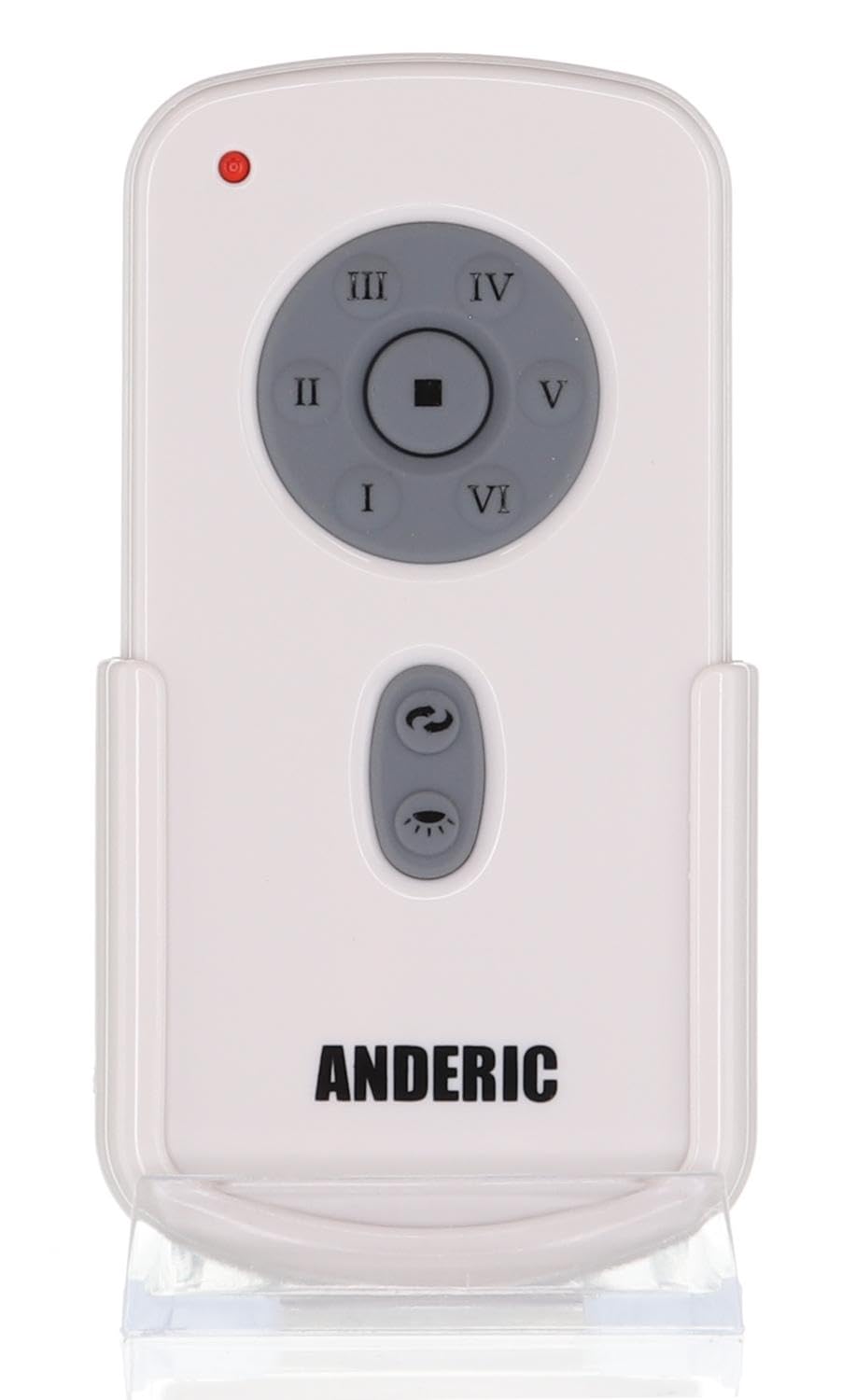
Сүрөт: алдыңкы view of the Anderic RR787T remote control, displaying its intuitive button layout for easy operation.
Шайкештик
The Anderic RR787T is designed for broad compatibility with specific ceiling fan systems:
- Кабыл алуучулар: Designed for ceiling fans that use receivers with 4 dip switches, including models originally paired with RH786R, RH787T, and UC787T remotes.
- Fan Brands: Compatible with high-end ceiling fans from brands such as Casablanca, Monte Carlo, Fanimation, Regency, and Home Decorators Collection.
- Колдоого алынган моделдер: Includes Casablanca Panama, Stealth, Stingray, Fellini, and Monte Carlo Vision, Arcade, Hicks, and Dover series.
- Маанилүү эскертүү: Not compatible with Fanimation Slinger fans (especially newer models), fans requiring 5 dip switch receivers, or 315 MHz systems like Harbor Breeze ZJF-HH-YK-A008. Always verify your fan's receiver type before purchase.
Техникалык тейлөө
Алыстан башкаруу пультуңуздун узак мөөнөттүү жана оптималдуу иштешин камсыз кылуу үчүн, төмөнкү техникалык тейлөө көрсөтмөлөрүн аткарыңыз:
- Батареяны алмаштыруу: Replace batteries when the remote's performance diminishes. Ensure correct battery type (2 AAA) and polarity.
- Тазалоо: Пультту жумшак, кургак чүпүрөк менен сүртүңүз. Күчтүү химиялык заттарды же абразивдүү тазалоочу каражаттарды колдонбоңуз.
- Сактагыч: Пультту күн нурунан жана экстремалдык температурадан алыс, салкын, кургак жерде сактаңыз.
Проблемаларды чечүү
Эгер сиз алыстан башкарууңузда көйгөйлөргө туш болсоңуз, төмөнкү жалпы чечимдерди караңыз:
- Алыстан жооп бербейт:
- Батареянын деңгээлин текшерип, керек болсо алмаштырыңыз.
- Ensure the dip switch settings on the remote match the receiver.
- Verify the fan's power supply is active.
- Light Not Dimming:
- Confirm that incandescent bulbs are being used.
- Check if the dimming function is enabled inside the battery compartment.
- Fan Not Changing Speed/Direction:
- Алыстан башкаруу пульту кабыл алгычтын диапазонунда экенин текшериңиз.
- Re-check dip switch settings.
Техникалык шарттар
| Бренд | Андерик |
| Модель номери | RR787T (replaces RH787T) |
| Пакеттин өлчөмдөрү | 4.96 x 4.92 x 2.8 дюйм |
| Элемент Салмагы | 3.2 унция |
| Батареялар | 2 AAA батарейка (киргизилген эмес) |
| Өзгөчө өзгөчөлүк | Wall Mount камтылган |
| Түс | Ак |
| Колдоого алынган түзмөктөрдүн максималдуу саны | 1 |
| Шайкеш түзмөктөр | Күйөрман |
Кепилдик жана колдоо
For warranty information or technical support, please refer to the product packaging or contact Anderic customer service directly. Keep your proof of purchase for any warranty claims.


