1. Киришүү
Thank you for choosing the Xiaomi Robot Vacuum S20+. This intelligent cleaning device is designed to provide efficient and thorough cleaning for your home, combining powerful suction with advanced mopping capabilities. Please read this manual carefully before use and retain it for future reference.
2. Коопсуздук боюнча маанилүү маалымат
To reduce the risk of injury or damage, read and follow all safety precautions below:
- Бул шайманды 8 жаштан жогорку балдар жана физикалык, сезүү же акыл-эс жөндөмү начар же тажрыйбасы жана билими жок адамдар колдонсо болот, эгерде алар көзөмөлгө алынган же шайманды коопсуз колдонуу боюнча нускама алган болсо жана коркунучтарды түшүнсө. тартылган.
- Балдар шайман менен ойнобошу керек. Тазалоо жана колдонуучу тейлөөнү балдар көзөмөлсүз жасабашы керек.
- Робот чаң соргучту нымдуу чөйрөдө же сууга жакын жерде колдонбоңуз.
- Ensure the charging base is placed on a level surface against a wall, with no obstacles within 0.5 meters on either side.
- Before cleaning, remove loose cables, small objects, or anything that could entangle the brushes.
- Do not use the robot vacuum to pick up large debris, sharp objects, or liquids.
- Only use the original charging adapter and base provided with the product.
- Робот чаң соргучту өзүңүз оңдоого же өзгөртүүгө аракет кылбаңыз. Жардам алуу үчүн ыйгарым укуктуу тейлөө кызматкерлерине кайрылыңыз.
3. Пакеттин мазмуну
Кутучаны кылдаттык менен ачып, бардык буюмдардын бар экенин текшериңиз:
- 1 x Xiaomi Robot Vacuum S20+ (White)
- 1 x Dustbin + Water Tank (pre-mounted)
- 2 х швабра
- 1 x Side Brush
- 1 x заряддоо базасы
- 1 x User Manual
- 1 x заряддоо адаптери
4. Продукт бүтүп калдыview
4.1 робот вакуум

4.1-сүрөт: Жогорку view of the Xiaomi Robot Vacuum S20+, highlighting the main control buttons and the laser navigation dome.
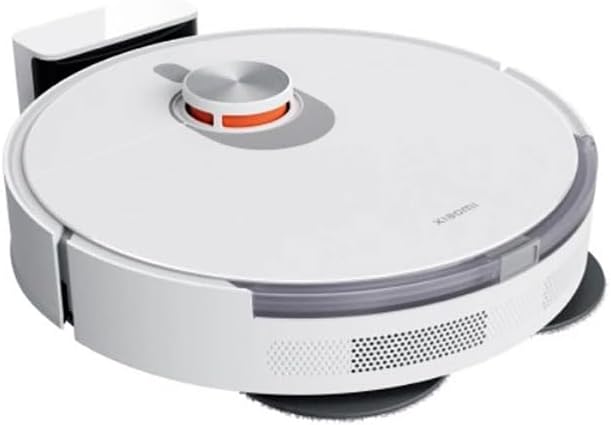
4.2-сүрөт: Каптал view of the Xiaomi Robot Vacuum S20+, illustrating the dual rotating mop pads and the side brush for edge cleaning.
- LDS Laser навигациясы: Так карта жана навигация үчүн.
- Кубат/Тазалоо баскычы: Press to start/pause cleaning, press and hold to power on/off.
- Үй баскычы: Press to send the robot back to the charging base.
- Таштанды челек жана суу багы: Integrated compartment for dry debris and water for mopping.
- Dual Rotating Mop Pads: For effective scrubbing and mopping.
- Каптал щетка: Sweeps debris from edges and corners into the main brush path.
- Негизги щетка: Полдон чаң жана таштандыларды чогултат.
- Сенсорлор: Cliff sensors, wall sensors, and obstacle avoidance sensors.
4.2 Кубаттоочу база

Figure 4.3: The Xiaomi Robot Vacuum S20+ docked with its charging base, ready for charging.
The charging base provides power to the robot vacuum and serves as its home station. It features charging contacts and an indicator light.
5. Орнотуу
5.1 Заряддоо базасын жайгаштыруу
Place the charging base on a hard, level surface against a wall. Ensure there is at least 0.5 meters of clear space on both sides of the charging base and 1.5 meters in front of it. Connect the power adapter to the charging base and plug it into a wall outlet. The indicator light on the charging base will illuminate.
5.2 Алгачкы заряддоо
Place the robot vacuum onto the charging base. Ensure the charging contacts on the robot align with those on the base. The robot will automatically power on and begin charging. For first-time use, it is recommended to fully charge the robot before its initial cleaning cycle.
5.3 Connecting to the Mi Home/Xiaomi Home App
For full functionality and smart features, connect your robot vacuum to the Mi Home/Xiaomi Home app:
- Download the "Mi Home" or "Xiaomi Home" app from your app store (Google Play Store or Apple App Store).
- Колдонмону ачып, Xiaomi аккаунтуңузду түзүңүз же ага кириңиз.
- Түзмөктү кошуу үчүн жогорку оң бурчтагы "+" сөлөкөтүн таптаңыз.
- Select the Xiaomi Robot Vacuum S20+ from the list of available devices or allow the app to scan for nearby devices.
- Follow the on-screen instructions to connect the robot to your Wi-Fi network. Ensure your phone is connected to a 2.4GHz Wi-Fi network during the setup process.
- Once connected, you can name your robot and access its features.
6. Иштөө нускамалары
6.1 Тазалоо циклин баштоо
- Роботтон: Press the Power/Clean button once to start a full cleaning cycle.
- Колдонмодон: Open the Mi Home/Xiaomi Home app, select your robot, and tap "Clean" or "Start Cleaning".
The robot will automatically map your home using its LDS laser navigation and plan an efficient cleaning path. It will return to the charging base when cleaning is complete or when the battery is low.
6.2 Тазалоо режимдери
The Xiaomi Robot Vacuum S20+ supports various cleaning functions:
- Sweep & Suction: The robot uses its side brush and main brush to sweep debris and then vacuums it into the dustbin.
- сүртүү: The dual rotating mop pads scrub the floor while the robot dispenses water from the water tank.
- Sweep, Suction & Mopping: The robot performs all functions simultaneously for a comprehensive clean.
You can select and customize cleaning modes, suction power, and water flow levels via the Mi Home/Xiaomi Home app.
6.3 Using the Mi Home/Xiaomi Home App
The app provides advanced control and customization:
- Реалдуу убакыттагы карта түзүү: View the robot's cleaning path and mapped areas.
- Аймакты тазалоо: Робот тазалоо үчүн атайын аймактарды аныктаңыз.
- Виртуалдык дубалдар жана өтүүгө тыюу салынган зоналар: Set boundaries to prevent the robot from entering certain areas.
- Пландаштырылган тазалоо: Күнүмдүк же жумалык тазалоо графигин түзүңүз.
- Алыстан башкаруу: Manually control the robot's movement.
- Тазалоо тарыхы: Review өткөн тазалоо жазуулары.
- Consumable Status: Monitor the lifespan of brushes and filters.
6.4 Үн менен башкаруу
The Xiaomi Robot Vacuum S20+ supports voice control via Amazon Alexa and Google Assistant. Link your Mi Home/Xiaomi Home account to your voice assistant app and use commands like "Alexa, start cleaning with Robot Vacuum" or "Hey Google, tell Robot Vacuum to go home."
7. Техникалык тейлөө
Үзгүлтүксүз техникалык тейлөө оптималдуу иштешин камсыздайт жана робот чаң соргучуңуздун иштөө мөөнөтүн узартат.
7.1 Cleaning the Dustbin and Water Tank
- Press the release button to remove the integrated dustbin and water tank.
- Open the dustbin cover and empty the debris.
- Remove the filter and tap it gently to remove dust. Do not wash the filter with water.
- Rinse the dustbin and water tank with clean water. Allow them to air dry completely before reinserting.
- Refill the water tank with clean water before mopping. Do not add detergents or cleaning solutions to the water tank as this may cause blockages.
7.2 Негизги щетканы тазалоо
- Flip the robot over and press the clips to remove the main brush cover.
- Негизги щетканы алып чыгыңыз. Щетканын айланасында чырмалышып калган түктөр менен таштандыларды тазалоо үчүн тазалоочу куралды (эгер бар болсо) колдонуңуз.
- Негизги щетканы жана капкакты кайра орнотуңуз.
7.3 Каптал щетканы тазалоо
- Каптал щетканы бурап чыгарыңыз.
- Remove any hair or debris. If the bristles are bent, you can soak them in warm water for a few minutes to reshape them.
- Каптал щетканы кайра бекитиңиз.
7.4 Cleaning the Mop Pads
- Remove the mop pads from the robot.
- Wash the mop pads with water and mild detergent.
- Кайрадан бекитүүдөн мурун, аларды толугу менен кургатыңыз.
7.5 Сенсорлорду жана заряддоо контакттарын тазалоо
- Wipe the cliff sensors, wall sensors, and charging contacts on both the robot and the charging base with a soft, dry cloth.
- Ensure no dust or debris obstructs the sensors.
8. Кыйынчылыктарды
Робот чаң соргучуңузда көйгөйлөргө туш болсоңуз, жалпы көйгөйлөр жана чечүү жолдору үчүн төмөнкү таблицага кайрылыңыз.
| Көйгөй | Мүмкүн себеп | Чечим |
|---|---|---|
| Робот күйбөйт. | Low battery; not on charging base. | Place the robot on the charging base and ensure it is charging. |
| Робот заряддоочу базаны таба албай жатат. | Charging base obstructed; robot too far. | Ensure clear space around the charging base. Manually place the robot closer to the base. |
| Начар тазалоо көрсөткүчү. | Толук таштанды челек; чаташкан щеткалар; кир фильтр. | Бош таштанды челек. Негизги щетканы жана каптал щеткасын тазалаңыз. Чыпканы тазалаңыз же алмаштырыңыз. |
| Робот бат-баттан тыгылып калат. | тоскоолдуктар; кир сенсорлор. | Clear obstacles from the cleaning path. Clean all sensors. |
| Чыпкалоо функциясы иштебейт. | Empty water tank; clogged water outlet; dry mop pads. | Refill water tank. Check for clogs. Moisten mop pads before use. |
| Колдонмого туташуу маселелери. | Incorrect Wi-Fi password; 5GHz Wi-Fi; robot offline. | Ensure 2.4GHz Wi-Fi. Re-enter password. Restart robot and router. Try re-pairing. |
9. Техникалык шарттар
| Параметр | Деталь |
|---|---|
| Модел | S20+ (BHR8159EU) |
| Бренд | XIAOMI |
| Түс | Ак |
| Функциялар | Sweep, Suction, Mop, Scrub |
| Навигация системасы | LDS Laser Navigation |
| Max Suction Level | 6000 Па |
| Батарея сыйымдуулугу | 5200 мАч |
| Таштанды кутусунун сыйымдуулугу | 450 мл |
| Суу резервуарынын сыйымдуулугу | 290 мл |
| Мобилдик колдонмо | Mi Home / Xiaomi Home |
| Үн менен башкаруу | Amazon Alexa, Google Жардамчысы |
| Power Source | Батарея менен иштейт |
| Тtage | 230 вольт |
| Өлчөмдөрү (пакет) | 50.6 x 44.2 x 15 см |
10. Кепилдик жана колдоо
Xiaomi products are manufactured to high quality standards. In the unlikely event of a defect, your product is covered by a limited warranty from the date of purchase. Please refer to the warranty card included in your package for specific terms and conditions.
For technical support, troubleshooting assistance, or warranty claims, please contact Xiaomi customer service or visit the official Xiaomi website for your region. Have your product model number (S20+ / BHR8159EU) and proof of purchase ready when contacting support.
Онлайн колдоо: Visit Xiaomi глобалдык колдоо


