1. Киришүү
Сатып алганыңыз үчүн рахматasing the NGTeco LED Desk Lamp ZMD01. This manual provides essential information for the safe and efficient operation of your new desk lamp. Сураныч, бул колдонмону колдонуудан мурун кылдат окуп чыгыңыз жана аны келечекте маалымат үчүн сактап коюңуз.
The NGTeco LED Desk Lamp ZMD01 is designed to provide versatile and comfortable lighting for various tasks, including working, studying, drawing, and general desktop use. It features a multi-bar design, adjustable arm, and multiple control options to enhance your workspace.

Image 1.1: NGTeco LED Desk Lamp ZMD01 in a typical office environment, illuminating a multi-monitor desk setup. A remote control is visible in the foreground.
2. Коопсуздук нускамалары
- электр менен жабдууну камсыз кылуу voltage l менен дал келетampтуташуудан мурун коюлган талаптар.
- l-ди ажыратууга же өзгөртүүгө болбойтamp. This may cause damage or electrical shock.
- l ачыкка чыгарбооamp сууга же жогорку нымдуулукка.
- l сактаңызamp жылуулук булактарынан жана түздөн-түз күн нурунан алыс.
- l тазалооamp жумшак, кургак чүпүрөк менен. Абразивдүү тазалагычтарды же эриткичтерди колдонбоңуз.
- Электр зымы бузулган болсо, коркунучту болтурбоо үчүн аны өндүрүүчү, анын тейлөө агенти же ушуга окшогон квалификациялуу адамдар алмаштырышы керек.
- Бул лamp үй ичинде колдонуу үчүн гана арналган.
3. Пакеттин мазмуну
Сураныч, пакетте төмөнкү нерселерди текшериңиз:
- NGTeco LED үстөлү Lamp ZMD01 (Main Unit)
- Desk Clamp
- Кубаттуу адаптер
- Зымсыз алыстан башкаруу
- Колдонуучунун Колдонмосу (бул документ)
4. Продукт бүтүп калдыview жана өзгөчөлүктөрү
The NGTeco LED Desk Lamp ZMD01 is designed with multiple features to provide optimal lighting for your workspace.
4.1. Multi-Bar Design
лamp features a 2+1 light bar configuration, including two main top lamps and one auxiliary side lamp. This design provides a wide lighting area, extending up to 39.3 inches, suitable for illuminating multiple monitors or a large desktop surface.

Image 4.1: Illustration of the 2+1 light bar design, highlighting the individual adjustability of top and side lights. It also shows the 20 available light modes, combining 5 brightness levels (20%-100%) and 4 color temperatures (3000K-6000K).
4.2. Adjustable Swing Arm
лamp's swing arm incorporates 5 horizontal axes and 3 vertical swivel joints, allowing for extensive rotation and positioning. This flexibility enables users to direct light precisely where needed for various tasks.

Image 4.2: Detailed diagram showing the various rotation points and angles of the lamp's arm and head, including 210°, 270°, 180°, and 360° rotation capabilities, along with the clamp механизм.
4.3. Eye-Caring Illumination
Equipped with 272 energy-saving LED lamp beads, the lamp provides soft, flicker-free illumination with a high Color Rendering Index (CRI > 95). The 45° tilted design directs light onto the workspace, minimizing screen reflections and reducing eye strain.

Сүрөт 4.3: Жакын план view of the 272 LED lamp beads and an illustration demonstrating the 45-degree angle design that focuses light on the desk area, promoting eye comfort.
4.4. Башкаруу параметрлери
лamp can be controlled via touch buttons located on the lamp head or through the included wireless multifunction remote control. The remote offers control from a distance of up to 32.8 ft (10 m).
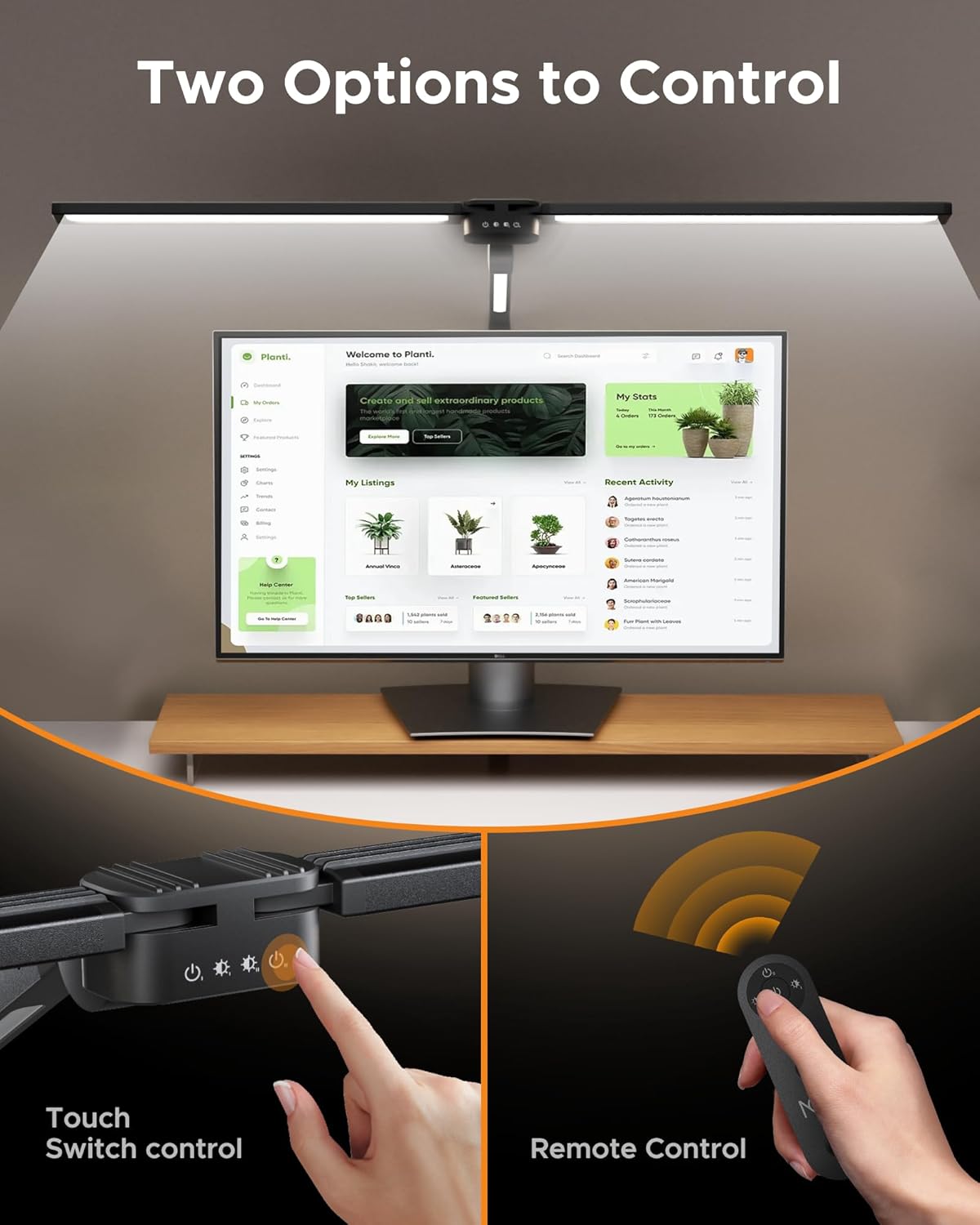
Image 4.4: Depiction of the two control methods: touch buttons on the lamp head and the wireless remote control, allowing for convenient adjustment of settings.
4.5. Lighting Modes and Timer
лamp offers 5 dimmable brightness levels (20%-100%) and 4 color temperatures (3000K-6000K), providing 20 lighting combinations. It also includes an automatic shut-off timer with options for 0.5, 1, or 2 hours, and a memory function that recalls the last used lighting mode.
5. Орнотуу жана орнотуу
Follow these steps to set up your NGTeco LED Desk Lamp ZMD01:
- Cl тиркеңизamp: Securely attach the desk clamp to the edge of your desk. Ensure the desk thickness is compatible with the clamp's maximum opening (typically up to 2.5 inches). Tighten the screw until the clamp бекем жана туруктуу болуп саналат.
- L киргизиңизamp Негизги: l негизин салыңызamp arm into the opening of the clampАнын толугу менен отурганын жана туруктуу экенин текшериңиз.
- Колду тууралоо: кылдаттык менен жөндөө лamp's swing arm and head to your desired position. The multiple joints allow for extensive customization.
- Туташуу кубаты: Кубат адаптерин l га туташтырыңызamp's power input port, then plug the adapter into a standard electrical outlet.

Image 5.1: Visual guide demonstrating correct and incorrect methods for installing the desk clamp, ensuring stability and proper fit on various desk edges.
6. Операция
The NGTeco LED Desk Lamp ZMD01 offers both touch control and remote control for ease of use.
6.1. Сенсордук башкаруу
The touch buttons are located on the lamp head. Functions typically include:
- Күйгүзүү/өчүрүү: Tap the power button to turn the lamp күйгүзүү же өчүрүү.
- Жарыктыкты жөндөө: Tap the brightness control button to cycle through 5 brightness levels.
- Түс температурасын жөндөө: Tap the color temperature button to cycle through 4 color temperature settings.
- Жардамчы Лamp Контролдоо: Separate controls may be available for the auxiliary lamp.
6.2. Алыстан башкаруу
The wireless remote control provides convenient access to all lamp functions from a distance.
- Кубат баскычы: l буратamp күйгүзүү же өчүрүү.
- Жарыктык +/-: Adjusts the brightness levels (5 levels).
- Түс температурасы баскычы: Cycles through 4 color temperature settings.
- Башкы Лamp Которуу: Controls the main top light bars.
- Жардамчы Лamp Которуу: Controls the side auxiliary lamp.
- Таймердин жөндөөлөрү: Activates the automatic shut-off timer (0.5h, 1h, 2h).

Image 6.1: An illustration detailing the functions of the remote control and the touch panel on the lamp, showing controls for main lamp switch, auxiliary lamp switch, main lamp brightness, and auxiliary lamp brightness, along with brightness levels and color temperature options.
7. Техникалык тейлөө
Proper maintenance ensures the longevity and performance of your desk lamp.
- Тазалоо: Тазалоодон мурун электр кубатынан сууруп алыңыз. Жумшак, кургак, мамыксыз чүпүрөктү колдонуп, аарчыңыз.amp's surface. Do not use liquid cleaners, sprays, or harsh chemicals.
- Сактагыч: Эгерде лamp узак убакыт бою, ал таза жана кургак болушу керек. Аны күн нурунан алыс салкын, кургак жерде сактаңыз.
- Лампаны алмаштыруу: LED lamp beads are integrated and not user-replaceable. Do not attempt to replace them.
8. Кыйынчылыктарды
If you encounter issues with your NGTeco LED Desk Lamp ZMD01, refer to the following table for common problems and solutions.
| Көйгөй | Мүмкүн себеп | Чечим |
|---|---|---|
| Lamp күйбөйт. | Электр байланышы жок. | Кубат адаптери розеткага бекем сайылганын текшериңизamp жана дубалдагы розетканы. Розетканын иштеп турганын текшериңиз. |
| Пульт иштебей жатат. | Remote battery is low or depleted. Obstruction between remote and lamp. | Пульттун батареясын алмаштырыңыз. Пульт менен l ортосунда эч кандай тоскоолдуктар жок экендигин текшериңизamp's sensor. Move closer to the lamp. |
| Жарык бүлбүлдөп же туруксуз. | Loose power connection. Power supply issue. | Ensure all power connections are secure. Try plugging the lamp башка розеткага. |
| Жарыктыгын/түс температурасын тууралоо мүмкүн эмес. | Incorrect button pressed. Remote control issue. | Refer to the operation section for correct button usage. If using the remote, check its battery. |
9. Техникалык шарттар
| Өзгөчөлүк | Спецификация |
|---|---|
| Модель номери | ZMD01 |
| Энергияны керектөө | 24 Вт |
| Жарык агымы | 1500 Lumens |
| Жарык булагы | 272 LED Lamp Мончоктор |
| Түс температурасы | 3000K-6000K (4 levels) |
| Жарыктык деңгээли | 5 деңгээл (20%-100%) |
| Түстөрдү көрсөтүү индекси (CRI) | >95 |
| Башкаруу ыкмасы | Touch Control, Wireless Remote Control |
| Таймер функциясы | 0.5 саат, 1 саат, 2 саат Автоматтык түрдө өчүрүү |
| Материал | Aluminum (Base), Acrylonitrile Butadiene Styrene (Shade) |
| Продукциянын өлчөмдөрү | 5.08 x 5.08 x 2.54 cm; 1.36 kg (approximate) |
| ASIN | B0DHGKF7VZ |
10. Кепилдик жана колдоо
NGTeco provides customer support and technical assistance for its products.
- Кепилдик: Please refer to the warranty card included with your product for specific warranty terms and conditions.
- Кардарларды колдоо: For any questions, technical support, or warranty claims, please contact NGTeco customer service. Contact information can typically be found on the product packaging or the official NGTeco webсайт.


