1. Киришүү
Сатып алганыңыз үчүн рахматasing the Greadio Portable CD Player Boombox, Model CD-X9B. This device offers multiple audio playback options including CD, Bluetooth, USB, AUX, and FM radio. This manual provides detailed instructions for setup, operation, maintenance, and troubleshooting to ensure optimal performance and longevity of your device. Please read this manual thoroughly before use and retain it for future reference.

Figure 1: Greadio CD-X9B Portable CD Player Boombox
2. Продукт бүтүп калдыview
2.1 Пакеттин мазмуну
- CD Player Boombox (Model CD-X9B) x 1
- AC кубат кабели x 1
- AUX кабели x 1
- Колдонуучунун колдонмосу x 1

Сүрөт 2: Камтылган аксессуарлар
2.2 Controls and Components
Familiarize yourself with the various buttons and ports on your boombox:

Figure 3: Front, Top, and Rear View Controls
- Power ON/OFF / Function Selector: Turns the unit on/off and switches between modes (CD, Bluetooth, USB, AUX, FM).
- Режим/Программа баскычы: Selects playback mode (e.g., repeat, random) or programs CD tracks.
- Previous Song / Fast Rewind Button: Skips to the previous track or fast rewinds during playback.
- Көлөм -: Үн деңгээлин төмөндөтөт.
- Наушник джек: Наушник үчүн 3.5 мм чыгаруу.
- USB уячасы: USB дискти ойнотуу үчүн.
- AUX IN уячасы: тышкы аудио түзмөктөр үчүн 3.5 мм киргизүү.
- Ойнот / Пауза / Скандоо: Plays or pauses playback; initiates FM radio scan.
- Stop/Sleep: Stops playback; sets the sleep timer.
- Next Song / Fast Forward Button: Skips to the next track or fast forwards during playback.
- Көлөм +: Үн деңгээлин жогорулатат.
- Баяндамачы: Интеграцияланган стерео динамиктер.
- LCD дисплей: Учурдагы режимди, тректин номерин, убакытты жана FM жыштыгын көрсөтөт.
- CD Disc Door: CD дисктерин салуу же алып салуу үчүн ачылат.
- туткасы: Көчмө көтөрүп жүрүү үчүн.
- FM антеннасы: FM радиосун кабыл алуу үчүн телескопиялык антенна.
- AC розетка: AC кубат шнурын туташтыруу үчүн.
- Батарея бөлүмү: Holds 6 C-size batteries (not included).
3. Орнотуу
3.1 Электр энергиясы
The Greadio CD-X9B boombox can be powered by either AC power or batteries.
- AC кубаттуулугу: Connect the provided AC power cord to the AC outlet on the back of the unit and then plug it into a standard wall outlet.
- Батарея кубаттуулугу: For portable use, open the battery compartment on the bottom of the unit and insert 6 C-size batteries (not included), ensuring correct polarity.

Figure 4: Dual Power Supply Options
3.2 Баштапкы күйгүзүү
басыңыз Күйгүзүү/ӨЧҮРҮҮ button to turn on the unit. The LCD display will illuminate.
4. Иштөө нускамалары
4.1 CD ойнотуу
Boombox CD, CD-R жана CD-RW форматтарын колдойт.
- басыңыз Power ON/OFF / Function Selector button repeatedly until 'CD' appears on the LCD display.
- ачыңыз CD Disc Door аны акырын көтөрүү менен.
- Place a CD onto the spindle with the label side facing up. Close the CD Disc Door.
- The unit will read the disc, and the total number of tracks will appear on the display.
- басыңыз Ойнотуу/Тыныгуу ойнотууну баштоо үчүн
- колдонуу Previous Song / Fast Rewind жана Кийинки ыр / Тез алдыга buttons to navigate tracks. Hold these buttons to fast rewind or fast forward.
- басыңыз Mode/Program button to cycle through playback modes: Normal, Single Cycle (repeat current track), Full Cycle (repeat all tracks), and Random Play.
- басыңыз Stop/Sleep ойнотууну токтотуу үчүн баскыч.
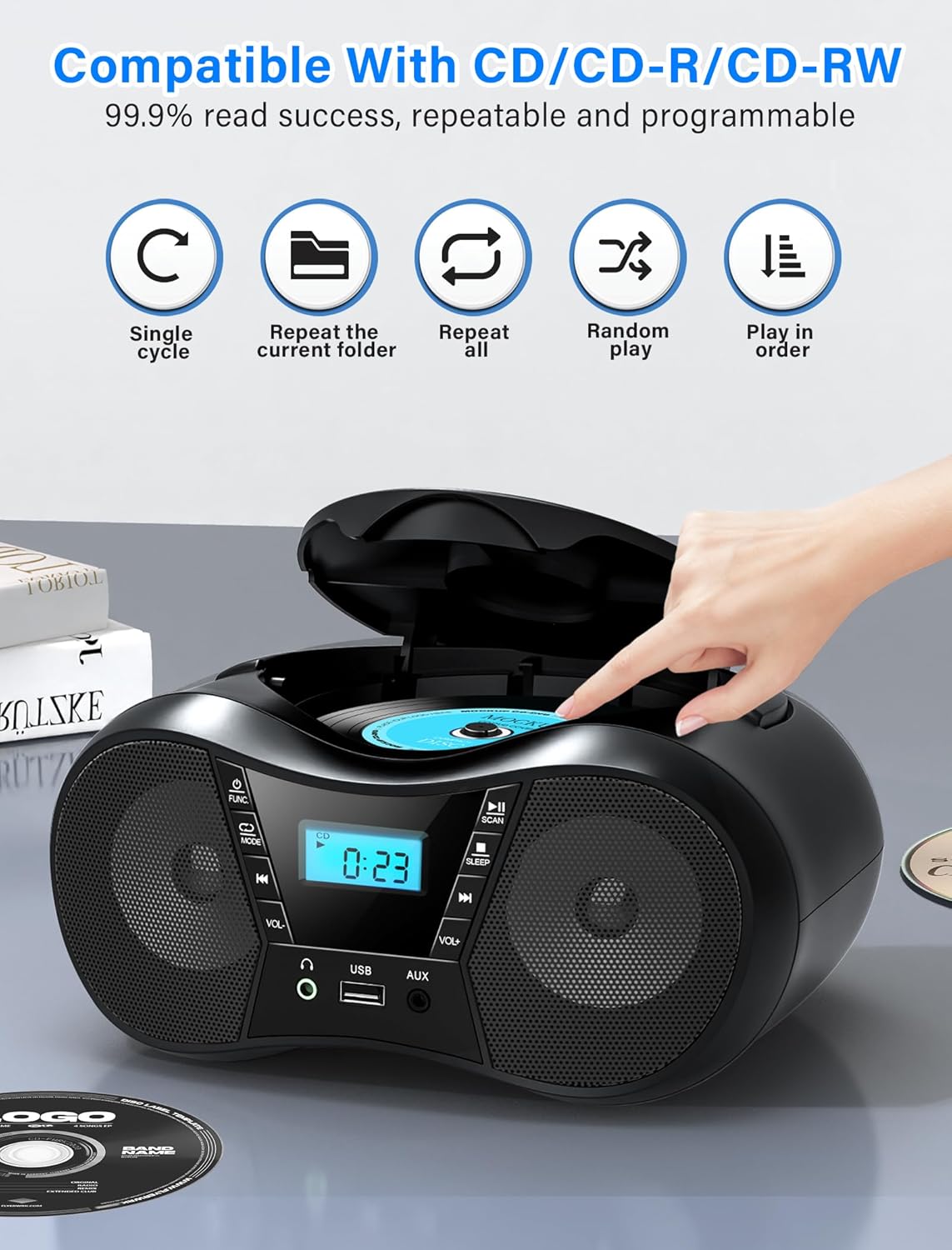
Figure 5: CD Playback Features
4.2 Bluetooth операциясы
Connect your Bluetooth-enabled device to the boombox.
- басыңыз Power ON/OFF / Function Selector button repeatedly until 'BT' appears on the LCD display. The unit will enter pairing mode, indicated by a flashing 'BT'.
- Enable Bluetooth on your external device (smartphone, tablet, computer) and search for available devices.
- Select 'CD-X9B' from the list of devices. Once connected, 'BT' will stop flashing and remain solid.
- Эми сиз туташкан түзмөгүңүздөн аудиону boombox аркылуу ойното аласыз.
- Bluetooth диапазону 26 фут (8 метр) чейин.
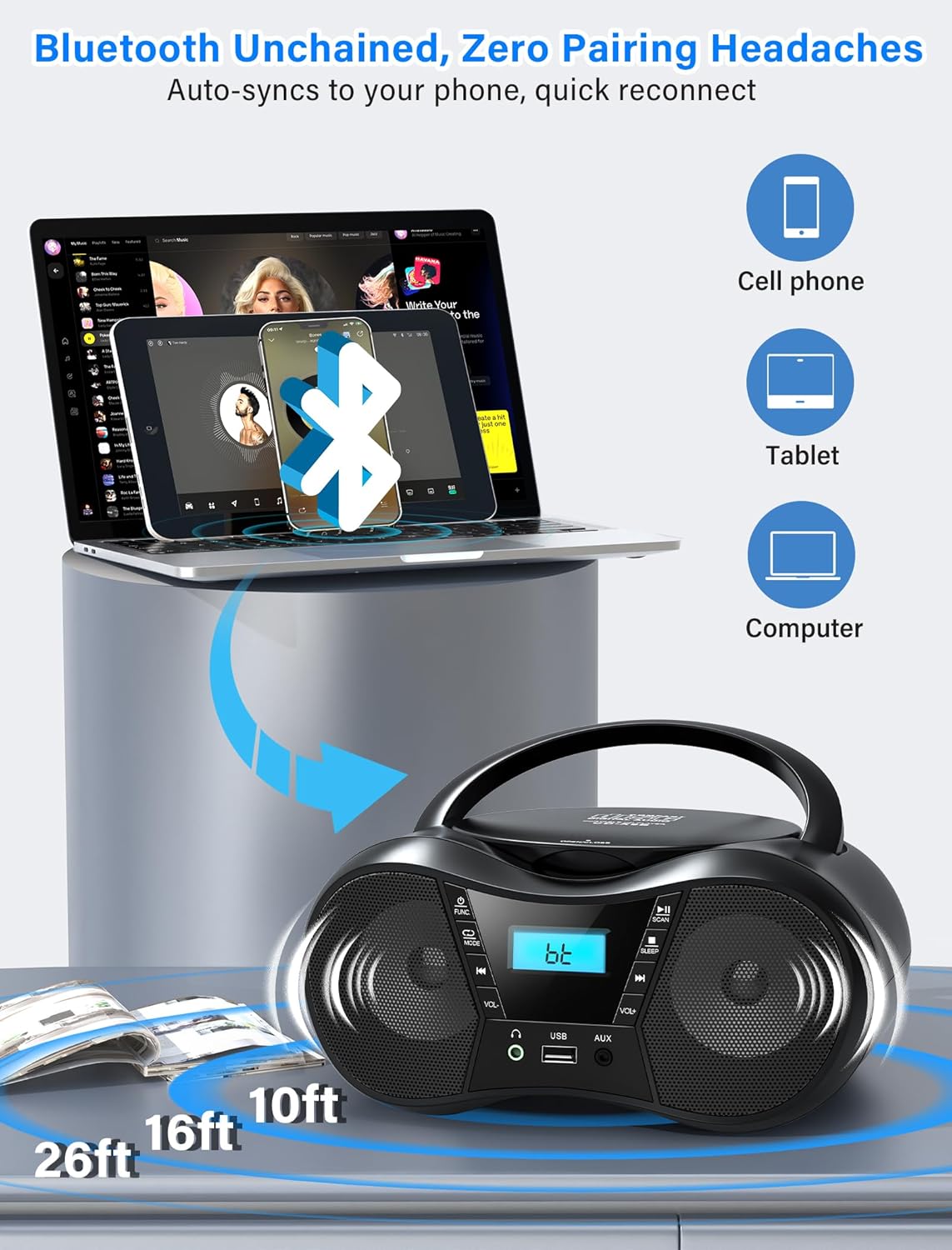
6-сүрөт: Bluetooth байланышы
4.3 FM радиосу
FM радиостанцияларын угуңуз.
- басыңыз Power ON/OFF / Function Selector button repeatedly until 'FM' appears on the LCD display.
- узартуу FM антеннасы fully and adjust its position for optimal reception.
- басыңыз Ойнот / Пауза / Скандоо жеткиликтүү FM станцияларын автоматтык түрдө сканерлөө жана сактоо үчүн баскыч.
- колдонуу Previous Song / Fast Rewind жана Кийинки ыр / Тез алдыга buttons to manually tune or select saved stations.
- The FM frequency range is 87.5 to 108 MHz.
4.4 USB ойнотуу
Аудио ойнотуу fileUSB дисктен.
- USB дискти салыңыз USB уячасы.
- басыңыз Power ON/OFF / Function Selector button repeatedly until 'USB' appears on the LCD display.
- The unit will automatically begin playing MP3 audio files USB дискинен.
- колдонуу Previous Song / Fast Rewind жана Кийинки ыр / Тез алдыга тректерди өтүү үчүн баскычтар.
4.5 AUX киргизүү
AUX кабелин колдонуп, тышкы аудио түзмөктөрдү туташтырыңыз.
- Берилген AUX кабелинин бир учун туташтырыңыз AUX IN уячасы бумбоксто.
- Экинчи учун тышкы түзмөгүңүздүн (мисалы, MP3 ойноткуч, компьютер) кулакчын уячасына же аудио чыгышына туташтырыңыз.
- басыңыз Power ON/OFF / Function Selector button repeatedly until 'AUX' appears on the LCD display.
- Play audio from your external device. The boombox will output the sound.

Figure 7: USB, AUX, and FM Modes
4.6 Үндү башкаруу
Үнүн колдонуп, үнүн жөндөңүз Көлөм + жана Көлөмү - баскычтар.
4.7 Гарнитураны колдонуу
For private listening, plug 3.5mm headphones into the Наушник уясы.
4.8 Уйку таймери
The sleep timer allows the unit to automatically turn off after a set period.
- Түзмөк күйүп турганда, баскычын басыңыз Stop/Sleep button repeatedly to cycle through sleep timer options (90, 80, 70, 60, 50, 40, 30, 20, 10 minutes, or OFF).
- The selected time will appear on the display. The unit will automatically power off after the set duration.

Figure 8: Sleep Timer Function
5. Техникалык тейлөө
5.1 Тазалоо
- Аппараттын сыртын жумшак, кургак чүпүрөк менен сүртүңүз. Абразивдүү тазалагычтарды же эриткичтерди колдонбоңуз.
- CD линзасы үчүн атайын CD линзасын тазалоочу дискти колдонуңуз.
5.2 CDге кам көрүү
- Оюн аянтында манжа издери калбашы үчүн, CDлерди четтеринен кармаңыз.
- Store CDs in their cases when not in use to prevent scratches.
- Clean dirty CDs with a soft, lint-free cloth, wiping from the center outwards.
5.3 Батареяны алмаштыруу
When using battery power, replace all 6 C-size batteries when the unit's performance degrades or the display dims. Ensure correct polarity when inserting new batteries.

9-сүрөт: Детальдуу Views of CD Compartment, Controls, and Battery Compartment
6. Кыйынчылыктарды
| Көйгөй | Мүмкүн себеп | Чечим |
|---|---|---|
| Түзмөк күйбөйт. | No AC power or depleted batteries. | Ensure AC cord is securely plugged in or replace batteries. |
| CD ойнобойт же өткөрүп жибербейт. | CD кир, чийилген же туура эмес салынган. | Clean the CD, check for damage, or reinsert correctly. |
| FM радиосун кабыл алуу начар. | Антенна узартылган эмес же тоскоолдук. | Fully extend and adjust the FM antenna. Reposition the unit near a window and away from electronic devices. |
| Bluetooth түзмөгү жупташа албайт. | Boombox not in pairing mode or device out of range. | Ensure boombox is in 'BT' mode and flashing. Move device closer to the boombox (within 26 feet). |
| USB аркылуу үн чыкпайт. | USB drive not inserted correctly or unsupported file формат. | USB диск толугу менен салынганын текшериңиз. Аудиону текшериңиз fileлар MP3 форматында. |
| No sound from AUX. | AUX cable not connected or external device volume too low. | Check AUX cable connection. Increase volume on both the boombox and the external device. |
7. Техникалык шарттар
- Модел: CD-X9B
- Бренд: Greadio
- Продукциянын өлчөмдөрү (L x W x Y): 9.01 x 8.23 x 4.29 дюйм (22.89 x 20.90 x 10.89 см)
- Элемент Салмагы: 2.1 фунт (0.95 кг)
- Байланыш технологиясы: Auxiliary, Bluetooth 5.1, USB
- Түсү: Кара
- Динамик түрү: Камтылган Стерео динамиктер
- CD шайкештиги: CD, CD-R, CD-RW
- FM Frequency колому: 87.5 - 108 МГц
- Электр камсыздоо: AC 120V~60Hz or 6 x C-size batteries (not included)
- Bluetooth диапазону: 26 фут (8 метр) чейин
8. Кепилдик жана колдоо
Greadio is committed to providing quality products and customer service.
- Hesitation Period: 15 күн
- Maintenance Period: 12 ай
- Кызмат колдоо: Өмүр бою
For any questions or support needs, please contact Greadio customer service. Our service offices are based in Seattle and Berlin to provide comprehensive customer experience.


