1. Коопсуздук маалыматы
ЭСКЕРТҮҮ! Not suitable for children under 3 years due to small parts which may present a choking hazard. Adult supervision is recommended during use.
- Батареяларды кичинекей балдар жетпеген жерде сактаңыз.
- Эски жана жаңы батарейкаларды аралаштырбаңыз.
- щелочтуу, стандарттуу (көмүртек-цинк) же кайра заряддалуучу (никель-кадмий) батареяларды аралаштырбаңыз.
- Эгерде продукт көпкө чейин колдонулбаса, батарейкаларды алып салыңыз.
2. Пакеттин мазмуну
Пакетте бардык буюмдар бар экенин текшериңиз:
- 1 x Lexibook Miraculous Electronic Secret Diary
- 1 х калем
- 1 х дептер
- 1 х Инструкция (бул документ)
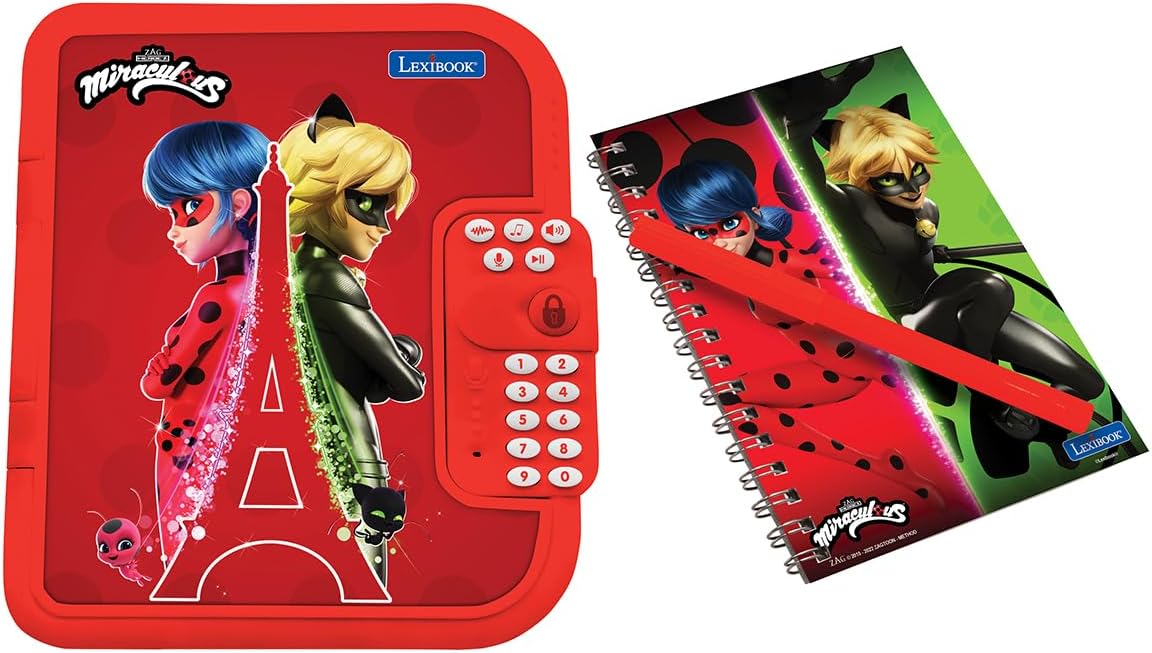
Figure 2.1: The electronic diary alongside its matching notebook and pen.
3. Баштоо
3.1 Батареяны орнотуу
- Күндөлүктүн арткы бетиндеги батарея бөлүмүн табыңыз.
- Бурагычты (кошулмада жок) колдонуп, батарея бөлүмүнүн капкагын ачыңыз.
- Туура полярдуулукту (+/-) камсыз кылып, 3 даана AA батарейкасын салыңыз.
- Батарея уясынын капкагын ордуна коюңуз жана аны бурама менен бекитиңиз.
3.2 Setting Your Personal Password
Upon first use or after a battery change, you will be prompted to set a 4-digit password.
- Press the power button to turn on the diary.
- Follow the voice prompts to enter your desired 4-digit code using the keypad.
- Confirm your password by re-entering it when prompted.
- Remember your password. If forgotten, refer to the Troubleshooting section.
3.3 Inserting the Notebook
The included notebook fits into a designated slot inside the diary.
- Open the diary by entering your password.
- Slide the notebook into the slot on the left side of the diary.
- Ensure it is securely seated for easy writing.
3.4 Customizing the Photo Frame
Personalize your diary by adding a photo to the integrated frame.
- Gently remove the clear plastic cover from the heart-shaped photo frame on the front of the diary.
- Insert a small photo of your choice.
- Replace the clear plastic cover to protect your photo.

Сүрөт 3.1: Алдыңкы view of the Lexibook Miraculous Electronic Secret Diary, showing the photo frame and keypad.
4. Operating Your Electronic Secret Diary
4.1 Күйгүзүү/өчүрүү
- Күйгүзүү үчүн: баскычын басыңыз Кубат баскычы (usually marked with an 'ON/OFF' symbol or a distinct button).
- To turn off: The diary will automatically power off after a period of inactivity to conserve battery life. You can also manually turn it off by pressing and holding the Кубат баскычы.
4.2 Unlocking the Diary
- басыңыз Кубат баскычы.
- Enter your 4-digit password using the numerical keypad.
- басыңыз Кулпулоо / Ачуу Баскычы (often a heart or lock symbol) to confirm.
- If the password is correct, the diary will open automatically with a sound effect.
4.3 Voice Recorder and Modifier
Record and modify your voice for fun and secret messages.
- басыңыз Жазуу баскычы (often a microphone symbol).
- Микрофонго так сүйлө.
- басыңыз Ойнотуу баскычы (often a play symbol) to listen to your recording.
- To modify your voice, press the Voice Modifier Button (check manual for specific symbol) and then the Ойнотуу баскычы. Cycle through different voice effects.
4.4 Melodies and Sound Effects
The diary includes 10 pre-programmed melodies and various sound effects.
- басыңыз Музыка баскычы (often a music note symbol) to play melodies. Press again to cycle through them.
- Sound effects will play automatically when the diary is opened or certain functions are activated.
- Үнүн колдонуп, үнүн жөндөңүз Үндү жогорулатуу/төмөн баскычтары (check manual for specific symbols).
4.5 Using the Secret Compartment
A hidden compartment is available for small treasures.
- Open the diary.
- Locate the small, discreet panel inside the diary (usually on the right side, beneath the keypad).
- Gently slide or lift the panel to reveal the secret storage space.
- Place small items inside and close the panel securely.

4.1-сүрөт: Интерьер view of the diary, showing the notebook slot and the discreet secret compartment.
4.6 Replacing the Notebook
When the included notebook is full, it can be easily replaced with a new one.
- Open the diary.
- Gently slide the full notebook out of its slot.
- Insert a new, similarly sized notebook into the slot.

Figure 4.2: A child engaging with the diary, demonstrating the writing function.
5. Features Overview
- Коопсуз кирүү: Features a 4-digit password for privacy.
- Интерактивдүү үндөр: Includes 10 captivating melodies and enchanting sound effects.
- Үн жаздыруу: Allows recording and playback of messages.
- Voice Modification: Transform recorded voices for added fun.
- Replaceable Notebook: Comes with a pen and notebook, which can be easily changed when full.
- Жашыруун бөлүм: A secret space for storing small personal items.
- Personalizable Photo Frame: Integrated frame to display a favorite picture.
6. Техникалык тейлөө
- Тазалоо: Wipe the diary with a soft, dry cloth. Do not use abrasive cleaners or immerse in water.
- Сактагыч: Store the diary in a cool, dry place away from direct sunlight and extreme temperatures.
- Батареяга кам көрүү: Эгерде күндөлүк көпкө чейин колдонулбаса, агып кетүүнүн алдын алуу үчүн батарейкаларды алып салыңыз.
7. Кыйынчылыктарды
- Diary does not turn on: Check if batteries are correctly installed and not depleted. Replace with new AA batteries if necessary.
- Сырсөздү унуттум: If you forget your password, locate the reset button (often a small pinhole) on the back of the diary. Use a paperclip to press and hold the reset button for a few seconds. This will reset the password to a default (e.g., '0000' or '1234') or prompt you to set a new one. Refer to the original packaging or a specific reset instruction if available.
- Үн маселелери: Ensure the volume is not set to minimum. Check battery levels.
- Diary does not open: Ensure the correct 4-digit password is entered and confirmed with the lock button.
8. Техникалык шарттар
| Атрибут | Деталь |
|---|---|
| Продукциянын өлчөмдөрү | 6.6 x 8 x 1.6 дюйм |
| Элемент Салмагы | 14.4 унция |
| Модель номери | SD50MI |
| Сунушталган Жаш | 6 жаш жана андан жогору |
| Батареялар талап кылынат | 3 AA батарейкалар (киргизилген эмес) |
| Өндүрүүчү | Лексикитеп |
9. Кепилдик жана колдоо
For warranty information or technical support, please refer to the contact details provided on the product packaging or visit the official Lexibook webсайт. Ар кандай кепилдик дооматтары үчүн сатып алганыңыздын далилин сактаңыз.


