Introduction
The ZGCINE DT-W126 D-Tap to NP-W126 Dummy Battery Cable provides a continuous power solution for compatible Fujifilm cameras. This cable allows you to power your camera from external D-Tap power sources, such as V-mount batteries or battery grips, enabling extended operation for various photography and videography applications.
Коопсуздук маалыматы
- Ensure the D-Tap power source provides a voltage within the specified input range (12-17V). Using an incompatible power source may damage the device or camera.
- Do not expose the cable or dummy battery to water, moisture, or extreme temperatures.
- Avoid bending or twisting the cable excessively, as this can damage internal wiring.
- Балдар жетпеген жерде сактаңыз.
- Disconnect the cable from both the camera and power source when not in use.
Жайгашуу
Follow these steps to connect the ZGCINE DT-W126 dummy battery cable to your camera and external power source:
- Insert the Dummy Battery: Open the battery compartment of your compatible Fujifilm camera. Insert the NP-W126 dummy battery end of the cable into the camera's battery slot, ensuring it is seated correctly.
- Кабель маршруту: Carefully close the camera's battery compartment door. Most cameras have a small opening or a flexible seal to allow the cable to exit without being pinched. Ensure the cable is not stressed or bent sharply.
- Connect to D-Tap Power Source: Connect the D-Tap connector end of the cable to a D-Tap output port on your external power source (e.g., V-mount battery, battery grip). Ensure the connection is secure. The power source should provide 12-17V.

Image: The ZGCINE DT-W126 dummy battery cable, illustrating the NP-W126 dummy battery end and the D-Tap connector end.
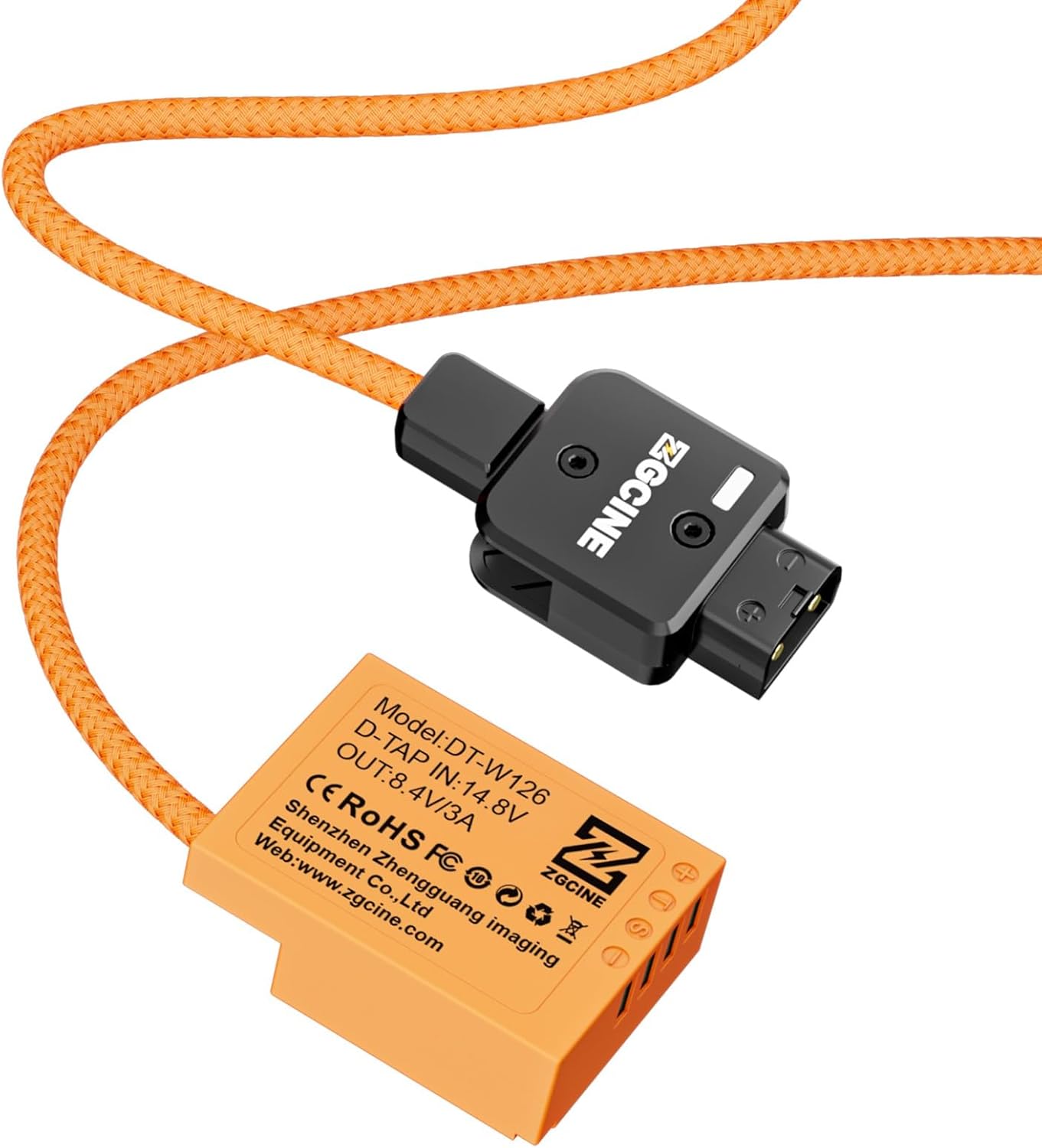
Сүрөт: деталдуу view of the D-Tap connector, ready to be plugged into a compatible power source.
Иштеп жатат
Once the cable is properly connected, your camera should power on as if a standard battery were inserted. The dummy battery provides a stable power supply for extended shooting sessions.
- Күйгүзүү: Turn on your camera using its standard power button. The camera should receive power directly from the external D-Tap source.
- Үзгүлтүксүз кубат: This setup is ideal for long-duration tasks such as time-lapse photography, studio shooting, wedding videography, sports event coverage, and online live streaming, where frequent battery changes are impractical.
- Мониторинг: While the camera's battery indicator may show a full charge or a specific icon indicating external power, always monitor your external D-Tap power source's remaining capacity to avoid unexpected power loss.
Compatible Camera Models:
- Fujifilm X-T50, X-T30, X-T1
- Fujifilm X-Pro1
- Fujifilm X-A1, X-E4, X-E1, X-M1
- Fujifilm FinePix HS50 EXR, HS30 EXR, HS33 EXR
- Fujifilm X100V
Техникалык тейлөө
- Тазалоо: Use a soft, dry cloth to clean the cable and connectors. Do not use liquid cleaners or solvents.
- Сактагыч: Store the cable in a cool, dry place away from direct sunlight and extreme temperatures. Avoid tangling the cable.
- Текшерүү: Regularly inspect the cable and connectors for any signs of wear, fraying, or damage. Discontinue use if any damage is observed.
Проблемаларды чечүү
| Көйгөй | Мүмкүн себеп | Чечим |
|---|---|---|
| Камера күйбөйт. | 1. Бошоң байланыш. 2. D-Tap power source off or depleted. 3. Incompatible D-Tap voltage. 4. Dummy battery not fully inserted. | 1. Бардык туташуулардын коопсуз экенин текшериңиз. 2. Verify the D-Tap power source is on and charged. 3. Check D-Tap output voltage (must be 12-17V). 4. Re-insert the dummy battery firmly into the camera. |
| Камерага үзгүлтүксүз кубат берүү. | 1. Loose cable connection. 2. Damaged cable or connector. | 1. Secure all connections. 2. Inspect the cable for damage. If damaged, discontinue use and replace. |
| Camera or cable feels warm. | Normal operation may generate some heat. Excessive heat could indicate an issue. | Ensure adequate ventilation around the camera and cable. If overheating persists or is extreme, disconnect immediately and contact support. The product has built-in safety protections. |
Техникалык шарттар

Image: The ZGCINE DT-W126 dummy battery, showing its model number and electrical specifications.
- Бренд: ZGCINE
- Модел: DT-W126
- Киргизүү туташтыргычы: D-тап
- Киргизүү көлөмүtage: 12-17V (D-Tap)
- Чыгуу туташтыргычы: NP-W126 Dummy Battery
- Output Voltage/Current: 8.4V/3A
- Кабель түрү: Braided D-Tap Cable
- Кабелдин узундугу: Болжол менен 60 см
- Өзгөчөлүктөр: Multiple Safety Protection (Overcurrent, Overvoltage, кыска туташуу)
- Шайкеш түзмөктөр: Fujifilm XT50, XT30, XT1, XPro1, XA1, XE4, X-E1, X-M1, FinePix HS50 EXR, HS30 EXR, HS33 EXR, X100V, and other cameras using NP-W126 type batteries.
- Элемент Салмагы: 2.08 унция (болжол менен 59 грамм)
- Пакеттин өлчөмдөрү: 5.5 x 2.75 x 1.18 дюйм (болжол менен 14 x 7 x 3 см)
Кепилдик жана колдоо
For product support or warranty inquiries, please refer to the following:
- Pre-Purchase Questions: If you have questions before purchasing, visit the seller's profile on Amazon and look for the "Have a question for HolaFoto?" section.
- Post-Purchase Support: For issues with an existing order, please check your Amazon Order Page and click "problem with this order." The seller aims to reply within 24 hours during working days.
- This product includes built-in protection systems against overcurrent, overvoltage, and short circuits, indicating a focus on product reliability.


