Greadio Кыска толкундуу радио колдонуучу колдонмо
Model: 8c0c898f-cb5d-4c0d-ae7c-39b2ea300e4d

Алдыңкы жана каптал view of the Greadio Shortwave Radio, highlighting its compact design and integrated 4000mAh battery.
Продукт бүттүview
The Greadio Shortwave Radio is a versatile and portable device designed for various listening and emergency needs. It combines traditional radio functionalities with modern features like Bluetooth connectivity and multiple charging options, making it an ideal companion for outdoor activities and emergency preparedness.
Негизги өзгөчөлүктөрү:
- Көп тилкелүү кабыл алуу: AM, FM, Shortwave (SW), and Weather Band (WB) for comprehensive coverage.
- Bluetooth 5.4: Шайкеш түзмөктөрдөн үзгүлтүксүз зымсыз аудио агымы.
- Бир нече энергия булактары: Rechargeable 4000mAh battery, Type-C charging, solar panel, and hand crank for reliable power in any situation.
- Өзгөчө кырдаалдардагы функциялар: Built-in SOS alarm and bright LED flashlight.
- Медиа ойнотуу: Supports USB flash drives and TF/SD cards (up to 256GB) for MP3/WAV audio playback.
- Жайлуулуктун өзгөчөлүктөрү: Sleep timer and 8 types of white noise for relaxation.
- Көчүрүү мүмкүнчүлүгү: Compact design with an integrated compass and wrist strap.

This image highlights the radio's compact size and lists its key features, including SOS, Bluetooth 5.4, TF/SD Card support, flashlight, sleep timer, white noise, earphone jack, USB driver, AM/FM/SW/WB radio, and 4000mAh rechargeable battery.

The Greadio radio is a versatile tool suitable for various outdoor activities, offering multiple functionalities in a compact form.
Башкаруу элементтери жана компоненттери
Familiarize yourself with the various buttons, switches, and ports on your Greadio Shortwave Radio for optimal use.
Бул видеодо толук маалымат берилетview of the Greadio radio's function buttons and overall appearance, including front, side, top, and back views.
Алдыңкы панели:
- LCD дисплей: Жыштыгын, режимин, батареянын деңгээлин жана башка көрсөткүчтөрдү көрсөтөт.
- Баяндамачы: 5W speaker for clear audio output.
- Кубат которгучу: Used to turn the radio on/off.
- Тунинг баскычы: Adjusts frequency and navigates menus.
Side Panel (Left):
- Функция которуу: Selects between RADIO, BT (Bluetooth), TF (TF Card), and USB modes.
- Кол бурчу: Used for manual power generation.
Жогорку панель:
- LED фонарик: жарыктандырууну камсыз кылат.
- Компас: Integrated compass for navigation, also functions as volume knob.
- Антенна: Extendable antenna for improved radio reception.
- Ак ызы-чуу баскычы: Activates white noise mode.
- БАНД баскычы: Cycles through radio bands (FM/AM/SW/WB).
- MODE баскычы: Used for sleep timer and lock mode.
- SOS Alert Switch: Өзгөчө кырдаал сигнализациясын иштетет.
- Previous Song Button (⏴): Skips to previous track/station.
- Pause/Play Button (⏵): Аудиону ойнотот же тындырат.
- Next Song Button (⏵): Skips to next track/station.
Арткы панель:
- Күн панели: Күн кубаттоо үчүн.
- Наушник уячасы (3.5 мм): Жеке угуу үчүн.
- Type-C заряддоо порту: Радиону заряддоо үчүн.
- TF/SD карта уячасы: Эстутум карталарынан аудио ойнотуу үчүн.
- USB порт: For playing audio from USB drives and for USB output charging.

Деталдаштырылган view of the radio's multi-function ports, including the 3.5mm earphone jack, USB Type-C charging port, TF/SD card slot, and USB port.
Жайгашуу
Баштапкы заряддоо
Before first use, it is recommended to fully charge the radio. The device offers three charging methods:
- Type-C заряддоо: Connect the provided Type-C charging cable to the radio's Type-C port and a compatible USB power adapter (not included). The charging indicator will turn red.
- Күн кубаты: Place the solar panel directly towards sunlight. The charging indicator lights will turn red when charging.
- Кол менен заряддоо: Turn the hand crank clockwise or anti-clockwise. The red charging indicator will light up. For initial use, crank for approximately three minutes to activate the battery.
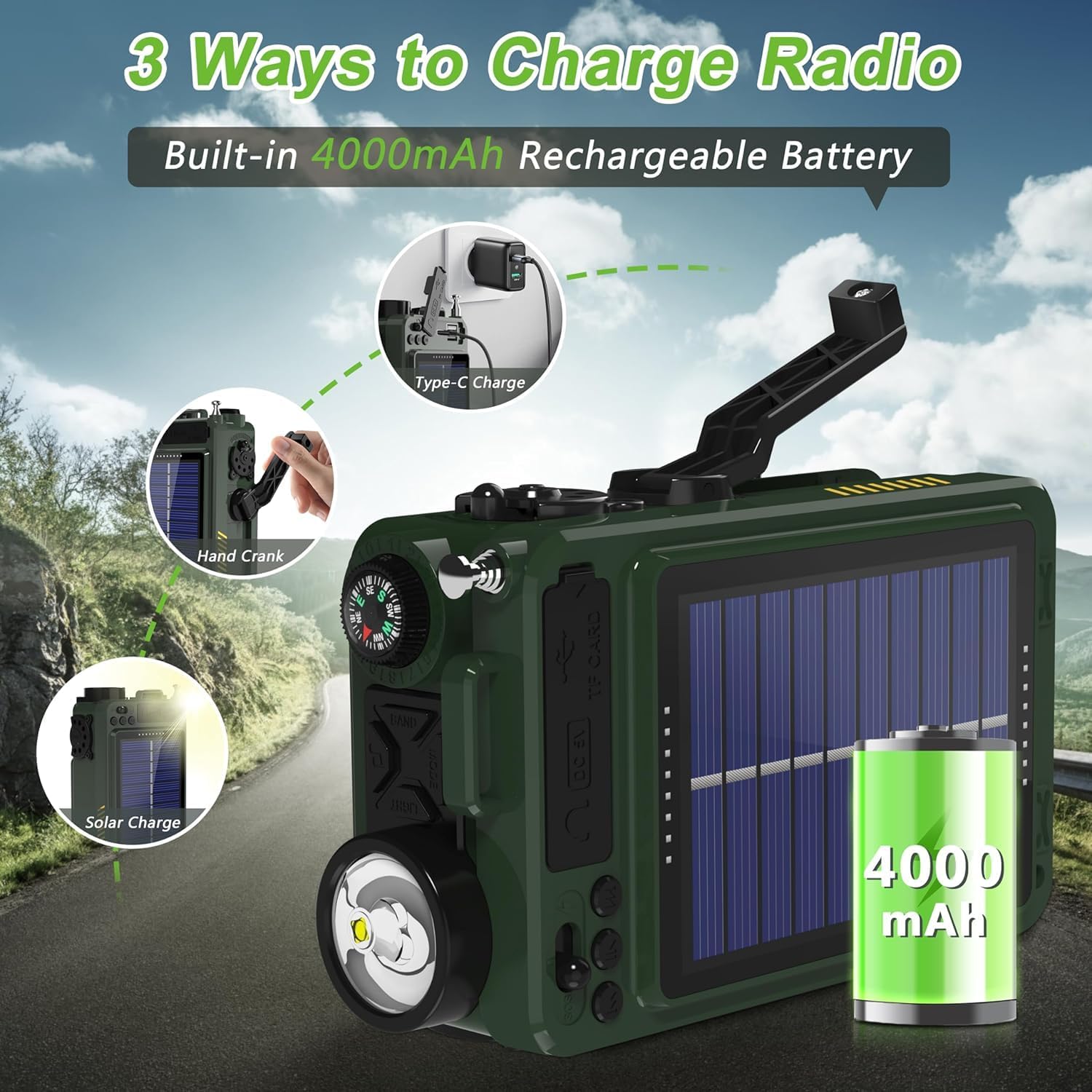
Illustration of the three charging methods for the radio: Type-C, hand crank, and solar panel.

Visual guide demonstrating the three power options: Type-C charging, hand cranking, and solar panel charging.
Күйгүзүү/өчүрүү
To turn the radio on or off, long press the power button (⏻) эки секундга.
This video demonstrates how to power on and off the Greadio portable radio, along with other basic functions like band switching, sleep timer, and lock mode.
Иштөө нускамалары
Band Switching
Press the "BAND" button to cycle through the available bands: FM, AM, SW (Shortwave), and WB (Weather Band).
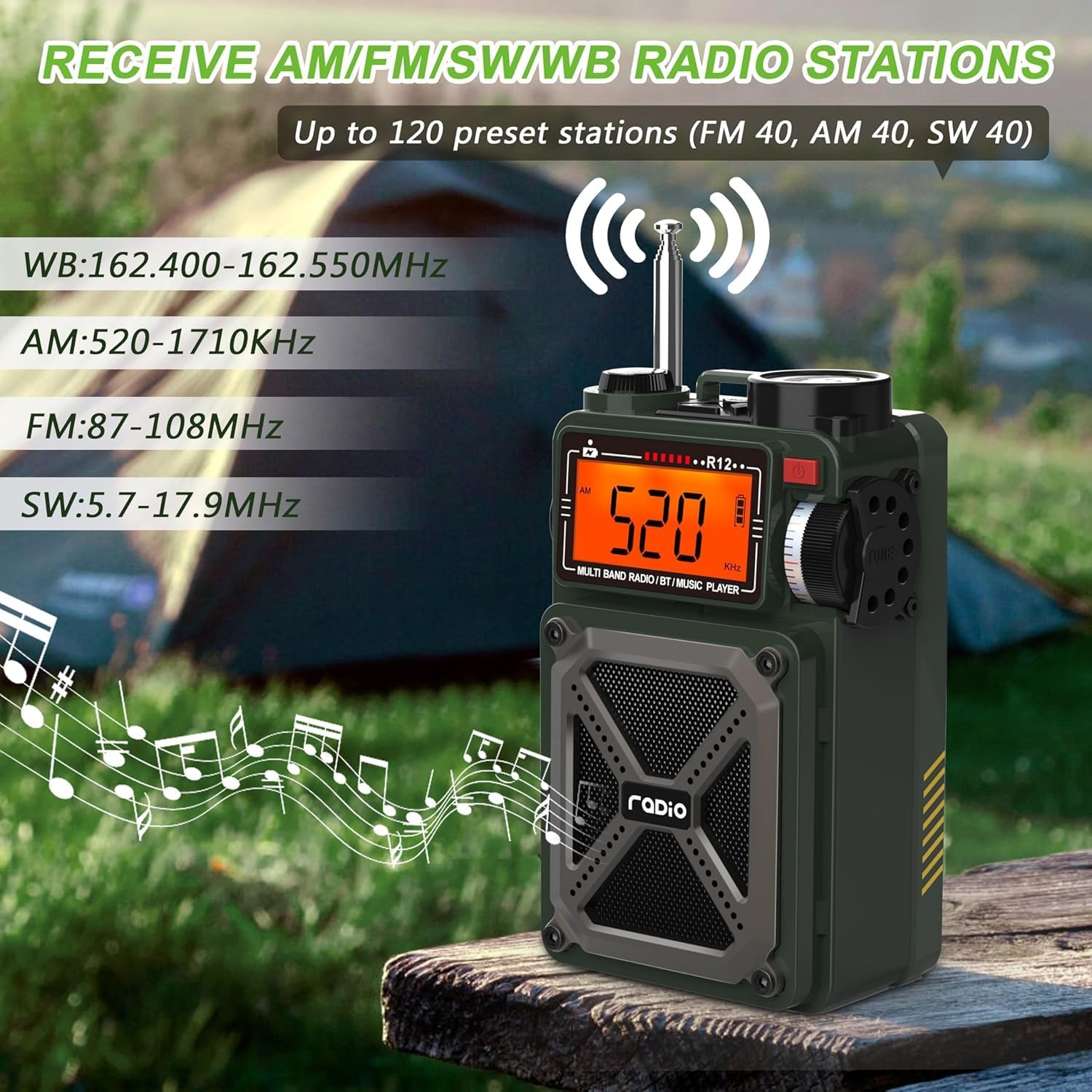
The radio's display showing different frequency bands (WB, AM, FM, SW) and its ability to receive up to 120 preset stations.

This image illustrates the radio's multi-band reception capabilities, including AM, FM, SW, and WB, with frequency ranges for each.
Тунинг жана алдын ала орнотуулар
- Автоматтык издөө: көпкө басыңыз ⏴⏵ button to automatically search for stations. The search will stop when a signal is received.
- Automatic Preset: көпкө басыңыз ⏴⏵ button to automatically search and store stations as presets.
- Manual Preset: Select your desired station using the tuning knob. Then, press the ⏵ button to select the storage location, and press ⏵ ырастоо үчүн дагы.
- Алдын ала коюлган жөндөөлөргө жетүү: баскычын кыска басыңыз ♫ button to call out the preset stations. Switch between presets using the ⏴⏵ баскычы.
Bluetooth режими
Adjust the "Function Switch" to "BT" to enter Bluetooth mode. Turn on Bluetooth on your device (e.g., smartphone) and connect to the device named "R12".

The radio displaying "bt" for Bluetooth mode, with a smartphone showing the Bluetooth connection process to "R12".

This image illustrates the Bluetooth 5.4 connectivity of the radio, showing a seamless connection to a smartphone and other devices within a 32ft range.
TF/SD Card & USB Playback
Enter the M-PLAY mode. Insert a Micro SD (TF) card or a USB flash drive into the respective slots. Short press the ⏵ button to play/pause the song, or use the ⏴⏵ buttons to switch to the previous or next song.

This image shows users enjoying music by plugging a USB drive into the radio, highlighting its support for MP3 and WAV formats up to 256GB.

A user reading while the radio plays music from a TF/SD card, emphasizing its support for MP3 and WAV formats up to 256GB.
White Noise & Sleep Timer
The radio features 8 types of white noise to help with relaxation and sleep. Long press the ♫ button to enter white noise mode. Press ⏴⏵ to choose from 1 to 8 natural sounds.
The sleep timer allows the radio to automatically shut off after 10-90 minutes. Short press the "MODE" button to set the sleep time.

The radio's display showing the sleep timer function and highlighting the 8 types of white noise available for a comfortable sleep environment.

A person sleeping peacefully with the radio emitting white noise, illustrating the feature designed to create a comfortable sleep environment.

A person resting in bed with the radio nearby, demonstrating the sleep timer function that allows automatic shut-off after a set period.
Өзгөчө кырдаалдардын функциялары
- SOS ойготкуч: Push the switch to the lightning symbol position (SOS) to activate the alert.
- LED фонарик: Press the "Light" button to turn on the flashlight.

A collage showing the radio's LED flashlight, SOS alarm, integrated compass, and USB output for charging other devices.

A person in distress with the radio's SOS alarm activated, indicating its use in emergency situations.

The radio's 1W flashlight illuminating a dark area, demonstrating its utility in low-light conditions.
Volume Adjustment & Compass
Adjust the volume by rotating the compass in the upper left corner of the radio. The integrated compass can be used for navigation.

A person using the radio's integrated compass for direction, with a note indicating that rotating the compass adjusts the volume.
USB чыгаруу функциясы (Power Bank)
The radio can charge external devices. Push the switch to the lightning symbol position. Plug your charging cable into the USB/Type-C output port and connect your phone or other device.

The radio's 4000mAh battery charging a smartphone, demonstrating its power bank capability.
Техникалык тейлөө
- Тазалоо: Радионун сыртын тазалоо үчүн жумшак, кургак чүпүрөктү колдонуңуз. Катуу химиялык заттарды же абразивдүү тазалоочу каражаттарды колдонуудан алыс болуңуз.
- Сактагыч: Радиону салкын, кургак жерде, түз күндүн нурунан жана экстремалдык температурадан алыс сактаңыз.
- Батареяга кам көрүү: To prolong battery life, avoid fully discharging the battery frequently. If storing for a long period, charge the battery to about 50% every few months.
- Суу каршылык: This device is not waterproof. Avoid exposure to rain, splashes, or submersion in water.
Проблемаларды чечүү
| Көйгөй | Мүмкүн себеп | Чечим |
|---|---|---|
| Радио күйбөйт. | Батарея аз же түгөнүп калган. | Charge the radio using Type-C, solar, or hand crank. Ensure initial hand cranking for 3 minutes if completely depleted. |
| Радио кабыл алуу начар. | Сигнал алсыз, антенна узартылган эмес, тоскоолдук бар. | Fully extend the antenna. Try moving to an open area away from electronic devices or large metal objects. |
| Bluetooth байланышы көйгөйлөрү. | Radio not in Bluetooth mode, device too far, interference. | Ensure the function switch is set to "BT". Keep your device within 26 feet (8 meters). Restart both devices. |
| USB/TF картасы ойнотулбай жатат. | Туура эмес режим, колдоого алынбайт file format, card/drive issue. | Ensure the radio is in M-PLAY mode. Verify audio files are MP3 or WAV format. Check if the card/drive is properly inserted or corrupted. |
| Volume knob is too sensitive. | Дизайн мүнөздөмөсү. | Adjust the volume slowly and carefully, especially at lower levels. |
Техникалык шарттар
- Продукциянын өлчөмдөрү: 3.19 x 2.05 x 5.2 дюйм
- Элемент Салмагы: 12.5 унция
- Модель номери: 8c0c898f-cb5d-4c0d-ae7c-39b2ea300e4d
- Батареялар: 2 литий-иондук батарейкалар талап кылынат (кошулган)
- Кубат булагы: Type-C Charging, Solar Powered, Hand Crank
- Байланыш технологиясы: Bluetooth 5.4
- Тюнер технологиясы: AM/FM/SW/WB
- Колдоого алынган радио топтору: 1-Band; AM/FM/SW/WB
- Өзгөчөлүктөр: Rechargeable, Compass, SOS Alarm, Portable, USB, SD Card Port, Flashlight
- Түсү: Жашыл
- Өндүрүүчү: Greadio
- Биринчи жеткиликтүү: 23-сентябрь, 2024-жыл
Кепилдик жана колдоо
Greadio provides a twelve-month manufacturer's warranty for this shortwave radio. For any technical assistance, troubleshooting, or warranty claims, please contact Greadio customer service. Refer to the contact information provided in your product packaging or visit the official Greadio webколдоо үчүн сайт.
Өндүрүүчү: Greadio
Камтылган компоненттер: Portable Shortwave Radio, Owner's Manual, Type-C Charging Cord, Exquisite Storage Bag, Wrist Strap.


