1. Киришүү
This manual provides essential instructions for the safe and efficient use of your DALI IO-8 Wireless/Wired Hi-Fi Headphones. Please read this manual thoroughly before using the product and retain it for future reference. The DALI IO-8 headphones are designed to deliver a high-fidelity audio experience with advanced features such as Active Noise Cancellation (ANC), Bluetooth AptX Adaptive connectivity, and a long-lasting battery.
2. Продукт бүтүп калдыview
Familiarize yourself with the components and controls of your DALI IO-8 headphones.

2.1-сүрөт: Фронт view of the DALI IO-8 headphones, showcasing the caramel and white color scheme and overall design.

2.2-сүрөт: Жогорудан төмөн view of the DALI IO-8 headphones, highlighting the earcups and visible control buttons on the side.
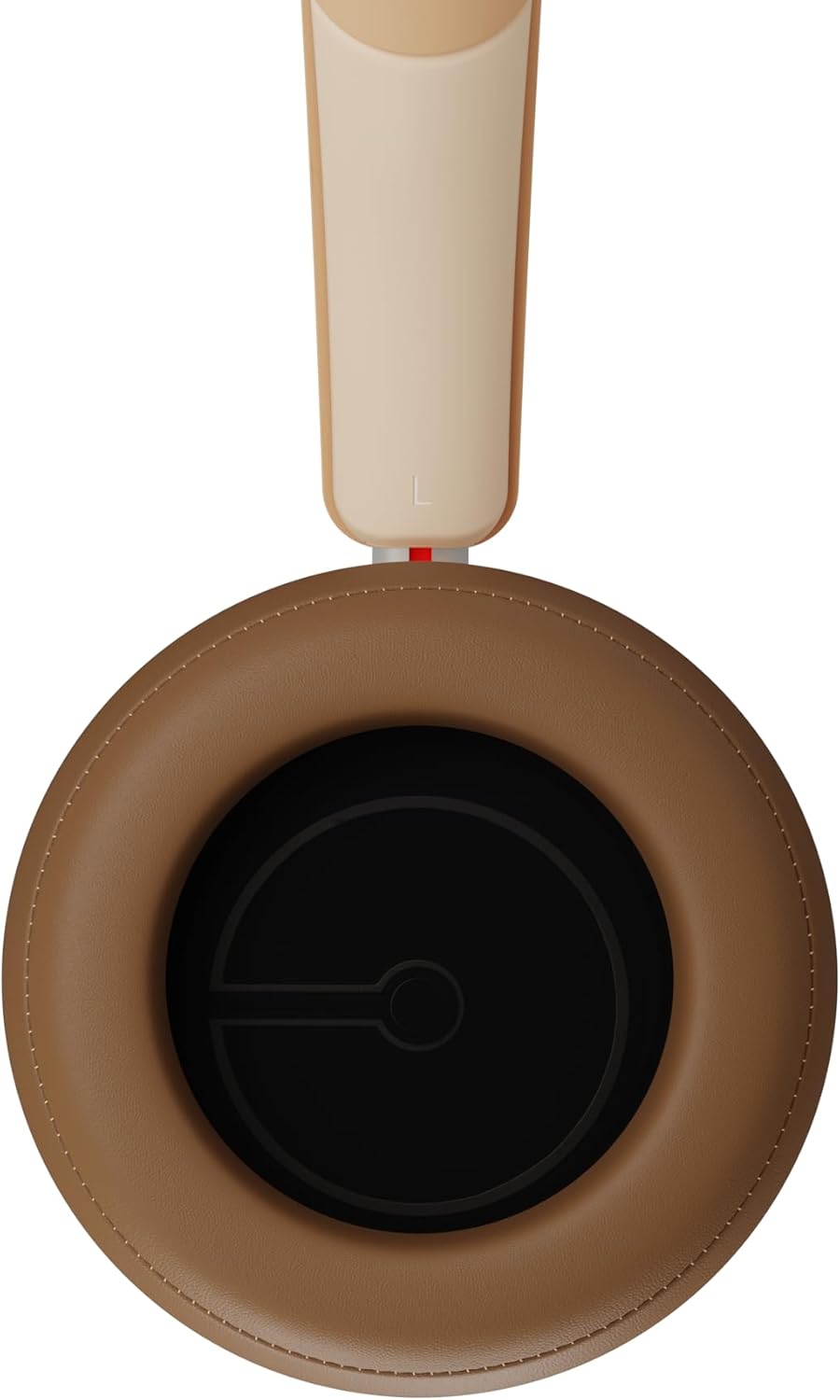
2.3-сүрөт: Интерьер view of a DALI IO-8 earcup, showing the soft padding and driver grille, designed for comfort and sound delivery.

2.4-сүрөт: Жакын план view of the DALI IO-8 earcup, showing the USB-C charging port and other control buttons.
2.1 Пакеттин мазмуну
- DALI IO-8 наушниктери
- USB-C заряддоо кабели
- 3.5 мм аудио кабель
- Travel Case (if included)
- Колдонуучунун Колдонмосу (бул документ)
2.2 Кулакчындын компоненттери

2.5-сүрөт: жарылды view illustrating the internal components of the DALI IO-8 headphones, including the 50mm driver, circuitry, and earcup structure.
- Headband (Adjustable)
- Earcups (Over-ear design with genuine leather)
- 50mm Driver (SMC Driver Technology)
- Control Buttons (Power, Volume, ANC, Multifunction)
- USB-C Port (Charging and Wired Audio)
- 3.5mm Audio Jack (Wired Audio)
- Microphones (for ANC and calls)
3. Орнотуу
3.1 Наушниктерди заряддоо
Before initial use, fully charge your DALI IO-8 headphones.
- Connect the supplied USB-C cable to the USB-C port on the headphone earcup.
- USB-C кабелинин экинчи учун шайкеш келген USB кубат булагына (мисалы, компьютердин USB портуна, USB дубал адаптерине) туташтырыңыз.
- The LED indicator will show charging status. A full charge provides up to 35 hours of playback with ANC enabled.
- Толук заряддалгандан кийин, кабелди ажыратыңыз.
3.2 Күйгүзүү/өчүрүү
- Күйгүзүү үчүн: Press and hold the Power button for approximately 2 seconds until the LED indicator illuminates.
- Өчүрүү үчүн: LED индикатору өчмөйүнчө кубат баскычын болжол менен 3 секунд басып туруңуз.
3.3 Bluetooth жупташтыруу
The DALI IO-8 supports Bluetooth AptX Adaptive for high-quality wireless audio.
- Наушниктердин өчүрүлгөнүн текшериңиз.
- Press and hold the Power button for approximately 5 seconds until the LED indicator flashes blue rapidly. This indicates pairing mode.
- On your audio device (smartphone, tablet, computer), enable Bluetooth and search for available devices.
- Select "DALI IO-8" from the list of found devices.
- Once paired, the LED indicator will glow solid blue or flash slowly.
- Кулакчындар күйгүзүлгөндө автоматтык түрдө акыркы жупташтырылган түзмөккө кайра туташуу аракетин көрүшөт.
3.4 Зымдуу туташуу
The DALI IO-8 can be used with a wired connection via the 3.5mm audio jack or USB-C.
- 3.5 мм аудио кабель: Connect one end of the supplied 3.5mm audio cable to the headphone's 3.5mm jack and the other end to your audio source's headphone output. The headphones can be used passively in this mode, or actively with ANC and amplification if powered on.
- USB-C аудио: Connect the supplied USB-C cable to the headphone's USB-C port and the other end to a compatible USB audio output on your computer or device. This mode allows for digital audio transmission and charging simultaneously.
4. Наушниктерди иштетүү
4.1 Активдүү ызы-чууну жокко чыгаруу (ANC)
The DALI IO-8 features three distinct ANC modes and wind noise suppression.
- Press the dedicated ANC button to cycle through the available modes:
- ANC күйүк: Maximum noise cancellation.
- Ачыктык режими: Allows ambient sounds to pass through for situational awareness.
- ANC өчүк: Active noise cancellation is disabled.
- Wind noise suppression is automatically engaged in ANC modes to reduce interference from wind.
4.2 Үн режимдери
Customize your listening experience with two sound profiles.
- Press the Sound Mode button (if available, or refer to specific button on device) to switch between:
- Hi-Fi режими: Delivers a balanced and neutral sound signature.
- Басс режими: Enhances low-frequency response for a more impactful bass.
4.3 Playback and Volume Control
Use the control buttons on the earcup for media playback and volume adjustments.
- Көлөмү: '+' баскычын басыңыз.
- Үнүн азайтуу: '-' баскычын басыңыз.
- Ойнотуу/тындыруу: Көп функциялуу баскычты бир жолу басыңыз.
- Кийинки трек: Double-press the Multifunction button.
- Мурунку трек: Triple-press the Multifunction button.
4.4 Чалууларды башкаруу
Manage phone calls when connected via Bluetooth.
- Чалууга жооп берүү/аяктоо: Көп функциялуу баскычты бир жолу басыңыз.
- Чакырууну четке кагуу: Көп функциялуу баскычты 2 секунд басып туруңуз.
- Үн Жардамчысын жандыруу: Press and hold the Multifunction button for 2 seconds (when not on a call).
5. Техникалык тейлөө
5.1 Тазалоо
- Наушниктерди жумшак, кургак, түксүз чүпүрөк менен сүртүңүз.
- Абразивдүү тазалагычтарды, эриткичтерди же химиялык спрейлерди колдонбоңуз.
- Кулакчындар үчүн бир аз d менен акырын сүртүңүзamp зарыл болсо, чүпүрөк, андан кийин дароо кургатуу.
- Ensure no moisture enters the ports or openings.
5.2 Сактоо
- When not in use, store the headphones in their protective travel case to prevent damage.
- Наушниктерди экстремалдык температурага, нымдуулукка же тике күн нуруна тийгизүүдөн сактаңыз.
6. Кыйынчылыктарды
| Көйгөй | Мүмкүн себеп | Чечим |
|---|---|---|
| Күч жок | Батарея түгөнүп калды. | Кулакчындарды берилген USB-C кабели аркылуу кубаттаңыз. |
| Bluetooth аркылуу жупташтыруу мүмкүн эмес | Кулакчындар жупташтыруу режиминде эмес; түзмөк Bluetooth өчүк; аппараттан өтө алыс. | Ensure headphones are in pairing mode (rapid blue LED flash). Turn on Bluetooth on your device. Move headphones closer to the device. Forget "DALI IO-8" on your device and re-pair. |
| Үн жок | Volume too low; incorrect input source; headphones not connected. | Increase volume on headphones and source device. Check Bluetooth connection or wired cable. Ensure the correct audio output is selected on your device. |
| АНК эффективдүү иштебей жатат | ANC mode off; poor earcup seal. | Ensure ANC is enabled. Adjust headphones for a proper seal around your ears. |
7. Техникалык шарттар
| Өзгөчөлүк | Деталь |
|---|---|
| Модель аты | DALI IO-8 |
| Бренд | ДАЛИ |
| Байланыш технологиясы | Зымдуу, Зымсыз (Bluetooth) |
| Зымсыз байланыш технологиясы | Bluetooth (AptX Adaptive) |
| Noise Cancellation | Active Noise Suppression (ANC) with Wind Noise Suppression |
| Кулак жайгаштыруу | Ашыкча кулак |
| Айдоочунун өлчөмү | 50mm (SMC Driver Technology) |
| Импеданс | 25 Ом |
| Наушник уясы | 3.5 мм |
| Батареянын иштөө мөөнөтү | 35 саатка чейин (ANC менен) |
| Материалдар | Genuine Leather (earcups) |
8. Коопсуздук маалыматы
Please observe the following safety guidelines to ensure safe operation and prevent damage to your headphones or injury to yourself.
- Do not expose the headphones to water, rain, or moisture.
- Ашыкча температурадан сактаныңыз.
- Do not disassemble, repair, or modify the headphones. This voids the warranty.
- Угуу жөндөмүнө зыян келтирбөө үчүн орточо үн деңгээлинде угуңуз.
- Балдар жетпеген жерде сактаңыз.
- Продукцияны жергиликтүү эрежелерге ылайык таштаңыз.
9. Кепилдик жана колдоо
DALI products are manufactured to high standards and are covered by a limited warranty. For specific warranty terms and conditions, please refer to the warranty card included with your product or visit the official DALI website. For technical support, troubleshooting assistance, or service inquiries, please contact your authorized DALI dealer or DALI customer support.

9.1-сүрөт: A person wearing the DALI IO-8 headphones, demonstrating their comfortable fit and use in a real-world environment.


