1. Продукт бүтүп калдыview
The NGTeco W3 is a state-of-the-art fingerprint time and attendance terminal equipped with a Wi-Fi module. It features NGTeco's advanced fingerprint reader, designed to perform reliably even under strong light and with wet or rough fingers. The integrated Wi-Fi functionality eliminates the need for costly network cabling installations, simplifying deployment. Users can easily configure the device, enroll employees, check attendance records, and download time reports using the dedicated NGTeco Time mobile application.

Сүрөт 1: Алдыңкы view of the NGTeco W3 WiFi Biometric Fingerprint Time Clock, showing the display, keypad, and fingerprint scanner.
2. Негизги өзгөчөлүктөрү
- Жогорку кубаттуулугу: Supports up to 100 fingerprints and stores 10,000 attendance records, suitable for small to medium-sized businesses with up to 50 employees.
- Fingerprint & Password Authentication: Equipped with a highly sensitive fingerprint sensor for fast and accurate authentication. Users can clock in using their fingerprint or a password.
- Ийкемдүү график: Accommodates various work schedules, including night shifts, without complex configurations. Allows unlimited punches per day.
- Automatic Calculation & Reporting: Automatically calculates total working hours. Attendance reports can be downloaded via USB or through the NGTeco Time mobile application.
- Free Mobile Application: Manage device settings, user enrollment, attendance records, and download reports conveniently using the free NGTeco Time app for iOS and Android.
- Advanced Fingerprint Technology: Reliable, fast, and secure access with a high-precision fingerprint module tested for over 1,000,000 touches. Features low False Acceptance Rate (FAR < 0.001%) and False Rejection Rate (FRR < 1%), and works effectively with both dry and wet fingers.
- Жөнөкөйлөштүрүлгөн башкаруу: Offers app-based management, flexible scheduling, night shift support, email and USB report export, automatic hour calculation, simple installation, and stable LAN connection.

Figure 2: Data storage capacity of the NGTeco W3, highlighting its ability to store 100 fingerprints and 10,000 records for up to 50 employees.

Figure 3: Illustration of the high-precision fingerprint module, emphasizing its reliability and performance with various finger conditions.
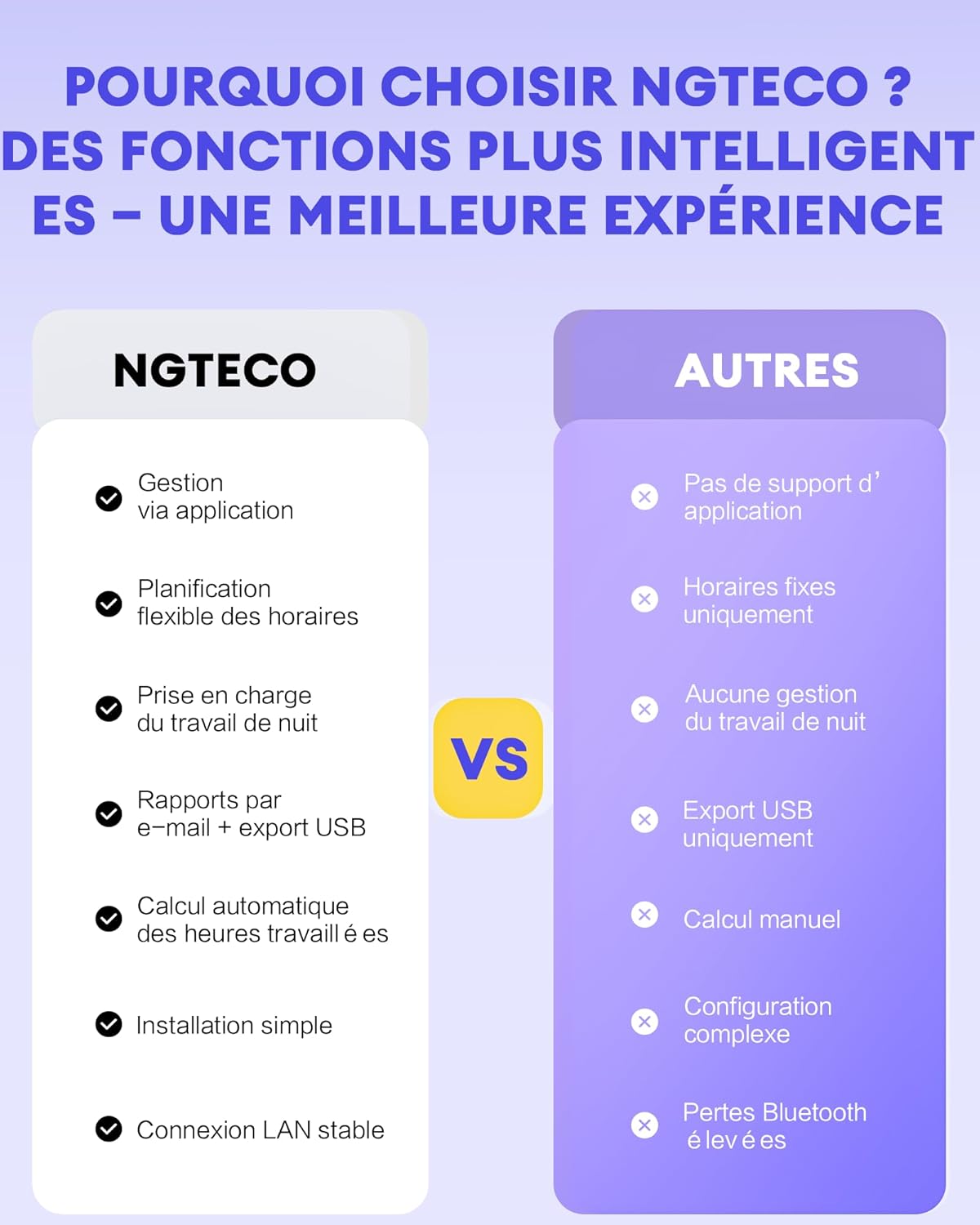
Figure 4: Feature comparison highlighting NGTeco's advantages such as app management, flexible scheduling, and automatic calculations.
3. Орнотуу колдонмосу
3.1. Пакеттин мазмуну
Баштоодон мурун, бардык компоненттер бар экенин текшериңиз:
- NGTeco W3 Time Clock Unit
- Кубаттуу адаптер
- Орнотуу комплекти (бурамалар, дубал анкерлери)
- USB кабели
- Колдонуучунун Колдонмосу (бул документ)
3.2. Орнотуу
- Жайгашкан жерди тандаңыз: Select a suitable location near a power outlet, away from direct sunlight or strong electromagnetic interference. Ensure it's easily accessible for employees.
- Монтаждоо: Use the provided mounting kit to securely attach the time clock to a wall at an appropriate height.
- Кубат туташуу: Connect the power adapter to the time clock and plug it into a power outlet. The device will power on automatically.
3.3. Initial Configuration & Wi-Fi Setup
- Download NGTeco Time App: Издөө "NGTeco Time" on the App Store (iOS) or Google Play Store (Android) and install the application on your smartphone.
- Wi-Fi'га туташуу:
- On the W3 device, navigate to the network settings.
- Select "Wi-Fi" and choose your 2.4GHz Wi-Fi network from the list. (Note: The device only supports 2.4GHz Wi-Fi networks.)
- Enter your Wi-Fi password using the keypad and confirm.
- Once connected, the Wi-Fi icon will appear on the device's display.
- Pair Device with App:
- Open the NGTeco Time app on your smartphone.
- Follow the in-app instructions to add a new device. The app will guide you through the pairing process, which typically involves scanning a QR code on the device or entering a device ID.
- Ensure your smartphone is connected to the same 2.4GHz Wi-Fi network as the W3 device during pairing.
4. Иштөө нускамалары
4.1. Employee Enrollment
Enroll employees via the NGTeco Time app for easy management.
- Open the NGTeco Time app and select your W3 device.
- Navigate to the "Users" or "Employees" section.
- Tap "Add User" and enter the employee's details (e.g., First Name, Last Name, ID).
- Enroll Fingerprint: Follow the app's prompts to enroll the employee's fingerprint. The employee will need to place their finger on the W3's scanner multiple times for accurate registration.
- Set Password (Optional): You can also set a numerical password for the employee as an alternative clock-in method.
- Save the user information. The data will sync with the W3 device.

Figure 5: Screenshots of the NGTeco Time app showing user addition and editing, and automatic punch detection.
4.2. Clocking In/Out
Employees can clock in or out using their registered fingerprint or password.
- Манжа изи: Place the registered finger firmly on the fingerprint scanner. The device will confirm the punch with a visual and/or audible cue.
- Купуя сөз: Enter the assigned ID number, then the password using the keypad. Press "M/OK" to confirm.
- Use the "IN" and "OUT" buttons on the device to specify the punch type if manual selection is required.
4.3. Managing Attendance Records
The NGTeco Time app provides comprehensive tools for managing attendance data.
- View Жазуулар: Access real-time attendance records through the app.
- Correct Punches: Easily correct errors or add missing punches directly within the app.
- Отчетторду түзүү: The app automatically calculates working hours. Generate and download attendance reports in various formats (e.g., Excel) for different pay periods (weekly, bi-weekly, semi-monthly, monthly). Reports can be exported via email or USB.

Figure 6: Screenshots illustrating how to correct or add punches within the NGTeco Time application.

7-сүрөт: Мисamples of timecard reports generated by the NGTeco Time app, compatible with weekly, bi-weekly, semi-monthly, and monthly pay cycles.
5. Техникалык тейлөө
- Cleaning the Fingerprint Sensor: Regularly clean the fingerprint sensor with a soft, dry, lint-free cloth to ensure optimal performance. Avoid using abrasive cleaners or liquids directly on the sensor.
- Программалык камсыздоо жаңыртуулары: Periodically check the NGTeco Time app for firmware updates for your W3 device. Keeping the firmware updated ensures the best performance and security.
- Маалыматтын камдык көчүрмөсү: Regularly download attendance reports and back up your data to an external storage device or cloud service to prevent data loss.
- Экологиялык шарттар: Ensure the device is operated within its specified temperature and humidity ranges to prolong its lifespan. Avoid extreme temperatures or high humidity.
6. Кыйынчылыктарды
| Көйгөй | Мүмкүн себеп | Чечим |
|---|---|---|
| Түзмөк күйбөй жатат. | Кубат адаптери туташкан эмес же бузук; розеткада көйгөй бар. | Check power connections. Try a different power outlet. Ensure the power adapter is working correctly. |
| Манжа изи таанылган жок. | Finger not placed correctly; sensor dirty; fingerprint not properly enrolled; wet/rough finger. | Ensure finger covers the sensor completely. Clean the sensor. Re-enroll the fingerprint if issues persist. Try with a dry finger. |
| Wi-Fi'га туташпай жатат. | Incorrect Wi-Fi password; device too far from router; 5GHz network selected; router issues. | Verify Wi-Fi password. Move device closer to router. Ensure you are connecting to a 2.4GHz network. Restart your Wi-Fi router. |
| App not syncing with device. | Device and phone on different networks; app permissions; internet connectivity issues. | Ensure both device and phone are on the same 2.4GHz Wi-Fi network. Check app permissions on your phone. Verify internet connection. Restart both app and device. |
| Attendance report errors. | Incorrect punch times; uncorrected missing punches. | Use the NGTeco Time app to review and correct any erroneous or missing punches. |
7. Техникалык шарттар
| Атрибут | Деталь |
|---|---|
| Модель номери | W3 |
| Өндүрүүчү | NGTeco |
| Өлчөмдөрү (L x W x Y) | 21 x 4 x 16 см |
| Салмагы | 700 грамм |
| Батарея түрү | 1 Литий-ион (кошулган) |
| Манжа изинин сыйымдуулугу | 100 |
| Record Capacity | 10,000 |
| Recommended Employees | 50ге чейин |
| Байланыш | Wi-Fi (2.4GHz only), USB |
| Камтылган компоненттер | Time clock unit, power cord, mounting kit, USB cable |
8. Кепилдик жана колдоо
For warranty information, technical support, or service inquiries, please refer to the warranty card included with your product or visit the official NGTeco website. You can also contact NGTeco customer support directly through the contact information provided on their webсайт.
Эскертүү: Кепилдиктин белгилүү бир шарттары жана эрежелери аймакка жана сатып алынган күнгө жараша өзгөрүшү мүмкүн. Кепилдик боюнча дооматтар үчүн сатып алганыңызды тастыктаган документти сактап коюңуз.
9. Шайкештик жөнүндө маалымат
This device complies with relevant industry standards. For detailed compliance statements and certifications, please refer to the product packaging or the official NGTeco webсайт.


