Introduction
This manual provides detailed instructions for the Fantech Tamago WHG01 Wireless Headphones. It covers product features, setup, operation, maintenance, and troubleshooting to ensure optimal performance and user experience. The WHG01 offers tri-mode connectivity (StrikeSpeed 2.4GHz wireless, Bluetooth 5.2, and wired Type-C) and a detachable microphone, designed for versatile audio needs.
Кутуда эмне бар
Төмөндө тизмеленген нерселердин баары пакетиңизге камтылганын текшериңиз:
- Fantech Tamago WHG01 Headset
- USB Receiver (for StrikeSpeed 2.4GHz wireless)
- C түрүндөгү кубаттоочу кабель
- Detachable Omnidirectional Microphone
- User Manual

Продукт бүттүview
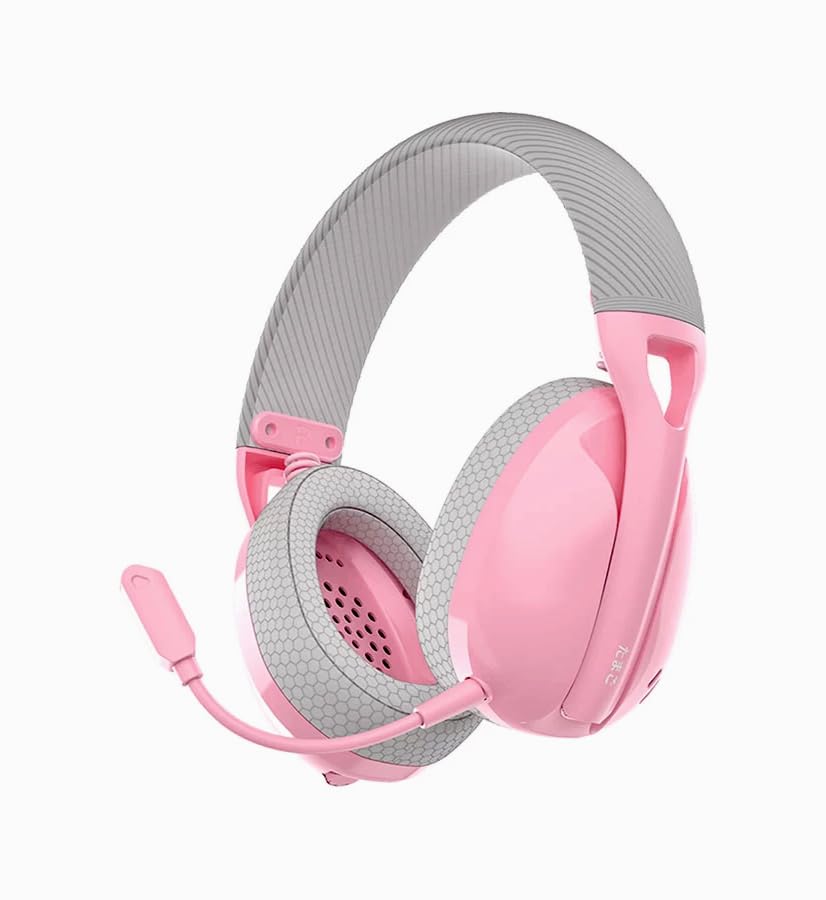
The Fantech Tamago WHG01 headphones are designed for comfort and versatility. Key features include:
- Өтө жеңил дизайн: Weighing approximately 168g (172g with microphone), ensuring comfort during extended use.
- Breathable Ear Cushions: Fabric-covered ear cushions for enhanced comfort and airflow.
- Алынуучу микрофон: A flexible omnidirectional microphone for clear communication, which can be removed when not needed.
- Кулактагы башкаруу элементтери: Integrated buttons for power, volume adjustment, and microphone mute.

Жайгашуу
1. Гарнитураны заряддоо
Before first use, fully charge the headset. A built-in 400mAh battery provides up to 18 hours of playtime.
- Берилген Type-C кубаттоочу кабелин гарнитуранын кубаттоо портуна туташтырыңыз.
- Кабелдин экинчи учун USB кубат булагына туташтырыңыз (мисалы, компьютердин USB порту, USB дубал адаптери).
- Гарнитурадагы LED индикатору кубаттоо абалын көрсөтөт (чоо-жайын LED индикатору бөлүмүн караңыз).
- Толук заряддалгандан кийин, заряддоо кабелин ажыратыңыз.

2. Микрофонду тиркөө
The WHG01 features a detachable omnidirectional microphone.
- Locate the microphone port on the left ear cup.
- Микрофондун туташтыргычын порт менен тегиздеп, ордуна чыкылдаган үн чыкканча акырын басыңыз.
- To detach, gently pull the microphone out of the port.
3. Байланыш режимдери
The headset supports three connectivity modes: StrikeSpeed 2.4GHz Wireless, Bluetooth 5.2, and Wired Type-C.

StrikeSpeed 2.4GHz Wireless Connection
Бул режим оюндар үчүн идеалдуу болгон аз кечигүү менен зымсыз аудиону камсыз кылат.
- Insert the USB receiver into an available USB port on your device (PC, laptop, compatible console).
- Power on the headset. The headset will automatically attempt to connect to the USB receiver.
- The LED indicator will confirm successful connection (refer to LED indicator section).
- Гарнитура системаңыздын жөндөөлөрүндө аудио чыгаруу/киргизүү түзмөгү катары тандалганын текшериңиз.
Bluetooth 5.2 туташуу
For wireless connection to Bluetooth-enabled devices like smartphones, tablets, or laptops.
- Гарнитурадагы кубаттуулук.
- Press and hold the mode button (or power button, depending on model specifics - refer to physical controls diagram if available) to enter Bluetooth pairing mode. The LED indicator will flash, indicating it's discoverable.
- On your device, go to Bluetooth settings and search for "Fantech Tamago WHG01" (or similar).
- Select the headset to pair. The LED indicator will change to a solid light upon successful pairing.
Зымдуу Type-C туташуу
For a direct, stable connection and simultaneous charging.
- Connect the Type-C charging cable to the headset's Type-C port.
- Connect the other end of the cable to a compatible Type-C port on your device.
- Гарнитура зымдуу аудио түзмөгү катары иштейт.
Иштөө нускамалары
Күйгүзүү/өчүрүү
- Күйгүзүү үчүн: Press and hold the Power button (usually located on the ear cup) for approximately 3 seconds until the LED indicator lights up.
- Өчүрүү үчүн: LED индикатору өчмөйүнчө кубат баскычын болжол менен 5 секунд басып туруңуз.
Үндү көзөмөлдөө
- Көлөмүн жогорулатуу: Press the '+' button on the ear cup.
- Көлөмдү азайтуу: Press the '-' button on the ear cup.
Микрофондун үнүн басуу/өчүрүү
- Микрофондун үнүн басуу: Press the dedicated microphone mute button (or a specific combination, refer to product diagram) on the ear cup.
- Микрофондун үнүн чыгаруу: Press the microphone mute button again.
Байланыш режимдерин которуу
The headset allows seamless switching between its tri-modes.
- Press the Mode button (if available) to cycle through StrikeSpeed Wireless, Bluetooth, and Wired modes.
- The LED indicator will change to reflect the active mode.
Техникалык тейлөө
Тазалоо
- Гарнитуранын бетин сүртүү үчүн жумшак, кургак чүпүрөктү колдонуңуз.
- Кулак жаздыкчалары үчүн, бир аз d менен акырын сүртүңүзamp чүпүрөк менен жууп, абада толугу менен кургатууга мүмкүнчүлүк бериңиз.
- Катуу химиялык заттарды, эриткичтерди же абразивдүү тазалагычтарды колдонбоңуз.
Сактагыч
- Гарнитураны күн нурунан жана экстремалдык температурадан алыс салкын, кургак жерде сактаңыз.
- Гарнитуранын үстүнө оор буюмдарды коюудан алыс болуңуз.
- Узак мөөнөткө сактасаңыз, анын иштөө мөөнөтүн узартуу үчүн батареянын жарым-жартылай заряддалганын (болжол менен 50%) текшериңиз.
Проблемаларды чечүү
- Кубат жок: Ensure the headset is charged. Connect the Type-C cable and check if the charging indicator lights up.
- No Sound (Wireless):
- Check if the headset is powered on and connected to the correct device.
- For StrikeSpeed, ensure the USB receiver is properly inserted and recognized by your device.
- For Bluetooth, ensure the headset is paired and selected as the audio output in your device's settings.
- Гарнитурадагы жана туташкан түзмөгүңүздүн үнүн жогорулатыңыз.
- Микрофон иштебейт:
- Микрофон гарнитурага бекем туташтырылганын текшериңиз.
- Check if the microphone is muted using the headset's controls.
- Verify that the correct microphone input device is selected in your computer's or device's sound settings.
- Туташуу маселелери:
- Гарнитураны да, туташкан түзмөктү да өчүрүп-күйгүзүп көрүңүз.
- For Bluetooth, try unpairing and re-pairing the headset.
- Ensure there are no significant obstructions or interference sources between the headset and the wireless receiver/device.
Техникалык шарттар
| Модел | WHG01 |
| Байланыш | Tri-mode (StrikeSpeed 2.4GHz Wireless, Bluetooth 5.2, Wired Type-C) |
| Салмагы | 168g (172g with microphone) |
| Динамик айдоочусу | 40мм |
| Спикер сезгичтиги | 106дБ±3дБ |
| Микрофон түрү | Detachable Omnidirectional |
| Микрофондун өлчөмү | ø6мм*2.7мм |
| Микрофондун сезгичтиги | -42±3 дБ |
| Батарея сыйымдуулугу | 400mAh |
| Оюн убактысы | 18 саатка чейин |
| Заряддоо порту | USB Type-C |
| Core Construction | ABS |
| Шайкеш түзмөктөр | PC, Laptop, Mobile devices |
Кепилдик жана колдоо
Кепилдик жөнүндө маалымат жана техникалык колдоо алуу үчүн, расмий Fantech компаниясына кайрылыңыз webсайтына кириңиз же жергиликтүү дистрибьюторуңузга кайрылыңыз. Кепилдик талаптары үчүн сатып алганыңызды тастыктаган документти сактап коюңуз.
Өндүрүүчү: Fantech
Импорттоочу/Пакер: MRJ Electronics Ahmedabad Gujarat. electronicsmrj@gmail.com. Contact: 9023265213
Биринчи жеткиликтүү болгон күнү: 25-сентябрь 2024-жыл


