1. Киришүү
This manual provides detailed instructions for the installation, operation, and maintenance of your ieGeek 5MP Floodlight Camera ZY-E2. This device is designed to enhance outdoor home security with its advanced features.
Негизги өзгөчөлүктөр төмөнкүлөрдү камтыйт:
- 5MP High-Resolution Video: Так жана деталдуу фоону тартатtage.
- Кош тилкелүү Wi-Fi: Supports both 2.4GHz and 5GHz networks for stable connectivity.
- Акылдуу кыймылды аныктоо: Features a 150° PIR sensor with customizable detection zones and sensitivity.
- Integrated Floodlights and Siren: Provides 2600 lumens of illumination and a 110dB siren for deterrence.
- Түнкү көрүнүш: Offers enhanced visibility in low-light conditions up to 49 feet (15 meters).
- Эки тараптуу аудио: Камера аркылуу реалдуу убакыт байланышын иштетет.
- 24/7 жаздыруу: Continuous recording capability with local and cloud storage options.
- Alexa шайкештиги: Integrates with Amazon Alexa for voice control and live view.
- IP65 аба ырайы: Ар кандай аба ырайынын шарттарында сыртта колдонуу үчүн иштелип чыккан.
2. Пакеттин мазмуну
Төмөндө тизмеленген нерселердин баары пакетиңизге камтылганын текшериңиз:
- 1 × ieGeek Floodlight Camera
- 1 × Плитаны орнотуу
- 1 × Installation Hook
- 1 × Central Screw
- 1 × Central Screw Cap
- 3 × Plate Screws
- 3 × Wire Nuts
- 1 × Instruction Manual

Image: All components included in the ieGeek Floodlight Camera package.
3. Продукт бүтүп калдыview
The ieGeek Floodlight Camera ZY-E2 combines a high-resolution camera with powerful floodlights and a motion sensor, all housed in a durable, weatherproof casing. The camera unit is centrally located, flanked by two adjustable LED floodlights. A PIR motion sensor is integrated below the camera lens.

Сүрөт: алдыңкы view of the ieGeek Floodlight Camera ZY-E2.
The device is designed for hard-wired installation to an existing junction box, ensuring continuous power and reliable operation.
4. Орнотуу жана орнотуу
4.1 Орнотуудан мурун
- Биринчи коопсуздук: Электр орнотуу иштерин баштоодон мурун ар дайым автоматтык өчүргүчтөн электр кубатын өчүрүңүз.
- Керектүү куралдар: You will need a screwdriver, wire strippers, and a drill (if mounting holes are not pre-existing).
- Колдонмону жүктөө: Download the "ieGeek Cam" app from the App Store (iOS) or Google Play Store (Android).
4.2 Физикалык орнотуу
- Зымдарды даярдоо: Ensure power is off. Connect the camera's wires to your existing junction box wiring (Live, Neutral, Ground) using the provided wire nuts.
- Монтаждоо: Secure the mounting plate to the junction box. Attach the camera unit to the mounting plate using the central screw and cap.
- Бурчту тууралоо: The floodlights and camera can be rotated independently to achieve the desired coverage area.

Image: Installation steps for the ieGeek Floodlight Camera.

Image: Wall mounting and ceiling mounting configurations.

Image: Adjusting the camera and floodlight angles.
4.3 Колдонмонун конфигурациясы
- Күйгүзүү: Restore power at the circuit breaker. The camera will enter setup mode.
- Колдонмону ачуу: Launch the "ieGeek Cam" app and follow the on-screen instructions to add a new device.
- Wi-Fi'га туташуу: The camera supports both 2.4GHz and 5GHz Wi-Fi networks. Select your network and enter the password. Bluetooth pairing is also available for faster initial setup.
- Толук орнотуу: Follow any remaining prompts to finalize the camera configuration.

Image: App interface for quick device discovery and setup.

Image: Dual-band Wi-Fi connectivity (2.4GHz and 5GHz).

Image: One-touch Bluetooth pairing for faster setup.
5. Операция
5.1 Live View жана Жаздыруу
Access the live video feed through the ieGeek Cam app. You can view реалдуу убакыт footage, take screenshots, and manually initiate video recordings directly from the app interface.

Image: 5MP UHD video quality from the camera.

Image: ieGeek Cam app live view интерфейс.
5.2 Кыймылды аныктоо жана эскертүүлөр
The camera features a 150° PIR motion sensor. When motion is detected, the floodlights can activate, and an optional 110dB siren can sound. Real-time notifications are sent to your smartphone. You can customize detection zones and adjust sensitivity levels (1-10) within the app to minimize false alerts.

Image: Activated lights and siren alarm upon motion detection.

Image: 150° PIR sensor and 130° view angle with night vision range.

Image: Customizable motion detection zones and sensitivity levels.

Image: Real-time alert notification on a smartphone.
5.3 Эки тараптуу аудио
Utilize the built-in microphone and speaker for two-way communication. This allows you to speak with visitors, delivery personnel, or deter unwanted individuals directly through the app.

Image: Two-way audio communication in use.

Image: Interacting with a delivery person using two-way audio.
5.4 Прожекторду башкаруу
The floodlights provide 2600 lumens of brightness. You can adjust the brightness levels (1-7) and set custom schedules for the lights to turn on and off via the ieGeek Cam app.

Image: Adjustable 2600 lumens floodlight brightness.

Image: Scheduling floodlight operation via the app.
5.5 Сактоо параметрлери
Video recordings can be stored in two ways:
- Micro SD картасы: Жергиликтүү сактагыч үчүн атайын уячага micro SD картаны (128 ГБ чейин, кошулган эмес) салыңыз.
- Булуттагы сактагыч: A free cloud service provides 6 seconds of recording and 7 days of loop coverage. Premium cloud storage plans are available as an optional subscription for extended features.

Image: 24/7 recording capability.

Image: Local Micro SD card and Cloud storage options.
5.6 Alexa интеграциясы
The ieGeek Floodlight Camera is compatible with Amazon Alexa. Link your camera to your Alexa account to enable voice commands for viewing live feeds on compatible Alexa-enabled devices.

Image: Two-way audio and Alexa compatibility.
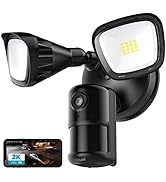
Image: Using Alexa to view камера берүү.
6. Техникалык тейлөө
- Тазалоо: Regularly clean the camera lens and floodlight covers with a soft, damp Оптималдуу иштөөнү жана так сүрөт сапатын камсыз кылуу үчүн кездемени колдонуңуз. Абразивдүү тазалоочу каражаттардан алыс болуңуз.
- Программалык камсыздоонун жаңыртуулары: Check the ieGeek Cam app periodically for available firmware updates. Keeping your camera's firmware up-to-date ensures access to the latest features and security enhancements.
- Аба ырайын коргоо: The camera has an IP65 waterproof rating, making it suitable for most weather conditions. Ensure all connections are sealed properly during installation to maintain water resistance.

Image: IP65 waterproof rating for outdoor durability.
7. Кыйынчылыктарды
- Кубат жок: Ensure the circuit breaker is on and all wiring connections are secure.
- Wi-Fi туташуу маселелери: Verify your Wi-Fi password is correct. Ensure the camera is within range of your router. Try restarting your router and the camera. The camera supports both 2.4GHz and 5GHz networks.
- Видеонун сапаты начар: Check for obstructions on the lens. Ensure the camera is clean. Verify your internet connection speed.
- Кыймылды аныктоо иштебей жатат: Check motion detection settings in the app, including sensitivity and detection zones. Ensure the PIR sensor is not obstructed.
- Колдонмо жооп бербей жатат: Колдонмону жаап, кайра ачыңыз. Эгер маселе чечилбесе, колдонмону кайра орнотуңуз.
Көбүрөөк жардам алуу үчүн, колдоо бөлүмүнө кайрылыңыз же кардарларды тейлөө кызматына кайрылыңыз.
8. Техникалык шарттар
| Өзгөчөлүк | Спецификация |
|---|---|
| Модель номери | ZY-E2 |
| Видео тартуунун резолюциясы | 5MP |
| Байланыш | Эки диапазондуу Wi-Fi (2.4 ГГц/5 ГГц) |
| Motion Sensor | 150° PIR |
| Прожектордун жарыктыгы | 2600 Lumens (Adjustable) |
| Сирена | 110дБ |
| Түнкү көрүнүш | Color Night Vision (up to 49 feet / 15 meters) |
| Аудио | Эки тараптуу аудио |
| Сактагыч параметрлери | Микро SD карта (128 ГБ чейин), Cloud Storage |
| Аба ырайына каршылык | IP65 суу өткөрбөйт |
| Продукциянын өлчөмдөрү | 11.02 x 7.09 x 5.91 дюйм |
| Элемент Салмагы | 2.88 фунт |
9. Кепилдик жана колдоо
The ieGeek Floodlight Camera ZY-E2 comes with a 2 жылдык кепилдик сатып алынган күндөн тартып. Бул кепилдик өндүрүштүк кемчиликтерди камтыйт жана кадимки колдонуу шарттарында ишенимдүү иштөөнү камсыз кылат.
For technical support, warranty claims, or any questions regarding your product, please refer to the contact information provided in your Quick Start Guide or visit the official ieGeek support website. Please have your model number (ZY-E2) and purchase details ready when contacting support.


