1. Киришүү
Thank you for choosing the Phomemo A30 Mini Bluetooth Portable Rechargeable Label Maker. This manual provides essential information for the safe and efficient operation of your device. Please read it thoroughly before use and keep it for future reference.

Figure 1: Phomemo A30 Label Maker and accessories. This image shows the compact white label maker, several rolls of colorful label tape, and a clear label cartridge, illustrating the product and its consumables.
2. Коопсуздук маалыматы
- Аппаратты демонтаждабаңыз, оңдоого же өзгөртүүгө болбойт.
- Keep the device away from water, high temperatures, and direct sunlight.
- Use only Phomemo-approved label tapes and accessories.
- Заряддоо учурунда туура желдетүүнү камсыз кылыңыз.
- Балдар жетпеген жерде сактаңыз.
3. Пакеттин мазмуну
Пакетиңизде бардык буюмдар бар экенин текшериңиз:
- Phomemo A30 Label Maker
- USB заряддоо кабели
- Колдонуучунун Колдонмосу (бул документ)
- One roll of label tape (pre-installed or separate)
4. Продукт бүтүп калдыview
Familiarize yourself with the components of your A30 Label Maker:

Figure 2: Key features of the A30 Label Maker. This image highlights the 1200mAh rechargeable battery, 203DPI high-definition printing, and the push-down cutter mechanism for easy label separation.
- Кубат баскычы: On/Off and status indicator.
- Энбелгиден чыгуу уячасы: Басылган этикеткалар пайда болгон жерде.
- Кесүүчү: For cleanly cutting labels after printing.
- USB кубаттоо порту: Ички батареяны кайра заряддоо үчүн.
- Label Compartment: Houses the label roll.
5. Орнотуу
5.1. Аппаратты заряддоо
Before first use, fully charge the label maker. Connect the provided USB cable to the charging port on the device and a compatible USB power adapter (not included) or computer USB port. The indicator light will show charging status.
- Заряддоо көрсөткүчү: Typically red while charging, turns green when fully charged.
- The device features a 1200mAh rechargeable battery.
5.2. Installing Label Rolls
- Этикетка бөлүмүнүн капкагын ачыңыз.
- Insert the label roll with the printing surface facing up, ensuring the label tape feeds smoothly into the print head mechanism.
- Pull a small portion of the label tape out through the label exit slot.
- Бөлүмдүн капкагын бекем жабыңыз.
5.3. Колдонмону жүктөп алуу жана орнотуу
The Phomemo A30 operates via a dedicated mobile application. Издөө "Print Master" in your device's app store (Apple App Store for iOS, Google Play Store for Android) or scan the QR code provided in the quick start guide (if applicable).
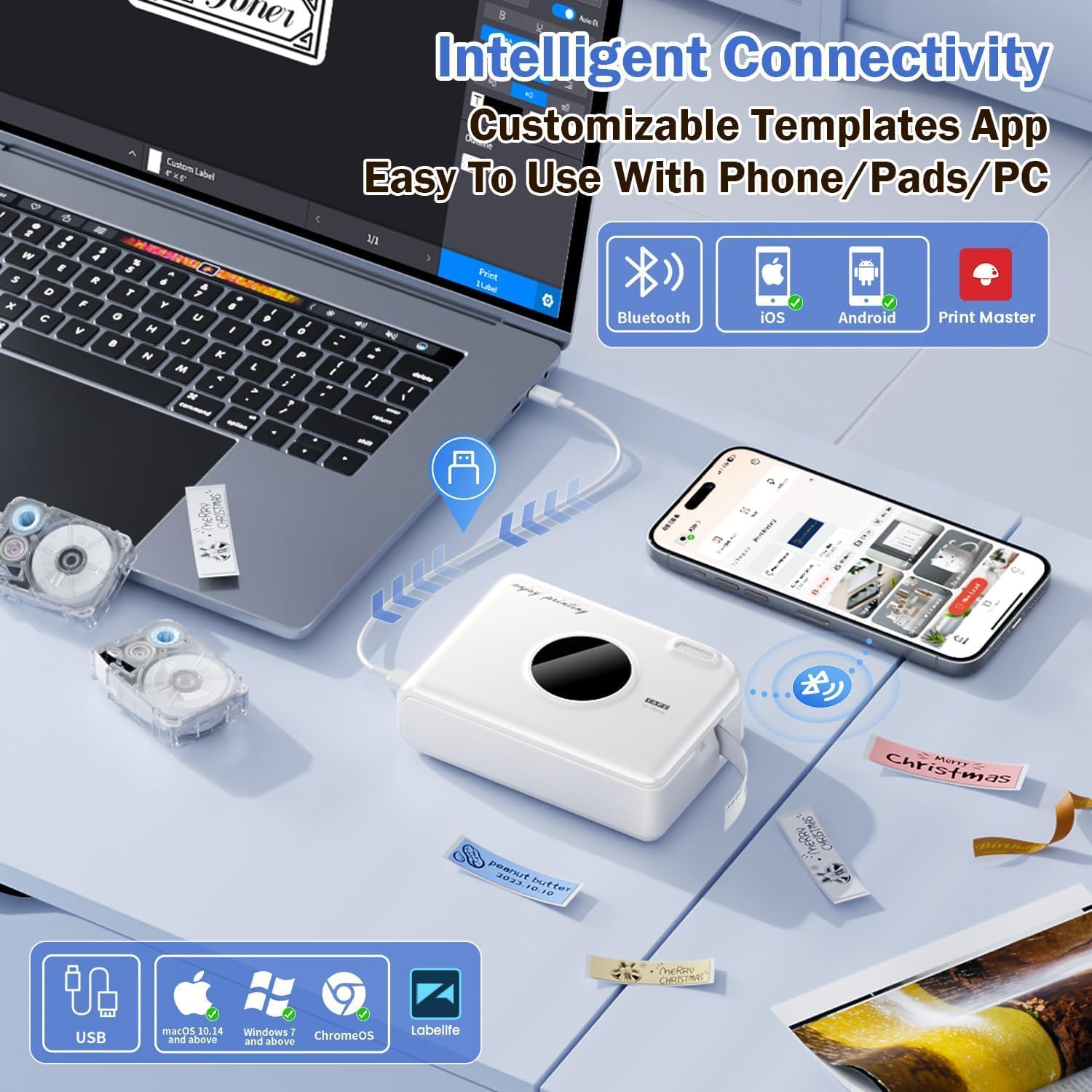
Figure 3: Connectivity options for the A30 Label Maker. This image illustrates the label maker connecting via Bluetooth to a smartphone and via USB to a laptop, highlighting compatibility with iOS, Android, and PC (Windows/Mac/ChromeOS) through the Print Master app.
The device also supports PC connectivity via USB for Windows, macOS 10.14+, and ChromeOS using the "Labellife" software.
5.4. Bluetooth Жупташтыруу
- Turn on the Phomemo A30 Label Maker by pressing and holding the power button.
- Смартфонуңузда же планшетиңизде Bluetooth иштетүү.
- Open the "Print Master" app. The app will automatically search for nearby Phomemo devices.
- Select "A30" from the list of available devices to connect. The indicator light on the label maker will confirm a successful connection.
6. Иштөө нускамалары
6.1. Basic Printing Steps
- Ensure the label maker is charged and connected via Bluetooth to your device.
- Open the "Print Master" app.
- Үлгү тандаңыз же жаңы энбелги дизайнын түзүңүз.
- Enter your desired text, add images, symbols, or barcodes.
- Preview the label to ensure accuracy.
- Колдонмодогу "Басып чыгаруу" баскычын таптаңыз.
- Once printed, use the integrated cutter to separate the label from the roll.
6.2. Using App Features and Templates
The "Print Master" app offers extensive customization options:

Figure 4: Creative features and templates available in the Print Master app. This image displays the app's interface with options for text, QR codes, barcodes, images, timestamps, and a wide selection of fonts, symbols, and border templates for personalized label creation.
- Текстти түзөтүү: Customize fonts (200+ built-in), sizes, styles (bold, italic), and alignment.
- Symbols & Icons: Access a library of 600+ symbols for various categories.
- Чек аралар жана алкактар: Choose from 200+ border templates.
- QR коддору жана штрих коддору: Generate and print scannable codes.
- Сүрөттөр: Insert images from your device or use image recognition features.
- Калыптар: Utilize pre-designed templates for common uses (e.g., home organization, office, school).
- Энбелгилерди автоматтык түрдө таануу: The A30 automatically recognizes compatible label consumables within the supported size of 12mm (0.47 inch) width.
6.3. Diverse Label Types and Applications
The A30 supports a wide range of Phomemo label types, allowing for versatile applications:
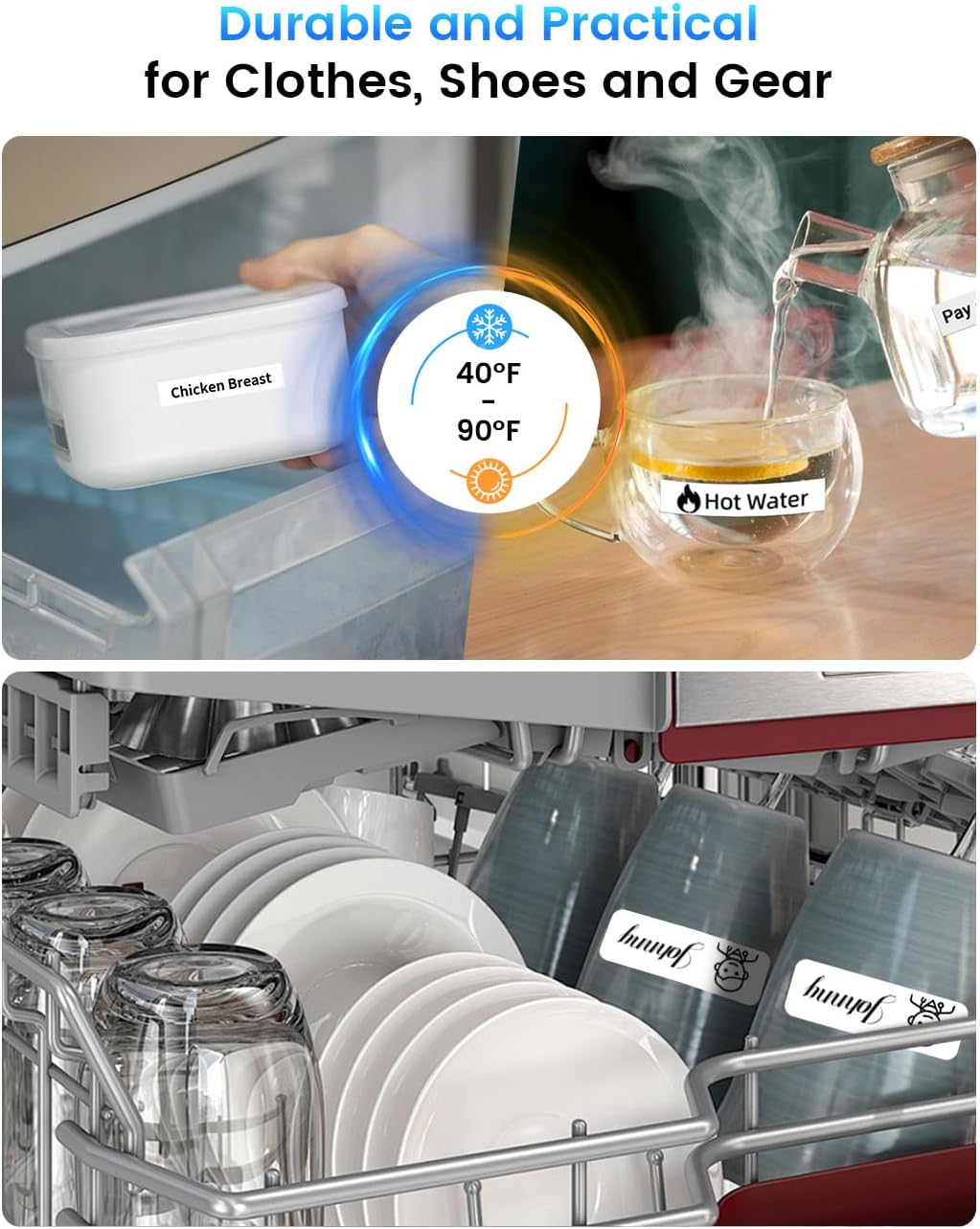
5-сүрөт: Мисamples of durable and practical label applications. This image shows labels applied to food containers in a refrigerator and items in a dishwasher, demonstrating the labels' resistance to temperature changes and water.
- Алдын ала кесилген/үзгүлтүксүз этикеткалар: Жалпы колдонуу үчүн стандарттуу этикеткалар.
- Үлгүлүү этикеткалар: Декоративдик дизайндагы этикеткалар.
- Муздаткычтын магниттик этикеткалары: For organizing items in cold environments.
- Кездеме үтүктөлүүчү этикеткалар: For clothing and textiles.
- Жаркыраган этикеткалар: Декоративдик максаттар үчүн.
- Жаркыраган этикеткалар: Labels that glow in the dark.
The labels are designed for durability, offering water and oil resistance, and can withstand temperatures from -10°C to 60°C, making them suitable for outdoor use and dishwashers.
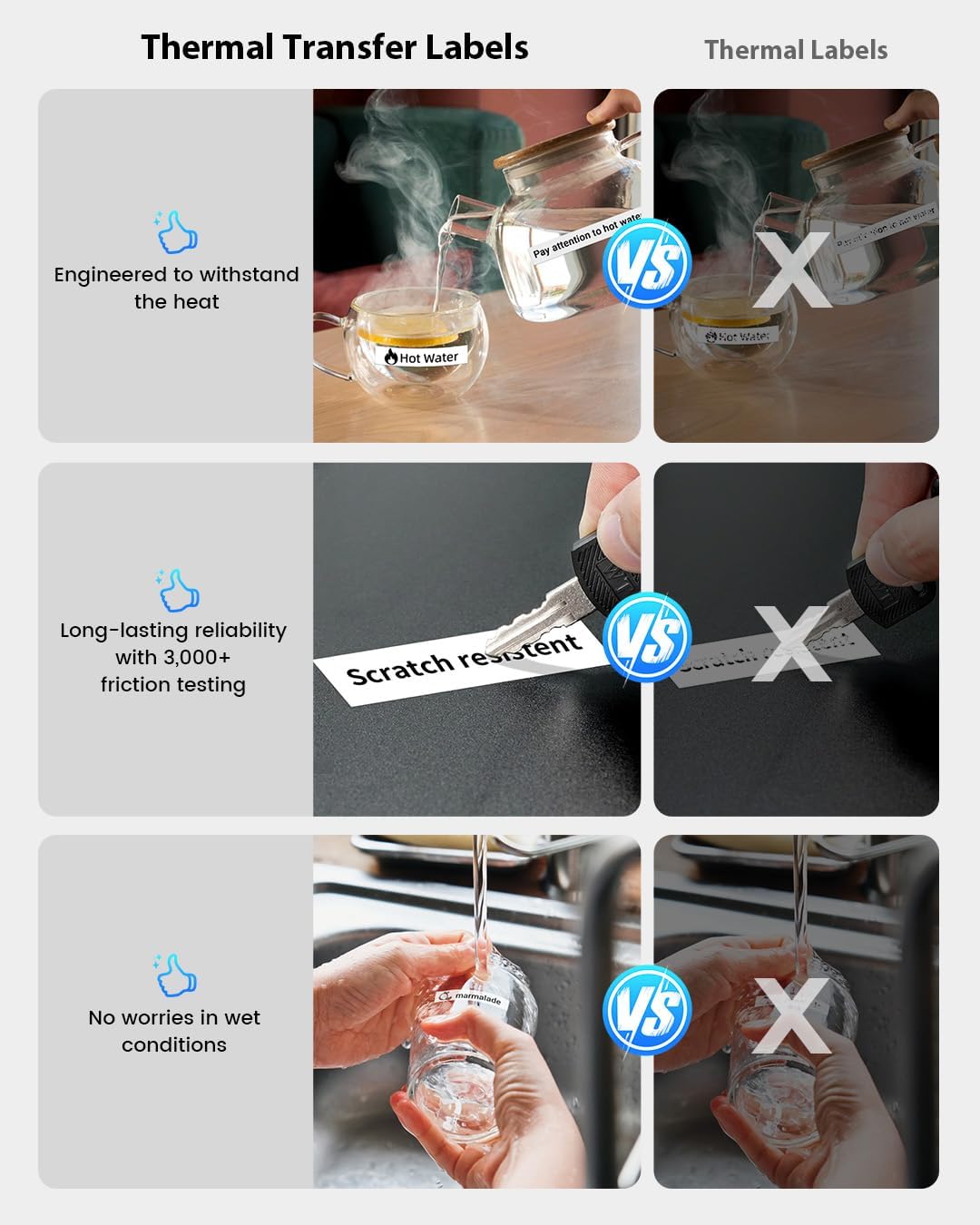
Figure 6: Durability comparison of thermal transfer labels. This image illustrates the superior resistance of thermal transfer labels to heat, scratches (3,000+ friction tests), and wet conditions compared to standard thermal labels, ensuring long-lasting reliability.
7. Техникалык тейлөө
7.1. Басып чыгаруу башын тазалоо
If print quality degrades or lines appear, the print head may need cleaning. Use a cotton swab lightly dampбасып чыгаруу башын акырын сүртүш үчүн изопропил спирти менен иштетилген. Колдонуудан мурун аны толугу менен кургатуу керек.
7.2. Сактоо
Store the label maker in a cool, dry place away from direct sunlight and extreme temperatures. Remove the label roll if storing for an extended period.
8. Кыйынчылыктарды
| Көйгөй | Мүмкүн себеп | Чечим |
|---|---|---|
| Түзмөк күйбөй жатат. | Батарея аз. | Аппаратты жок эле дегенде 30 мүнөткө кубаттаңыз. |
| Bluetooth аркылуу туташуу мүмкүн эмес. | Bluetooth is off; device is out of range; app issue. | Ensure Bluetooth is on; move device closer; restart app and label maker. |
| Poor print quality / Faded print. | Print head dirty; incorrect label roll insertion; low battery. | Clean print head; re-insert label roll correctly; charge device. |
| Этикеткалар туура эмес берилип жатат. | Label roll jammed or incorrectly installed. | Open compartment, clear any jam, re-install label roll. |
| Колдонмо бузулат же катып калат. | Software bug; insufficient device memory. | Restart the app; update to the latest app version; clear app cache. |
9. Техникалык шарттар

Figure 7: Phomemo A30 Label Maker key features and dimensions. This image highlights features such as colored ribbon printing, auto paper detection, extreme environment testing, 8+ years lifespan, 1200mAh rechargeable battery, and portable wireless design, along with its compact dimensions (5.16 x 3.74 x 1.52 inches).
| Өзгөчөлүк | Деталь |
|---|---|
| Модель аты | A30 (7W31-WuAiTing-US-A30-WH-1) |
| Бренд | Phomemo |
| Байланыш технологиясы | Bluetooth |
| Басма технологиясы | Термикалык |
| Принтердин чыгышы | Монохромдуу |
| Макс басып чыгаруу ылдамдыгы | 20 ppm (Бир түстүү) |
| Элемент Салмагы | 160 грамм |
| Батарея | 1200mAh кайра заряддалуучу |
| Колдоого алынган энбелгилердин туурасы | 12мм (0.47 дюйм) |
| Иштөө температурасы диапазону | -10°Cден 60°Cге чейин |
| Өзгөчөлүктөр | Creative Print Functions (Barcode, Text, Picture, QR 2D Code, Table, Date, Border, Icon, Shape, Pattern, Template, Save as, Line, Image Recognition, Voice Recognition, Automated Text Extraction, Automated Image Resizing, Automated Image Cropping, Automated Image Rotation, Automated Image Filtering, Automated Image Compression), Portable, Inkless, Wireless, Rechargeable, Print Continuous & Pre-cut Label Tapes, Rich Font Icon Pattern. |
10. Кепилдик жана колдоо
Phomemo products come with a standard warranty. For detailed warranty information, technical support, or customer service, please refer to the warranty card included with your product or visit the official Phomemo website. You can also contact Phomemo customer support through the "Print Master" app or their official channels.
Кошумча жардам алуу үчүн, сураныч, баш багыңыз Amazon'догу Phomemo дүкөнү.


