1. Киришүү
The ASUS DC300 Docking Station is a compact device designed to streamline laptop connectivity and enhance productivity. It allows users to connect multiple peripherals, external displays, and power their laptop through a single USB-C cable. This manual provides detailed instructions for setting up, operating, and maintaining your docking station.
2. Продукт бүтүп калдыview
The ASUS DC300 Docking Station offers extensive connectivity options in a sleek, durable design. Its metal construction ensures longevity and a sophisticated appearance that blends seamlessly into any workspace. Key features include support for multiple displays, high-speed data transfer ports, and pass-through charging capabilities.
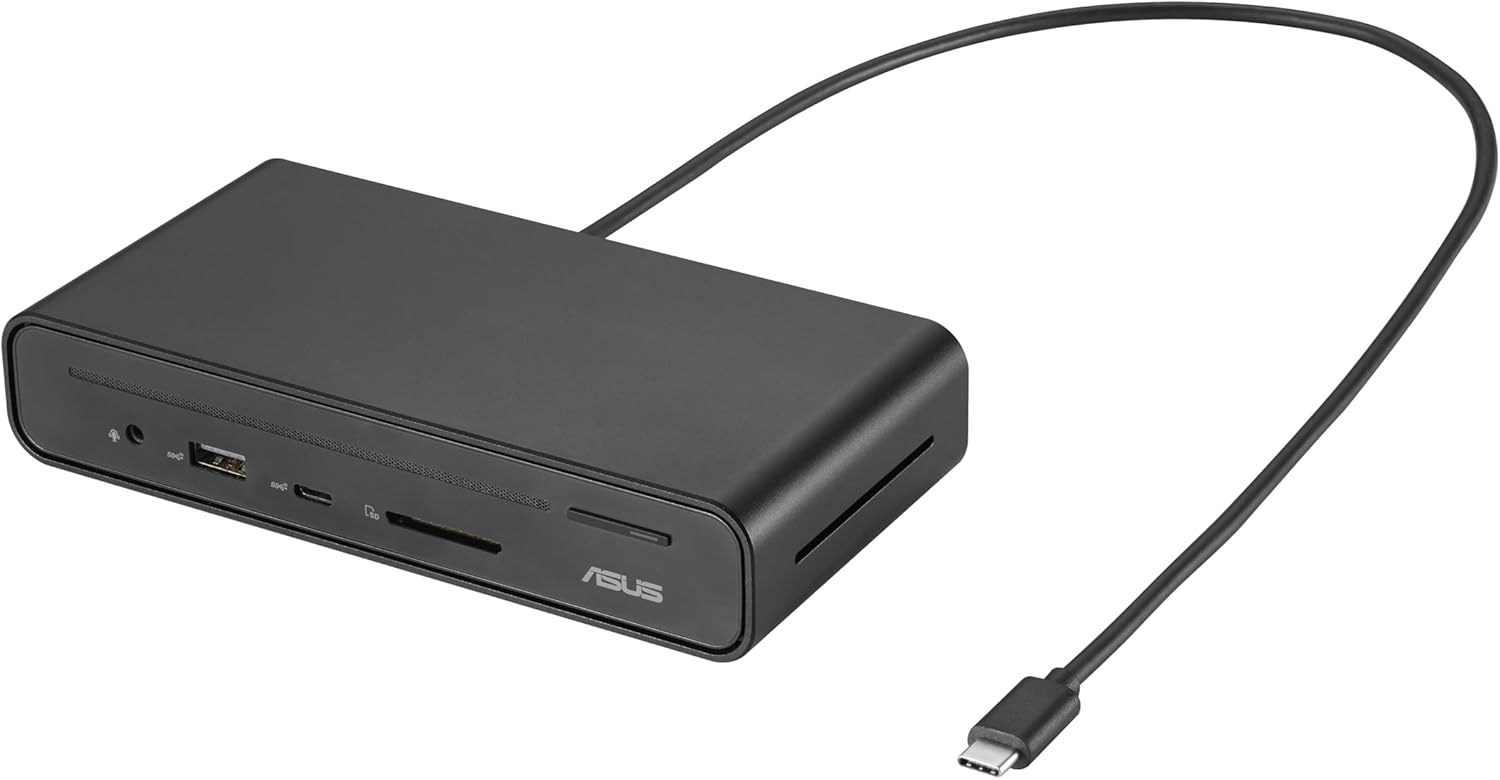
Figure 2.1: ASUS DC300 Docking Station with attached USB-C cable.
3. Пакеттин мазмуну
Пакетте бардык буюмдар бар экенин текшериңиз:
- ASUS DC300 Docking Station
- USB Type-C Cable (braided)
- Magnetic Base with Adhesive
- Колдонуучунун Колдонмосу (бул документ)
4. Physical Components and Port Layout
The docking station features a variety of ports for comprehensive connectivity. Familiarize yourself with the port layout for optimal use.
4.1 Алдыңкы панелдин порттору
- 1x USB Type-C Port (10 Gbps): жогорку ылдамдыктагы маалыматтарды берүү үчүн.
- 1x USB Type-A Port (10 Gbps): жогорку ылдамдыктагы маалыматтарды берүү үчүн.
- SD картаны окугуч: Стандарттуу SD эстутум карталарын окуу үчүн.
- MicroSD картаны окугуч: MicroSD эс тутум карталарын окуу үчүн.
- 3.5 мм аудио уячасы: Кулакчындарды же тышкы аудио түзмөктөрдү туташтыруу үчүн.
- Кубат баскычы: Док-станцияны күйгүзүү/өчүрүү үчүн.

Сүрөт 4.1: Алдыңкы view of the docking station with accessible high-speed data and media card ports.
4.2 Арткы панелдин порттору
- 2x HDMI Ports (4K@60Hz): Тышкы дисплейлерди туташтыруу үчүн.
- 2x DisplayPort (4K@60Hz): Тышкы дисплейлерди туташтыруу үчүн.
- 1x USB Type-C PD Port (100W): For power delivery to your laptop and pass-through charging.
- 1x USB Type-A Port (10 Gbps): жогорку ылдамдыктагы маалыматтарды берүү үчүн.
- 1x USB Type-A Port (480 Mbps): For connecting peripherals like keyboard/mouse dongles.
- 1x Gigabit Ethernet Port: Туруктуу зымдуу тармак туташуусу үчүн.

4.2-сүрөт: Арткы view of the docking station with various display, power, and network ports.
5. Орнотуу колдонмосу
Follow these steps to set up your ASUS DC300 Docking Station:
- Докту жайгаштырыңыз: Place the docking station on a flat, stable surface. You may use the included magnetic base to secure it to your desk. Ensure the adhesive is applied to a suitable surface if you intend to use it permanently.
- Ноутбукка туташуу: Connect the braided USB Type-C cable from the docking station's "To Laptop" port (rear panel) to your laptop's USB Type-C port.
- Кубатты туташтыруу (милдеттүү эмес, бирок сунушталат): For optimal performance, especially with multiple displays and charging, connect your laptop's USB Type-C power adapter to the docking station's "USB Type-C PD" port (rear panel). This enables pass-through charging for your laptop.
- Туташуу дисплейлери: Use HDMI or DisplayPort cables to connect your external monitors to the corresponding ports on the rear panel of the docking station.
- Перифериялык түзүлүштөрдү туташтыруу: Plug in your mouse, keyboard, external drives, or other USB devices to the available USB Type-A or USB Type-C ports on the front or rear panels.
- Тармакка туташуу (милдеттүү эмес): For a stable wired internet connection, connect an Ethernet cable to the Gigabit Ethernet port on the rear panel.
- Күйгүзүү: Press the power button on the front panel to turn on the docking station. The digital LED display will illuminate, showing the status of connected ports.
6. Иштөө нускамалары
6.1 Көрсөтүү режимдери
Док-станция ар кандай дисплей конфигурацияларын колдойт:
- Windows системалары: Supports single, dual, and triple external displays in extended or mirrored modes. Resolutions up to 4K@60Hz are supported for single/dual displays, and 4K@30Hz for triple displays.
- Mac OS Systems: Supports single and dual external displays. Triple display is not supported in extended mode; displays will be mirrored.

6.1-сүрөт: Мисample of a triple monitor setup with the ASUS DC300 Docking Station.
6.2 Маалыматтарды өткөрүү
Utilize the high-speed USB ports for quick data transfer:
- USB 3.2 Gen 2 Ports (10 Gbps): Чоң көлөмдөгү ташууга идеалдуу files to/from external SSDs or other high-speed devices.
- SD/MicroSD Card Readers: For fast transfer of photos and videos from memory cards.
6.3 One-Click Screen Lock
The power button on the top of the docking station also functions as a screen lock button:
- Windows: Press the button once to instantly lock your displays.
- MacOS: Press the button twice to lock your displays.
7. Техникалык тейлөө жана кам көрүү
- Keep the docking station in a clean, dry environment.
- Аппаратты экстремалдык температурага же тике күн нуруна кабылуудан сактаңыз.
- Clean the surface with a soft, dry cloth. Do not use liquid cleaners.
- Ensure cables are properly connected and not under strain to prevent damage.
8. Кыйынчылыктарды
Эгер көйгөйлөргө туш болсоңуз, төмөнкү жалпы чечимдерди караңыз:
- Unstable LAN Connection: If the LAN connection is unstable or disconnects, especially after sleep mode, try disabling and re-enabling the network driver in your operating system settings.
- Power Button Not Functioning: Ensure the docking station is properly connected to your laptop and, if applicable, to a power source.
- Экрандын бүлбүлдөөсү: Check all display cable connections. Ensure your display drivers are up to date. Verify that your monitor and cable support the selected resolution and refresh rate.
- Дисплей чыгышы жок: Confirm that your laptop's USB-C port supports video output (DisplayPort Alt Mode). Ensure all display cables are securely connected. Check your display settings in your operating system.
- кубаттоо маселелери: Ensure your laptop's power adapter is connected to the docking station's USB Type-C PD port. Verify that your laptop supports USB-C power delivery.
9. Техникалык шарттар
| Өзгөчөлүк | Деталь |
|---|---|
| Модель номери | 90XB08CN-BDS000 |
| Продукциянын өлчөмдөрү | 3.66 x 3.27 x 0.98 дюйм |
| Элемент Салмагы | 1.1 фунт |
| Байланыш технологиясы | Зымдуу |
| Кубаттоо мүмкүнчүлүгү | Yes (up to 100W via USB-C PD) |
| Дисплей колдоо | 3 Displays Supported (4K resolution) |
| HDMI порттору | 2 (4K@60Гц) |
| DisplayPort | 2 (4K@60Гц) |
| Жалпы USB порттору | 4 (2x USB 3.2 Gen 2 Type-A, 1x USB 3.2 Gen 2 Type-C, 1x USB 2.0 Type-A) |
| Ethernet | Гигабит Ethernet |
| Memory Card Reader | SD, MicroSD |
| Шайкеш түзмөктөр | Expertbook (and other USB-C compatible laptops) |
10. Кепилдик жана колдоо
For warranty information and customer support, please refer to the official ASUS website or contact their customer service directly. The product typically comes with a manufacturer's warranty. Please retain your proof of purchase for warranty claims.
ASUS колдоосу: https://www.asus.com/support/


