1. Introduction and Overview
This manual provides essential information for operating your Samsung Galaxy Z Fold 6 5G. Designed for enhanced productivity and immersive viewing, this device combines smartphone portability with tablet-like functionality. It features advanced AI capabilities and a robust foldable design.
Негизги өзгөчөлүктөр төмөнкүлөрдү камтыйт:
- Large 7.6-inch Dynamic AMOLED 2X inner screen (1-120Hz) for multitasking and media.
- 6.3-inch Dynamic AMOLED 2X cover display (120Hz) for quick tasks.
- Powered by Snapdragon 8 Gen 3 "for Galaxy" chipset with 12GB RAM for efficient performance.
- Triple camera system: 50MP main, 12MP ultra-wide, 10MP 3x telephoto lens.
- Reinforced Armor Aluminum frame, IP48 water and dust resistance.
- S Pen Fold Edition support and advanced Galaxy AI features.

Figure 1.1: The Samsung Galaxy Z Fold 6 5G, showcasing its folded and unfolded states.
2. Орнотуу
2.1 Кутудан чыгаруу жана алгачкы текшерүү
Carefully remove all components from the packaging. Verify that all items listed in the 'What's in the Box' section are present and inspect the device for any physical damage.
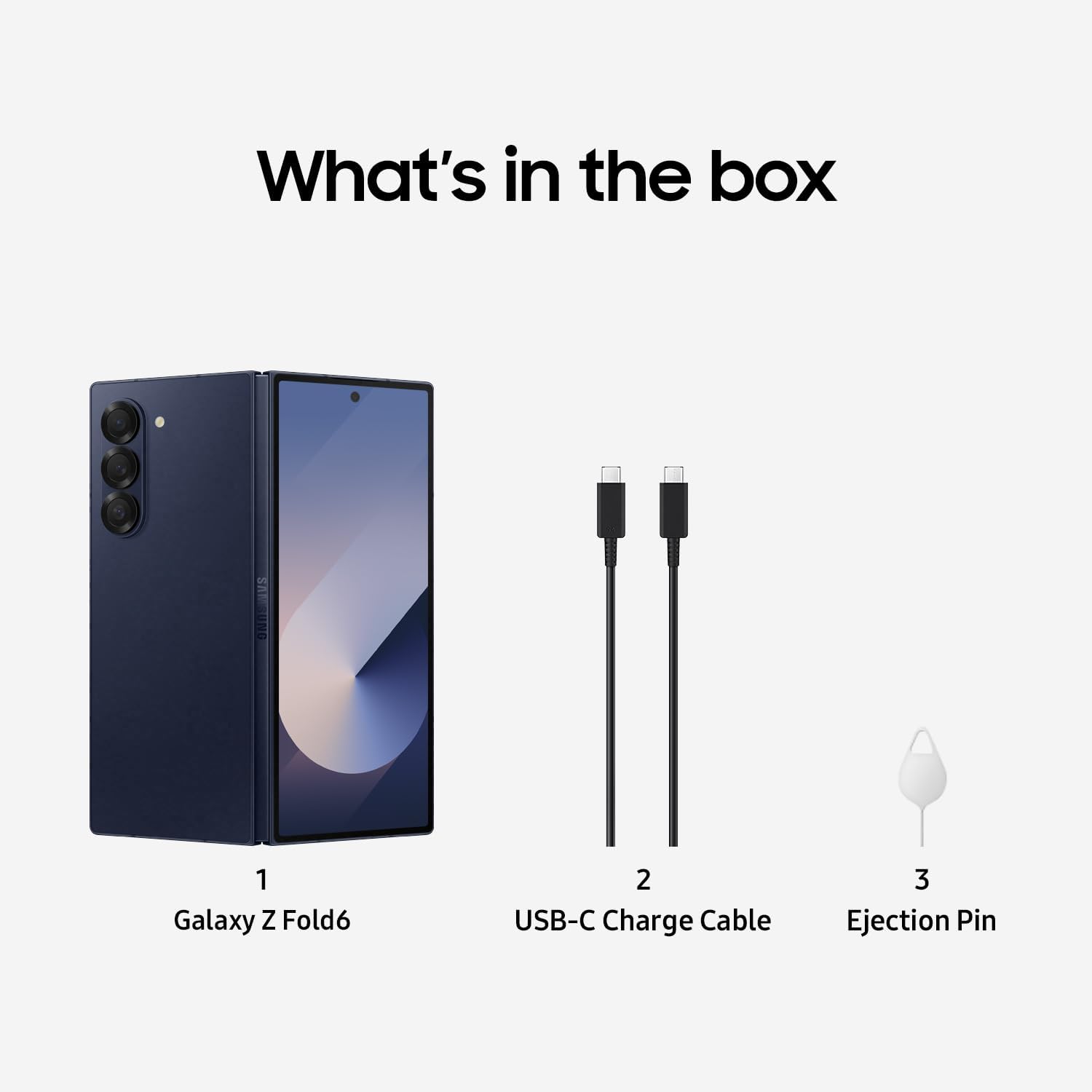
Figure 2.1: Included accessories: Galaxy Z Fold6 device, USB-C Charge Cable, and Ejection Pin.
2.2 SIM картаны орнотуу
- Аппараттын капталындагы SIM карта салгычын табыңыз.
- Insert the provided ejection pin into the small hole on the SIM card tray to open it.
- Nano-SIM картаңызды(ларыңызды) алтын түстөгү контакттары ылдый каратып салгычка салыңыз.
- Аспапка лотокту кылдаттык менен кайра салыңыз.
2.3 Баштапкы күйгүзүү жана орнотуу
- Samsung логотиби пайда болгуча Power/Side баскычын басып, кармап туруңуз.
- Тилиңизди тандоо, Wi-Fi тармагына туташуу жана Google аккаунтуңузду орнотуу үчүн экрандагы көрсөтмөлөрдү аткарыңыз.
- Transfer data from your previous device using Samsung Smart Switch if desired.
3. Аппаратты иштетүү
3.1 Бүктөө жана ачуу
The Galaxy Z Fold 6 is designed to seamlessly transition between a compact smartphone and an expansive tablet. Gently fold or unfold the device along its central hinge. Avoid applying excessive force or placing objects between the screens when folding.
3.2 Cover Screen Usage
When folded, the 6.3-inch Dynamic AMOLED 2X cover display allows for convenient one-handed use for calls, messages, notifications, and quick app access.
3.3 Main Screen Usage and Multitasking
Unfold the device to reveal the large 7.6-inch Dynamic AMOLED 2X main screen, ideal for immersive content viewing and advanced multitasking. Utilize features like Flex Mode and Multi-Active Window to enhance productivity:
- Flex режими: Partially fold the device to use apps on the top half of the screen while controls or content appear on the bottom half.
- Multi-Active Window: Run multiple apps simultaneously on the main screen by dragging apps from the Edge Panel or Recents screen.
Видео 3.1: A review of the Samsung Galaxy Z Fold 6, demonstrating its folding mechanism and screen functionality.
Бул видео жалпы маалымат беретview of the device's design and user interface.
3.4 S Pen Compatibility
The Galaxy Z Fold 6 supports the S Pen Fold Edition (sold separately), allowing for precise writing, drawing, and navigation on the main screen. Ensure you use an S Pen specifically designed for foldable devices to prevent screen damage.
4. Камеранын өзгөчөлүктөрү
Ар тараптуу камера системасы менен укмуштуудай сүрөттөрдү жана видеолорду тартыңыз:
- Негизги камера: 50 MP wide-angle lens with Optical Image Stabilization (OIS).
- Ультра кең камера: 12 MP lens for expansive shots.
- Телефото камера: 10 MP lens with 3x optical zoom.
- Алдыңкы камералар: 10 MP cover camera and 4 MP under-display camera on the main screen.
Utilize advanced features like Night Mode, Pro Mode, and AI-enhanced photography tools for optimal results.

Figure 4.1: Detailed specifications for the camera system, display, and battery capacity.
Video 4.2: A comparison of camera photos between the Galaxy Z Fold 6 and Pixel 9 Pro Fold.
This video highlights the photographic capabilities of the device.
5. Батарея жана заряддоо
The Galaxy Z Fold 6 is equipped with a 4400 Milliamp Hours battery, designed to provide ample power for a full day of use.
- Тез кубаттоо: Supports up to 45W wired fast charging. Use a compatible charger for optimal speeds.
- Зымсыз кубаттоо: Зымсыз кубаттоону колдойт.
- Wireless PowerShare: Share your device's battery power wirelessly with other compatible devices or accessories.
6. Узактыгы жана дизайн
The Galaxy Z Fold 6 is engineered for durability and resilience:
- Соот алюминий каркасы: Структуралык бүтүндүктү жакшыртат.
- IP48 Суу жана чаңга туруктуулугу: Offers protection against splashes and dust ingress.
- Corning Gorilla Glass Victus 2: Protects the exterior displays from scratches and drops.
- Ийилүүчү шарнир: Designed for smooth and durable folding, tested for at least 200,000 folds.

Figure 6.1: Details on the FlexHinge, IP48 rating, and protective materials used in the device's construction.

Figure 6.2: Galaxy Z Assurance guarantees ultimate innovation and peace of mind, with durable materials and extensive fold testing.
7. Техникалык шарттар
| Өзгөчөлүк | Спецификация |
|---|---|
| Модель аты | Galaxy Z Fold6 5G |
| ASIN | B0DHYPJW67 |
| Продукциянын өлчөмдөрү | 6 x 4 x 2 дюйм |
| Элемент Салмагы | 8.3 унция |
| Операция системасы | Android |
| CPU модели | Snapdragon 8 Gen 3 |
| CPU ылдамдыгы | 3.39 ГГц |
| Негизги экрандын өлчөмү | 7.6 дюйм |
| Негизги экрандын чечилиши | 968 x 2376 |
| RAM эстутум орнотулган өлчөмү | 12 ГБ |
| Эстутум сактоо сыйымдуулугу | 512 ГБ |
| Батарея сыйымдуулугу | 4400 миллионamp Саат |
| Телефон менен сүйлөшүү убактысы | 22 саат |
| Зымсыз оператор | Бардык операторлор үчүн кулпусу ачылды |
| Connectivity Technologies | 4G LTE, 5G |
| Өзгөчөлүктөр | 3G/4G/5G Data Capable, Accelerometer, Bluetooth Enabled, Internet Browser, Music Player, Speakerphone, Touchscreen |
| Аудио Jack | Наушник уячасы жок |
| Өндүрүүчү | Samsung |
| Дата биринчи жеткиликтүү | 25-сентябрь, 2024-жыл |
8. Техникалык тейлөө
To ensure the longevity and optimal performance of your Samsung Galaxy Z Fold 6, follow these maintenance guidelines:
- Экранга кам көрүү: Avoid pressing hard on the main foldable screen with sharp objects. Keep the screen free from dust and debris, especially when folding.
- Топчуга кам көрүү: Do not force the hinge or place objects between the screens when closing the device.
- Суу жана чаңга туруктуулугу: While IP48 rated, avoid intentional submersion in water or exposure to high-pressure water jets. Dry the device thoroughly if it gets wet.
- Тазалоо: Use a soft, lint-free cloth to clean the screens and body. Avoid harsh chemicals.
- Программалык камсыздоо жаңыртуулары: Regularly install software updates to benefit from performance improvements, security patches, and new features.
9. Кыйынчылыктарды
Эгер түзмөгүңүздө көйгөйлөргө туш болсоңуз, төмөнкү жалпы көйгөйлөрдү чечүү кадамдарын жасап көрүңүз:
- Түзмөк жооп бербейт: Press and hold the Power/Side key and Volume Down button simultaneously for more than 7 seconds to restart the device.
- кубаттоо маселелери: Ensure you are using a compatible charger and cable. Check for debris in the charging port. Try a different power outlet.
- Экранды көрсөтүү көйгөйлөрү: If the screen is unresponsive or has visual anomalies, restart the device. If issues persist, contact support.
- Колдонмонун бузулушу: Close and reopen the app. Clear the app's cache and data in Settings > Apps. Reinstall the app if necessary.
- Тармакка туташуу: Toggle Wi-Fi or mobile data off and on. Restart the device. Check your SIM card installation.
10. Кепилдик жана колдоо
This Samsung Galaxy Z Fold 6 is a renewed product. Amazon Renewed products are fully functional and come with generic or original accessories and packaging. They are backed by a 90-day refund or replacement policy.

Figure 10.1: Amazon Renewed products are categorized by condition (Excellent, Good, Acceptable) based on cosmetic damage and battery life.
For further assistance, please refer to the Amazon Renewed store's support pages or contact Samsung customer service directly.


