1. Киришүү
This manual provides essential instructions for the setup, operation, maintenance, and troubleshooting of your MGI Zip Navigator Remote Controlled Golf Cart. Please read this manual thoroughly before using the product to ensure safe and efficient operation. The MGI Zip Navigator is designed to enhance your golfing experience by providing effortless transportation of your golf clubs across various terrains.
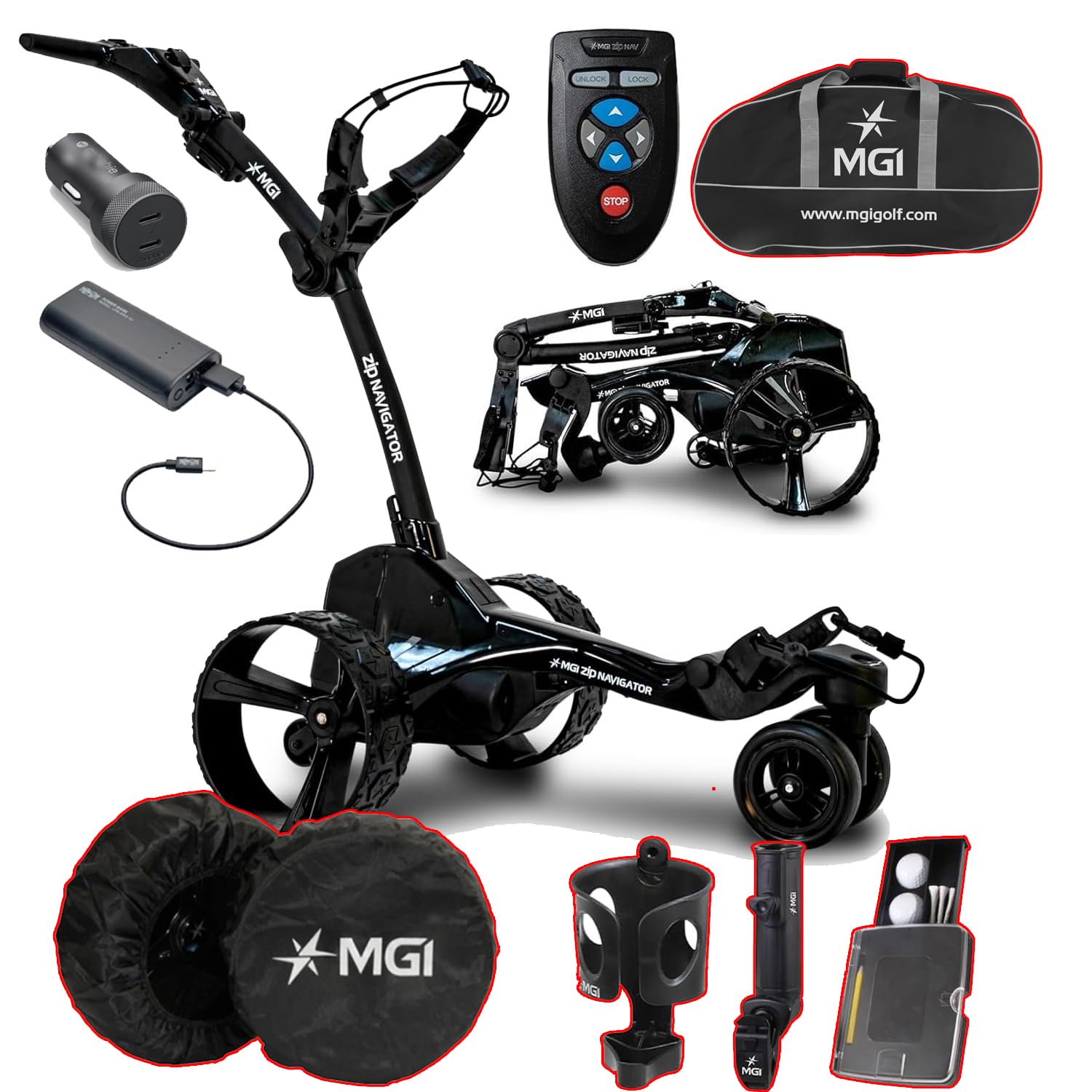
This image displays the MGI Zip Navigator golf cart in its operational state, alongside its remote control, battery pack, charging cable, travel bag, wheel covers, cup holder, umbrella holder, and a golf ball/tee holder.
2. Кутуда эмне бар
Таңгактан чыгарууда бардык компоненттер бар экенин текшериңиз:
- MGI Zip Navigator Golf Cart Frame
- Алыстан башкаруу
- Zip High Performance Lithium 36 Hole Battery
- Батарея заряддагыч
- USB Charging Port (integrated into handle)
- Travel Cover (for Power Bundle & Travel Cover variant)
- Wheel Covers
- Cup Holder
- Umbrella Holder
- Golf Ball and Tee Holder
- Колдонуучунун Колдонмосу (бул документ)
3. Орнотуу
3.1 Пакеттен чыгаруу
Таңгактан бардык компоненттерди этияттык менен алып салыңыз. Зарыл болсо, келечекте сактоо же ташуу үчүн таңгакты сактап коюңуз.
3.2 Assembly (Zip Fold Technology)
The MGI Zip Navigator features an innovative Zip Fold system for quick setup and compact storage. To unfold the cart:
- Place the folded cart on a flat surface.
- Release the main latch mechanism.
- Gently extend the frame until it locks into its operational position.
- Колдонуудан мурун бардык кулпу механизмдери бекем орнотулганын текшериңиз.
- The rear wheels can be inverted on the axle to reduce the footprint when not in use.
The MGI Zip Navigator golf cart is shown in its folded position, highlighting its compact design for easy transport and storage. The rear wheels can be inverted to further reduce its footprint.
3.3 Батареяны орнотуу жана заряддоо
The MGI Zip Navigator uses a 'Click & Go' Lithium Battery System.
- Заряддоо: Connect the battery charger to a power outlet and then to the battery's color-coded charge port (Red & Black). The charger indicator will show Red when charging and Green when fully charged.
- Орнотуу: Once charged, align the battery with the vertical slot on the cart and click it into place. Ensure it is securely seated.
- Алып салуу: Use the easy-to-access lifting handle to remove the battery when needed.
The image shows the compact lithium battery pack and its charging cable, demonstrating the 'Click & Go' system for easy installation and removal.
4. Иштөө нускамалары
4.1 Алыстан башкаруунун иштеши
The MGI Zip Navigator is controlled via a full-directional remote. Familiarize yourself with the buttons:
- Багыттуу жебелер: Use these to move the cart forward, backward, left, and right.
- БУЛПУНДУ АЧУУ: Activates the remote control.
- БУЛПОО: Deactivates the remote control to prevent accidental movement.
- ТОКТОТУУ: Immediately halts the cart's movement.
The remote control features directional arrows for forward, backward, left, and right movement, along with 'UNLOCK', 'LOCK', and 'STOP' buttons for precise control of the golf cart.
4.2 Digital Display and Settings
The cart features an advanced digital display:
- Өзгөрмө ылдамдыкты башкаруу: Adjust speed from 1 to 20.
- Батарея деңгээлинин көрсөткүчү: Four color-coded levels show the remaining charge.
- Distance Modes: Two resettable distances (A & B) in yards or meters, and a total odometer in miles or kilometers.
- USB кубаттоо порту: Located underneath the top handle for charging remote control or mobile devices.
4.3 Navigating Terrain
The MGI Zip Navigator is designed for various course conditions:
- Automatic Downhill Speed: This feature automatically adjusts the cart's speed when descending slopes, maintaining control.
- Patented Gyroscope: Automatically tracks the cart on a straight course, even on uneven ground, allowing you to walk freely.
- Twin 230 Watt Motors: Provide reliable power and agility for smooth movement.
4.4 Adjusting the Cart
Customize the cart for your comfort:
- Adjustable Ergonomic T-Bar Top Handle: Features a premium soft rubber grip for comfortable handling.
- Adjustable Independent Top Bag Support: Ensures a secure and customized fit for various golf bag sizes.
5. Техникалык тейлөө
5.1 Тазалоо
Regular cleaning helps maintain your cart's performance and appearance:
- Раманы жана дөңгөлөктөрдү жарнама менен сүртүңүзamp кир жана калдыктарды тазалоо үчүн ар бир колдонуудан кийин кездеме.
- Катуу химиялык заттарды же абразивдүү тазалагычтарды колдонуудан алыс болуңуз.
- Ensure all electrical components are dry before storage.
5.2 Батареяга кам көрүү
Батареяга туура кам көрүү анын иштөө мөөнөтүн узартат:
- Ар бир колдонуудан кийин, жарым-жартылай гана заряды бүтсө дагы, батареяны ар дайым толук заряддаңыз.
- Батареяны салкын, кургак жерде сактаңыз.
- Узак мөөнөткө сактасаңыз, терең разрядка жол бербөө үчүн батареяны 1-2 ай сайын заряддап туруңуз.
5.3 Сактоо
When not in use, store your MGI Zip Navigator properly:
- Fold the cart using the Zip Fold Technology to its most compact size.
- Consider inverting the rear wheels for additional space saving.
- Store in a dry, protected area away from extreme temperatures.
- Use the provided travel cover for protection during transport or storage.
Various accessories are displayed, including protective wheel covers, a cup holder, an umbrella holder, and a compact holder for golf balls and tees, all designed to enhance the user experience.
6. Кыйынчылыктарды
If you encounter issues with your MGI Zip Navigator, refer to the following common problems and solutions:
| Көйгөй | Мүмкүн себеп | Чечим |
|---|---|---|
| Араба күйбөйт. | Батарея туура орнотулган эмес же заряды түгөнгөн. | Батарея толук заряддалганын жана ордуна бекем орнотулганын текшериңиз. |
| Алыстан башкаруу жооп бербей жатат. | Пульттун батареясы аз же жупташтырылган эмес. | Charge the remote control via the cart's USB port. Refer to pairing instructions in the full manual (if applicable). Ensure remote is 'UNLOCKED'. |
| Cart veers off course. | Gyroscope calibration needed or uneven terrain. | The patented gyroscope should correct this automatically. If persistent, ensure the cart is on level ground when starting. |
| Cart struggles on inclines. | Батарея заряды аз. | Колдонуудан мурун батареянын толук заряддалганын текшериңиз. |
For issues not listed here, please contact MGI customer support.
7. Техникалык шарттар
| Өзгөчөлүк | Спецификация |
|---|---|
| Дисплей өлчөмү | 2.5 дюйм |
| Кепилдик | 3 жылдык өндүрүүчүсү |
| Адам интерфейсинин киргизүү | Touchscreen (on cart display), Remote Control |
| Байланыш технологиясы | Bluetooth |
| Моторлор | Twin 230 Watt Motors |
| Folded Dimensions (Inverted Rear Wheels) | 27.55 X 18.5 x 16.5 дюйм |
| Weight (No Battery) | 28.6 LBS |
| Салмагы (батарея менен) | 34.96 LBS |
| Батарея түрү | Lithium (36 Hole Extended) |
8. Кепилдик жана колдоо
Your MGI Zip Navigator Golf Cart comes with a 3 жылдык Өндүрүүчүнүн Кепилдиги. Бул кепилдик нормалдуу колдонуудагы материалдардагы жана жасалгадагы кемчиликтерди камтыйт. Кепилдик дооматтары үчүн сатып алганыңыздын далилин сактап коюңуз.
For technical support, warranty claims, or to purchase replacement parts, please visit the official MGI webсайтка же кардарларды тейлөө бөлүмүнө кайрылыңыз. Көбүрөөк маалымат жана өнүмдөрдү бул жерден таба аласыз MGI Store on Amazon.


