1. Киришүү
This manual provides detailed instructions for the proper use and maintenance of your BOBLOV F2 Body Camera. The F2 is a versatile recording device designed for various applications, including security, law enforcement, and personal documentation. It features dual screens, 2K video recording, 40MP photo capabilities, and integrated GPS functionality.
2. Пакеттин мазмуну
Төмөндө тизмеленген нерселердин баары пакетиңизге камтылганын текшериңиз. Эгерде кандайдыр бир нерселер жок болсо же бузулса, кардарларды колдоо менен байланышыңыз.
- BOBLOV F2 кузовдук камерасы
- Узун клип
- Кыска клип
- Автомобиль соруучу тоосу
- Dual-Shoulder Chest Vest
- Унаа заряддагыч
- USB-C Cable
- Колдонуучунун Колдонмосу (бул документ)
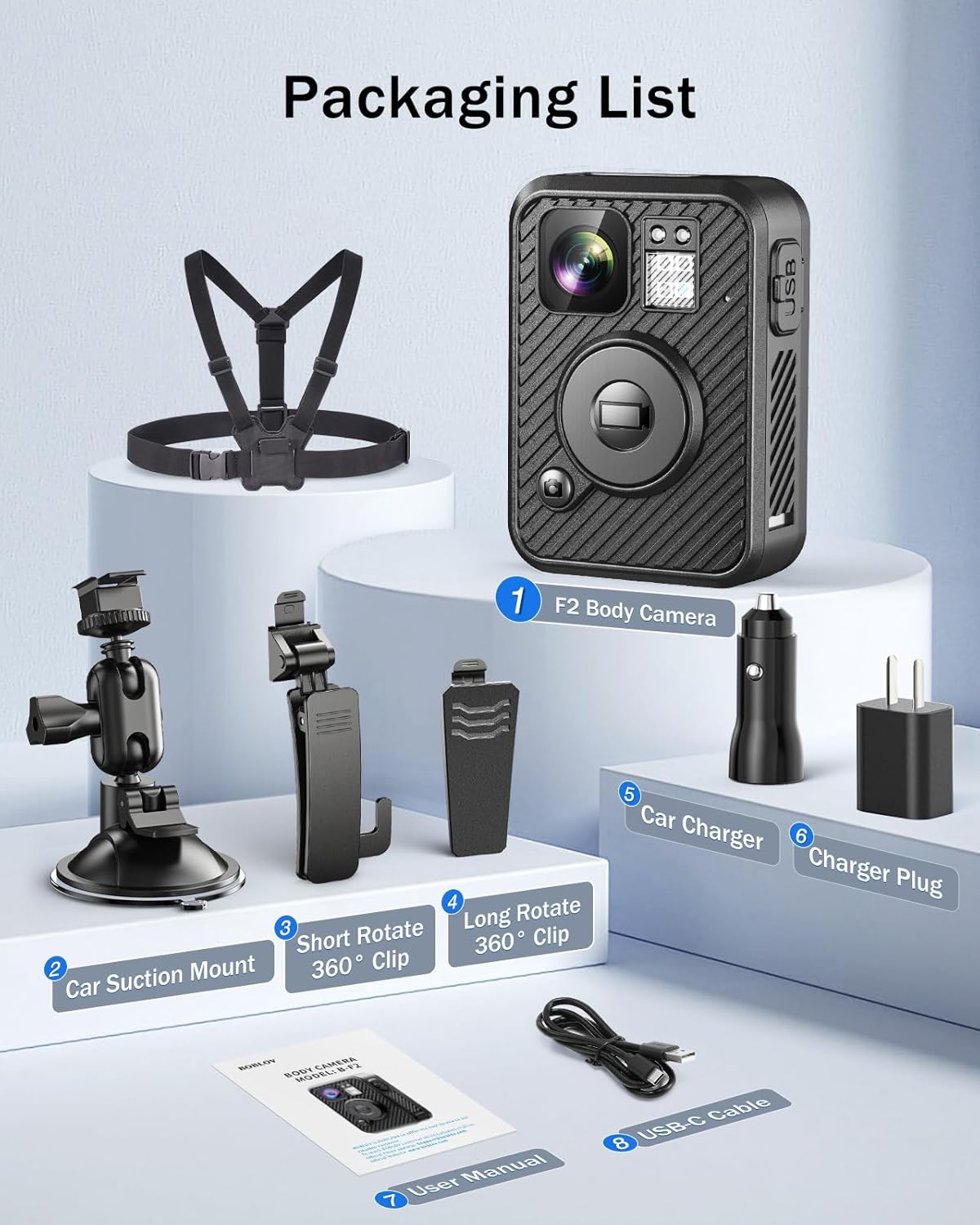
Image: Contents of the BOBLOV F2 Body Camera package.
3. Продукт бүтүп калдыview
The BOBLOV F2 Body Camera is equipped with several features for effective recording and monitoring.
3.1 Негизги өзгөчөлүктөрү
- Кош экрандар: A 0.66-inch top screen displays real-time status (battery, storage, GPS, recording) and a 2.0-inch main screen for live view жана ойнотуу.
- Жогорку чечилиштеги жаздыруу: Captures video in 2K/1440P and photos at 40MP.
- GPS функциясы: Built-in GPS for tracking routes and location data.
- Интуитивдик башкаруулар: Large, distinct buttons for easy operation of recording, snapshot, and audio functions.
- Батареянын узак иштөө мөөнөтү: Integrated 3000mAh battery provides 8-10 hours of continuous recording.
- Ар тараптуу монтаждоо: Includes a double-shoulder chest vest, long clip, short clip, and car suction mount for various applications.
- Видеорегистратор режими: Can be used as a dash camera with the included car mount.

Image: BOBLOV F2 Dual-Screen Innovation.
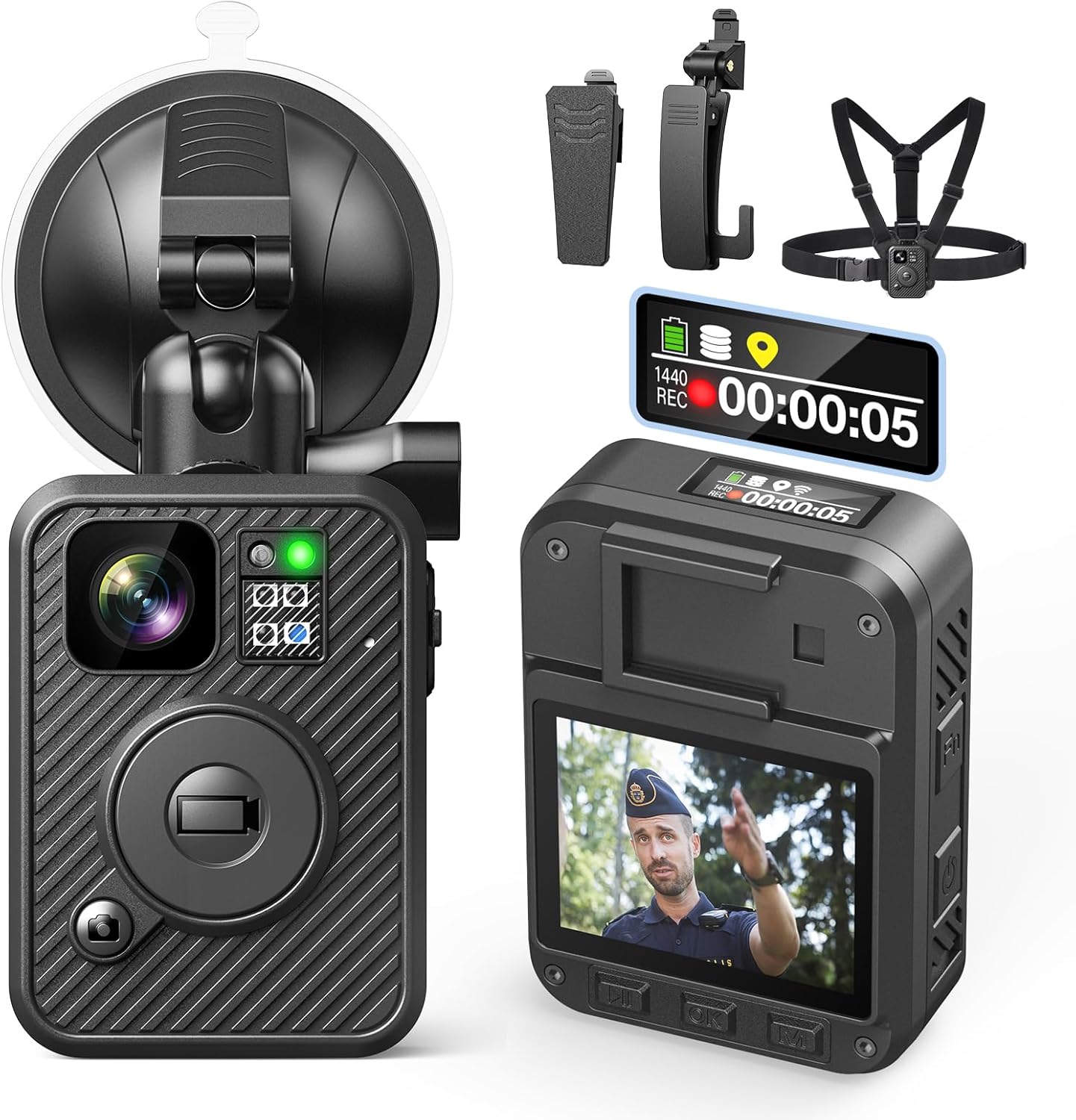
Image: BOBLOV F2 Body Camera with accessories.
4. Орнотуу
4.1 Батареяны заряддоо
- USB-C кабелин камеранын кубаттоо портуна туташтырыңыз.
- Connect the other end of the USB-C cable to the car charger or a standard USB power adapter (not included).
- The camera's indicator light will be blue while charging.
- Once fully charged (approximately 4-6 hours), the indicator light will turn white.

Image: Charging the BOBLOV F2 Body Camera.
4.2 Камераны тиркөө
The F2 camera offers multiple attachment options for various scenarios.
- Клиптерди колдонуу: Attach the long or short clip to the back of the camera. These clips can rotate 360 degrees for flexible positioning on clothing, belts, or bags.
- Using Chest Vest: For maximum stability, secure the camera to the included double-shoulder chest vest. This is ideal for active use and ensures a hands-free setup.
- Using Car Suction Mount: For dash cam functionality, attach the camera to the car suction mount and secure it to your vehicle's windshield.
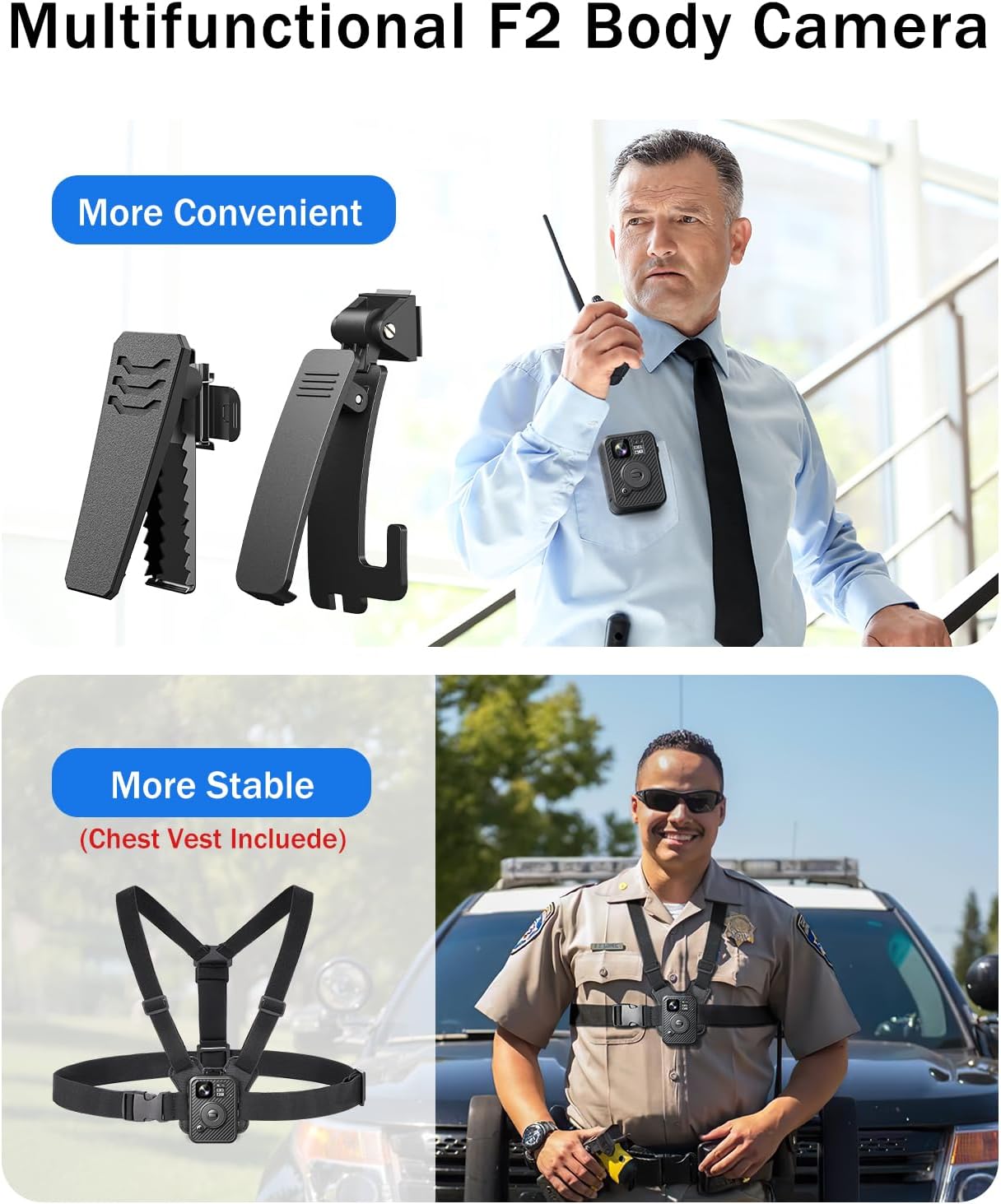
Image: BOBLOV F2 Body Camera with clips and chest vest.
4.3 Баштапкы күйгүзүү жана негизги орнотуулар
- Камераны иштетүү үчүн Кубат баскычын басып, кармап туруңуз.
- Navigate the menu using the control buttons (Up, Down, OK, Menu) to set the correct date, time, and desired language.
- Ensure GPS is enabled in the settings for location tracking.
5. Операция
5.1 Видео жаздыруу
Видео жазууну баштоо үчүн:
- Камера күйгүзүлгөнүн текшериңиз.
- Чоңду басыңыз Жаздыруу button on the front of the camera. The top screen will indicate "REC" and the recording duration.
- Жазууну токтотуу үчүн, басыңыз Жаздыруу кайра баскычын.
- The camera supports 2K/1440P video resolution.

Image: BOBLOV F2 capturing 2K video and 40MP photos.
5.2 Сүрөт тартуу
To capture a still image:
- While in standby or recording mode, press the Сүрөт button (usually marked with a camera icon).
- The camera will capture a 40MP photo.
5.3 Аудио жаздыруу
To record audio only:
- басыңыз Аудио button (usually marked with an 'Fn' or microphone icon).
- Press it again to stop audio recording.

Image: F2 applications and button functions.
5.4 GPS функциясы
The built-in GPS module records location data with your video fileс. Бул маалыматтарды кайра алууга болотviewed on the camera or a computer.
- Ensure GPS is enabled in the camera settings.
- When connected to a computer, use compatible software to view recorded routes and location information.

Image: GPS function in action, showing route tracking on a computer.
5.5 Компьютерге туташуу
өткөрүп берүү үчүн files or review GPS data:
- Камераны берилген USB-C кабели аркылуу компьютериңизге туташтырыңыз.
- The camera will appear as a removable disk drive.
- You can access video, photo, and audio fileтүздөн-түз с.
- For GPS data review, use compatible playback software on Windows or Mac.
6. Техникалык тейлөө
6.1 Тазалоо
- Камеранын корпусун жумшак менен сүртүңүз, гamp кездеме.
- Линза үчүн, чийилип калбашы үчүн, линзаны тазалоочу атайын чүпүрөктү жана эритмени колдонуңуз.
- Катуу химиялык заттарды же абразивдүү материалдарды колдонбоңуз.
6.2 Сактоо
- Камераны салкын, кургак жерде күндүн тике тийген нурунан жана экстремалдык температурадан алыс сактаңыз.
- Узак мөөнөткө сактоонун алдында анын иштөө мөөнөтүн узартуу үчүн батареянын жарым-жартылай заряддалганын (болжол менен 50%) текшериңиз.
6.3 Батареяга кам көрүү
- Батареяны бат-баттан толук кубаттап калуудан алыс болуңуз.
- Charge the camera regularly, even if not in use, to maintain battery health.
7. Кыйынчылыктарды
| Көйгөй | Мүмкүн себеп | Чечим |
|---|---|---|
| Камера күйбөйт. | Батарея аз. | Charge the camera for at least 30 minutes. |
| Видео жаздыруу/сүрөткө тартуу мүмкүн эмес. | Сактоочу жай жетишсиз. | Эскисин жок кылуу files or transfer them to a computer to free up space. |
| GPS маалыматтары жаздырылбай жатат. | GPS function disabled or poor signal. | Enable GPS in settings. Ensure camera has a clear view асмандын. |
| Компьютер камераны тааныбайт. | USB кабели же порту туура эмес. | Try a different USB-C cable or a different USB port on your computer. |
| Video footage титиреп турат. | Сүрөттү турукташтыруунун жоктугу. | Ensure the camera is securely mounted and minimize sudden movements during recording. |
8. Техникалык шарттар
| Өзгөчөлүк | Деталь |
|---|---|
| Модель аты | F2 |
| Видео тартуунун резолюциясы | 2K/1440P |
| Сүрөттүн резолюциясы | 40MP |
| Lens Angle | 120° кең бурч |
| Батарея сыйымдуулугу | 3000 мАч литий полимери |
| Жазуу убактысы | 8-10 саат (үзгүлтүксүз) |
| Заряддоо убактысы | 4-6 саат |
| Байланыш | USB-C |
| Өзгөчөлүктөр | GPS, Night Vision, Dual-Screen |
| Өлчөмдөрү (L x W x Y) | 2.36 x 3.15 x 3.94 дюйм (болжол менен) |
| Элемент Салмагы | 1.81 фунт (болжол менен) |
| Сууга туруктуулук деңгээли | Waterproof (general usage, not for submersion) |
9. Кепилдик жана колдоо
9.1 Продукциянын кепилдиги
BOBLOV provides a 24-month product coverage for its customers. This warranty covers manufacturing defects and issues arising from normal use. Please retain your proof of purchase for warranty claims.
9.2 Кардарларды колдоо
For technical assistance, troubleshooting, or warranty inquiries, please contact BOBLOV customer support. We aim to provide quick responses within 24 hours and offer lifetime technical support.
You can visit the official BOBLOV store for more information and contact details: Amazon'догу BOBLOV дүкөнү


