1. Продукт бүтүп калдыview
The autoabc Wireless CarbitLink USB Dongle (Model I) provides seamless integration of Apple CarPlay and Android Auto into compatible vehicle infotainment systems. This device enables wireless access to your smartphone's navigation, music, communication, and other applications directly on your car's display, enhancing your driving experience with convenience and connectivity.

Сүрөт 1.1: Бүттүview of the autoabc Wireless CarbitLink USB Dongle, showing its compact design and how it integrates with a car's display for both Apple CarPlay and Android Auto.
Кутуда эмне бар:
- autoabc Wireless CarbitLink USB Dongle
- USB туташуу кабели
- Колдонуучунун Колдонмосу (бул документ)
2. Шайкештик талаптары
Before installation, ensure your vehicle and smartphone meet the following requirements:
- Унаа шайкештиги: The dongle is designed for vehicles with OEM Carbit Link, Smart Link, Phone Link, or Easy Connect functionality, version 6.0 and above. It is primarily compatible with 98% of Chinese brand cars.
- Смартфондун шайкештиги: Supports both Apple CarPlay (iOS) and Android Auto (Android).
- USB порт: Your vehicle must have a functional USB port for connecting the dongle.
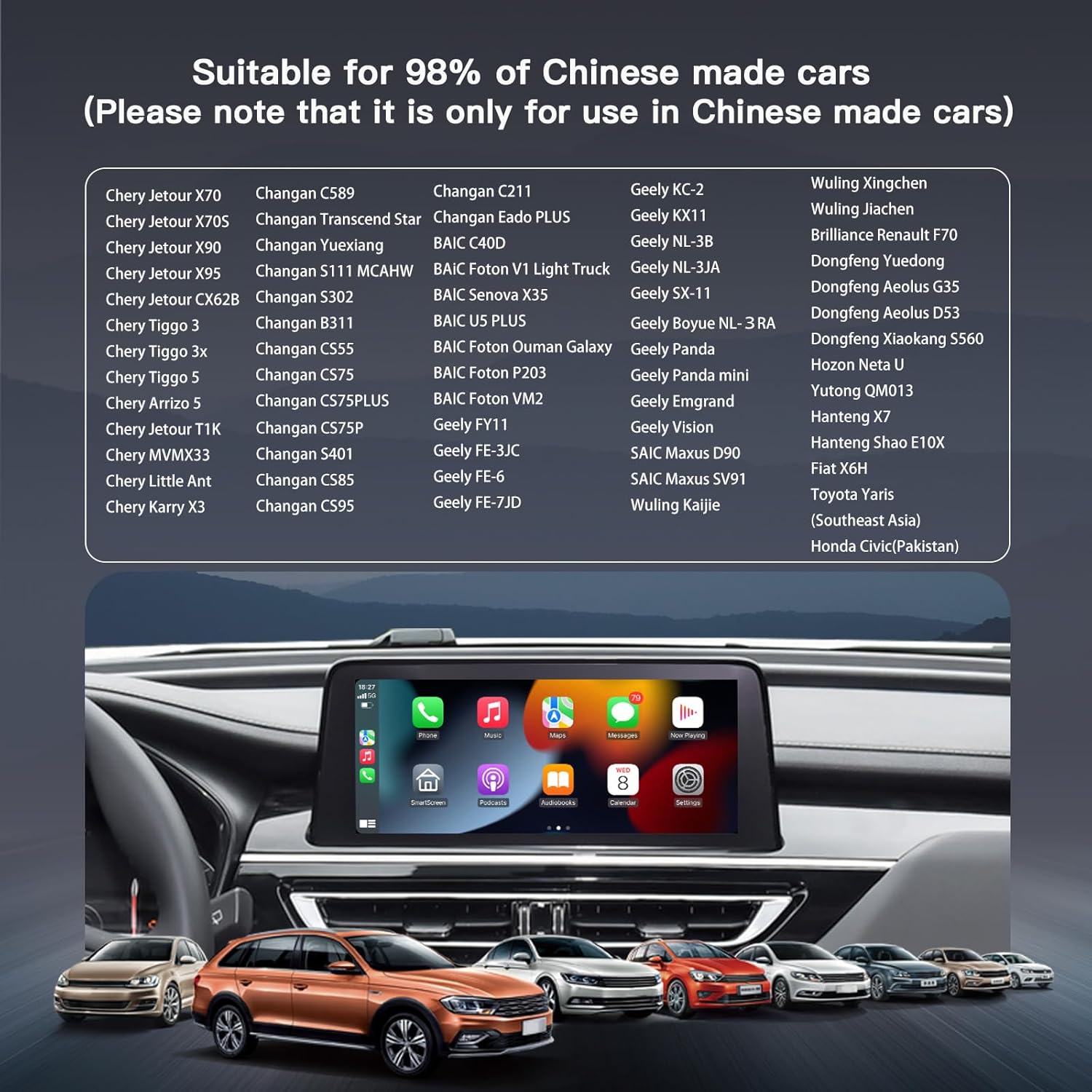
Image 2.1: A visual representation of various compatible Chinese car models, highlighting the dongle's broad compatibility with these vehicles.
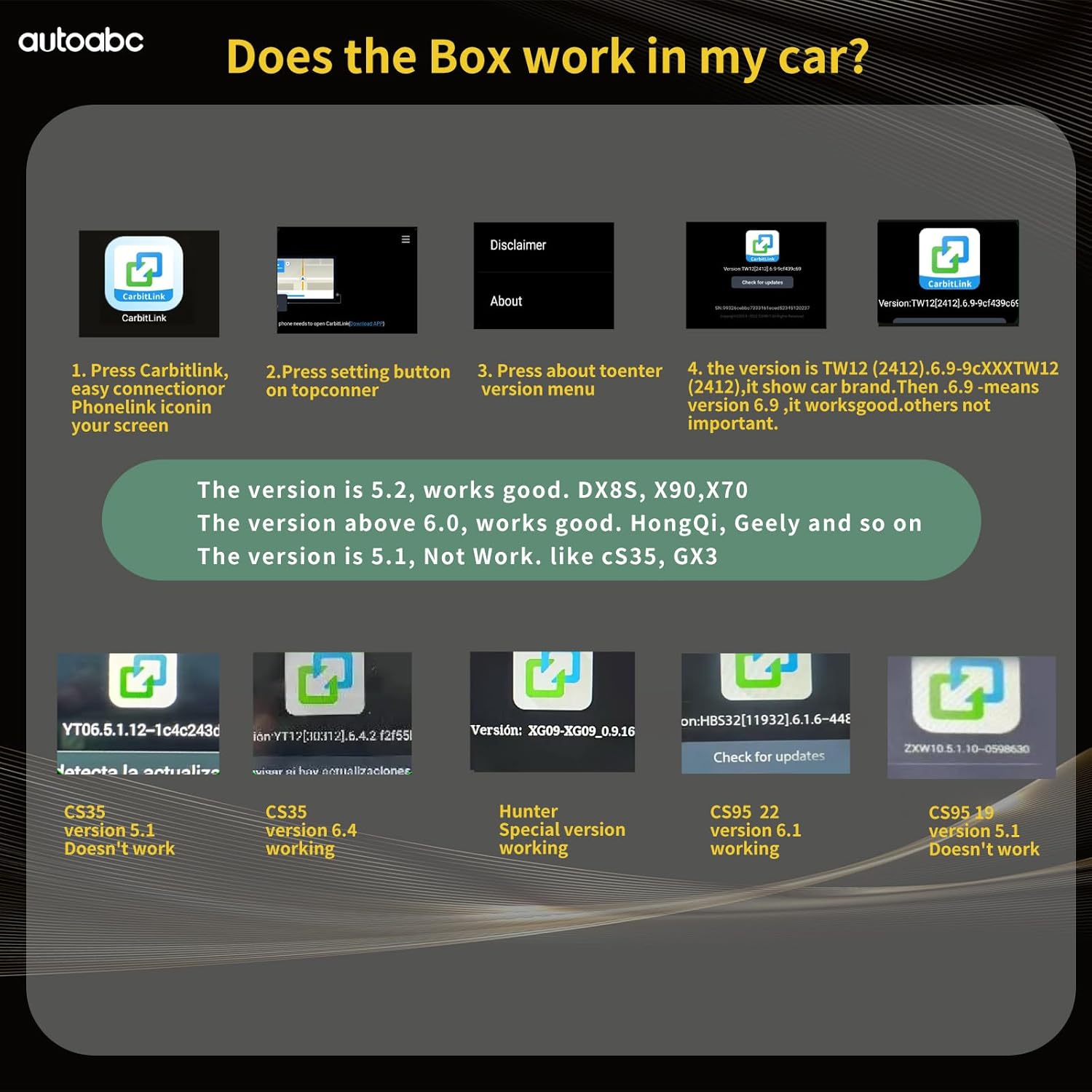
Image 2.2: A chart detailing CarbitLink software versions and their compatibility with the dongle. Versions 5.2, 6.0, and above are generally compatible, while version 5.1 and specific models like CS35 version 5.1 are not.
3. Орнотуу нускамалары
Follow these steps to set up your autoabc Wireless CarbitLink USB Dongle:
- Донглду туташтырыңыз: Plug the USB dongle into your car's original USB port. Ensure the connection is secure.
- Access Mobile Connect: On your car's infotainment screen, navigate to the 'Mobile Connect' or 'Easy Connection' option. This will display a QR code or a prompt to connect your phone via Bluetooth.
- Bluetooth аркылуу жупташуу: On your smartphone, go to Bluetooth settings and search for available devices. Select the device named "Carplay&Auto_XXXX" (where XXXX is a unique identifier). Confirm the pairing request on both your phone and the car screen.
- Automatic Interface Launch: Once Bluetooth pairing is successful, the CarPlay or Android Auto interface will automatically launch on your car's display.

Image 3.1: Visual guide showing the three main steps for setup: plugging in the dongle, pairing via Wi-Fi and Bluetooth, and using CarPlay.
Video 3.1: This video demonstrates the complete setup process for the autoabc Wireless CarbitLink USB Dongle, including connecting the device, pairing a smartphone via Bluetooth for both Apple CarPlay and Android Auto, and showcasing basic functionalities like navigation and music playback.
4. Иштөө нускамалары
Once connected, you can utilize the features of Apple CarPlay or Android Auto:
4.1. Apple CarPlay Operation
- Навигация: Use online map applications for real-time directions.
- Музыка жана аудио: Stream music, podcasts, and audiobooks through your car's sound system. CarPlay audio is output through the original car's Bluetooth channel with lossless sound quality.
- Телефон чалуулар: Make and receive calls directly from the car's display.
- Үн менен башкаруу: Ар кандай функцияларды колсуз башкаруу үчүн Siri'ни иштетиңиз.
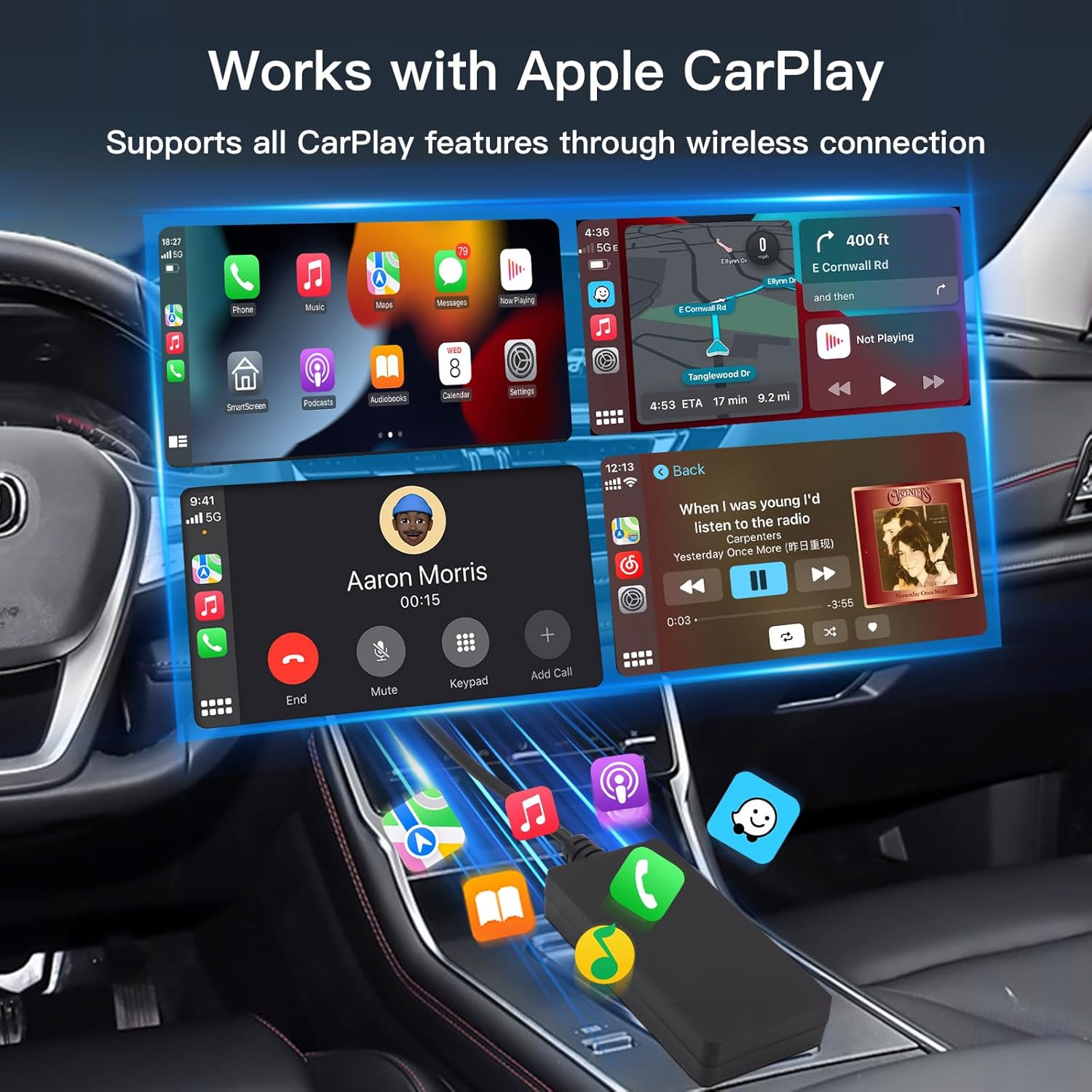
Сүрөт 4.1: Мурункуample of the Apple CarPlay interface on a car's infotainment screen, showing access to phone, maps, messages, and music applications.
4.2. Android Auto Operation
- Навигация: Access Google Maps or other compatible navigation apps.
- Музыка жана аудио: Play music from Spotify, YouTube Music, or other streaming services. Android Auto audio is output through the original car's Bluetooth channel with lossless sound quality.
- Телефон чалуулар: Manage calls with a clear interface.
- Үн менен башкаруу: Үн буйруктары үчүн Google Жардамчыны колдонуңуз.
5. Техникалык тейлөө
The autoabc Wireless CarbitLink USB Dongle is designed for minimal maintenance. Keep the device clean and dry. Avoid exposing it to extreme temperatures or direct sunlight for prolonged periods. Ensure the USB connection port remains free of dust and debris.
6. Кыйынчылыктарды
If you encounter issues with your autoabc Wireless CarbitLink USB Dongle, refer to the following troubleshooting steps:
- No Connection/Initial Pairing Issues:
- Ensure the dongle is securely plugged into the car's USB port.
- Verify your car's infotainment system has 'Carbit Link', 'Smart Link', 'Phone Link', or 'Easy Connect' functionality (version 6.0 or above).
- Смартфонуңузду жана унаанын маалымат-зоок системасын өчүрүп-күйгүзүңүз.
- Delete any previous Bluetooth pairings for the dongle on your phone and car, then attempt to re-pair.
- Үзгүлтүктүү байланыш/кечиктирүү:
- Ensure your phone's Wi-Fi and Bluetooth are enabled and not connected to other devices that might interfere.
- Check for any obstructions between your phone and the dongle.
- Смартфонуңуздун операциялык системасын эң акыркы версиясына жаңыртыңыз.
- Аудионун сапаты боюнча маселелер:
- Confirm that your car's Bluetooth is selected as the audio output source.
- Adjust volume levels on both your phone and car system.
- CarbitLink Version Incompatibility:
- Refer to Image 2.2 in the Compatibility Requirements section to verify if your car's CarbitLink version is supported. If not, the dongle may not function.
7. Техникалык шарттар
| Өзгөчөлүк | Деталь |
|---|---|
| Модель номери | I |
| Бренд | автоабк |
| Түс | Кара |
| Туташтыргыч түрү | USB түрү C |
| Шайкеш түзмөктөр | Смартфон |
| Элемент Салмагы | 2.39 унция (0.07 килограмм) |
| Пакеттин өлчөмдөрү | 6.26 x 3.62 x 1.14 дюйм |
| Байланыш | 2.4/5GHz Wi-Fi, Bluetooth 5.1 |
| Биринчи жеткиликтүү | 30-сентябрь, 2024-жыл |

Image 7.1: The autoabc Car Smart Box packaging and the dongle itself, with dimensions indicating its compact size.
8. Кепилдик жана колдоо
For warranty information and technical support, please refer to the contact details provided with your purchase or visit the official autoabc webсайт. Кепилдик дооматтар үчүн сатып алганыңыздын далилин сактаңыз.


