1. Киришүү
Thank you for choosing the Vtopek 10.26" 4K Portable Carplay Android Auto Display. This device integrates wireless Apple CarPlay and Android Auto functionalities with advanced camera features, enhancing your driving experience with smart navigation, entertainment, and safety. This manual provides detailed instructions for installation, operation, and maintenance of your new device.

Figure 1: Vtopek 10.26" 4K Portable Carplay Android Auto Display
2. Пакеттин мазмуну
Пакетте бардык буюмдар бар экенин текшериңиз:
- 1x Vtopek 10.26" Carplay Display
- 1x 1080p Rear Camera
- 1x 64 ГБ SD карта
- 1x Power Cord (for cigarette lighter)
- 1x AUX кабели
- 1x Display Stand
- 1x Long Suction Cup Mount
- 1x 10m Extension Cable (for rear camera)
- 1x Колдонуучунун колдонмосу
3. Орнотуу жана орнотуу
The Vtopek Carplay Display is designed for easy, plug-and-play installation without requiring modifications to your vehicle. It is compatible with most 7-36V vehicles.
3.1 Дисплейди орнотуу
The device includes both a suction cup mount and an adhesive mount, offering flexible placement options on your dashboard or windshield. The exclusive bracket design ensures stability and prevents slippage during driving.
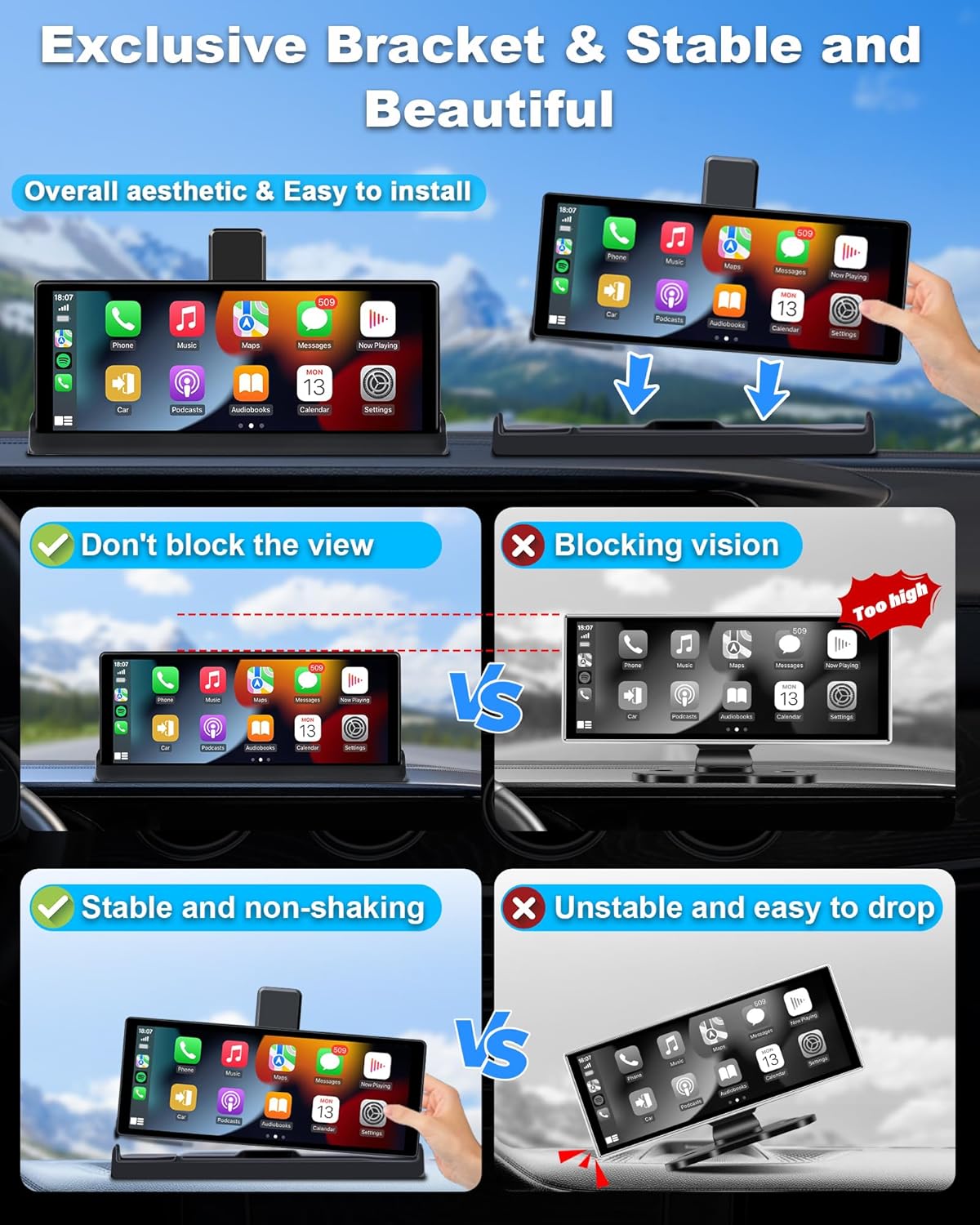
Figure 2: Stable Mounting with Exclusive Bracket
3.2 Аппаратты туташтыруу
- Connect the Type-C cable дисплей бирдигине.
- Plug the other end of the power cord into your car's cigarette lighter interface.
- (Optional) Rear Camera Installation: Connect the 1080p rear camera using the provided 10m extension cable. This typically involves routing the cable to the rear of the vehicle and connecting the camera near the license plate or rear window. Professional installation may be recommended for the rear camera.
- (Optional) AUX Connection: For enhanced audio quality, connect the AUX cable from the display to your car's AUX input.

Figure 3: Basic Installation Steps
4. Иштөө нускамалары
4.1 Зымсыз Apple CarPlay & Android Auto
The display supports wireless Apple CarPlay and Android Auto, allowing seamless integration with your smartphone for navigation, music, calls, and messages.
- Wireless CarPlay үчүн: Requires an iPhone with iOS 6 or later. Ensure your iPhone's CarPlay system and voice control (Siri) are enabled.
- Wireless Android Auto үчүн: Requires a phone that supports 5 GHz Wi-Fi and runs Android 11 or higher. Ensure the Android Auto app is updated to the latest version.
Шайкештик жөнүндө эскертүү: Not all Android phones are fully compatible. Specifically, some Samsung Note and S series, Huawei Series (e.g., P30, Mate 20, Mate 30, P40), Xiaomi Series (e.g., 12 Pro, 11 lite), Oppo Series (e.g., Reno 2, Reno2 Z, A16S), and Galaxy A20 (SM-A205G) models may not support wireless CarPlay or Android Auto. Please verify your phone's compatibility before use.

4-сүрөт: Wireless CarPlay жана Android Auto Interface

Figure 5: CarPlay and Android Auto Compatibility Details
4.2 Үн менен башкаруу (Siri/Google Жардамчысы)
Utilize intelligent voice control for hands-free operation, enhancing driving safety. Simply activate Siri or Google Assistant to:
- Make or answer calls
- Музыка ойнотуу
- Get navigation directions
- Билдирүүлөрдү жөнөтүү

6-сүрөт: Коопсуз айдоо үчүн үн менен башкаруу
4.3 Mirror Link (Apple AirPlay & Android Cast)
The Mirror Link function allows you to cast your smartphone screen directly onto the display. This is useful for viewing navigation maps, photos, or other content. Please note that streaming services like Netflix, YouTubeTV, and Paramount+ are not supported via Mirror Link.
4.4 Camera Functions (Dash Cam & Rear Camera)
The device features a 4K front camera and a 1080p rear camera for comprehensive recording and parking assistance.
- 4K алдыңкы камерасы: Records in 4K resolution, capturing clear and detailed footage. It features a 350° rotatable lens, allowing you to record the front, side windows, or even the interior of your car, including rear-seat passengers.
- 1080p Rear Camera: ачык-айкын камсыз кылат view for parking and reversing. It includes WDR (Wide Dynamic Range) for improved night vision and a 140° wide-angle lens to reduce blind spots. Adjustable parking lines assist with precise maneuvering.
- Цикл жаздыруу: Ensures continuous recording by overwriting the oldest fileэстутум картасы толгондо.
- G-сенсор: Automatically detects sudden movements or collisions and locks the current video file анын үстүнөн жазылышына жол бербөө үчүн.
- Wi-Fi туташуусу: Connect to the device via Wi-Fi to preview, playback, and download recorded files in real-time using a dedicated mobile application. The included 64GB TF card provides ample сактагыч.

Figure 7: 4K Front Camera Recording Capabilities

Figure 8: High-Quality Front and Rear Cameras
4.5 Аудио чыгаруу параметрлери
The device offers multiple ways to output audio to your car's sound system:
- Bluetooth to Car Speaker: Connect the display to your car's original speakers via Bluetooth for clear and stable audio. The dual Bluetooth technology allows simultaneous connection to the display and your car's speakers.
- AUX Cable Input: Use the provided AUX cable to connect the display directly to your car's AUX input for a wired audio connection.
- FM тараткыч: Эки түзмөктү тең бир FM жыштыгына тууралоо менен, аудиону унааңыздын FM радиосуна зымсыз өткөрүңүз.
- Камтылган динамик: The display has an integrated speaker for basic audio output.
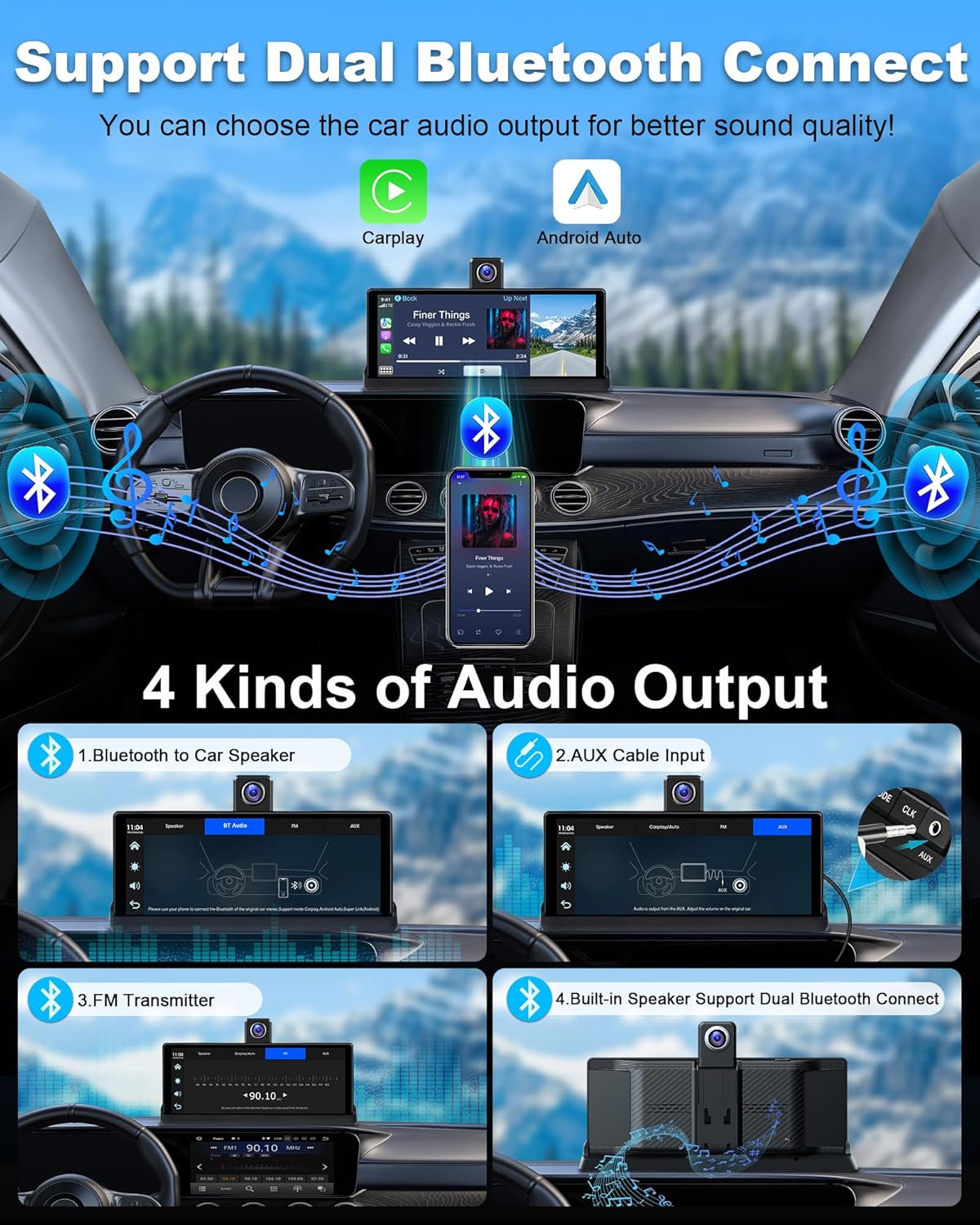
9-сүрөт: Аудио чыгаруу параметрлери
5. Техникалык тейлөө
To ensure the longevity and optimal performance of your Vtopek Carplay Display, follow these maintenance guidelines:
- Тазалоо: Экранды жана сыртын тазалоо үчүн жумшак, кургак чүпүрөктү колдонуңуз. Бетине зыян келтирүүчү абразивдүү тазалагычтардан же эриткичтерден алыс болуңуз.
- Температура: Түзмөктү өтө ысык жана муздак температурага дуушар кылбаңыз, анткени бул анын электрондук компоненттерине таасир этиши мүмкүн.
- Кабелдик башкаруу: Ensure all cables are securely connected and not pinched or tangled, which could lead to damage or intermittent connections.
- Программалык камсыздоо жаңыртуулары: Periodically check for any available software updates for the device or its companion application to ensure optimal performance and access to new features.
6. Кыйынчылыктарды
If you encounter issues with your Vtopek Carplay Display, refer to the following common troubleshooting steps:
- Түзмөк күйбөй жатат:
- Ensure the power cord is securely plugged into both the display and the car's cigarette lighter.
- Унаанын тамеки күйгүзгүч розеткасы иштеп жатканын текшериңиз (мисалы, башка түзмөк менен сынап көрүү аркылуу).
- Verify your car's voltage 7-36V диапазонунда.
- Wireless CarPlay/Android Auto Disconnections:
- Ensure your smartphone's Wi-Fi and Bluetooth are enabled and connected to the display.
- Башка зымсыз түзмөктөрдөн кандайдыр бир тоскоолдук бар экенин текшериңиз.
- Дисплейди да, смартфонуңузду да өчүрүп-күйгүзүңүз.
- Verify your phone's compatibility (refer to section 4.1).
- Аудио чыгышы жок:
- Check the selected audio output method (Bluetooth, AUX, FM Transmitter).
- If using Bluetooth, ensure the display is paired with your car's audio system.
- Эгер AUX колдонуп жатсаңыз, кабель туура туташтырылганын жана унааңыздын аудио киргизүүсү AUXка коюлганын текшериңиз.
- If using FM Transmitter, ensure both the display and car radio are tuned to the same clear FM frequency.
- Adjust the volume on both the display and your car's audio system.
- Camera Not Recording/Displaying:
- Ensure the SD card is properly inserted and not full.
- Check the camera connections.
- Format the SD card through the device settings if issues persist (this will erase all data).
- Issues with Viidure App (as reported in a review):
- Ensure your phone has a stable Wi-Fi connection to the device.
- Check for app updates on your smartphone's app store.
- Try reinstalling the application.
Бул кадамдар маселени чечпесе, кардарларды колдоо кызматына кайрылыңыз.
7. Техникалык шарттар
| Бренд | Vtopek |
| Модель номери | T337S |
| Screen Size | 10.26 дюйм |
| Түс | Кара |
| Байланыш технологиясы | Bluetooth, WiFi |
| Өзгөчөлүктөр | App Control, Voice Control, G-sensor, Night Vision, Integrated Wi-Fi |
| Шайкеш түзмөктөр | Смартфон |
| Видео жаздыруу чечими | 2160p (4K) |
| талаасы View | 140 градус |
| Монтаж түрү | Куралдар тактасы |
| Камтылган компоненттер | 10.26" Carplay Screen, 1080p Rear Camera, 64GB SD Card, Power Cable, AUX Cable, Display Stand, Suction Cup Mount, 10m Extension Cable, User Manual |
8. Кепилдик жана колдоо
The Vtopek Carplay Display comes with a 1 жылдык кепилдик. For any technical issues or support inquiries, please contact our customer service team. Free technical support is available.
Кардарларды тейлөө электрондук почтасы: jenny@jansite.cn
