1. Продукт бүтүп калдыview
The ATTACK SHARK M87 PRO is a versatile mechanical gaming keyboard designed for high performance and customization. It features tri-mode connectivity (USB-C wired, 2.4Ghz wireless, and Bluetooth 5.0), allowing seamless switching between multiple devices. The keyboard boasts a hot-swappable design, enabling users to easily customize switches. Its gasket structure with five layers of padding ensures a pure and HIFI keystroke sound, while the vibrant 16.8M RGB illumination enhances the gaming atmosphere. Equipped with a 5000mAh battery, it offers extended usage on a single charge and is compatible with both Windows and Mac operating systems.

1-сүрөт: Жогорку view of the ATTACK SHARK M87 PRO Wireless Mechanical Gaming Keyboard.
2. Пакеттин мазмуну
- ATTACK SHARK M87 PRO Wireless Mechanical Gaming Keyboard
- 2-in-1 Keycap Switch Puller
- USB Type-C кабели
- Колдонуучунун Колдонмосу (бул документ)

Figure 2: The keyboard package includes the keyboard, a 2-in-1 keycap and switch puller, and a USB-C cable.
3. Орнотуу жана туташуу
3.1 Баскычтопту заряддоо
Before first use, it is recommended to fully charge the keyboard. Connect the provided USB Type-C cable to the keyboard's Type-C port and the other end to a USB power source (e.g., computer USB port, wall adapter). The keyboard features a 5000mAh battery for long-lasting performance.

Figure 3: The keyboard is equipped with a 5000mAh high-capacity battery for extended use.
3.2 Туташуу режимдери
The M87 PRO supports three connection modes: 2.4Ghz Wireless, Bluetooth 5.0, and USB Type-C Wired. Use the toggle switch located on the keyboard to select your desired mode.
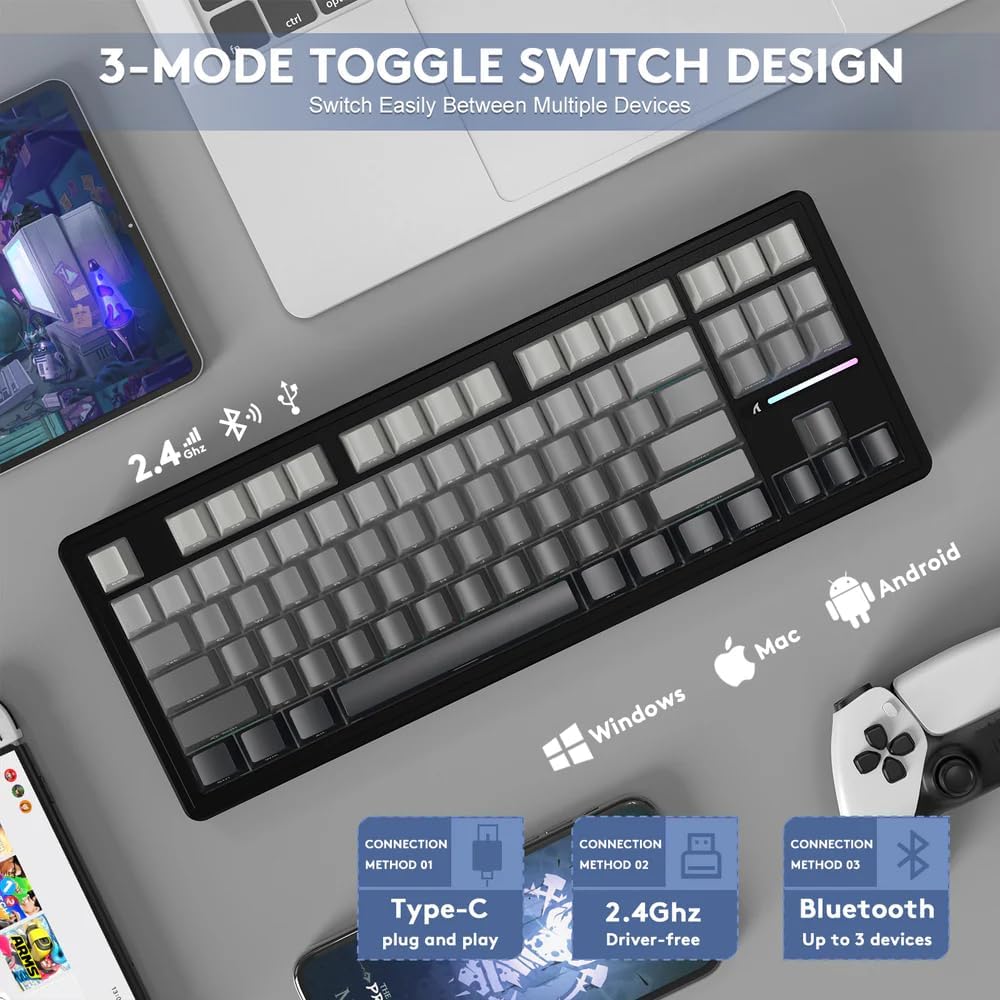
Figure 4: The keyboard features a 3-mode toggle switch for easy switching between Type-C wired, 2.4Ghz wireless, and Bluetooth connections.
3.2.1 2.4 ГГц зымсыз байланыш
- Адатта клавиатурадагы бөлүмдө сакталган 2.4 ГГц USB ресиверди табыңыз.
- USB ресиверди компьютериңиздеги жеткиликтүү USB портуна сайыңыз.
- Set the keyboard's mode switch to 2.4Ghz. The keyboard should automatically connect.
3.2.2 Bluetooth 5.0 туташуу
- Set the keyboard's mode switch to Bluetooth.
- On your device (PC, Mac, Tablet), enable Bluetooth and search for new devices.
- Select "ATTACK SHARK M87 PRO" from the list of available devices to pair. The keyboard can connect to up to 3 Bluetooth devices.
3.2.3 USB Type-C Wired Connection
- Берилген USB Type-C кабелин клавиатуранын Type-C портуна туташтырыңыз.
- Кабелдин экинчи учун компьютериңиздеги USB портуна туташтырыңыз.
- Set the keyboard's mode switch to Wired. The keyboard will function as a wired device and charge simultaneously.
4. Иштөө нускамалары
4.1 RGB арткы жарыкты башкаруу
The M87 PRO features vibrant RGB backlighting with 19 lighting effects and 8 color options. Use the following FN key combinations to control the backlight:
- FN + \ |: Switch Backlit Mode
- FN + Del: Switch Backlit Colors
- FN + Ctrl: Switch Side Backlit
- FN + ↑ / ↓: Adjust Backlight Brightness
- FN + ← / →: Adjust Backlight Speeds
- FN + End: Switch Function Bar Backlit
- FN + ESC: Restore to Factory Settings
- FN + Space: Turn Off/On the Backlight

Figure 5: Illustration of FN key combinations for controlling RGB backlight effects and brightness.
4.2 Ыкчам алмаштырылуучу которгучтар жана баскычтоп капкактары
The M87 PRO is designed with a hot-swappable base, allowing you to easily change switches without soldering. It is compatible with most 3-pin or 5-pin mechanical switches. The default switches are pre-lubricated linear white jade switches.

Figure 6: The hot-swappable PCB allows for easy replacement of switches, compatible with 3 or 5-pin mechanical switches.
The keycaps are Cherry profile PBT keycaps with side-printed letters, offering a minimalist and clean aesthetic. Use the provided 2-in-1 keycap switch puller to remove and install keycaps and switches.
4.3 Батареянын абалын текшерүү
Зымсыз режимде батареянын деңгээлин текшерүү үчүн басыңыз FN + ALT. A green light indicates sufficient power, while a red light indicates insufficient power, signaling that charging is required.
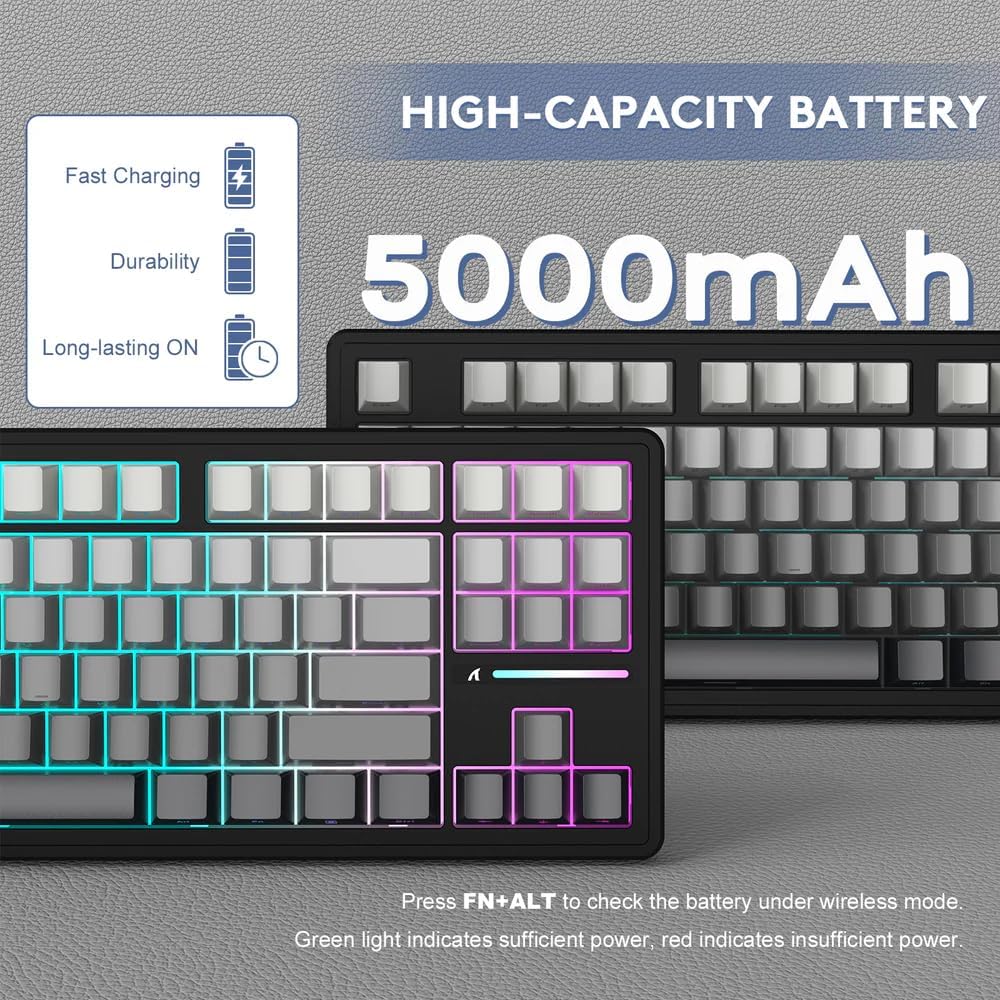
Figure 7: Press FN+ALT to check battery status. Green indicates sufficient power, red indicates low power.
5. Техникалык тейлөө
5.1 Баскычтопту тазалоо
To maintain the keyboard's appearance and functionality, regularly clean it. Use a soft, lint-free cloth to wipe down the keycaps and chassis. For deeper cleaning, you can remove keycaps using the provided puller and use compressed air to clear debris from underneath.
5.2 Коммутаторлорду алмаштыруу
If a switch becomes faulty or you wish to customize your typing experience, you can replace the switches. Use the switch puller to gently remove the existing switch. Align the new 3-pin or 5-pin switch with the holes on the PCB and press down firmly until it clicks into place. Ensure the pins are straight before insertion to avoid bending them.
6. Кыйынчылыктарды
- Баскычтоп жооп бербей жатат:
- Баскычтоп кубатталганын текшериңиз.
- Check the connection mode switch (wired, 2.4Ghz, Bluetooth) matches your intended connection.
- For 2.4Ghz, ensure the USB receiver is securely plugged in.
- For Bluetooth, ensure the keyboard is paired and selected on your device. Try re-pairing if necessary.
- Зымсыз көйгөйлөрдү болтурбоо үчүн USB-C кабели аркылуу туташтырып көрүңүз.
- RGB чырактары иштебей жатат же туура эмес:
- Ensure the backlight is turned on (FN + Space).
- Adjust brightness (FN + ↑).
- Try resetting to factory settings (FN + ESC).
- Катталбаган ачкычтар же эки жолу терүү:
- This could indicate a faulty switch. Use the switch puller to remove the problematic switch and replace it with a spare or new one.
- Коммутатордун платага толугу менен орнотулганын текшериңиз.
- Connectivity issues (lag, disconnections):
- Баскычтоп кабыл алгычтын/түзмөктүн диапазонунда экенин текшериңиз.
- Башка зымсыз түзмөктөрдүн кийлигишүүсүн азайтыңыз.
- Баскычтоптун батареясы аз эмес экенин текшериңиз.
Video 1: Official product video demonstrating the ATTACK SHARK M87 PRO Tri-Mode Mechanical Keyboard features and usage. This video highlights the keyboard's design, hot-swappable switches, and connectivity options.
7. Техникалык шарттар
| Өзгөчөлүк | Description |
|---|---|
| Баскычтоптун аталышы | M87 Pro V2 Custom Mechanical Keyboard |
| Макет | 80% with 87 keys |
| Түс | Moonlight (Gradient Color Keycaps) |
| Которуу | Custom Linear White Jade Switch |
| Axle-Beat | Kailh shaft seat |
| Структура | Gasket Structure, Full Key Hot Swappable, All Key Non-Conflict |
| Ички толтуруу | PORON foam, 10x IXPE switch pad, PET noise cancellation pad, Japanese DEPEM dampening pad, Silicon pad |
| Light Position | South Facing LED |
| Арткы жарык | About 16.8 million RGB, 19 lighting effects and 8 light colors |
| Баскычтоптун капкагынын бийиктиги | Cherry Profile |
| Keycap Technology | Double shot injection PBT keycaps/Side engraved luminous character |
| Жайгашкан такта | Slot PC positioning plate |
| PCB | 1.2mm Single key slotted |
| Батарея сыйымдуулугу | 5000mAh |
| Туташуу режими | Tri-mode connection (Type-C Wired, 2.4Ghz Wireless, Bluetooth 5.0) |
| Actuate | Full key User-defined keys |
| Системаны колдоо | Windows / MacOS / Linux |
| Пакеттин өлчөмдөрү | 15.94 x 7.28 x 2.09 дюйм |
| Элемент Салмагы | 2.61 фунт |

Figure 8: Detailed specifications and features of the M87 PRO keyboard, including its gasket structure and PCB design.
8. Кепилдик жана колдоо
Specific warranty information for the ATTACK SHARK M87 PRO Wireless Mechanical Gaming Keyboard is typically provided with your purchase documentation or can be found on the official ATTACK SHARK website. For technical support, troubleshooting assistance, or warranty claims, please refer to the contact information provided by the manufacturer or your retailer.
You can visit the official ATTACK SHARK store for more information: ATTACK SHARK Store.


