1. Киришүү
Welcome to the user manual for your Ulefone Armor 27 Rugged Smartphone. This device is engineered for durability and high performance, featuring a robust design, a powerful 10600mAh battery, advanced camera systems including night vision, and the latest Android 14 operating system. This manual provides essential information for setting up, operating, maintaining, and troubleshooting your device.

Figure 1.1: Ulefone Armor 27 Rugged Smartphone
The Ulefone Armor 27 is designed to withstand challenging environments, boasting IP68/IP69K water and dust resistance, and MIL-STD-810H shockproof certification. Its large battery ensures extended usage, while the MediaTek Helio G99 processor provides smooth performance for daily tasks and gaming.
2. Кутуда эмне бар
Ulefone Armor 27 телефонуңузду кутудан чыгарганда, төмөнкү нерселердин баары камтылганын текшериңиз:
- 1 x Ulefone Armor 27 Smartphone
- 1 x AC Power Charger (100~240V)
- 1 x Type-C to Type-C Data Cable (100cm)
- 1 x Screen Protector (Pre-installed)
- 1 x Tempered Glass Screen Protector
- 1 x SIM Tray Ejector
- 1 x Lanyard
- 1 x Көп тилдүү колдонуучу колдонмосу (бул документ)
- 1 x Multi Function Instruction Card
- 1 x Charging Instruction Card
- 1 x Safety Prompt Card
- 1 x Accessories Ecosystem Brochure
- 1 x Service Center APP Instructions
- 1 x Thermal Imaging User Manual (if applicable)

2.1-сүрөт: Пакеттин мазмуну
3. Орнотуу колдонмосу
3.1 SIM карта жана MicroSD орнотуу
The Ulefone Armor 27 supports dual Nano SIM cards and a microSD card for expandable storage. Locate the SIM tray on the side of the device. Use the provided SIM tray ejector tool to open the tray. Carefully place your Nano SIM cards and/or microSD card into the designated slots, ensuring correct orientation. Close the tray securely to maintain the device's water and dust resistance.
3.2 Алгачкы заряддоо
Before first use, it is recommended to fully charge your Ulefone Armor 27. Connect the provided Type-C cable to the phone's charging port and the AC power charger to a wall outlet. The device supports 33W fast charging. For convenience, it also supports 30W Qi wireless charging. Simply place the phone on a compatible wireless charging pad. The 10600mAh battery provides extended standby and talk times.
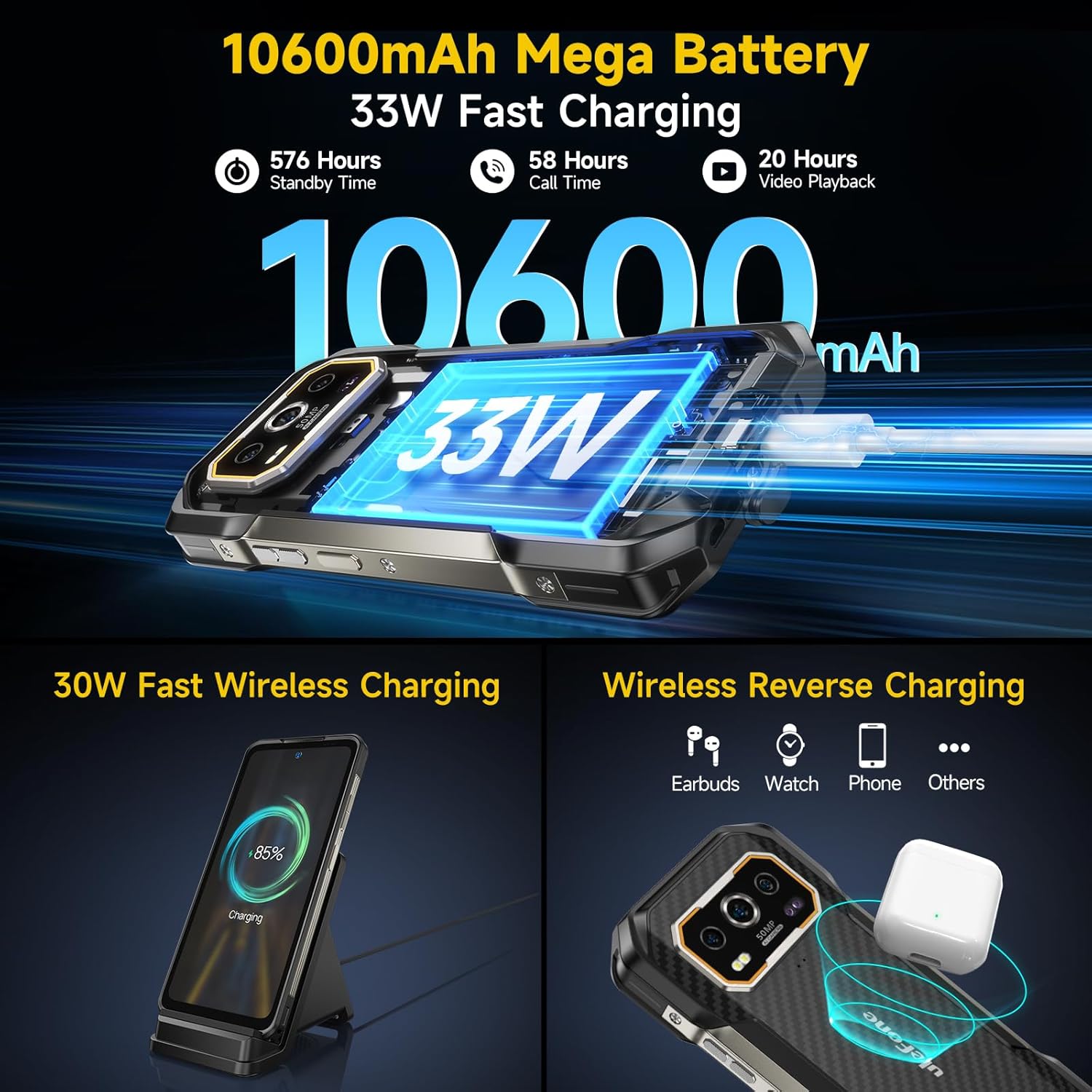
Figure 3.1: Battery and Charging Capabilities
3.3 Күйгүзүү/өчүрүү
To power on your device, press and hold the Power button (located on the side) until the Ulefone logo appears. To power off, press and hold the Power button, then select 'Power off' from the options that appear on the screen.
4. Аппаратыңызды иштетүү
4.1 Дисплей жана навигация
The Ulefone Armor 27 features a 6.78-inch FHD+ display with a 120Hz refresh rate, offering a smooth and immersive visual experience. The screen is protected by Corning Gorilla Glass Victus, providing enhanced durability against scratches and drops.

Figure 4.1: High-Refresh-Rate Display
4.2 Камеранын өзгөчөлүктөрү
Ар тараптуу камера системасы менен укмуштуудай сүрөттөрдү жана видеолорду тартыңыз:
- 50MP Негизги камера: Equipped with a 1/1.31-inch ultra-large sensor for high-resolution images.
- 64MP түнкү көрүү камерасы: Allows clear visibility and targeting in low-light or unlit environments.
- 32MP алдыңкы камера: For sharp and detailed selfies and video calls.
- Суу астындагы режим: Enables taking photos and videos while submerged, ideal for swimming or diving.

Figure 4.2: Advanced Camera System
4.3 Байланыш
Stay connected with various network and wireless options:
- 4G тармагы: Supports WCDMA and LTE networks for global connectivity.
- Wi-Fi 6: For faster and more stable wireless internet connections.
- Bluetooth 5.2: For efficient pairing with wireless accessories.
- NFC: Тийбей туруп төлөмдөр жана туура келген түзмөктөр менен тез жупташтыруу үчүн.

Сүрөт 4.3: Байланыш параметрлери
4.4 Өзгөчөлүктөр
The Ulefone Armor 27 includes several unique features for enhanced usability:
- Fingerprint ID & Face ID: Secure and convenient unlocking methods.
- Ыңгайлаштырылган ачкыч: A programmable side button for quick access to frequently used functions or apps.
- IR жардыргыч: Шайкеш үй техникасын көзөмөлдөңүз.
- FM радиосу: Enjoy radio without needing headphones (headset-free FM).
- 3.5 мм гарнитура уячасы: Салттуу зымдуу аудио байланыштар үчүн.
- GPS: Так багыттоо үчүн интеграцияланган GPS, ГЛОНАСС, Beidou жана Galileo.
- uSmart Accessories Support: Compatible with Ulefone's uSmart connector for external accessories like endoscopes and microscopes.
- Колкап режими: Enhances touch sensitivity for operation while wearing gloves.

Figure 4.4: Additional Functionalities
5. Техникалык тейлөө жана туруктуулук
The Ulefone Armor 27 is built to be highly durable, with certifications for extreme conditions:
- IP68/IP69K рейтинги: This means the phone is dustproof and can withstand immersion in water up to 2 meters deep for 30 minutes, as well as high-pressure, high-temperature water jets.
- MIL-STD-810H сертификациясы: Tested to military standards for shock resistance, capable of surviving drops from up to 2 meters without damage.
- Өтө Температура каршылык: Designed to perform reliably in temperatures ranging from -30°C (-22°F) to 55°C (131°F).

Figure 5.1: Ruggedness and Durability
5.1 Тазалоо жана кам көрүү
To maintain your device's performance and appearance, wipe it regularly with a soft, damp cloth. Avoid using harsh chemicals or abrasive materials. Ensure all port covers are securely closed before exposing the phone to water or dusty environments.
6. Кыйынчылыктарды
6.1 Тармактын шайкештиги
The Ulefone Armor 27 is an unlocked 4G smartphone. It is compatible with T-Mobile and supports WCDMA and LTE networks. Маанилүү эскертүү: Бул аппарат болуп саналат ЖОК compatible with AT&T, Cricket, Metro PCS, Sprint, Boost Mobile, or Verizon networks. Please ensure your carrier supports the device's network bands before purchase.
6.2 Жалпы маселелер
- Түзмөк жооп бербейт: Эгер түзмөгүңүз жооп бербей калса, өчүрүп-күйгүзүү үчүн Күйгүзүү баскычын болжол менен 10-15 секунд басып туруңуз.
- Unexpected Restarts or Display Anomalies: Ensure your device's software is up to date. Check for available system updates in the Settings menu. If issues persist, a factory reset may be necessary (back up your data first).
- кубаттоо маселелери: Verify that the charging cable and adapter are securely connected and undamaged. Try a different outlet or charging method (wired vs. wireless) to isolate the problem.
- Сигнал/байланыш начар: Check your SIM card installation. Ensure you are within your carrier's supported network area. If using Wi-Fi, verify your router is functioning correctly.
For further assistance, utilize the Exclusive Service Center App pre-installed on your device. This app provides direct access to support resources and troubleshooting guides.
7. Техникалык шарттар
| Өзгөчөлүк | Спецификация |
|---|---|
| Модель аты | Ulefone Armor 27 Rugged Phone |
| Операция системасы | Android 14 |
| Процессор | MTK Helio G99 Octa Core 2.2Hz |
| RAM | 24 ГБ чейин (12 ГБ физикалык + 12 ГБ виртуалдык) |
| Ички сактагыч | 256 ГБ |
| Кеңейтүүчү сактагыч | 2 ТБ чейин (microSD) |
| Screen Size | 6.78 дюйм |
| Display Resolution | 1080 x 2460 FHD+ |
| Жаңыртуу ылдамдыгы | 120Hz |
| Башкы камера | 50MP |
| Түнкү көрүнүш камерасы | 64MP |
| Алдыңкы камера | 32MP |
| Батарея сыйымдуулугу | 10600mAh |
| Зымдуу кубаттоо | 33W тез заряддоо |
| Зымсыз заряддоо | 30W Qi зымсыз кубаттоо |
| Суу/чаңга туруктуулук | IP68/IP69K |
| Сокку каршылык | MIL-STD-810H (2m drop) |
| Байланыш | 4G LTE, Wi-Fi 6, Bluetooth 5.2, NFC |
| Аудио Jack | 3.5 мм |
| Элемент Салмагы | 1.81 фунт (болжол менен 821 г) |
| Өлчөмдөр | 7.83 x 4.29 x 2.83 дюйм (Пакет) |
8. Кепилдик жана колдоо
Ulefone provides support for its products. For any technical issues, warranty claims, or general inquiries, please utilize the Exclusive Service Center App pre-installed on your Ulefone Armor 27. This application is designed to provide instant, personalized support and access to FAQs, contact information, and service options.
Please refer to the warranty card included in your product packaging for specific warranty terms and conditions applicable to your region. Keep your proof of purchase for warranty validation.


