Introduction
This manual provides comprehensive instructions for the setup, operation, and maintenance of your GUSGU Transparent Case with Wireless Keyboard. Please read this manual thoroughly to ensure proper use and to maximize the functionality of your device.
Шайкештик
This keyboard case is designed for specific iPad models:
- iPad Air 13 дюймдук (M3, 2025)
- iPad Air 13 дюймдук (M2, 2024)
- iPad Pro 12.9 дюймдук (6-муундагы, 2022)
- iPad Pro 12.9 дюймдук (5-муундагы, 2021)
- iPad Pro 12.9 дюймдук (4-муундагы, 2020)
- iPad Pro 12.9 дюймдук (3-муундагы, 2018)
To verify your iPad model, check the back of your device for the model number (e.g., A2898).
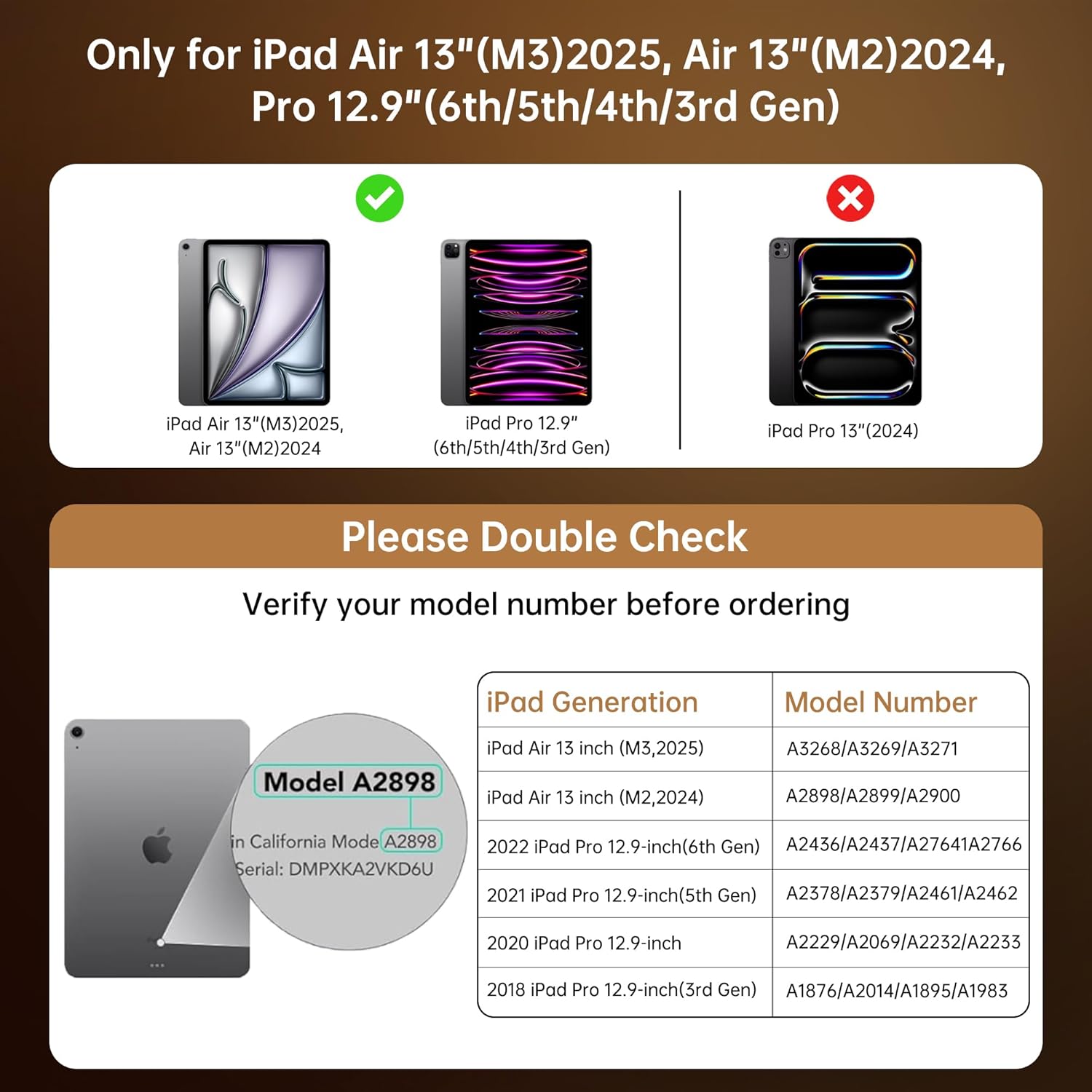
This chart provides essential compatibility information, detailing the specific iPad Air 13-inch (M3/M2) and iPad Pro 12.9-inch (6th/5th/4th/3rd Gen) models that are compatible with this keyboard case. It includes a visual guide on where to find your iPad's model number for verification.
Орнотуу нускамалары
- Insert Your iPad: Gently align your iPad with the case and press it into the protective frame until it is securely seated. Ensure all ports and buttons are accessible. The case provides secure, form-fit protection.
- Клавиатураны кубаттоо: Before first use, fully charge the keyboard. Connect the provided USB-C cable to the keyboard's charging port and to a power source. A full charge takes approximately 2 hours and provides up to 30 days of power.
- Pair the Keyboard via Bluetooth:
- Кубат баскычын жылдырып, баскычтопту күйгүзүңүз. Индикатор жарыгы күйүп-өчөт, бул анын жупташуу режиминде экенин билдирет.
- iPad'иңизден төмөнкүгө өтүңүз Орнотуулар > Bluetooth.
- Bluetooth күйгүзүү.
- Select "GUSGU Keyboard" (or similar name) from the list of available devices.
- Follow any on-screen prompts to complete the pairing process. The indicator light will turn solid when successfully paired.

This graphic illustrates the efficient power management of the keyboard, showing that a 2-hour charge provides up to 30 days of usage, ensuring extended productivity.
Иштөө нускамалары
360° Rotating Stand & Multi-Angle Viewing
The case features a 360° swivel stand and offers 5 adjustable viewing angles. This allows for seamless transitions between typing, sketching, and media viewрежимдери.

This image displays the GUSGU Transparent Keyboard Case with an iPad, illustrating its versatile design. The main view shows the iPad attached to the keyboard, with smaller insets demonstrating how the case can rotate 360 degrees and be adjusted to multiple viewing angles for typing, drawing, or media consumption.
- Терүү режими: Position the iPad upright for a laptop-like experience.
- Эскиз режими: Lay the iPad flat or at a low angle for comfortable drawing or writing.
- Viewрежими: Adjust the iPad to various angles for watching videos or presentations.

This image illustrates three practical ways to use the keyboard case: 'Sketch' mode, where the iPad is laid flat for drawing; 'Watch Videos' mode, with the iPad angled for comfortable viewing; and 'Video Call' mode, positioning the iPad upright for communication.
Баскычтоптун арткы жарыгы
The keyboard features 7 colors of backlight and 3 brightness levels for comfortable typing in various lighting conditions.
- басыңыз Электр лампасы арткы жарыктын түстөрүн алмаштыруу баскычы.
- басыңыз Fn + Лампочка keys to adjust backlight brightness (3 levels).

A visual representation of the keyboard's customizable backlight feature, showcasing the seven distinct colors and three adjustable brightness levels available to personalize the typing experience.

Жакын план view of hands typing on the keyboard, emphasizing the comfortable and responsive typing experience provided by the backlit keys and scissor-switch mechanism with 1mm key travel.
Precision Trackpad
The integrated trackpad supports multi-touch gestures for intuitive navigation, similar to a laptop. Familiar gestures include:
- Серпүү: Move your finger across the trackpad to navigate.
- Жылдыруу: Өйдө же ылдый сыдыруу үчүн эки манжаңызды колдонуңуз.
- Чымчуу: Чоңойтуу же кичирейтүү үчүн эки манжаңызды колдонуңуз.
- Эки жолу таптаңыз: Элементтерди тандаңыз же колдонмолорду ачыңыз.
- Колдонмолорду алмаштыруу: Use three or four fingers to swipe between open applications (iPadOS dependent).

This image shows a hand interacting with the precision multi-touch trackpad, illustrating its responsiveness and support for various gestures, enhancing navigation and control.
Apple карандаш кармагычы
The case includes a dedicated magnetic holder for your Apple Pencil, ensuring it is securely stored and readily accessible without needing to remove the case.

This image highlights two key features: the robust, form-fitting protection provided by the case, particularly around the iPad's edges, and the convenient, integrated holder designed to securely store an Apple Pencil.
Авто уйку/ойгонуу функциясы
The case supports the iPad's auto sleep/wake function. Closing the case will put your iPad to sleep, and opening it will wake it up, conserving battery life.
Техникалык тейлөө
- Ишти тазалоо: жумшак колдонуу, damp Корпустун сыртын сүртүү үчүн чүпүрөк колдонуңуз. Катуу химиялык заттардан же абразивдүү материалдардан алыс болуңуз.
- Баскычтопту тазалоо: Use a soft, dry cloth or a can of compressed air to clean between the keys. Do not spray liquid directly onto the keyboard.
- Сактагыч: When not in use for extended periods, ensure the keyboard is turned off to conserve battery. Store the case in a cool, dry place.
Проблемаларды чечүү
- Баскычтоп туташпай жатат:
- Баскычтоп күйгүзүлгөнүн жана толук кубатталганын текшериңиз.
- Check your iPad's Bluetooth settings to confirm Bluetooth is enabled and the keyboard is paired. If not, try re-pairing.
- iPad жана клавиатураны өчүрүп күйгүзүңүз.
- Ачкычтар жооп бербейт:
- Баскычтоптун Bluetooth аркылуу туташканын текшериңиз.
- Баскычтоптун батареясынын деңгээлин текшериңиз.
- Ачкычтардын айланасындагы калдыктарды тазалаңыз.
- Сенсордук панель иштебей жатат:
- Баскычтоптун туташып турганын текшериңиз.
- iPadOS жөндөөлөрүн трекпаддын иштешин текшериңиз.
- iPad'иңизди өчүрүп күйгүзүңүз.
- Backlight Not Working/Changing:
- Баскычтоп күйгүзүлгөнүн текшериңиз.
- Press the Light Bulb key or Fn + Light Bulb keys to cycle through options.
- Батареянын деңгээлин текшериңиз, анткени батареянын аздыгы жарыкты өчүрүп коюшу мүмкүн.
Техникалык шарттар
| Бренд | ГУСГУ |
| Шайкеш түзмөктөр | iPad Air 13-inch (M2/M3), iPad Pro 12.9-inch (6th/5th/4th/3rd Gen) |
| Keyboard Description | Ergonomic Backlit Keyboard (7 colors, 3 brightness levels, scissor-switch, 1mm travel) |
| Trackpad | Precision Multi-Touch Trackpad |
| Power Source | Battery Powered (2-hour charge for 30-day power) |
| Баскычтоптун жайгашуусу | QWERTY |
| Колдун багыты | Эки тараптуу |
| Элемент Салмагы | 2.86 фунт |
| Пакеттин өлчөмдөрү | 12.13 x 10.24 x 1.18 дюйм |
Кепилдик жана колдоо
GUSGU provides lifetime customer support for this product. If you encounter any issues or have questions, please contact GUSGU customer service for assistance.
Кошумча жардам алуу үчүн, сураныч, баш багыңыз GUSGU Store on Amazon.


