Introduction
Thank you for choosing the Gritin G1310 Rechargeable Book Light. This manual provides essential information for the safe and efficient operation of your device. Please read it thoroughly before use and retain it for future reference.
Продукт бүттүview
The Gritin G1310 is a compact, eye-caring LED reading light designed for comfortable reading in various environments. It features adjustable color temperatures, brightness levels, and a flexible design for optimal illumination.
Негизги өзгөчөлүктөрү:
- Көзгө кам көрүү дизайн: 7 high-quality LED beads with a unique honeycomb lampshade for soft, diffused, anti-glare, anti-flicker, and anti-shadow lighting.
- Adjustable Color Modes: Three color temperatures (1800K Amber, 3400K Mixed, 6000K White) to suit different reading preferences and environments.
- Flexible Brightness Control: 5 preset brightness levels and stepless dimming from 10% to 100%.
- Узак мөөнөттүү батарея: Built-in 600mAh USB-C rechargeable battery provides up to 80 hours of illumination.
- Көп бурчтуу тууралоо: Light head rotates 90° left/right, tilts 45° downwards, and the clip adjusts 215° for precise positioning.
- Эстутум функциясы: Automatically recalls the last used color temperature and brightness settings.
- Портативдик дизайн: Compact and lightweight, made from durable ABS material.
Пакеттин мазмуну
- Gritin G1310 Rechargeable Book Light
- USB-C заряддоо кабели
- User Manual
Жайгашуу
Charging the Book Light
Before first use, fully charge the book light. The device comes with a built-in 600mAh battery and a USB-C charging port.
- Түзмөктөгү USB-C кубаттоо портун табыңыз.
- Connect the provided USB-C cable to the book light and the other end to a USB power source (e.g., computer, wall adapter).
- The power indicator lights will illuminate to show charging status. All four lights indicate a full charge.

Image: Gritin G1310 Book Light with USB-C charging port and battery indicator showing 80 hours of use from a 600mAh battery.
Attaching the Book Light
The book light features a sturdy clip for attachment to books, e-readers, or other surfaces.
- Gently open the clip and attach it to the desired page or cover of your book.
- Ensure the clip is securely fastened to prevent the light from falling.
Иштөө нускамалары
Күйгүзүү/өчүрүү
- Press the power button (marked with a circle and vertical line) once to turn the light on or off.
Түс температурасын тууралоо
The book light offers three distinct color temperatures.
- Short press the color temperature adjustment button (marked with a thermometer icon) to cycle through the modes: Amber Light (1800K), Mixed Light (3400K), and White Light (6000K).
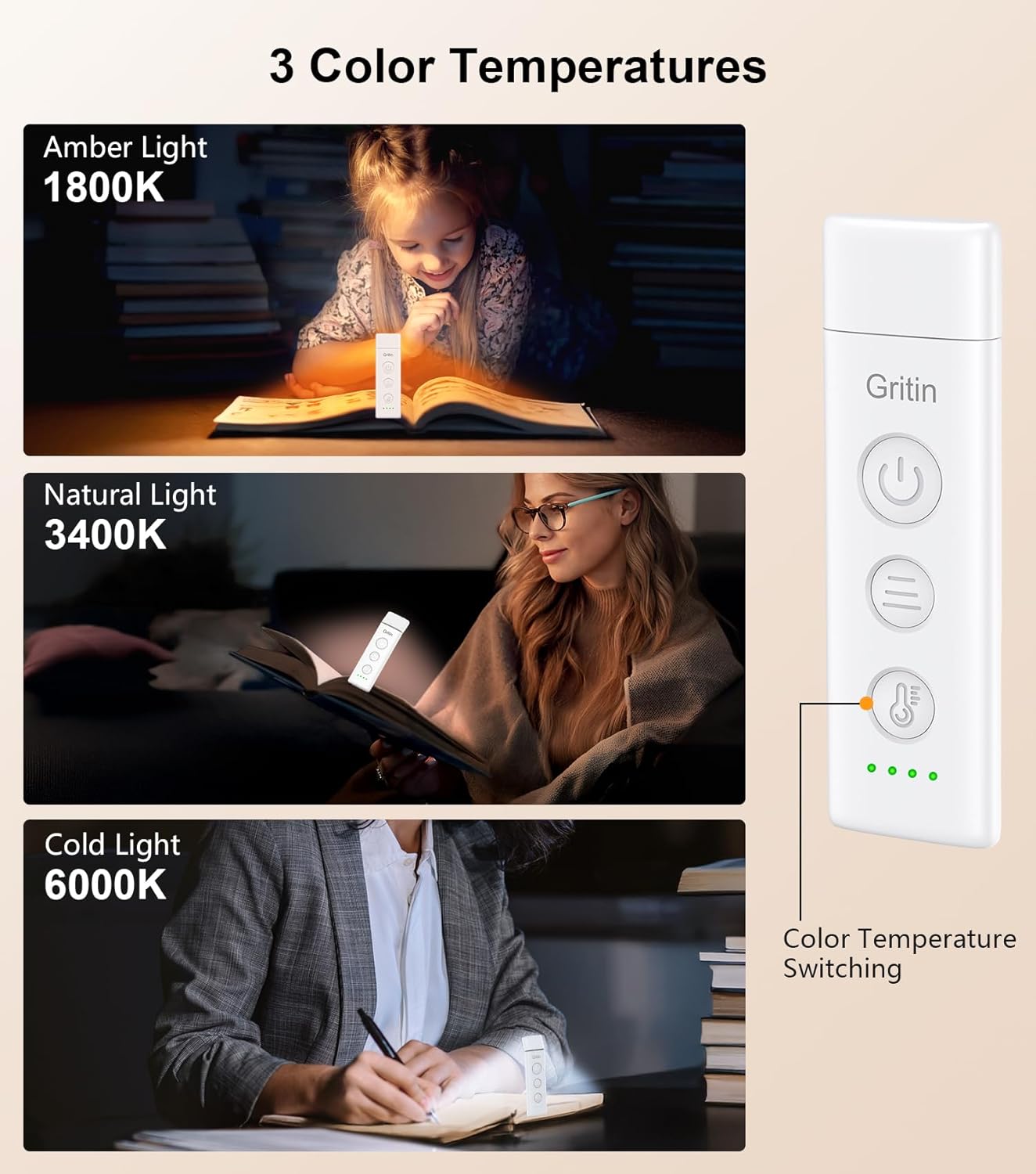
Image: Gritin G1310 Book Light showing three color temperature options: Amber (1800K), Natural (3400K), and Cold (6000K) with a user reading under each light setting.
Жарыктыкты жөндөө
The book light provides both preset brightness levels and stepless dimming.
- Preset Brightness: Short press the brightness adjustment button (marked with three horizontal lines) to quickly switch between 10%, 25%, 50%, 75%, and 100% brightness levels.
- Кадамсыз күңүрттөө: Long press the brightness adjustment button for 4 seconds to smoothly adjust the brightness from 10% to 100%. Release the button when the desired brightness is reached.
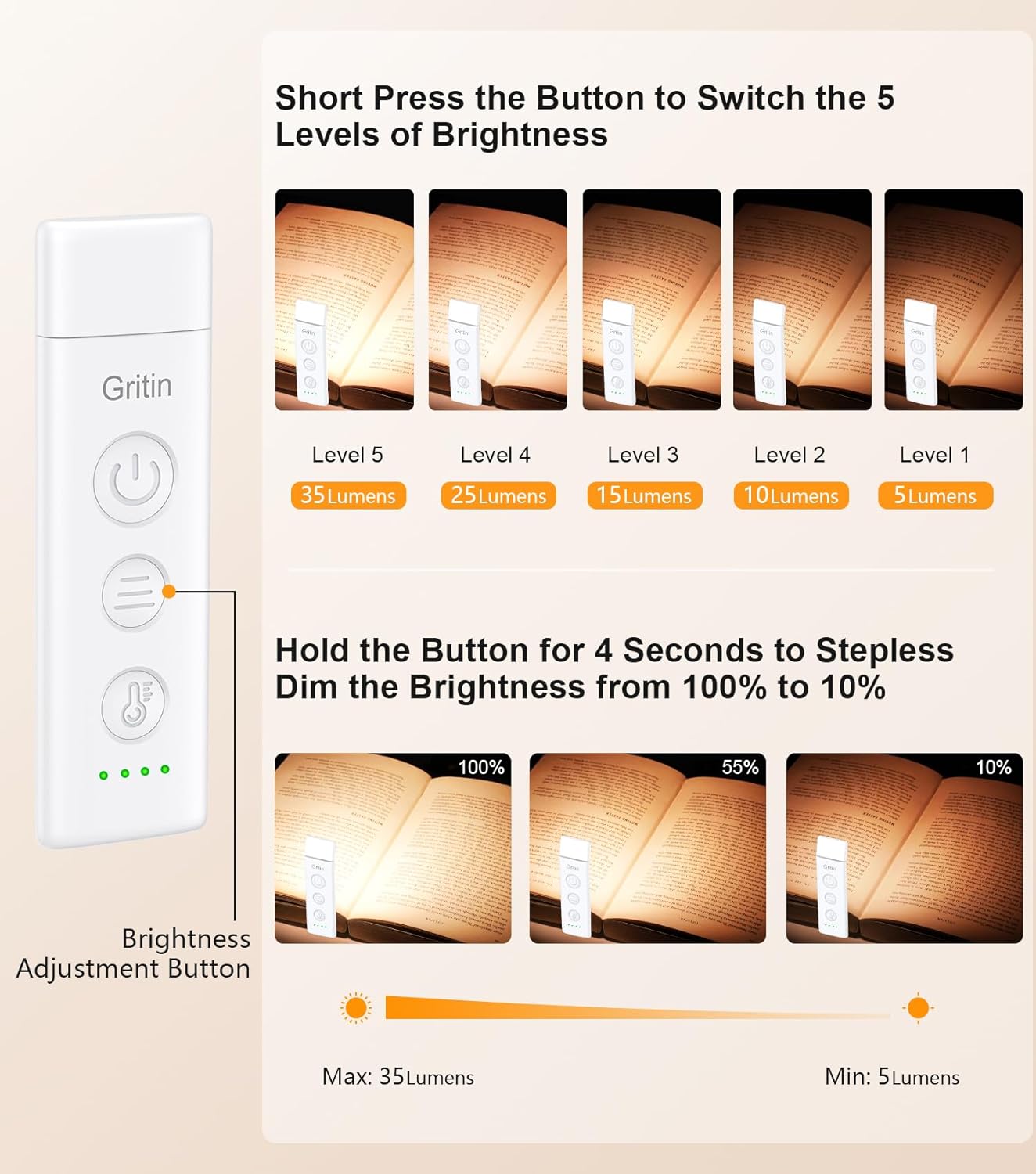
Image: Gritin G1310 Book Light illustrating 5 levels of brightness (5 to 35 lumens) with short presses and stepless dimming (10% to 100%) with a long press of the brightness adjustment button.
Жарык бурчту тууралоо
The flexible design allows for precise light positioning.
- The light head can be rotated 90° to the left or right.
- The light head can be tilted 45° downwards.
- The clip base can be adjusted up to 215°.
- Adjust the light head and clip to direct the illumination exactly where needed.

Image: Gritin G1310 Book Light demonstrating flexible angle adjustment: 90 degrees left/right rotation and 45 degrees downward tilt of the light head.
Техникалык тейлөө
Тазалоо
- Тазалоодон мурун аппарат өчүрүлгөнүн текшериңиз.
- Бетти жумшак, кургак чүпүрөк менен сүртүңүз.
- Абразивдүү тазалагычтарды же эриткичтерди колдонбоңуз, алар финишке зыян келтириши мүмкүн.
Сактагыч
- Китепти салкын, кургак жерде, күндүн түз тийген нурларынан жана өтө жогорку температурадан алыс сактаңыз.
- Узак мөөнөткө сактасаңыз, анын ден соолугун сактоо үчүн батареяны мезгил-мезгили менен заряддаңыз.
Проблемаларды чечүү
| Көйгөй | Мүмкүн себеп | Чечим |
|---|---|---|
| Жарык күйбөйт. | Батарея түгөнүп калды. | Charge the book light using the provided USB-C cable. |
| Жарык бүлбүлдөп же күңүрт. | Батарея аз. | Китептин жарыгын кайра заряддаңыз. |
| Түс режимин же жарыктыгын өзгөртүү мүмкүн эмес. | Туура эмес баскыч басуу. | Ensure you are using short presses for cycling modes/levels and a long press for stepless dimming. |
| Жарык зарядды кармабайт. | Faulty charging cable or adapter; battery degradation. | Башка USB-C кабелин жана кубат адаптерин колдонуп көрүңүз. Эгер көйгөй чечилбесе, кардарларды колдоо кызматына кайрылыңыз. |
Техникалык шарттар
| Өзгөчөлүк | Деталь |
|---|---|
| Модель аты | G1310 |
| Жарык булагы түрү | LED (7 шуру) |
| Түс температурасы | 1800K (Amber), 3400K (Mixed), 6000K (White) |
| Жарыктык деңгээли | 5 preset levels (10%, 25%, 50%, 75%, 100%), Stepless dimming (10%-100%) |
| Батарея сыйымдуулугу | 600 мАч литий полимери |
| Заряддоо порту | USB-C |
| Максималдуу жарыктандыруу убактысы | Up to 80 hours (at lowest setting) |
| Материал | ABS пластик |
| Продукциянын өлчөмдөрү | 4.31"D x 1.28"W x 0.59"H (10.97cmx3.26cmx1.5cm) |
| Элемент Салмагы | 1.52 унция (43 грамм) |
| Тtage | 5 вольт |
| Ватtage | 1.5 Ватт-саат |
Коопсуздук маалыматы
- Аппаратты ажыратпаңыз же өзгөртпөңүз.
- Keep away from water and high humidity. This product is not waterproof.
- LED жарыгына көздүн түз тийүүсүнө узак убакыт бою жол бербеңиз.
- Балдар жетпеген жерде сактаңыз.
- Use only the provided or certified USB-C charging cable.
Кепилдик жана колдоо
Кепилдик
Gritin products come with a standard manufacturer's warranty. Please refer to the product packaging or the official Gritin webатайын кепилдик шарттары жана шарттары үчүн сайт.
Кардарларды колдоо
For any questions, technical support, or warranty claims, please contact Gritin customer service through the retailer where the product was purchased or visit the official Gritin webбайланыш маалыматы үчүн сайт.


