1. Киришүү
Thank you for choosing the Donner DDP-95 Digital Piano. This instrument is designed to provide an authentic piano playing experience with modern digital features, suitable for beginners and experienced players alike. This manual provides essential information for the safe and effective use of your digital piano.
1.1 Коопсуздук маалыматы
- Электр камсыздоо: Белгиленген кубат адаптерин гана колдонуңуз. Voltage сиздин жергиликтүү электр камсыздооңузга дал келет.
- Жайгашкан жери: Пианинону туруктуу, тегиз жерге коюңуз. Түз күн нурунан, жылуулук булактарынан жана ашыкча нымдуулуктан алыс болуңуз.
- Тазалоо: Тазалоо үчүн жумшак, кургак чүпүрөктү колдонуңуз. Суюк тазалагычтарды же эриткичтерди колдонбоңуз.
- Суу жана ным: Keep the instrument away from water or any liquids. Do not operate with wet hands.
- Вентиляция: Ensure proper ventilation around the instrument to prevent overheating.
- Тейлөө: Do not attempt to repair the instrument yourself. Refer all servicing to qualified personnel.
2. Продукт бүтүп калдыview
The Donner DDP-95 features an 88-key weighted keyboard, a 4.3-inch LCD display, and a wide array of tones, rhythms, and teaching modes to enhance your musical journey.
2.1 Негизги компоненттер
- Digital Piano Unit (Keyboard and Stand)
- 3-Pedal System (Soft, Sostenuto, Sustain)
- Музыкалык эс алуу
- Кубаттуу адаптер
- User Manual

2.1-сүрөт: Donner DDP-95 санариптик пианиносу, көрсөтүүasing its full size, integrated stand, and three-pedal unit.

2.2-сүрөт: жогорудан ылдыйга view of the DDP-95 control panel, highlighting the LCD display and various function buttons for wireless connection, split, dual tones, MP3, transpose, chord, drum kit, and metronome.
3. Орнотуу
3.1 Ассамблея
The DDP-95 typically comes with the keyboard and stand as separate components. Follow the included assembly guide for detailed instructions on attaching the keyboard to the stand and securing the pedal unit. Ensure all screws are tightened securely before use.
3.2 Кубатты туташтыруу
- Connect the DC power adapter to the DC 15V input jack on the rear of the piano.
- Адаптерди стандарттуу электр розеткасына сайыңыз.
3.3 Педалдарды туташтыруу
Connect the pedal unit cable to the 'PEDAL' jack on the rear of the piano. The DDP-95 features a 3-pedal system for Soft, Sostenuto, and Sustain functions.

Figure 3.1: The three-pedal system, including Soft, Sostenuto, and Sustain pedals, designed for an authentic playing experience.
3.4 Аудио байланыштар
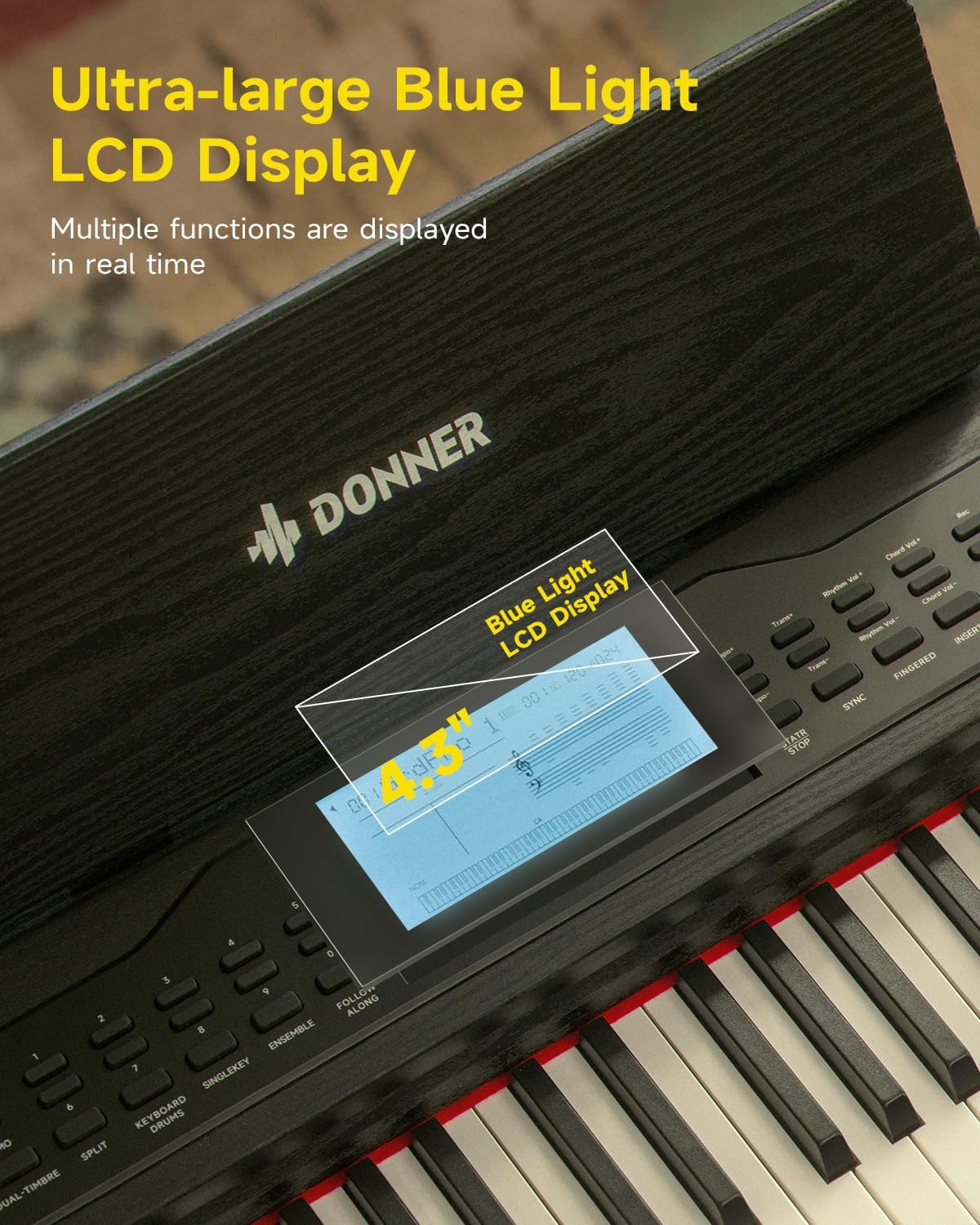
Figure 3.2: Rear panel connections, including (1) DC power jack, (2) Sustain Pedal Jack, (3) Headphone jack, (4) Audio input/output jacks, and (5) USB-MIDI port for connecting to computers, smartphones, and tablets.
- Наушник: Connect standard 6.35mm stereo headphones to the 'HEADPHONE' jack for private practice.
- Аудио кириш/чыгыш: Use the 'AUDIO IN' and 'AUDIO OUT' 6.35mm jacks to connect to external audio devices like amplifiers, mixers, or other instruments.
3.5 USB-MIDI and Bluetooth Connectivity
- USB-MIDI: Connect the piano to a computer, smartphone, or tablet using a USB-MIDI cable for MIDI data transfer with compatible software.
- Bluetooth: The DDP-95 supports wireless Bluetooth connection for MIDI-compatible applications. Refer to your device's Bluetooth settings and the application's instructions for pairing.
4. Иштөө нускамалары
4.1 Негизги операция
- Күйгүзүү/өчүрүү: Press the 'POWER' button to turn the piano on or off.
- Үндү көзөмөлдөө: Use the 'VOLUME' knob or buttons to adjust the overall sound level.
- Тон тандоо: The DDP-95 offers 610 tones. Use the 'TONE' buttons and the LCD display to browse and select different instrument sounds.
- Ритм тандоо: Choose from 600 rhythms (including 128 accompaniment styles) using the 'RHYTHM' buttons.
- Демо ырлар: Play through 100 built-in demo songs for inspiration or practice.
- Метроном: Убакытты жана ритмди машыктырууга жардам берүү үчүн метроном функциясын иштетиңиз.

Figure 4.1: ашыкview of the DDP-95's extensive sound library, including 610 tones, 600 rhythms, 110 demo songs, and 128-note polyphony.
4.2 LCD дисплей
The 4.3-inch blue light LCD display provides visual feedback on various settings and functions. It can show notes in staff notation, indicate key positions, and offer intuitive prompts.

Figure 4.2: The 4.3-inch blue light LCD display, showing real-time information and musical notation.

Figure 4.3: Detailed breakdown of the LCD display elements: (1) Tone/Demo/Rhythm Name, (2) Number of Bars, (3) Tempo, (4) Rhythmic Volume, (5) Indication of Active Keys, (6) Currently Used Function Icon, (7) Piano Score.
4.3 Баскычтоптун өзгөчөлүктөрү
- 88-Key Fully Weighted Keyboard: Provides an authentic piano feel with hammer action.
- 16-Level Touch Sensitivity: Adjusts the volume and timbre based on how hard or soft you play the keys, allowing for expressive dynamics.

Figure 4.4: Visual representation of the 16-level touch sensitivity, demonstrating how key weight influences sound effects from light to heavy.
4.4 Teaching Modes
The DDP-95 includes three teaching modes to assist learners:
- Бир ачкыч: Practice individual notes.
- Follow Along: The piano waits for you to play the correct note before proceeding.
- Бирге: Practice with an accompaniment, playing your part along with the built-in music.

Figure 4.5: Illustration of the three teaching modes: Single Key, Follow Along, and Ensemble, designed to guide learners progressively.
4.5 Жазуу жана ойнотуу
The piano allows you to record your performances, with a capacity of up to 5000 bytes. This feature is useful for reviewing your playing, identifying areas for improvement, and capturing musical ideas.
- Press the 'RECORD' button to start recording.
- Press 'PLAY' to listen to your recorded performance.
4.6 Кошумча функциялар
- Бөлүнгөн баскычтоп: Divides the keyboard into two sections, allowing two different tones to be played simultaneously or for two people to play together.
- Dual Tones: Layers two different tones to create a richer, more complex sound.
- Которуу: Бүтүндөй клавиатуранын тонун жарым тон кадамдары менен өйдө же ылдый жылдырат.
- Chord Function: Provides automatic chord accompaniment based on the keys played.
- Drum Kit: Access various drum sounds for rhythm creation.
5. Техникалык тейлөө
5.1 Тазалоо
To maintain the appearance and functionality of your DDP-95 Digital Piano:
- Бетти жумшак, кургак, түксүз чүпүрөк менен сүртүңүз.
- өжөр кир үчүн, бир аз гampчүпүрөккө суу куюп, анан дароо кургатып сүртүңүз.
- Avoid abrasive cleaners, waxes, or solvents as they can damage the finish.
5.2 Сактоо
When not in use for extended periods, store the piano in a cool, dry place, away from extreme temperatures and humidity. Cover the keyboard with a dust cover to protect the keys and internal components.
6. Кыйынчылыктарды
If you encounter issues with your Donner DDP-95, refer to the following common problems and solutions:
| Көйгөй | Мүмкүн себеп | Чечим |
|---|---|---|
| Үн жок | Үнү өтө төмөн; кулакчындар туташтырылган; кубат көйгөйү. | Increase volume; disconnect headphones; check power connection. |
| Ачкычтар жооп бербейт | Function mode active (e.g., teaching mode); internal error. | Exit special modes; power cycle the instrument. |
| Bluetooth байланышы ишке ашпай калды | Device not in pairing mode; interference; distance. | Ensure device is discoverable; reduce distance; restart both devices. |
| Бурмаланган үн | Volume too high; faulty cable; external speaker issue. | Lower volume; check/replace cables; test with different speakers/headphones. |
Бул чечимдерди колдонуп көргөндөн кийин көйгөй чечилбесе, Donner кардарларды колдоо бөлүмүнө кайрылыңыз.
7. Техникалык шарттар
| Өзгөчөлүк | Деталь |
|---|---|
| Модель аты | ДДП-95 |
| Ачкычтардын саны | 88 |
| Баскычтоптун түрү | Fully Weighted, Hammer Action |
| Touch Sensitivity | 16 деңгээл |
| Обондор | 610 |
| Ритмдер | 600 (128 Accompaniment Styles) |
| Демо ырлар | 100 |
| Полифония | 128-нот |
| Дисплей | 4.3" Blue Light LCD |
| Жаздыруу мүмкүнчүлүгү | 5000 XNUMX байтка чейин |
| Байланыш | Bluetooth, USB-MIDI, 6.35mm Headphone Jack, 6.35mm Audio In/Out Jacks |
| Педаалдар | Soft, Sostenuto, Sustain (3-Pedal System) |
| Power Source | DC 15V электр булагы |
| Элемент Салмагы | 65.9 фунт (болжол менен 29.9 кг) |
| Пакеттин өлчөмдөрү | 53.94 x 16.14 x 11.81 дюйм (болжол менен 137 x 41 x 30 см) |
8. Кепилдик жана колдоо
8.1 Кепилдик маалыматы
Donner products are manufactured to high-quality standards. For specific warranty terms and conditions, please refer to the warranty card included with your product or visit the official Donner webсайт. Кепилдик дооматтар үчүн сатып алганыңыздын далилин сактаңыз.
8.2 Кардарларды колдоо
If you have any questions, require technical assistance, or need to report an issue, please contact Donner customer support through their official website or the contact information provided in your product packaging. Provide your model number (DDP-95) and purchase details when seeking support.


