1. Киришүү
Бул колдонмо сиздин түзмөгүңүздү туура орнотуу, иштетүү жана техникалык тейлөө үчүн маанилүү маалыматты берет ViewSonic VA2708-4K-MHD 27-inch 4K UHD Monitor. Please read this manual thoroughly before using the product to ensure optimal performance and safety. The ViewSonic VA2708-4K-MHD is designed to deliver stunning visuals with its 4K Ultra HD resolution, SuperClear IPS technology, and HDR10 support, making it suitable for professional and multimedia applications.

Сүрөт: ViewSonic VA2708-4K-MHD monitor with key features highlighted.
2. Пакеттин мазмуну
Төмөндө тизмеленген нерселердин баары сиздин продукт таңгагыңызда бар экенин текшериңиз:
- VA2708-4K-MHD Monitor x1
- HDMI Cable (v2.0) x1
- AC/DC адаптер x1
- X1
- Электр сайгыч x1
3. Орнотуу
3.1 Мониторду чогултуу
Carefully remove the monitor from its packaging. Attach the stand base to the stand neck, then secure the assembled stand to the back of the monitor. Ensure all connections are firm.
3.2 Компьютерге туташуу
Мониторду компьютериңизге төмөнкү ыкмалардын бири менен туташтырыңыз:
- HDMI туташуу: Монитордун HDMI портун компьютериңиздин HDMI чыгышына туташтыруу үчүн берилген HDMI кабелин колдонуңуз.
- DisplayPort туташуу: Use a DisplayPort cable (not included) to connect the monitor's DisplayPort to your computer's DisplayPort output.
For audio output, connect external speakers or headphones to the 3.5mm audio-out port on the monitor, or utilize the built-in 2W dual stereo speakers.

Image: Monitor rear panel with connectivity options.
3.3 Кубат туташтыруу
Connect the AC/DC adapter to the monitor's power input, then plug the power cord into a power outlet.
3.4 VESA орнотуу
The monitor supports VESA-compatible mounts (75 x 75 mm) for alternative mounting solutions. Refer to your VESA mount's instructions for installation.
4. Иштөө нускамалары
4.1 Күйгүзүү/өчүрүү
Аны күйгүзүү же өчүрүү үчүн монитордо жайгашкан кубат баскычын басыңыз. Монитор активдүү болгондо кубат индикаторунун жарыгы күйөт.
4.2 Экрандагы дисплей (OSD) менюсу
The OSD menu allows you to adjust various monitor settings. Use the control buttons (usually located on the back or bottom right of the monitor) to navigate the menu and make selections.
4.3 Киргизүүнү тандоо
If you have multiple devices connected, use the OSD menu or a dedicated input select button to switch between HDMI 1, HDMI 2, and DisplayPort inputs.
4.4 ViewMode Presets
The monitor includes several ViewMode presets to optimize display settings for different content types:
- Оюн: Enhanced contrast and response for gaming.
- Тасма: Optimized for video playback with richer colors.
- Web: Balanced settings for general internet browsing.
- Текст: Reduced brightness and contrast for comfortable reading.
- Моно: Grayscale display for specific applications.

Сүрөт: ViewMode presets for various applications.
5. Негизги өзгөчөлүктөрү
5.1 4K UHD чечилиши
Experience exceptional detail with 4K Ultra HD (3840 x 2160) resolution, providing four times the clarity of Full HD. This high resolution is ideal for professionals requiring extensive screen real estate and sharp image reproduction.

Image: Visual comparison of Full HD versus 4K UHD clarity.
5.2 SuperClear IPS Technology
The SuperClear IPS panel ensures vivid colors, consistent brightness, and wide 178-degree viewing angles, maintaining image quality and color accuracy from various perspectives.

Сүрөт: Монитор showcasing lifelike color display with IPS technology.
5.3 HDR10 колдоосу
With HDR10 technology, the monitor delivers enhanced contrasts, brighter highlights, and a wider spectrum of vibrant colors, supporting up to 10-bit color depth for over a billion color variations.

Image: Monitor demonstrating HDR10 for enhanced visual experience.
5.4 Eye ProTech+
Equipped with Flicker-Free technology and a Low Blue Light filter, Eye ProTech+ helps reduce eye strain during prolonged use, promoting comfortable viewing.
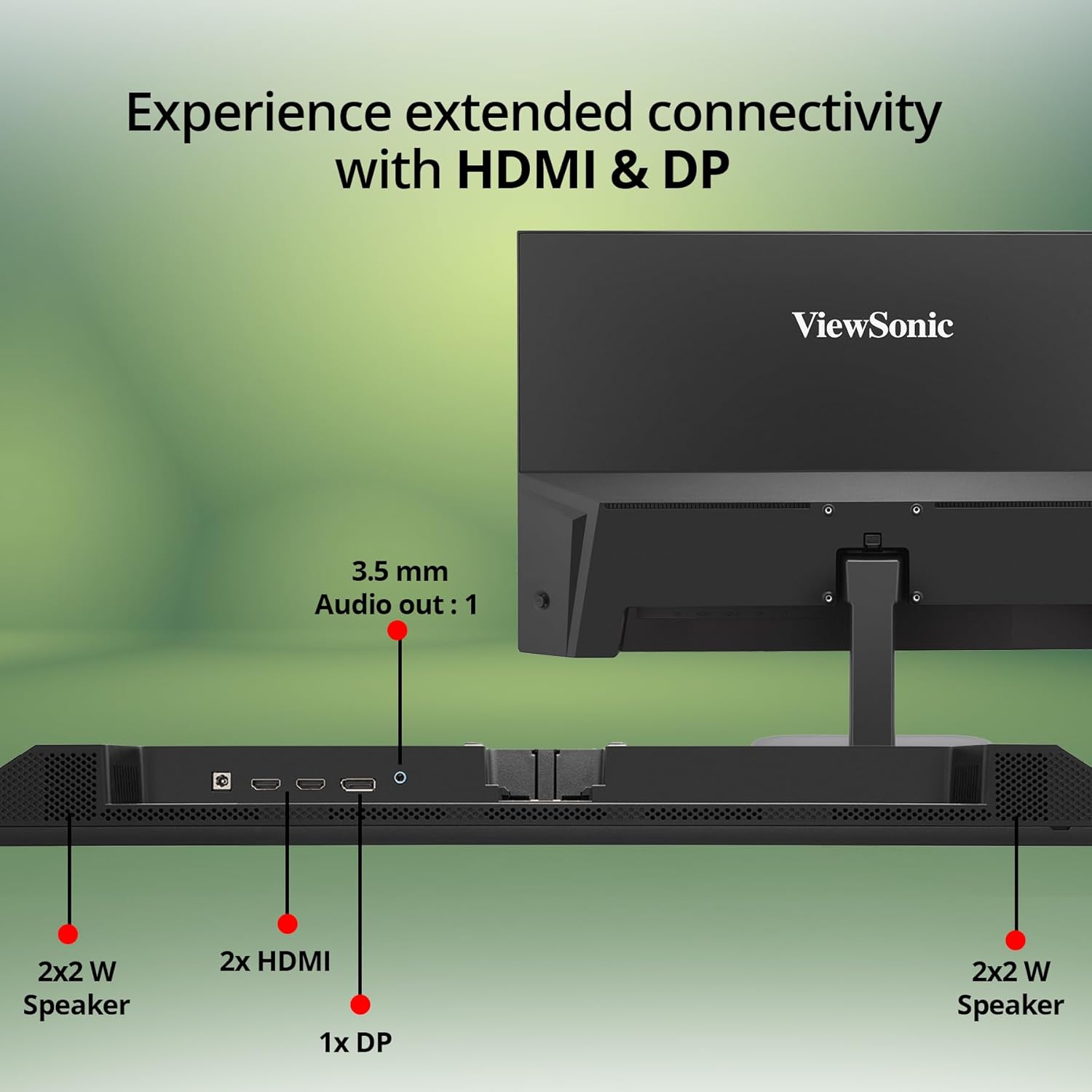
Image: Comfortable viewing features including Eye Care Technology, Blue Light Filter, and Flicker Free.
5.5 Frameless Design
The monitor features a sleek, 3-sided frameless design that maximizes screen space and provides a modern aesthetic, ideal for multi-monitor setups.

Image: Detail of the monitor's frameless design.
6. Техникалык тейлөө
6.1 Экранды тазалоо
Экранды жумшак, түксүз чүпүрөк менен акырын сүртүңүз. өжөр белгилери үчүн, жеңил гampчүпүрөккө суу же жумшак, абразивдүү эмес экран тазалагыч. Катуу химиялык заттарды же абразивдүү материалдарды колдонуудан алыс болуңуз.
6.2 C. тазалооasing
Мониторду тазалоо үчүн жумшак, кургак чүпүрөктү колдонуңуз casing. Суюк тазалоочу каражаттарды түздөн-түз тешиктин үстүнө колдонбоңузasing.
6.3 Сактоо
When storing the monitor for an extended period, ensure it is powered off, unplugged, and stored in a cool, dry place away from direct sunlight and extreme temperatures.
7. Кыйынчылыктарды
| Көйгөй | Мүмкүн себеп | Чечим |
|---|---|---|
| Экранда сүрөт жок | Электр кабели туташкан эмес; Видео кабели туташкан эмес; Туура эмес киргизүү тандалды. | Ensure power cable is securely connected. Check video cable connection to both monitor and computer. Select the correct input source via the OSD menu. |
| Сүрөт бүдөмүк же бурмаланган | туура эмес чечим; Видео кабель маселеси. | Set the display resolution to 3840 x 2160. Check the video cable for damage or replace if necessary. |
| Динамиктерден үн жок | Volume too low or muted; Audio cable not connected (for external speakers); Incorrect audio output selected on computer. | Increase monitor volume via OSD. Ensure computer's audio output is set to the monitor or correct external device. Check audio cable connection if using external speakers. |
| Монитор жаркылдап турат | Жаңыртуу ылдамдыгы дал келбейт; Кабель маселеси. | Ensure the refresh rate is set correctly (e.g., 60Hz). Try a different video cable. |
8. Техникалык шарттар
| Өзгөчөлүк | Деталь |
|---|---|
| Бренд | ViewSonic |
| Модель номери | VA2708-4K-MHD |
| Screen Size | 27 дюйм (68.58 см) |
| Резолюция | 4K UHD (3840 x 2160 пиксел) |
| Панел түрү | SuperClear IPS |
| HDR колдоо | HDR10 |
| Түс тереңдиги | 1.07 миллиард түс (10-бит) |
| sRGB камтуусу | 104% |
| Байланыш | 2 x HDMI 2.0, 1 x DisplayPort 1.2, 1 x 3.5 мм аудио чыгыш |
| Баяндамачылар | 2 х 2W стерео колонкалар |
| Көзгө кам көрүү өзгөчөлүктөрү | Eye ProTech+, Flicker-Free, Low Blue Light Filter |
| VESA шайкештиги | 75 x 75 мм |
| Энергияны керектөө (Типтүү) | 28 Вт |
| Dimensions (Physical) | 613.19 x 449.89 x 190 мм |
| Элемент Салмагы | 4.1 кг |
9. Кепилдик жана колдоо
9.1 Өндүрүүчүнүн Кепилдиги
Бул ViewSonic VA2708-4K-MHD monitor comes with a 3 Years Standard On-site Manufacturer Warranty. Кепилдик дооматтары үчүн сатып алганыңыздын далилин сактап коюңуз.
9.2 Техникалык колдоо
For technical assistance, product registration, or further information, please visit the official ViewSonic колдоо website or contact their customer service. Contact details can typically be found on the ViewSonic webсайтында же Ыкчам баштоо колдонмосунда.


