Introduction
This manual provides essential information for setting up, operating, and maintaining your Thomson 32-inch QLED Google Smart TV. Please read this manual thoroughly before using the television to ensure proper functionality and safety.
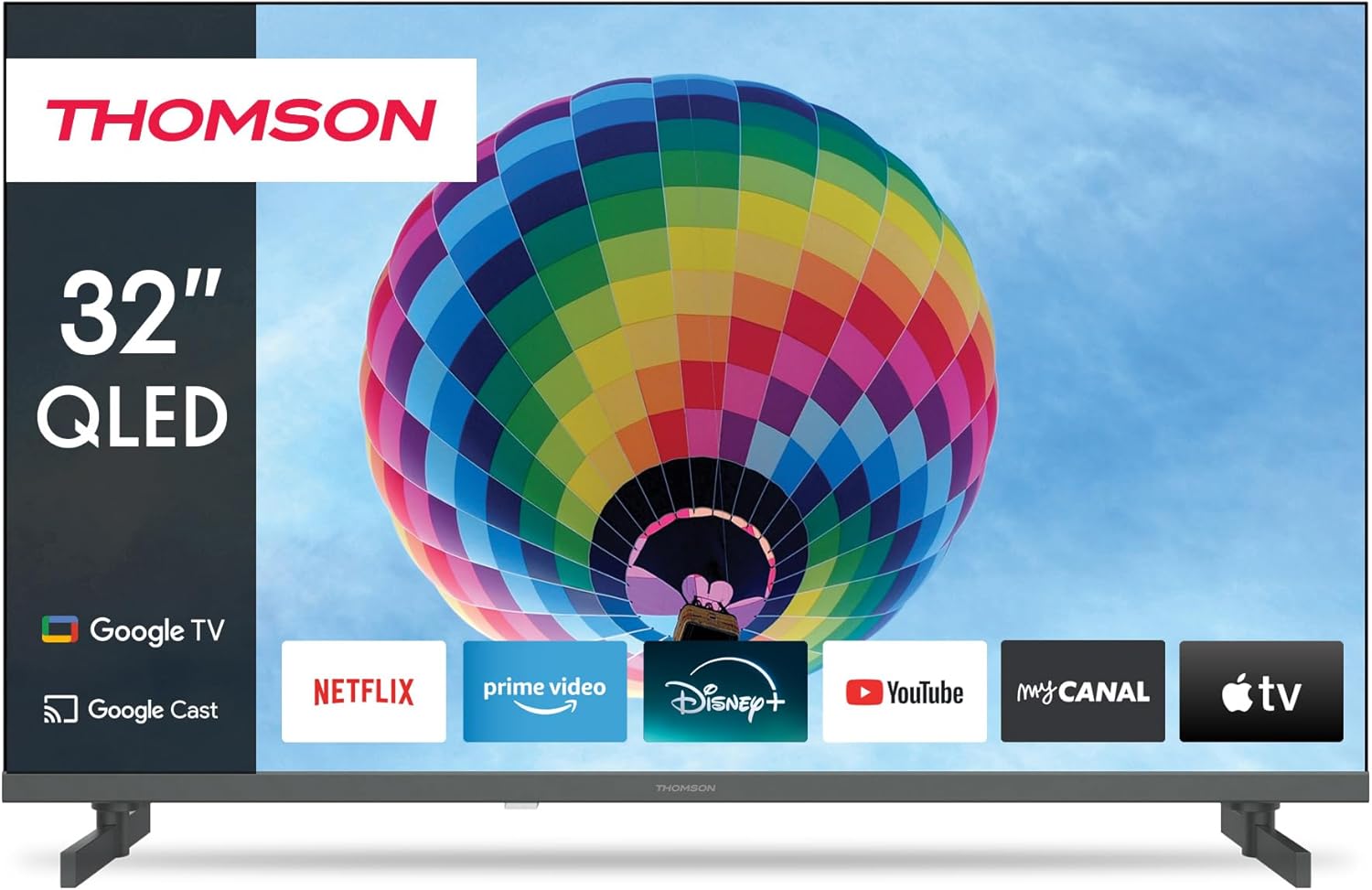
Сүрөт: алдыңкы view of the Thomson 32-inch QLED Google Smart TV, showcasing its sleek design and integrated Google TV interface with popular streaming applications like Netflix, Prime Video, Disney+, YouTube, My Canal, and Apple TV.
1. Орнотуу
1.1 Кутудан чыгаруу жана Пакеттин мазмуну
Бардык компоненттерди таңгактан кылдаттык менен алып салыңыз. Төмөндө саналып өткөн нерселердин бардыгы бар экенин текшериңиз:
- Thomson 32-inch QLED Google Smart TV
- Алыстан башкаруу
- Электр кабели
- Столдун стенди (2 даана)
- Screws for stand attachment
- Колдонуучунун Колдонмосу (бул документ)
Келечектеги ташуу же тейлөө муктаждыктары үчүн таңгакты сактап коюңуз.
1.2 Столдун таянычын бекитүү
To attach the table stands:
- Сыналгы экранын сызып кетпеши үчүн жумшак, тегиз бетке ылдый каратып кой.
- Ар бир стендди телевизордун астындагы тиешелүү уячаларга тууралаңыз.
- Берилген бурамалар менен стенддерди бекитиңиз. Алардын бекем кысылганын текшериңиз.

Сүрөт: каптал view of the Thomson 32-inch QLED Google Smart TV, illustrating its compact dimensions of 8 cm depth, 72 cm width, and 46 cm height (with stand), making it suitable for various living spaces.
1.3 Тышкы түзмөктөрдү туташтыруу
Your Thomson TV offers various connection ports for external devices. Refer to the diagram below for port locations and types:

Сүрөт: Арткы view of the Thomson 32-inch QLED Google Smart TV, detailing the available connection ports: 2x USB 2.0, DVB-T2/C/S2 (Antenna/Satellite), HDMI 1.4 + ARC, 2x HDMI 1.4, AV IN, Digital Optical Audio Out, and LAN (Ethernet).
- HDMI: Connect Blu-ray players, game consoles, or set-top boxes. The HDMI 1.4 + ARC port supports Audio Return Channel for simplified audio connections to soundbars or AV receivers.
- USB: Медияны ойнотуу үчүн USB сактагыч түзмөктөрдү туташтыруу үчүн files.
- Antenna/Satellite (DVB-T2/C/S2): Connect your terrestrial antenna, cable, or satellite dish for broadcast TV.
- LAN: Зымдуу интернет байланышы үчүн. Же болбосо, Wi-Fi колдонуңуз.
- Санариптик оптикалык аудио чыгышы: Оптикалык киргизүү менен тышкы аудио системаларына туташуу үчүн.
- AV IN: For older devices using composite video and stereo audio connections.
- CI+: Common Interface Plus slot for conditional access modules (CAM) to decrypt pay TV channels.
1.4 Алгачкы күйгүзүү жана биринчи жолу орнотуу
Бардык керектүү кабелдерди туташтыргандан кийин:
- Электр кабелин электр розеткасына сайыңыз.
- Телевизорду күйгүзүү үчүн сыналгыдагы же пульттун кубат баскычын басыңыз.
- Баштапкы орнотууну аяктоо үчүн экрандагы нускамаларды аткарыңыз, анын ичинде:
- Тил тандоо
- Тармакка туташуу (Wi-Fi же зымдуу LAN)
- Google Account sign-in (for Google TV features)
- Channel scanning (Antenna, Cable, or Satellite)
- Шарттарды жана шарттарды кабыл алуу
The Google TV interface will guide you through personalizing your viewing experience, including setting up streaming services and Google Assistant.
2. Иштөө
2.1 Алыстан башкаруу функциялары
The remote control is your primary interface for navigating the TV. Key features include:

Image: The Thomson Smart TV remote control, illustrating its intuitive layout. Features include number keys for direct channel access, a dedicated Google Assistant button for voice control, backlit keys for visibility in low light, and quick access buttons for popular streaming apps like YouTube, Netflix, Prime Video, and Disney+.
- Кубат баскычы: Телевизорду күйгүзөт же өчүрөт.
- Сан баскычтары: Түздөн-түз канал тандоо.
- Навигация тактасы (өйдө/төмөн/сол/оң/ОК): Менюда навигация жана тандоо үчүн.
- Артка/Үй баскычтары: Мурунку экранга же үй экранына кайтуу.
- Үнүн жогорулатуу/төмөндөтүү: Аудионун үнүн тууралайт.
- Канал өйдө/төмөн: Телеканалдарды өзгөртөт.
- Google Жардамчы баскычы: Мазмунду издөө, акылдуу үй түзмөктөрүн башкаруу жана башкалар үчүн үн менен башкарууну иштетет.
- Ыкчам кирүү баскычтары: Dedicated buttons for popular streaming services (e.g., Netflix, Prime Video, YouTube, Disney+).
2.2 Google TV функциялары
Your Thomson Smart TV runs on Google TV, providing a personalized and integrated entertainment experience.

Image: The Google TV home screen, displaying personalized content recommendations and easy access to a wide array of streaming applications, allowing users to manage multiple profiles.
- Мазмунду бириктирүү: Access over 400,000 movies and series from various streaming services like Netflix, Prime Video, YouTube, Disney+, and Canal+ all in one place.
- Google Жардамчысы: Use voice commands to find content, control playback, get answers, and manage smart home devices.
- Chromecast камтылган: Cast photos, videos, and music directly from your smartphone, tablet, or computer to the TV.
- Жекелештирилген Profiles: Бир нече колдонуучу про жаратыңызfiles for tailored recommendations and watchlists.
2.3 Input Selection and Channel Tuning
To switch between different input sources (HDMI, AV, TV tuner) or manage channels:
- Киргизүүнү тандоо: Press the "Input" or "Source" button on your remote control to bring up the input menu. Select the desired source (e.g., HDMI 1, AV, TV).
- Каналды жөндөө: If you need to rescan for channels or adjust settings for your antenna, cable, or satellite connection, navigate to the "Settings" menu, then "Channels & Inputs" or "Channel Setup".
3. Техникалык тейлөө
3.1 Телевизорду тазалоо
Regular cleaning helps maintain the TV's appearance and performance:
- Экран: Gently wipe the screen with a soft, lint-free cloth (e.g., microfiber cloth). For stubborn marks, lightly dampчүпүрөктү суу же экранга арналган тазалоо эритмеси менен сүртүңүз. Суюктукту экранга түз чачпаңыз.
- Дене: Телевизордун алкагын жана стендин сүртүү үчүн жумшак, кургак чүпүрөктү колдонуңуз.
- Вентиляция: Ашыкча ысып кетүүнүн алдын алуу үчүн телевизордун артындагы желдетүү тешиктери жабылбагандыгын текшериңиз.
Тазалоодон мурун телевизорду розеткадан сууруп алыңыз.
3.2 Программалык камсыздоо жаңыртуулары
Your Google Smart TV may receive software updates to improve performance, add new features, or fix bugs. It is recommended to keep your TV's software up to date.
- Автоматтык жаңыртуулар: By default, the TV is set to receive automatic updates when connected to the internet.
- Кол менен текшерүү: You can manually check for updates by navigating to "Settings" > "System" > "About" > "System update".
4. Кыйынчылыктарды
Телевизоруңузда көйгөйлөргө туш болсоңуз, төмөнкү жалпы көйгөйлөрдү жана аларды чечүү жолдорун караңыз:
4.1 Жалпы маселелер жана чечимдер
| Көйгөй | Мүмкүн болгон себеп / Чечим |
|---|---|
| Күч жок |
|
| Сүрөт жок / Кара экран |
|
| Үн жок |
|
| Пульт иштебейт |
|
| Тармакка туташуу маселелери |
|
4.2 Кошумча жардам
If the problem persists after trying the above solutions, please refer to the official Thomson support webсайтка же кошумча жардам алуу үчүн кардарларды тейлөөгө кайрылыңыз.
5. Техникалык шарттар
Detailed technical specifications for your Thomson 32-inch QLED Google Smart TV (Model 32QG4S14):
| Өзгөчөлүк | Деталь |
|---|---|
| Бренд | Томсон |
| Модель номери | 32QG4S14 |
| Экрандын өлчөмү (диагоналдык) | 80 см (32 дюйм) |
| Дисплей технологиясы | QLED |
| Резолюция | 1920 x 1080 (Full HD) - Note: While the product title mentions 4K UHD, the detailed specifications and energy label indicate a resolution of 1920 x 1080. |
| Жаңыртуу ылдамдыгы | 60 Гц |
| Операция системасы | Google TV |
| Байланыш технологиясы | Bluetooth, USB, HDMI, Wi-Fi (WLAN) |
| HDMI порттору | 3 (1x HDMI 1.4 with ARC, 2x HDMI 1.4) |
| USB порттору | 2x USB 2.0 |
| Тюнер түрү | Triple-Tuner (DVB-T2/C/S2 for Cable/Satellite/Antenna) |
| Колдоого алынган Интернет кызматтары | Netflix, Prime Video, YouTube, Disney+, Canal+ |
| Өнүмдүн Өлчөмдөрү (Ж x Y x D) | 72 x 46 x 8 cm (approx. with stand) |
| Салмагы | 4.86 килограмм |
| Монтаж түрү | Table Mount (Side Feet) |
| Энергия эффективдүүлүгү классы | E |

Image: The energy efficiency label for the Thomson 32QG4S14 TV, indicating an 'E' rating and 26 kWh/1000h energy consumption.
6. Кепилдик жана колдоо
Thomson is committed to providing high-quality products and reliable support.
- Кепилдик: Your Thomson TV comes with a 3-year warranty, ensuring peace of mind and coverage against manufacturing defects. This commitment reflects the brand's dedication to quality and customer satisfaction.
- A+ Panel: The TV features an A+ Panel, guaranteeing precise images without dead pixels.
- European Assembly: Highest quality standards are maintained through assembly in Europe.
For detailed warranty terms, technical support, or service requests, please visit the official Thomson support website or contact their customer service. You can find more information on the Thomson brand store: Amazon'догу Thomson дүкөнү.


