1. Киришүү
This manual provides detailed instructions for setting up, operating, and maintaining your Mercusys MR27BE BE3600 Dual-Band Wi-Fi 7 Router. The MR27BE is designed to deliver high-speed wireless connectivity with Wi-Fi 7 technology, featuring dual-band operation and multiple high-speed Ethernet ports for a robust home or small office network.
2. Пакеттин мазмуну
Пакетиңизде төмөнкү заттар бар экенин текшериңиз:
- Mercusys MR27BE Wi-Fi 7 Router
- Кубаттуу адаптер
- Ethernet кабели
- Ыкчам орнотуу колдонмосу

This image displays the retail packaging for the Mercusys MR27BE BE3600 Dual Band Wi-Fi 7 Router, highlighting key features and branding.
3. Физикалык бүтүрүүview
3.1 Арткы панель
The rear panel of the MR27BE router features various ports and buttons for connectivity and control.
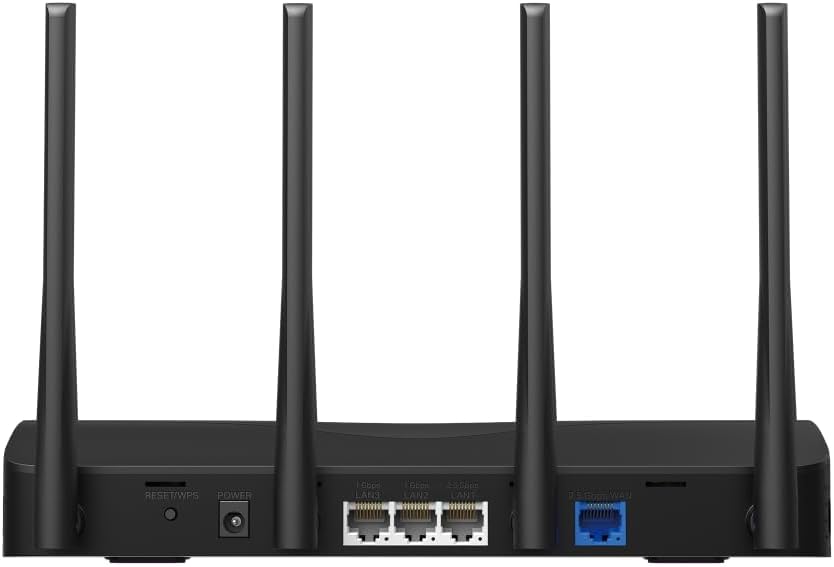
This image displays the rear panel of the MR27BE router, highlighting the 2.5 Gbps WAN port (blue), 2.5 Gbps LAN port, two 1 Gbps LAN ports, the Reset/WPS button, and the power input.
- Электр порту: Берилген кубат адаптерин бул жерге туташтырыңыз.
- Калыбына келтирүү/WPS баскычы: Press and hold for 1 second to activate WPS. Press and hold for more than 5 seconds to factory reset the router.
- LAN Ports (1 Gbps): Two Gigabit Ethernet ports for connecting wired devices.
- LAN Port (2.5 Gbps): One 2.5 Gigabit Ethernet port for high-speed wired connections.
- WAN Port (2.5 Gbps): One 2.5 Gigabit Ethernet port for connecting to your modem or internet service provider's (ISP) network.
3.2 Негизги өзгөчөлүктөрү
The MR27BE router incorporates advanced features for enhanced network performance.

This graphic illustrates key features of the MR27BE, including its Wi-Fi 7 capabilities, the presence of 2x 2.5 Gbps ports and 2x Gigabit ports, four omni-directional high-gain antennas, EasyMesh compatibility, and easy app control.

This image demonstrates the speed performance of the MR27BE router, indicating up to 2880 Mbps on the 5 GHz band and 688 Mbps on the 2.4 GHz band, showcasing its Wi-Fi 7 capabilities.
4. Орнотуу
4.1 Аппараттык туташуу
- Өчүрүү: Disconnect the power from your modem (if applicable).
- WAN портуна туташуу: Connect one end of the Ethernet cable to your modem's Ethernet port and the other end to the blue 2.5 Gbps WAN port on your MR27BE router.
- Туташуу кубаты: Connect the power adapter to the router's Power port and plug it into an electrical outlet.
- Күйгүзүү: Wait for the router to power on completely. The LED indicator should turn solid green.
- Түзмөктөрдү туташтыруу (кошумча): For wired devices, connect an Ethernet cable from your computer or other device to one of the yellow LAN ports on the router.

This image shows the 2.5 Gbps ports of the MR27BE router in use, illustrating connections for 2.5 Gbps wired devices and multi-gig internet access, emphasizing high-performance networking.
4.2 Баштапкы конфигурация
You can configure your router using the MERCUSYS app or a web браузер.
Using the MERCUSYS App:
- Download the MERCUSYS app from the App Store or Google Play.
- Connect your smartphone to the router's default Wi-Fi network (SSID and password are on the label at the bottom of the router).
- Open the MERCUSYS app and follow the on-screen instructions to complete the setup.
Колдонуу а Web Браузер:
- Connect your computer to the router via an Ethernet cable or the default Wi-Fi network.
- ачуу а web браузер жана түрү
mwlogin.netor192.168.1.1дарек тилкесине. - Суралган учурда кирүү сырсөзүн түзүңүз.
- Follow the Quick Setup wizard to configure your internet connection and Wi-Fi settings.
5. Маршрутизаторду иштетүү
5.1 Түзмөктөрдү туташтыруу
- Зымсыз түзмөктөр: Издөө your Wi-Fi network name (SSID) on your device and enter the Wi-Fi password you set during setup.
- Зымдуу түзмөктөр: Connect an Ethernet cable from your device to any available LAN port on the router.
5.2 EasyMesh шайкештиги
The MR27BE router supports EasyMesh, allowing you to create a seamless whole-home Wi-Fi network by adding compatible EasyMesh range extenders or other routers.

This diagram visually explains how the EasyMesh system, compatible with the MR27BE router, can expand Wi-Fi coverage throughout an entire home, ensuring seamless connections.
To set up an EasyMesh network, refer to the instructions provided with your EasyMesh compatible devices or the MERCUSYS app.
5.3 Advanced Settings (via Web Интерфейс)
кирүү web интерфейс (mwlogin.net) сыяктуу өркүндөтүлгөн жөндөөлөрдү конфигурациялоо үчүн:
- Коноктор тармагы: Коноктор үчүн өзүнчө Wi-Fi тармагын түзүңүз.
- Ата-энелик көзөмөл: Белгилүү бир түзмөктөр үчүн интернетке кирүүнү башкаруу.
- Тармак коопсуздугу: Configure firewall rules and access control.
- Иштөө режими: Switch between Router, Access Point, or Range Extender modes.
6. Техникалык тейлөө
6.1 Орнотулган программаны жаңыртуу
Regularly updating the router's firmware ensures optimal performance and security. You can check for updates via the MERCUSYS app or the web interface under System Tools > Firmware Upgrade.
6.2 Маршрутизаторду кайра иштетүү
If you experience network issues, a simple restart can often resolve them. You can restart the router via the MERCUSYS app, the web interface, or by unplugging and replugging the power adapter.
6.3 Заводдук абалга кайтаруу
A factory reset will restore the router to its default settings. This can be done by pressing and holding the Reset/WPS button on the rear panel for more than 5 seconds until the LED blinks rapidly, or via the web interface under System Tools > Factory Defaults.
7. Кыйынчылыктарды
7.1 Интернетке кирүү жок
- Check all cable connections, especially the WAN port connection to your modem.
- Модемиңиз туура иштеп жатканын текшериңиз.
- Модемди да, роутерди да өчүрүп күйгүзүңүз.
- Роутердеги интернет жөндөөлөрүңүздү текшериңиз web интерфейс.
7.2 Wi-Fi сигналынын көйгөйлөрү
- Роутерди тоскоолдуктардан жана тоскоолдук булактарынан (мисалы, микротолкундуу мештер, зымсыз телефондор) алыс, борбордук жерге жайгаштырыңыз.
- Оптималдуу камтуу үчүн роутердин антенналарын тууралаңыз.
- Consider using EasyMesh compatible devices to extend coverage in larger homes.
7.3 Wi-Fi сырсөзүн унуткан же Логин сырсөзүн
- Wi-Fi сырсөзү роутердин астыңкы жагындагы этикеткада көрсөтүлгөн.
- If you changed it and forgot, you will need to perform a factory reset to restore default settings, then reconfigure the router.
8. Техникалык шарттар
| Модель аты | MR27BE |
| Зымсыз стандарт | 802.11be (Wi-Fi 7) |
| Жыштык тилкесинин классы | Кош тилкелүү |
| WAN порт | 1x 2.5 Гбит/сек WAN порту |
| LAN порттору | 1x 2.5 Gbps LAN Port, 2x 1 Gbps LAN Ports |
| Өзгөчө өзгөчөлүк | EasyMesh ылайыктуу |
| Продукциянын өлчөмдөрү | 7.87 x 5.91 x 3.94 дюйм |
| Элемент Салмагы | 2.23 фунт |
| Камтылган компоненттер | MR27BE, Power Adapter, instruction manual |
9. Колдоо
For technical support, warranty information, or further assistance, please visit the official Mercusys website or contact Mercusys customer support.
- Mercusys расмий сайты Webсайт: www.mercusys.com
- Refer to the Quick Installation Guide for initial setup and contact details.


