1. Киришүү
This manual provides detailed instructions for the installation, operation, and maintenance of your Hugolog Security Camera System, which includes a 4K 8MP Indoor Pan/Tilt Camera and 3K 5MP Outdoor Security Cameras. Please read this manual thoroughly before using the product to ensure proper functionality and safety.
2. Продукт бүтүп калдыview
2.1 Пакеттин мазмуну
Your Hugolog Security Camera System package typically includes:
- Hugolog 4K 8MP Indoor Pan/Tilt Security Camera
- Hugolog 3K 5MP Outdoor Security Cameras (quantity may vary)
- Кубаттуу адаптер
- Монтаждоо бурамалар жана анкерлер
- Колдонуучунун Колдонмосу (бул документ)
- Quick Start Guide
2.2 Негизги өзгөчөлүктөрү
- 4K 8MP Indoor Camera: Ultra HD resolution with auto-focus, 12x digital zoom, 355° pan and 90° tilt for wide coverage. Features auto-tracking for persons, pets, and flames.
- 3K 5MP Outdoor Cameras: High-definition resolution with Starlight Color Night Vision for clear images in low light. IP65 waterproof rating for outdoor use.
- Эки тараптуу аудио: Built-in microphone and speaker for real-time communication, with noise cancellation for enhanced clarity.
- Кыймылды аныктоо жана эскертүүлөр: Configurable motion detection with instant notifications, lights, and siren alarms.
- Ийкемдүү сактагыч: Supports secure US cloud storage and local SD card storage (up to 128GB).
- Smart Home интеграциясы: Compatible with Alexa Echo Show and Google Assistant for voice control and live view көрсөтүү.
- ONVIF шайкештиги: Supports ONVIF protocol for integration with Network Video Recorders (NVRs) and other surveillance systems.
2.3 Продукт компоненттери
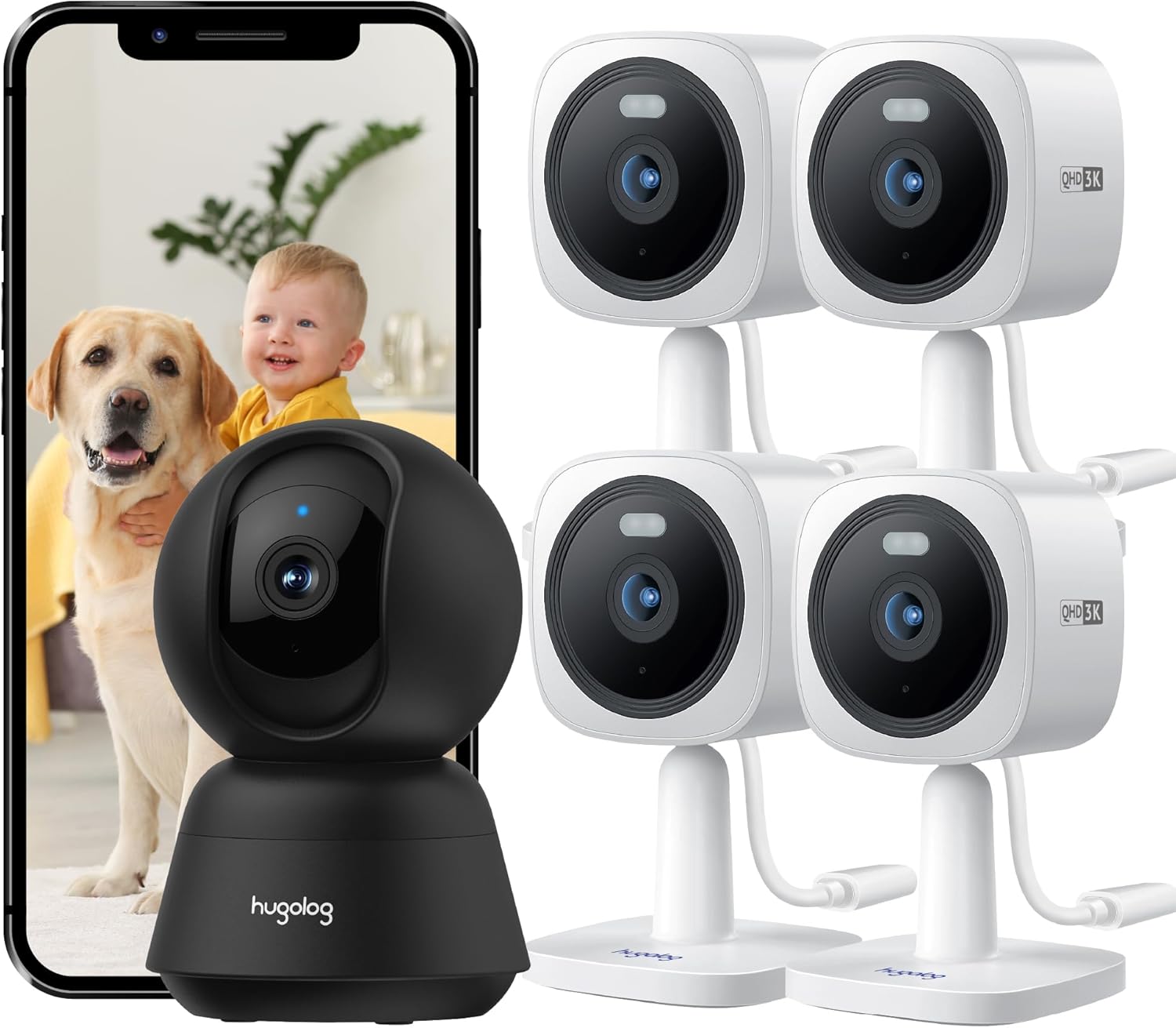
1-сүрөт: Бүттүview of the Hugolog Security Camera System, showing the indoor pan/tilt camera, multiple outdoor cameras, and a smartphone displaying live footage of a baby and a dog.

2-сүрөт: The Hugolog 4K 8MP Indoor Pan/Tilt Camera, a black dome-shaped camera, shown next to a smartphone displaying a golden retriever. This camera offers 4K resolution for clear indoor monitoring.

3-сүрөт: A set of four Hugolog 3K 5MP Outdoor Security Cameras, white in color, designed for external surveillance. A smartphone displays live footage of a child watering plants, demonstrating outdoor monitoring capabilities.
3. Орнотуу колдонмосу
3.1 Баштапкы орнотуу кадамдары
- Колдонмону жүктөп алыңыз: Издөө the "Hugolog" app on your smartphone's app store (iOS or Android) and install it.
- Каттоо эсебин түзүү: Колдонмону ачып, жаңы аккаунт каттоо же эгер сизде мурунтан эле бар болсо, кирүү үчүн экрандагы көрсөтмөлөрдү аткарыңыз.
- Камераларды күйгүзүү: Connect the power adapter to each camera and plug it into a power outlet. Wait for the camera's indicator light to show it's ready for pairing (usually a blinking light).
- Түзмөк кошуу: In the Hugolog app, tap the "+" icon to add a new device. Select the appropriate camera model (Indoor Pan/Tilt or Outdoor Camera).
- Тармак конфигурациясы: Follow the app's instructions to connect the camera to your 2.4GHz Wi-Fi network. This typically involves scanning a QR code generated by the app with the camera's lens or entering Wi-Fi credentials.
- Жайгашкан жери:
- Indoor Camera: Place on a flat surface or mount to a ceiling/wall using the provided hardware. Ensure it has a clear view каалаган мониторинг аймагынын.
- Outdoor Cameras: Choose a mounting location that provides optimal coverage and a stable Wi-Fi signal. The IP65 rating allows for outdoor installation. Mounting options include normal, wall, or built-in base.
- Орнотууну аяктоо: Once connected, you can name your camera and adjust initial settings within the app.
3.2 Mounting Instructions for Outdoor Cameras
The outdoor cameras are designed for flexible installation. Use the provided screws and anchors to securely mount the cameras. Ensure the camera is positioned to cover the desired area and is within Wi-Fi range.

4-сүрөт: Examples of Hugolog outdoor security cameras mounted in various locations, including walls, trees, and under eaves, demonstrating their versatility and ONVIF compatibility for multi-camera monitoring on a single screen.
4. Иштөө нускамалары
4.1 Live View жана Ойнотуу
- Open the Hugolog app and select the desired camera to view анын жандуу тоюту.
- Use the app interface to access recorded footage from cloud storage or the SD card.

5-сүрөт: A comparison demonstrating the clarity of 3K QHD (5MP) live streaming from a Hugolog outdoor camera versus standard 1080P resolution, highlighting the enhanced detail provided by the higher resolution.
4.2 Pan, Tilt, and Auto-Tracking (Indoor Camera)
For the indoor pan/tilt camera, use the controls within the Hugolog app to remotely adjust the camera's viewing angle (355° pan, 90° tilt). Enable auto-tracking to automatically follow detected motion.

6-сүрөт: Illustrates the 355° pan and 90° tilt capabilities of the Hugolog indoor camera, along with its auto-tracking function for persons, pets, and flames. A child on a toy bike and a corgi are shown being tracked.
4.3 Эки тараптуу аудио
Колдонмонун түз эфириндеги микрофон сүрөтчөсүн таптаңыз view to initiate two-way communication. Speak into your phone's microphone, and your voice will be transmitted through the camera's speaker. Listen for responses through the camera's microphone.

7-сүрөт: Demonstrates the clear two-way audio feature of the Hugolog camera. A child is shown interacting with a dog, and a smartphone displays the live feed with an audio icon, indicating active communication.
4.4 Түнкү көрүнүш
The outdoor cameras feature Starlight Color Night Vision, providing clear, detailed color images even in low-light conditions. The indoor camera also includes night vision capabilities for round-the-clock monitoring.

8-сүрөт: A comparison showing the superior clarity and color detail of Hugolog's Starlight Color Night Vision in low-light conditions compared to traditional IR night vision, capturing a residential street scene at night.
4.5 Кыймылды аныктоо жана эскертүүлөр
Configure motion detection zones and sensitivity settings within the app. When motion is detected, the camera can trigger alarms (lights and siren) and send instant notifications to your smartphone.
5. Техникалык тейлөө
- Линзаны тазалоо: Gently wipe the camera lens with a soft, dry cloth to remove dust or smudges. Avoid abrasive cleaners.
- Программалык камсыздоонун жаңыртуулары: Regularly check the Hugolog app for available firmware updates. Keeping your camera's firmware up-to-date ensures optimal performance and security.
- Электр камсыздоо: Ensure power adapters are securely connected and free from damage.
- Wi-Fi туташуусу: Periodically check the camera's Wi-Fi signal strength in the app to ensure a stable connection.
- Outdoor Camera Care: While IP65 rated, occasional cleaning of the outdoor camera housing can help maintain its appearance and prevent debris buildup.
6. Кыйынчылыктарды
6.1 Жалпы маселелер жана чечимдер
| Маселе | Мүмкүн чечим |
|---|---|
| Камера оффлайн | Check power connection. Verify Wi-Fi signal strength. Restart the camera and your router. Re-add the camera in the app if necessary. |
| Видеонун сапаты начар | Ensure a strong Wi-Fi connection. Clean the camera lens. Adjust resolution settings in the app if available. |
| Кыймыл сигналдары иштебейт | Check motion detection settings in the app. Ensure notifications are enabled for the app on your smartphone. Verify camera is online. |
| Эки тараптуу аудио түшүнүксүз | Ensure microphone and speaker are not obstructed. Check app volume settings. Reduce background noise if possible. |
| Wi-Fi'га туташпай жатат | Ensure you are connecting to a 2.4GHz Wi-Fi network. Double-check Wi-Fi password. Move camera closer to the router during setup. |
7. Техникалык шарттар
| Өзгөчөлүк | Деталь |
|---|---|
| Indoor Camera Resolution | 4K (8MP) Ultra HD |
| Сырткы камеранын чечилиши | 3K (5MP) HD |
| Indoor Camera Pan/Tilt | 355° Пан, 90° Тилт |
| Түнкү көрүнүш | Starlight Color Night Vision (Outdoor), Standard Night Vision (Indoor) |
| Аба ырайына каршылык | IP65 (Outdoor Cameras) |
| Аудио | Ызы-чууну жокко чыгаруу менен эки тараптуу сүйлөшүү |
| Сактагыч параметрлери | Cloud Storage, SD Card (up to 128GB) |
| Smart Home шайкештиги | Alexa Echo Show, Google Assistant |
| Байланыш | 2.4GHz Wi-Fi, ONVIF |
| Модел ASIN | B0DKSW71T |
8. Кепилдик жана колдоо
For warranty information and technical support, please refer to the official Hugolog website or contact their customer service directly. Details are typically provided on the product packaging or within the Hugolog mobile application.
Эскертүү: No specific warranty duration or support contact details were provided in the product information. Please consult the manufacturer's official resources for the most current information.


