Introduction
This manual provides comprehensive instructions for the setup, operation, maintenance, and troubleshooting of your Xtrike Me GW-119 Wireless Mouse. Designed for versatility and comfort, this mouse offers reliable performance for various computing tasks.
Пакеттин мазмуну
- Xtrike Me GW-119 Wireless Mouse
- USB Receiver (for 2.4G connection)
- 1 x Литий-иондук батарея (алдын ала орнотулган же кошо берилет)
- Колдонуучунун Колдонмосу (бул документ)
Жайгашуу
1. Батареяны орнотуу
The Xtrike Me GW-119 mouse requires one Lithium Ion battery, which is included. If not pre-installed, locate the battery compartment on the underside of the mouse. Open the cover, insert the battery according to the polarity indicators (+/-), and close the cover securely.

1-сүрөт: Асты view of the mouse, indicating the battery compartment location. Ensure correct battery polarity during installation.
2. Чычканды туташтыруу
The GW-119 supports two connection types: 2.4G wireless via USB receiver and Bluetooth (BT).
2.1. 2.4G зымсыз туташуу
- Locate the USB receiver, usually stored within the battery compartment or a dedicated slot on the mouse.
- USB ресиверди компьютериңиздеги жеткиликтүү USB портуна сайыңыз.
- Төмөн жагындагы кубат которгучу менен чычканды күйгүзүңүз.
- Компьютериңиз керектүү драйверлерди автоматтык түрдө таап, орнотуп алышы керек. Чычкан колдонууга даяр болот.
2.2. Bluetooth туташуусу
- Чычкан күйгүзүлгөнүн текшериңиз.
- Activate Bluetooth on your computer or device.
- Put the mouse into pairing mode (refer to the mouse's underside for a potential pairing button or switch, or consult the device's Bluetooth settings).
- On your computer, search for new Bluetooth devices. Select "Xtrike Me GW-119" from the list of available devices to pair.
- Once paired, the mouse is ready for use.
Иштөө нускамалары
Негизги функциялар
- Сол чыкылдатуу: Негизги тандоо жана активдештирүү.
- Оң чыкылдатуу: Контексттик менюларга жетет.
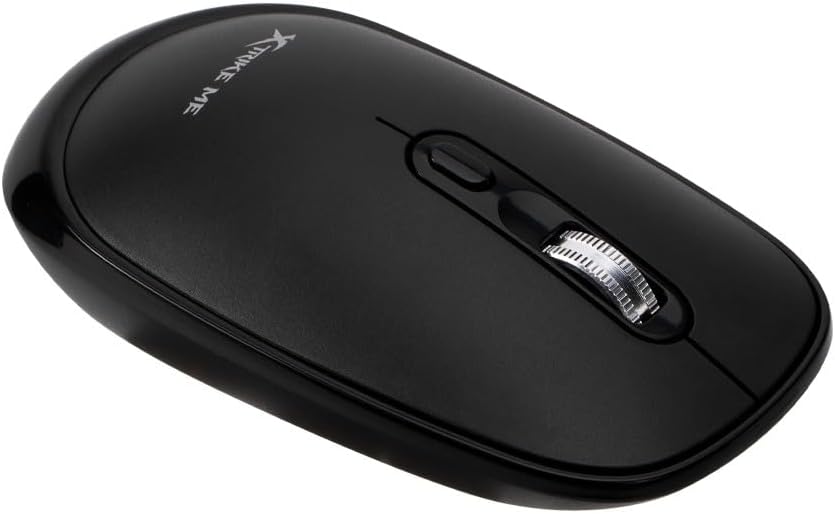
- Жылдыруу дөңгөлөгү: Scrolls content vertically. Can also be clicked for middle-click functionality (e.g., opening links in new tabs).

2-сүрөт: Жогорку view of the mouse highlighting the left and right click buttons, and the scroll wheel.
DPI тууралоо
The GW-119 mouse features adjustable DPI (Dots Per Inch) settings, allowing you to change cursor sensitivity. The available DPI levels are 800, 1200, and 1600dpi. To cycle through these settings, press the DPI button, typically located near the scroll wheel. Each press will switch to the next DPI level.
3-сүрөт: The DPI button is located directly below the scroll wheel, allowing for quick sensitivity adjustments.
Техникалык тейлөө
Тазалоо
To maintain optimal performance and appearance, clean your mouse regularly. Use a soft, dry, lint-free cloth to wipe the surface. For stubborn dirt, slightly dampen the cloth with water or a mild, non-abrasive cleaner. Avoid using harsh chemicals or submerging the mouse in liquid.
Батареяга кам көрүү
- If the mouse will not be used for an extended period, it is recommended to turn off the power switch to conserve battery life.
- Replace the battery when performance degrades or the mouse becomes unresponsive.
- Колдонулган батарейкаларды жергиликтүү эрежелерге ылайык таштаңыз.
Проблемаларды чечүү
| Көйгөй | Мүмкүн себеп | Чечим |
|---|---|---|
| Mouse is unresponsive or erratic. | Low battery, poor connection, or interference. |
|
| Cursor movement is too fast or too slow. | Incorrect DPI setting. | Press the DPI button to cycle through sensitivity settings (800/1200/1600dpi). |
| Чычкан тез-тез үзүлүп калат. | Interference, distance, or low battery. |
|
Техникалык шарттар
| Бренд | Xtrike Me |
| Модел | GW-119 |
| Туташуу түрү | 2.4G Wireless / Bluetooth (BT) |
| DPI орнотуулары | 800-1200-1600дпи |
| Батарея түрү | 1 x Литий иону (кошулган) |
| Элемент Салмагы | 100 г (0.1 килограмм) |
| Пакеттин өлчөмдөрү | 15.7 x 8 x 4.6 см |
| Өндүрүүчү | Shenzhen Xtrikeme Electronics Co.,Ltd |
Кепилдик жана колдоо
For warranty information and technical support, please refer to the documentation provided at the point of purchase or contact your retailer. You may also visit the official Xtrike Me webкошумча жардам үчүн сайт.
Өндүрүүчү: Shenzhen Xtrikeme Electronics Co.,Ltd


