1. Киришүү
Thank you for choosing the Sharkoon AK6 RGB ATX PC Case. This manual provides essential information for the proper installation, operation, and maintenance of your new PC case. Please read this guide thoroughly before beginning the assembly process to ensure optimal performance and longevity of your components.
2. Коопсуздук маалыматы
- Компьютердин корпусунун ичиндеги кандайдыр бир компоненттерди орнотуудан же алып салуудан мурун, ар дайым кубат булагын розеткадан сууруп алыңыз.
- Чыңалган айнек панелдерди этияттык менен кармаңыз. Алар морт жана түшүп кетсе же соккуга кабылса, сынып кетиши мүмкүн.
- Avoid exposing the case to extreme temperatures, humidity, or direct sunlight.
- Keep small parts and screws out of reach of children.
- Сезимтал электрондук компоненттердин электростатикалык разряддан (ЭСЗ) бузулушуна жол бербөө үчүн туура жерге туташтырууну камсыз кылыңыз.
3. Пакеттин мазмуну
Пакетиңизде бардык буюмдар бар экенин текшериңиз:
- Sharkoon AK6 RGB ATX PC Case
- Кошумча кутуча (бурамаларды, кабелдик байлагычтарды жана башка майда бөлүктөрдү камтыйт)
- Колдонуучунун Колдонмосу (бул документ)
4. Продукт бүтүп калдыview
The Sharkoon AK6 RGB ATX PC Case is designed with a modern glass aesthetic, featuring seamless integration of tempered glass on the front and side panels. It includes four pre-installed 120mm addressable RGB PWM fans for optimal airflow and visual appeal. The case supports a wide range of components, including BTF motherboards, and offers ample space for high-performance hardware.

Figure 4.1: Front interior view of the Sharkoon AK6 RGB PC case, showcasing the pre-installed addressable RGB fans and the spacious main chamber.

4.2-сүрөт: Бурчтуу view of the Sharkoon AK6 RGB PC case, highlighting the tempered glass side panel and the top mesh for ventilation.

4.3-сүрөт: Арткы view of the Sharkoon AK6 RGB PC case, showing the I/O shield cutout, rear exhaust fan mount, and expansion slots.
Алдыңкы I/O панели
The front I/O panel is located on the side of the case and includes:
- Кубат баскычы
- Калыбына келтирүү баскычы
- 2 x USB Ports (Type-A)
- 1 x USB Type-C порту
- Audio Jacks (TRRS)
5. Орнотуу жана орнотуу
Follow these steps to install your components into the Sharkoon AK6 RGB PC Case.
5.1 Ишти даярдоо
- Корпусту тегиз, туруктуу бетке коюңуз.
- Carefully remove the tempered glass side panel by unscrewing the thumb screws at the rear and gently pulling the panel away.
- Remove the rear metal side panel by unscrewing the thumb screws.
5.2 Motherboard орнотуу
The AK6 RGB supports Mini-ITX, Micro-ATX, ATX, and BTF motherboards.
- Install the I/O shield into the cutout at the rear of the case (if not pre-installed on your motherboard).
- Align your motherboard with the standoffs inside the case. Ensure all standoffs match the motherboard's mounting holes.
- Аксессуар кутучасынан тиешелүү бурамалар менен энелик тактаны бекитиңиз.
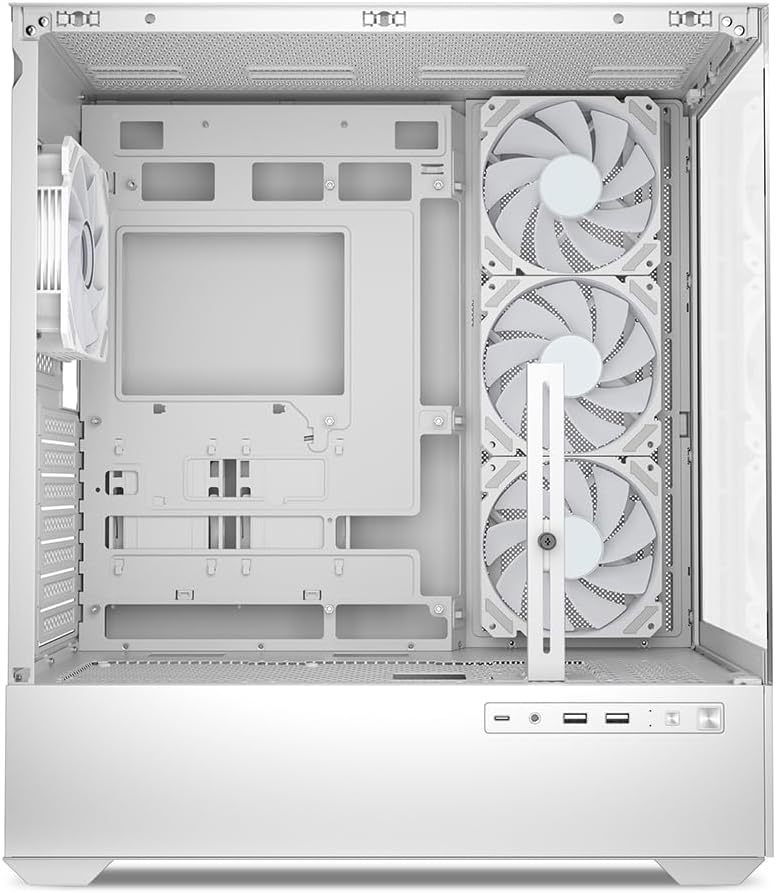
5.1-сүрөт: Интерьер view of the Sharkoon AK6 RGB PC case, illustrating the motherboard tray, cable management cutouts, and front fan mounting points.
5.3 Электр менен камсыздоону орнотуу
The case features a bottom-mount power supply design.
- Slide the power supply unit (PSU) into the dedicated compartment at the bottom rear of the case.
- PSUну корпустун артындагы буроо тешиктери менен тууралаңыз.
- Secure the PSU with the provided screws.
5.4 Сактагыч түзүлүштү орнотуу
The AK6 RGB supports up to two 3.5" HDDs or four 2.5" SSDs.
- 3.5 дюймдук катуу дисктер үчүн: Locate the drive cages beneath the PSU shroud. Slide the HDD into a drive tray and secure it with screws.
- 2.5 дюймдук SSD дисктери үчүн: SSDs can be mounted on the dedicated brackets behind the motherboard tray or on the 3.5" drive trays using adapter screws.
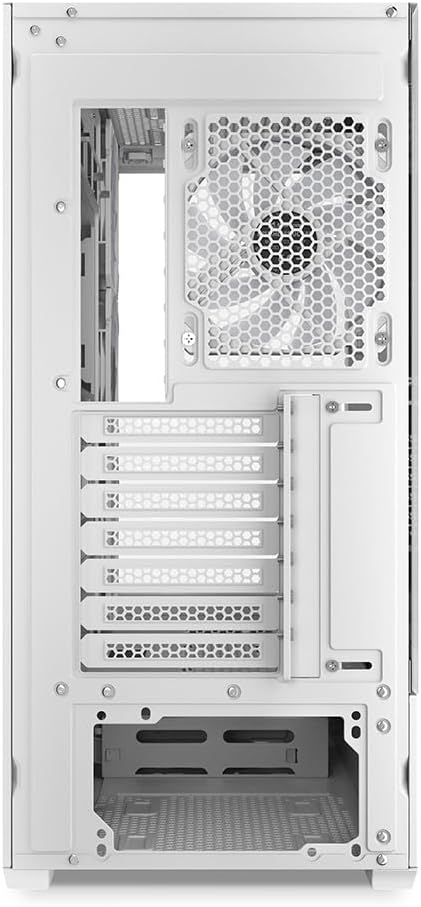
Сүрөт 5.2: Арткы интерьер view of the Sharkoon AK6 RGB PC case, detailing the drive cages for 3.5-inch HDDs and 2.5-inch SSDs, and the power supply shroud area.
5.5 Видеокартаны жана кеңейтүү картасын орнотуу
- Корпустун арткы жагындагы керектүү кеңейтүү уячасынын капкактарын алып салыңыз.
- Графикалык картаңызды же башка кеңейтүү карталарын энелик платаңыздагы тиешелүү PCIe уячаларына салыңыз.
- Secure the cards with screws. The case includes a rubberized graphics card support for larger cards.
5.6 CPU Cooler and Radiator Installation
The case supports CPU coolers up to 17 cm in height and allows for extensive liquid cooling setups.
- CPU муздаткычыңызды өндүрүүчүнүн көрсөтмөлөрүнө ылайык орнотуңуз.
- For liquid cooling, the case can accommodate a 360mm radiator at the top and an additional 280mm radiator.
5.7 Кабелди башкаруу
Кабелдерди өткөрүү жана бекитүү үчүн энелик плата лотогунун артындагы кабелдерди башкаруу кесиктерин жана бекитүүчү чекиттерди колдонуңуз. Бул аба агымын жана эстетиканы жакшыртат.
6. Иштөө нускамалары
6.1 Күйгүзүү
After all components are installed and cables are connected, replace the side panels. Connect the power cable to your PSU and a wall outlet, then press the power button on the front I/O panel to start your system.
6.2 RGB желдеткичти башкаруу
The AK6 RGB comes with four pre-installed addressable RGB PWM fans. These fans are connected to an RGB controller which also provides connections for up to four LED elements and four PWM fans. The RGB lighting can typically be controlled via your motherboard's RGB software (if compatible) or through a dedicated button on the case (if present and connected).
6.3 Аба агымын оптималдаштыруу
The case is designed for ideal airflow, with three inverted fans drawing air from the side into the case. The top and rear fan mounts allow for additional exhaust fans. Ensure proper fan orientation for optimal cooling performance.

6.1-сүрөт: Мисample of a fully assembled system within the Sharkoon AK6 RGB PC case, featuring various components and active RGB lighting.
7. Техникалык тейлөө
Үзгүлтүксүз тейлөө сиздин PC компоненттеринин узак мөөнөттүү иштешин жана иштешин камсыз кылууга жардам берет.
- Чаң чыпкалары: Periodically clean the removable dust filters (e.g., on the top and bottom) to maintain optimal airflow and prevent dust buildup inside the case. Use compressed air or a soft brush.
- Айнек панелдер: Clean tempered glass panels with a soft, lint-free cloth and a glass cleaner. Avoid abrasive materials that could scratch the surface.
- Ички тазалоо: Ички компоненттерден жана желдеткичтерден чаңды кетирүү үчүн кысылган абаны колдонуңуз. Тазалоодон мурун системанын өчүрүлгөнүн жана розеткадан суурулганын текшериңиз.
8. Кыйынчылыктарды
If you encounter issues with your PC case, refer to the following common troubleshooting steps:
- Кубат жок: Ensure the power supply is properly connected to the wall outlet and the motherboard. Check all internal power cables (24-pin ATX, 8-pin CPU, PCIe power).
- Желдеткичтер айланбай жатат/RGB иштебей жатат: Verify that all fan and RGB cables are correctly connected to the motherboard or the included RGB controller. Check your motherboard's BIOS/UEFI settings or RGB software for fan speed and lighting control.
- Алдыңкы киргизүү/чыгаруу порттору иштебейт: Confirm that the front panel connectors (USB, audio, power/reset switches) are correctly plugged into the corresponding headers on your motherboard.
- Ашыкча ысып кетүү: Ensure all fans are spinning correctly and oriented for proper airflow. Clean dust filters and internal components. Verify CPU cooler installation.
For further assistance, please contact Sharkoon support.
9. Техникалык шарттар
| Өзгөчөлүк | Спецификация |
|---|---|
| Бренд | Шаркун |
| Модель аты | AK6 RGB |
| Модель номери | C-AK6W |
| Иштин түрү | ATX мунарасы |
| Түс | Ак |
| Материал | Температуралуу айнек |
| Motherboard шайкештиги | Mini ITX, Micro ATX, ATX, BTF |
| Кубат менен камсыздоону орнотуу түрү | Төмөнкү тоо |
| Муздатуу ыкмасы | Аба |
| Алдын ала орнотулган күйөрмандар | 4 x 120mm Addressable RGB PWM Fans |
| CPU муздаткычтын максималдуу бийиктиги | 17 см |
| Макс графикалык карта узундугу | 41 cm (with rubberized support) |
| Максималдуу PSU узундугу | 23.5 см |
| Радиатор колдоо | Top: up to 360mm, Additional: up to 280mm |
| Drive Bays | 2 x 3.5" HDD or 4 x 2.5" SSD |
| Алдыңкы I / O порттору | 2 x USB Type-A, 1 x USB Type-C, Audio (TRRS) |
| Элемент Салмагы | 6.1 килограмм |
| Өзгөчөлүктөр | RGB Lighting, Unique Glass Appearance, BTF Motherboard Support |
10. Кепилдик
Sharkoon products are manufactured to high quality standards. For detailed warranty information, please refer to the warranty card included with your product or visit the official Sharkoon webсайт. Кепилдик, адатта, нормалдуу колдонуудагы материалдардагы жана жасалгадагы кемчиликтерди камтыйт.
11. Колдоо
If you require technical assistance or have questions regarding your Sharkoon AK6 RGB ATX PC Case, please visit the official Sharkoon website for support resources, FAQs, and contact information. You may also find updated drivers or software for the RGB controller there.
Webсайт: www.sharkoon.com


