1. Продукт бүтүп калдыview
This Sungale Bluetooth Transmitter & Receiver is a versatile audio device designed to enhance your audio experience. It functions as both a wireless receiver and a transmitter, allowing you to stream audio wirelessly to or from various devices. It supports Bluetooth 5.3 technology, offering low distortion, low power consumption, low latency, and high-fidelity stereo sound.
Негизги өзгөчөлүктөр төмөнкүлөрдү камтыйт:
- Кош режимдин функциясы: Transmitter (TX) жана Receiver (RX) режимдеринин ортосунда оңой которулуңуз.
- Bluetooth 5.3: For stable, high-quality wireless audio streaming.
- Акылдуу ызы-чууну азайтуу: CVC8.0 noise cancellation and DSP technology for clear audio.
- Hands Free Чалуу: Built-in microphone and multi-function button for convenient call management.
- Батареянын узак иштөө мөөнөтү: Up to 6-12 hours of usage on a single charge.
- Кеңири шайкештик: Connects to TVs, home stereos, car speakers, headphones, MP3 players, computers, and more via a 3.5mm Aux jack.

Image 1.1: The Sungale Bluetooth Transmitter & Receiver, showcasing its compact design and 3.5mm audio jack.
2. Продукциянын компоненттери
Familiarize yourself with the various parts of your device:
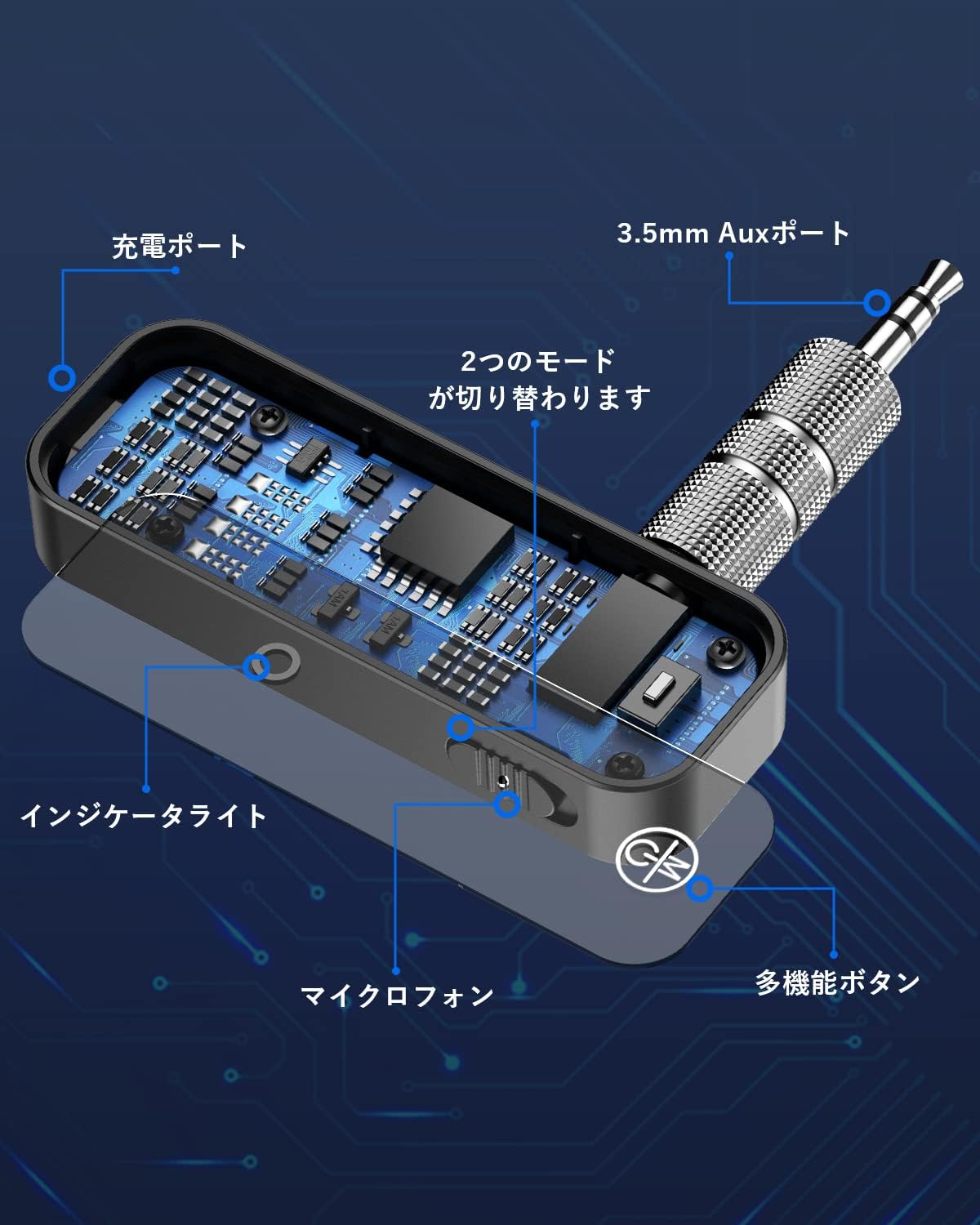
Image 2.1: Detailed diagram illustrating the device's components, including the charging port, 3.5mm Aux port, indicator light, microphone, multi-function button, and mode switch.
- 3.5mm Aux Port: Аудио киргизүү/чыгаруу үчүн.
- Заряддоо порту: USB port for charging the device.
- Индикатор жарыгы: Displays connection and battery status.
- Микрофон: Үнсүз чалуу үчүн.
- Көп функциялуу баскыч: Controls power, play/pause, answer/end calls.
- Режим которуу: Өткөргүч (TX) жана кабыл алгыч (RX) режимдеринин ортосунда которулат.
3. Аппаратты заряддоо
The device has a built-in rechargeable lithium battery. Before first use, fully charge the device.
- Connect the charging cable (not explicitly listed but implied) to the charging port on the device.
- Кубаттоочу кабелдин экинчи учун USB кубат булагына туташтырыңыз (мисалы, компьютердин USB порту, USB дубал адаптери).
- The indicator light will show the charging status. Once fully charged, the light may change color or turn off.
A full charge provides approximately 6-12 hours of usage. The device can be used while charging.

Сүрөт 3.1: Ички view of the device highlighting its battery capacity, indicating approximately 6 hours of operation.
4. Орнотуу жана жупташтыруу
4.1 Күйгүзүү/өчүрүү
- Күйгүзүү үчүн: Press and hold the Multi-function Button until the indicator light illuminates.
- Өчүрүү үчүн: Press and hold the Multi-function Button until the indicator light turns off.
4.2 Режимди тандоо
Use the Mode Switch to select between Transmitter (TX) and Receiver (RX) modes before connecting to your audio source/device.
4.3 Pairing in Receiver (RX) Mode
In RX mode, the device receives audio from a Bluetooth-enabled source (e.g., smartphone, tablet) and outputs it to a non-Bluetooth audio system (e.g., car stereo, home speakers).
- Түзмөктү которуштуруу RX режими.
- Connect the 3.5mm Aux port of the device to the AUX input of your non-Bluetooth audio system (e.g., car stereo, wired headphones, home speaker).
- The indicator light will flash, indicating it is in pairing mode.
- On your Bluetooth audio source (e.g., smartphone), enable Bluetooth and search for available devices.
- Select "Sungale BT Adapter" (or similar name) from the list to pair.
- Once paired, the indicator light will become solid, and audio from your source will play through your connected audio system.

Image 4.1: Illustration of the device operating in Bluetooth Receiver (RX) mode, connecting a smartphone to a speaker system.
4.4 Pairing in Transmitter (TX) Mode
In TX mode, the device takes audio from a non-Bluetooth source (e.g., TV, CD player) and transmits it wirelessly to a Bluetooth-enabled receiving device (e.g., Bluetooth headphones, Bluetooth speaker).
- Түзмөктү которуштуруу TX режими.
- Connect the 3.5mm Aux port of the device to the audio output of your non-Bluetooth source (e.g., TV headphone jack, CD player audio out).
- The indicator light will flash, indicating it is in pairing mode.
- Put your Bluetooth receiving device (e.g., headphones, speaker) into pairing mode.
- The Sungale device will automatically search for and connect to nearby Bluetooth receiving devices.
- Once paired, the indicator light will become solid, and audio from your source will be transmitted to your Bluetooth receiving device.

Image 4.2: The device in Transmitter (TX) mode, connected to a TV to send audio wirelessly to headphones.

Image 4.3: The device in Transmitter (TX) mode, connected to a speaker to send audio wirelessly.
5. Аппаратты иштетүү
5.1 Music Playback (RX Mode)
- Ойнотуу/тындыруу: Көп функциялуу баскычты кыска басыңыз.
- Кийинки трек: Көп функциялуу баскычты эки жолу басыңыз.
- Мурунку трек: Triple press the Multi-function Button.
5.2 Hands-free Calling (RX Mode)
When connected to a smartphone in RX mode, you can manage calls using the built-in microphone and Multi-function Button.
- Чакырууга жооп берүү: Көп функциялуу баскычты кыска басыңыз.
- Чакырууну аяктоо: Чалуу учурунда көп функциялуу баскычты кыска басыңыз.
- Чакырууну четке кагуу: Көп функциялуу баскычты 2 секунд басып туруңуз.
- Акыркы номерди кайра терүү: Double press the Multi-function Button when not on a call.
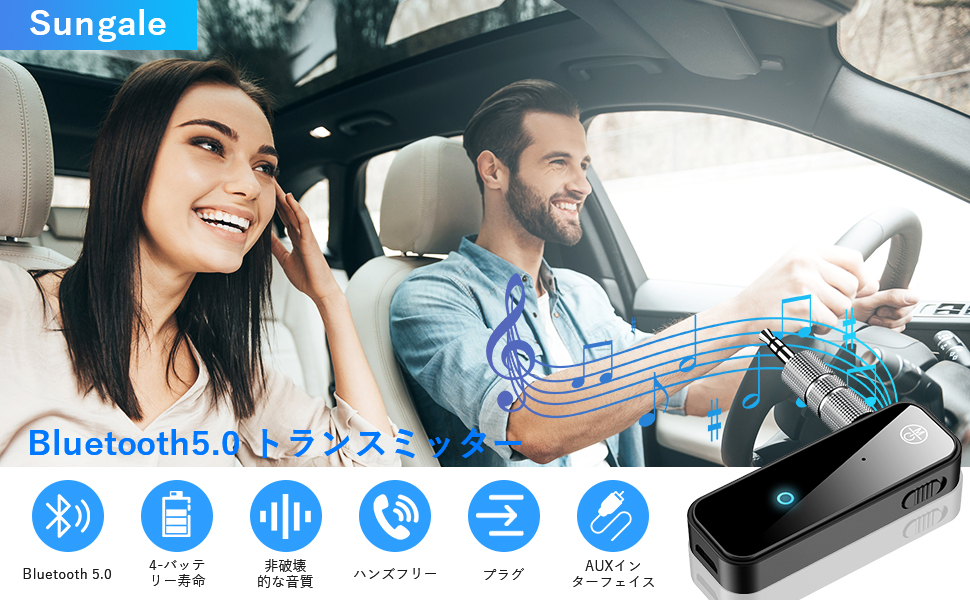
Image 5.1: A couple in a car utilizing the device for hands-free communication and music streaming, demonstrating its car compatibility.
5.3 Navigation Broadcasts (RX Mode)
When connected to your car audio system via RX mode, the device supports broadcast voice announcements from existing navigation applications on your smartphone.

Image 5.2: The device integrated into a car's dashboard, illustrating its use for streaming music and potentially navigation audio.
6. Техникалык тейлөө
To ensure the longevity and optimal performance of your Sungale Bluetooth Transmitter & Receiver, follow these maintenance guidelines:
- Тазалоо: Use a soft, dry cloth to clean the device. Avoid using harsh chemicals, solvents, or abrasive cleaners.
- Сактагыч: Аппаратты түз күн нурунан жана экстремалдык температурадан алыс салкын, кургак жерде сактаңыз.
- Суудан качуу: This device is not waterproof. Keep it away from water and other liquids.
- Этияттык менен мамиле кылуу: Аппаратты түшүрүүдөн же катуу таасирлерден сактаныңыз.
- Батареяга кам көрүү: For long-term storage, charge the battery to about 50% every few months to prevent deep discharge.
7. Кыйынчылыктарды
If you encounter issues with your device, refer to the following troubleshooting steps:
| Көйгөй | Мүмкүн себеп | Чечим |
|---|---|---|
| Түзмөк күйбөйт. | Батарея аз. | Аппаратты толук заряддаңыз. |
| Түзмөк менен жупташтыруу мүмкүн эмес. | Incorrect mode selected (TX/RX). Түзмөк жупташтыруу режиминде эмес. Bluetooth device too far away. | Туура режим тандалганын текшериңиз. Restart the device and put it into pairing mode. Түзмөктөрдү жакыныраак жылдырыңыз (10 метрдин ичинде). |
| Аудио чыгаруу/киргизүү жок. | 3.5mm Aux cable not connected properly. Үн өтө төмөн. Туташкан түзмөктө туура эмес аудио булагы/чыгыш тандалган. | Ensure the 3.5mm Aux cable is securely connected. Increase volume on both the device and connected audio system. Verify audio settings on your source/receiving device. |
| Аудио сапаты начар же статикалык. | Интерференция. Device too far from connected device. Батарея аз. | Башка зымсыз түзмөктөрдөн алыстаңыз. Түзмөктөрдүн ортосундагы аралыкты азайтыңыз. Аппаратты заряддаңыз. |
Бул чечимдерди колдонуп көргөндөн кийин көйгөй чечилбесе, кардарларды колдоо менен байланышыңыз.
8. Техникалык шарттар
| Өзгөчөлүк | Деталь |
|---|---|
| Модель номери | 1029T6824JSQA2 |
| Бренд | Sungale |
| Bluetooth версиясы | 5.3 |
| Режимдер | Өткөргүч (TX), Кабыл алгыч (RX) |
| Noise Cancellation | CVC8.0, DSP Technology |
| Батарея түрү | Кайра заряддалуучу литий батареясы |
| Батареянын иштөө мөөнөтү | 6-12 саат (болжол менен) |
| Батарея Салмагы | 10 грамм |
| Өлчөмдөр | 10 x 6.7 x 1.9 см |
| Салмагы | 30 грамм |
| Байланыш | 3.5 мм жардамчы джек |
9. Коопсуздук маалыматы
Please read and follow these safety precautions to prevent damage to the device or injury to yourself:
- Аппаратты демонтаждабаңыз, оңдоого же өзгөртүүгө болбойт.
- Keep the device away from extreme temperatures, humidity, and corrosive substances.
- Do not expose the device to fire or dispose of it in fire, as the battery may explode.
- Балдар жетпеген жерде сактаңыз.
- Бекитилген кубаттоочу кабелдерди жана адаптерлерди гана колдонуңуз.
10. Кепилдик жана колдоо
For warranty information or technical support, please refer to the documentation included with your purchase or contact Sungale customer service through their official webпродукт сатылып алынган сайт же сатуучу.


