1. Продукт бүтүп калдыview
The ETOE Seal Pro A1363 is a 1080P Google TV projector designed for home entertainment. It features a built-in Google TV system, native 1080P resolution with 4K UHD decoding, auto-focus, auto-keystone correction, dual 10W speakers, and dual-band Wi-Fi connectivity. Its fully-sealed optical engine ensures a long, maintenance-free lifespan.
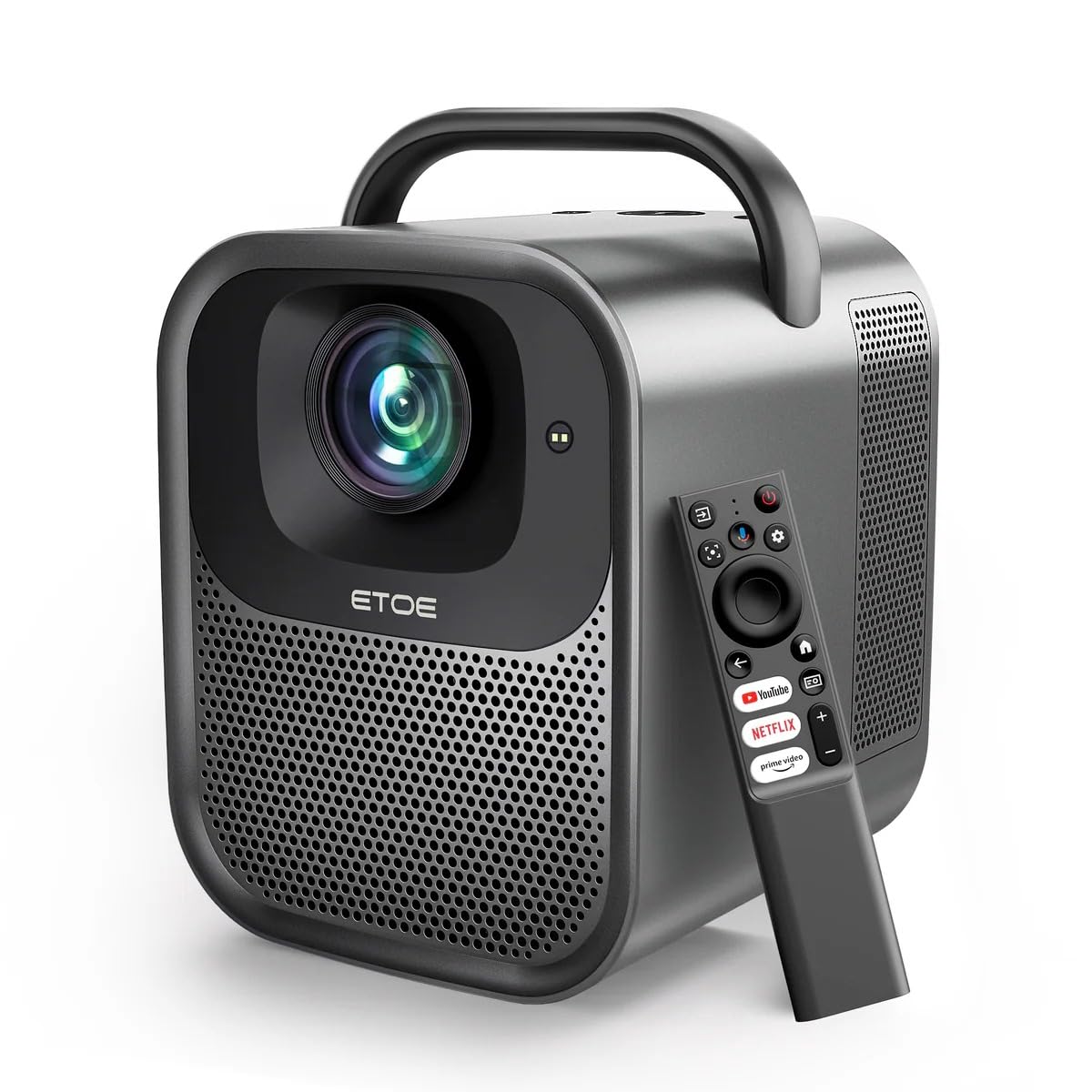
1.1-сүрөт: ETOE Seal Pro A1363 Projector. This image shows the front and side view of the projector, highlighting its compact design and lens.
Негизги өзгөчөлүктөрү:
- Built-in Google TV System: Access streaming services like Netflix, YouTube, Prime Video, Disney+, and HBO directly.
- Native 1080P & 4K UHD Decoding: Delivers sharp visuals with 1920x1080 resolution and HDR enhancement.
- Auto-Focus and Keystone Correction: Ensures perfectly square and stable images from various angles.
- Имерсивдүү үн: Equipped with powerful 2x10W dual speakers and multiple audio modes.
- Кош тилкелүү Wi-Fi: Supports 2.4G & 5G for stable wireless projection from Android, iOS, and PC devices.
- Туруктуу дизайн: Features a dust-proof, fully-sealed optical engine for extended lifespan.
Продукт видеосу бүттүview:
Видео 1.1: ETOE Seal Pro Projector Features. This video provides a visual overview of the projector's main features and capabilities, including its Google TV integration, auto-focus, and sound system.
2. Кутуда эмне бар
Кутучаны ачканда таңгагыңыздын ичиндегисин текшериңиз:
- ETOE Seal Pro A1363 Projector
- Кубаттуу адаптер
- Электр кабели
- Алыстан башкаруу
- Колдонуучунун Колдонмосу (бул документ)
3. Орнотуу колдонмосу
3.1 Алгачкы жайгаштыруу
Проекторду туруктуу, тегиз бетке коюңуз. Түзмөктүн айланасында жетиштүү желдетүү бар экенин текшериңиз. Оптималдуу viewing, position the projector directly in front of the screen or wall.
3.2 Кубатты туташтыруу
- Connect the power adaptor to the DC IN port on the projector.
- Plug the power cord into the power adaptor.
- Электр шнурунун розеткага сайыңыз.
3.3 Тышкы түзмөктөрдү туташтыруу
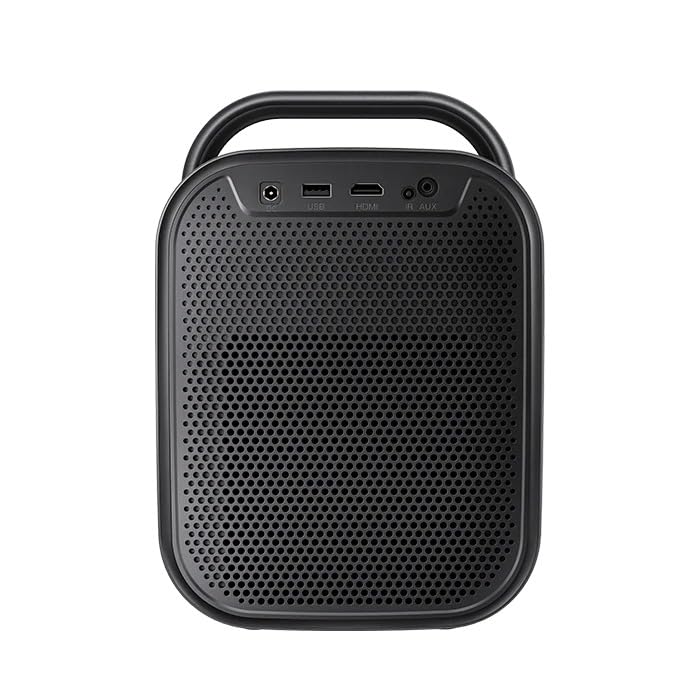
3.1-сүрөт: Арткы view of the ETOE Seal Pro A1363 Projector, showing the DC IN, USB, HDMI, and AUX ports.
Проектор ар кандай байланыш параметрлерин сунуш кылат:
- HDMI: Connect Blu-ray players, gaming consoles, laptops, or other HDMI-enabled devices.
- USB: Медиа ойнотуу үчүн USB дисктерди туташтырыңыз.
- AUX: Тышкы аудио түзмөктөрдү же кулакчындарды туташтырыңыз.
- Bluetooth: Зымсыз аудио үчүн Bluetooth динамиктери же кулакчындар менен жупташтырыңыз.
- Wi-Fi: Connect to your home network for online streaming and wireless projection.
4. Иштөө нускамалары
4.1 Күйгүзүү/өчүрүү
- Press the Power button on the projector or the remote control to turn the device on.
- To turn off, press the Power button again and confirm the shutdown prompt on the screen.
4.2 Controls Overview
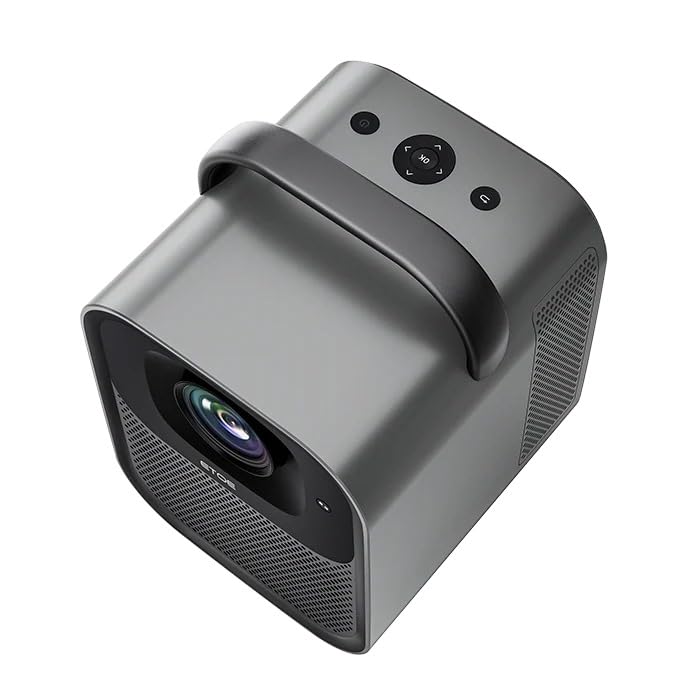
4.1-сүрөт: Жогорку view of the ETOE Seal Pro A1363 Projector, showing the power button, navigation controls, and back button.
The projector can be controlled using the buttons on the top panel or the included remote control.
- Кубат баскычы: Проекторду күйгүзөт же өчүрөт.
- Чабыттоо баскычтары (өйдө/төмөн/сол/оң): Менюларда багыттоо жана параметрлерди тандоо үчүн колдонулат.
- OK баскычы: Тандоолорду ырастайт.
- Артка баскычы: Мурунку экранга же менюга кайтат.
4.3 Google TV интерфейси
Upon powering on, the projector will display the Google TV home screen. You will need to log in with your Google account to access personalized content and streaming services.
- Follow the on-screen prompts to connect to your Wi-Fi network.
- Google каттоо эсебиңиз менен кириңиз.
- Install or access your preferred streaming applications (Netflix, YouTube, Prime Video, etc.).
- Use the remote control's navigation buttons and OK button to browse content.
- Utilize Google Assistant for voice commands by pressing the dedicated button on the remote.
4.4 Image Adjustment (Auto-Focus & Keystone)
The ETOE Seal Pro A1363 features automatic focus and keystone correction for a clear and properly shaped image.
- Автофокус: The projector automatically adjusts the image focus when powered on or moved.
- Автоматтык негизги ташты оңдоо: The projector automatically corrects distorted images to a rectangular shape, even if placed at an angle.
- Digital Zoom: If further adjustments are needed, navigate to the image settings in the Google TV menu to use the digital zoom feature (50% to 100%) to fine-tune screen size.
5. Техникалык тейлөө
Туура тейлөө проекторуңуздун узак иштөөсүн жана оптималдуу иштешин камсыз кылат.
5.1 Проекторду тазалоо
- Тазалоодон мурун проектордун өчүрүлгөнүн жана розеткадан суурулганын текшериңиз.
- Проектордун сыртын сүртүү үчүн жумшак, кургак чүпүрөктү колдонуңуз.
- Линза үчүн линзаны тазалоочу чүпүрөктү жана линзаны тазалоочу атайын эритмени колдонуңуз. Абразивдүү материалдардан алыс болуңуз.
- Do not spray cleaning liquids directly onto the projector.
5.2 Dust-Free Optical Engine
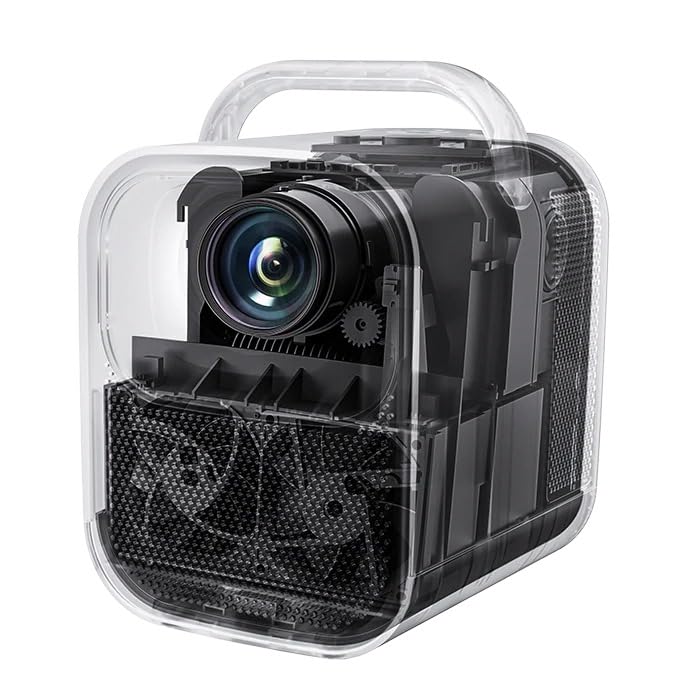
5.1-сүрөт: Ички view of the ETOE Seal Pro A1363 Projector, highlighting the fully-sealed optical engine designed to prevent dust accumulation.
The ETOE Seal Pro A1363 features a fully-sealed optical engine, which significantly reduces dust accumulation and minimizes the need for internal cleaning. This design contributes to a maintenance-free lifespan of over 30,000 hours.
6. Кыйынчылыктарды
Проекторуңузда көйгөйлөргө туш болсоңуз, төмөнкү жалпы көйгөйлөрдү жана чечимдерди караңыз:
- Кубат жок:
- Ensure the power cord is securely connected to the projector and the wall outlet.
- Дубалдагы розетка иштеп турганын текшериңиз.
- Кубат адаптери туура туташтырылганын текшериңиз.
- Сүрөт жок:
- Check the input source selection. Ensure it matches the connected device (e.g., HDMI).
- Verify the external device is powered on and sending a signal.
- Линзанын капкагын алып салыңыз.
- бүдөмүк сүрөт:
- The projector has auto-focus. If the image is blurry, try moving the projector slightly or restarting it to trigger auto-focus.
- Проекциялык беттин тегиз жана жылмакай экенине ынаныңыз.
- Distorted Image (Not Rectangular):
- The projector has auto-keystone correction. If distortion persists, try repositioning the projector or restarting it.
- Check for any manual keystone settings in the menu that might override auto-correction.
- Үн жок:
- Проектордогу жана туташкан булак түзмөгүндөгү үндү күчөтүңүз.
- Булак түзмөктөгү аудио чыгаруу жөндөөлөрүн текшерүү.
- Эгер тышкы динамиктерди колдонсоңуз, алардын туура туташып, күйгүзүлгөнүн текшериңиз.
- Wi-Fi туташуу маселелери:
- Проектор Wi-Fi роутериңиздин диапазонунда экенин текшериңиз.
- Wi-Fi сырсөзүнүн туура киргизилгендигин текшериңиз.
- Роутериңизди жана проекторуңузду өчүрүп-күйгүзүңүз.
7. Техникалык шарттар
| Өзгөчөлүк | Спецификация |
|---|---|
| Бренд | etoe |
| Модел | A1363 |
| Native Resolution | 1920 x 1080 (1080P) |
| декоддоо токтому | 4K UHD чейин |
| Сүрөттүн жарыктыгы | 1000 ANSI челинин |
| Сүрөттүн карама-катышы | 3000:1 |
| Дисплей технологиясы | LCD |
| Аспект катышы | 16:9 |
| Байланыш | Dual-Band Wi-Fi (2.4G & 5G), Bluetooth, USB, HDMI, AUX |
| Өзгөчөлүктөр | Auto Focus, Auto Keystone Correction, Portable, Wireless |
| Баяндамачылар | 2 x 10W Dual Speakers |
| Optical Engine Lifespan | 30,000 XNUMX+ саат |
| Продукциянын өлчөмдөрү | 53 x 34 x 59 см |
| Элемент Салмагы | 3 кг |
| Тtage | 240 вольт |
| Ватtage | 20 Ватт |
| Жаңыртуу ылдамдыгы | 60 Гц |
8. Кепилдик жана колдоо
For warranty information and customer support, please refer to the warranty card included with your product or contact the manufacturer directly.
Өндүрүүчү: JVDN International
Байланыш маалыматы: JVDN International (OPC) Private Limited, B-1122 Sun Westbank, Ashram Road, Ahmedabad, Gujarat, India, 380009. Contact person: JAYESH KUMAR JAGETIYA. Tel: +91 91361 87951. Email: jayesh@jvdninternational.com
Кепилдик дооматтары үчүн сатып алганыңыздын далилин сактап коюңуз.


