1. Киришүү
Thank you for choosing the Flatsons LIV-M01 88-Key Weighted Digital Piano. This instrument is designed to provide an authentic piano playing experience with advanced features for musicians of all levels. This manual will guide you through the setup, operation, and maintenance of your new digital piano.

Image 1.1: The Flatsons LIV-M01 88-Key Weighted Digital Piano, shown with included headphones and triple pedal unit.
2. Продукт бүтүп калдыview
2.1 Компоненттер
- 88-Key Weighted Digital Piano Unit
- Үч педальдуу блок
- Кубаттуу адаптер
- Наушник
- Музыкалык эс алуу
- Instruction Manual
2.2 Башкаруу панели жана туташуулар
The control panel features an LCD display and touch-sensitive buttons for various functions. The rear panel and underside provide connection ports for power, pedals, audio, and MIDI.

Сүрөт 2.1: Детальдуу view of the LIV-M01 control panel, showing the LCD display and touch-sensitive function buttons.
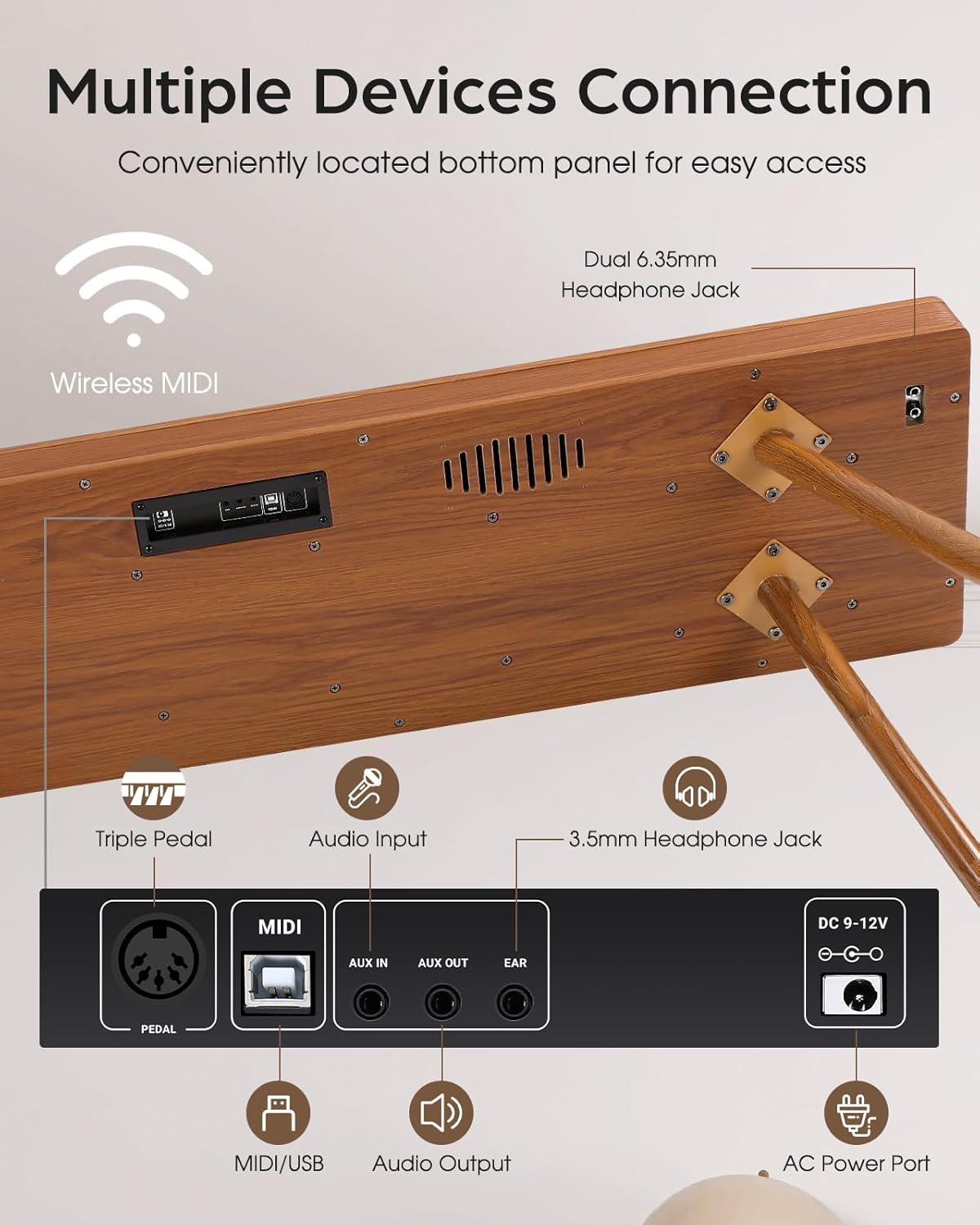
Image 2.2: The underside of the piano, illustrating the location of the triple pedal input, MIDI/USB, audio input/output, 3.5mm headphone jack, and AC power port.
3. Орнотуу жана чогултуу
Follow these steps to assemble and set up your digital piano.
3.1 Пакеттен чыгаруу
- Бардык компоненттерди таңгактан кылдаттык менен алып салыңыз.
- Көрсөтүлгөн бардык компоненттердин бар экендигин текшериңиз.
3.2 Стендди чогултуу (эгер бар болсо)
The LIV-M01 typically comes with a detachable stand. Attach the legs securely to the main piano body using the provided hardware. Ensure all screws are tightened to prevent wobbling.
3.3 Педаль блогун туташтыруу
- Locate the pedal input port on the underside of the piano (refer to Image 2.2).
- Connect the cable from the triple pedal unit firmly into this port.
3.4 Кубат туташтыруу
- Connect the power adapter to the DC 9-12V power port on the underside of the piano.
- Адаптерди стандарттуу электр розеткасына сайыңыз.
3.5 Music Rest Installation
Музыкалык калган бөлүгүн пианинонун жогорку панелиндеги атайын уячаларга салыңыз.

Image 3.1: Dimensions of the LIV-M01 and a visual representation of included accessories such as power adapter, pedal unit, headphones, and cleaning cloth.
4. Негизги операция
4.1 Күйгүзүү/өчүрүү
Press the Power button on the control panel to turn the piano on or off.
4.2 Үндү тууралоо
Use the 'VOL+' and 'VOL-' touch buttons on the control panel to adjust the master volume. The current volume level will be displayed on the LCD screen.
4.3 Обондорду тандоо
- Press the 'VOICE/RHYTHM' button to enter Tone selection mode.
- Use the 'SELECT+' and 'SELECT-' buttons to browse through the 128 available tones.
- The selected tone name or number will appear on the LCD display.
4.4 Наушниктерди колдонуу
Connect headphones to either the 3.5mm or 6.35mm headphone jacks on the underside of the piano for private practice. Connecting headphones will mute the internal speakers.
5. Өркүндөтүлгөн функциялар
5.1 Realistic Sound Sampлинг
The LIV-M01 utilizes a 192kHz/32-bit sampling rate and an advanced Dream5504 chip to reproduce the natural depth and resonance of a grand piano. This technology ensures clear, dynamic, and nuanced tones.

Image 5.1: Visual representation of the high-end audio chip (Dream5504) responsible for the piano's realistic sound sampлинг.

Image 5.2: Illustrates the high-definition sound source, emphasizing the quality of the piano's audio output.
5.2 Weighted Hammer Action Keys
The 88 full-size keys feature graded hammer action, mimicking the feel of an acoustic grand piano with heavier touch in the lower register and lighter touch in the higher register. Six levels of touch sensitivity allow for expressive playing.

Image 5.3: Explains the 88 fully weighted keys, highlighting the hammer action design, progressive weighting, and 6-level touch sensitivity.

Image 5.4: A visual representation of how key weighting changes across the keyboard, from light (PPP) to heavy (FFF).
5.3 Rhythm and Demo Songs
- Ритмдер: The piano includes 100 preset rhythms. Press 'VOICE/RHYTHM' and use 'SELECT+'/'SELECT-' to choose a rhythm. Press 'SYNC' to start/stop.
- Демо ырлар: Explore 88 demo songs with accompaniment sync. Press 'DEMO/SONG' and use 'SELECT+'/'SELECT-' to select a song.
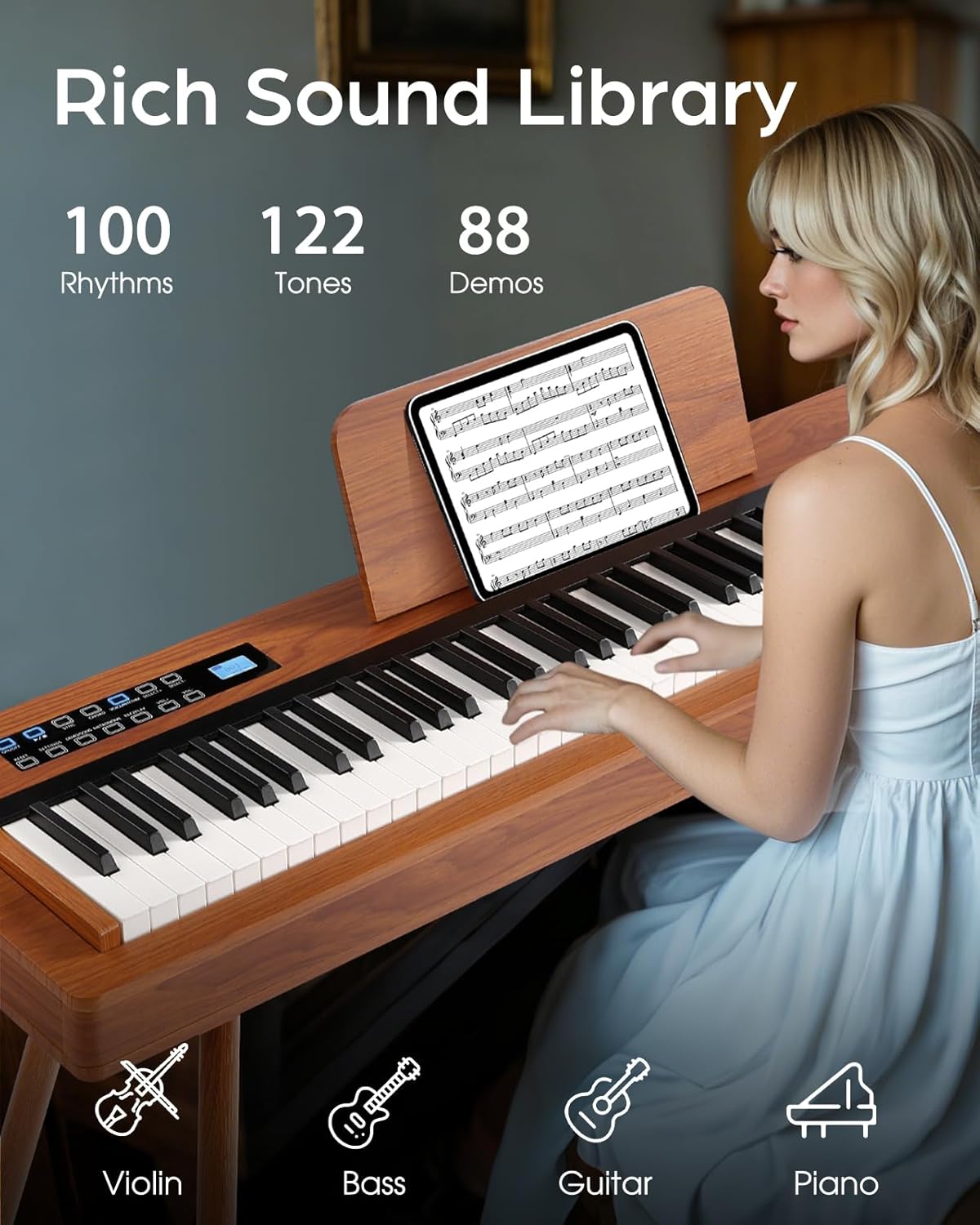
Image 5.5: Highlights the extensive sound library, including 100 rhythms, 122 tones, and 88 demo songs.
5.4 Метроном
Activate the metronome by pressing the 'METRONOME' button. Use 'SELECT+'/'SELECT-' to adjust the tempo from 30 to 250 BPM. This feature assists with timing and rhythm practice.
6. Байланыш
The LIV-M01 offers various connectivity options for enhanced functionality.
6.1 Wireless MIDI
Connect your digital piano wirelessly to compatible devices (phones, iPads, PCs) via MIDI. This allows interaction with music learning apps and digital audio workstations (DAWs).

Image 6.1: Demonstrates wireless MIDI connectivity, compatible with popular music applications like POP Piano, Synthesia, GarageBand, and Flowkey.
6.2 USB MIDI
For a wired connection, use the USB MIDI port to connect to computers for recording or using software instruments.
6.3 Аудио киргизүү/чыгаруу
- Аудио киргизүү (AUX IN): Connect external audio sources (e.g., MP3 player, smartphone) to play along with your favorite music.
- Audio Output (AUX OUT): Connect the piano to external ampкөтөргүчтөр, миксерлер же жаздыруучу түзүлүштөр.
7. Кароо жана тейлөө
- Тазалоо: Пианинонун бетин сүртүү үчүн жумшак, кургак чүпүрөктү колдонуңуз. өжөр кир үчүн, бир аз гampкездемени суу менен сүртүңүз. Абразивдүү тазалоочу каражаттардан же эриткичтерден алыс болуңуз.
- Негизги кам көрүү: Ачкычтарды таза кармаңыз. Эгерде алар кирдеп калса, аларды жумшак, нымдуу чүпүрөк менен акырын сүртүңүз.amp кездеме.
- Сактагыч: Store the piano in a dry, temperate environment away from direct sunlight, extreme temperatures, and humidity.
- Транспорт: When moving the piano, ensure it is powered off and all cables are disconnected. Handle with care to avoid damage.
8. Кыйынчылыктарды
| Көйгөй | Мүмкүн себеп | Чечим |
|---|---|---|
| Динамиктерден үн жок | Үнү өтө төмөн; Кулакчындар туташтырылган; Кубатта көйгөй бар | Increase volume; Disconnect headphones; Check power connection |
| Ачкычтар жооп бербейт | Piano not powered on; MIDI settings issue | Ensure power is on; Check MIDI settings if connected to external device |
| Педалдар иштебей жатат | Pedal unit not connected properly | Ensure pedal cable is securely plugged into the correct port |
| Wireless MIDI not connecting | Bluetooth/Wireless MIDI not enabled on device; Interference | Ensure wireless MIDI is active on both piano and device; Reduce distance or interference |
9. Техникалык шарттар
- Модел: LIV-M01
- Ачкычтар: 88 Full-Size, Fully Weighted, Graded Hammer Action
- Тийүү сезгичтиги: 6 деңгээл
- Обондор: 128
- Ритмдер: 100 Алдын ала коюлган
- Демо ырлар: 88
- Sampлинг чен: 192кГц/32-бит
- Аудио чип: Dream5504
- Метроном: 30-250 BPM (Adjustable)
- Байланыш: Wireless MIDI, USB MIDI, Audio Input (AUX IN), Audio Output (AUX OUT)
- Наушник уячалары: 1х 3.5мм, 2х 6.35мм
- Кубат булагы: Corded Electric (DC 9-12V)
- Өлчөмдөрү: Approximately 52.7 x 18.5 x 33.5 inches (L x W x H, with stand)
- Салмагы: Болжол менен 51.9 фунт
- Дене материалы: Wood (outer casing), Plastic/Synthetic Composite (keys)
10. Кепилдик жана колдоо
Flatsons is committed to customer satisfaction. Your LIV-M01 digital piano includes:
- 24-Month Product Guarantee: Кадимки колдонуудагы өндүрүштүк кемчиликтерди жана бузулууларды жабат.
- Lifelong Expert Technical Support: Access to technical assistance for the lifetime of the product.
- 30-Day Easy Return Policy: As per Amazon's policy.
- 24/7 Кардарларды тейлөө: For any inquiries or support needs.
For support, please contact Flatsons customer service through the platform of purchase or refer to the contact information provided with your product packaging.

Image 10.1: Summary of customer support and warranty benefits provided by Flatsons.


