Introduction
Welcome to the FASTWD Kids Tablet user manual. This guide provides detailed instructions on how to set up, operate, maintain, and troubleshoot your new tablet. Designed specifically for children, this tablet combines robust performance with essential child safety features, offering a secure and engaging learning and entertainment experience.
Түзмөктүн туура иштешин камсыз кылуу жана анын иштөө мөөнөтүн узартуу үчүн колдонуудан мурун ушул колдонмону кунт коюп окуп чыгыңыз.
1. Орнотуу
1.1. Кутудан чыгаруу жана баштапкы төлөм
Carefully remove all components from the packaging. You should find the FASTWD Kids Tablet, a protective case, a USB-C charging cable, and a power adapter.
Before first use, fully charge the tablet. Connect the USB-C cable to the tablet's charging port and the other end to the power adapter. Plug the adapter into a wall outlet. The charging indicator will illuminate.

Image: The FASTWD Kids Tablet, showcasing its 10-inch screen, green protective case, and key specifications like 36GB RAM, 128GB ROM, and Android 14 operating system.
1.2. Күйгүзүү жана баштапкы конфигурация
- Press and hold the power button located on the side of the tablet until the FASTWD logo appears on the screen.
- Каалаган тилди, аймакты тандоо жана Wi-Fi тармагына туташуу үчүн экрандагы көрсөтмөлөрдү аткарыңыз.
- Google аккаунтуңуз менен кириңиз же жаңысын түзүңүз. Бул Google Play Дүкөнүнө жана башка Google кызматтарына кирүү үчүн керек.
- Set up parental controls as desired. The tablet comes with pre-installed child safety features.

Image: The tablet's home screen displaying various educational and entertainment applications, highlighting features like privacy settings, customizable widgets, and access to the Google Play Store for app downloads.
2. Планшетти иштетүү
2.1. Негизги навигация
- Тийүү жаңсоолору: Тандоо үчүн таптаңыз, сыдыруу үчүн серпиңиз, чоңойтуу үчүн чымчыңыз.
- Башкы экран: Access your installed apps and widgets.
- Эскертме панели: Ыкчам жөндөөлөргө жана эскертмелерге жетүү үчүн экрандын өйдө жагынан ылдый сүрүңүз.
- Колдонмо тартмасы: Экранды ылдый жагынан өйдө сүрүңүз view бардык орнотулган колдонмолор.
2.2. Ата-энелик көзөмөл функциялары
The FASTWD Kids Tablet includes a robust parental control system to ensure a safe digital environment for children. This system allows you to manage:
- Убакытты башкаруу: Set daily limits for tablet usage.
- Колдонмо башкаруу: Control which applications your child can access.
- Мазмунду башкаруу: Filter inappropriate content from web browsing and app stores.
Access these settings through the dedicated "Kids Space" or "Parental Control" app on the tablet.

Image: A child and adult interacting with the tablet, illustrating the ease of use and the presence of child safety features. Icons below represent time management, app management, and content management, all part of the tablet's parental control system.
2.3. Колдонмолорду орнотуу жана башкаруу
Apps can be downloaded from the Google Play Store. Ensure parental controls are configured to approve app installations if desired.
- ачыңыз Play Store колдонмо.
- Издөө desired apps or browse categories.
- таптаңыз Орнотуу to download and install an app.
- To uninstall an app, go to Орнотуулар > Колдонмолор жана эскертмелер > Бардык колдонмолорду көрүү, колдонмону тандап, таптаңыз Чыгаруу.

Image: An infographic highlighting key features of the FASTWD 10-inch Kids Tablet, including WiFi connectivity, 36GB RAM, 128GB ROM, expandable storage via TF card (up to 256GB), Google Play access, and parental control capabilities.
2.4. Байланыш жана порттор
The FASTWD Kids Tablet offers various connectivity options and ports for enhanced functionality:
- 3.5 мм аудио уячасы: Наушниктерди же тышкы динамиктерди туташтыруу үчүн.
- USB Type-C порту: Used for charging the tablet and for data transfer.
- OTG (On-The-Go) Support: Allows the tablet to act as a host, enabling connection of USB devices like flash drives, keyboards, or mice (requires an OTG adapter, sold separately).
- MicroSD картасынын уячасы: Expand the tablet's storage capacity beyond the built-in 128GB.

Сүрөт: Коллаж көрсөтүүasing various features and usage scenarios of the tablet, including its 3.5mm audio jack, OTG support, USB Type-C charging port (5V/2A), and its robust protective design. It also depicts children happily using the tablet, emphasizing its suitability as a gift.
3. Техникалык тейлөө
3.1. Планшетти тазалоо
Экранды тазалоо үчүн жумшак, мамыксыз чүпүрөктү колдонуңуз. Өжөр тактар үчүн бир аз сүртүңүзampчүпүрөккө суу же экран тазалоочу каражат. Катуу химиялык заттарды же абразивдик материалдарды колдонуудан алыс болуңуз.
The protective case can be wiped clean with a damp зарыл болсо, кездеме жана жумшак самын.

Сүрөт: деталдуу view of the FASTWD Kids Tablet's integrated protective case, emphasizing its full protection, anti-drop, and anti-shock design. This case is designed to withstand typical child usage.
3.2. Батареяга кам көрүү
- Батареяны үзгүлтүксүз толугу менен жараксыз кылуудан алыс болуңуз.
- Планшетти экстремалдык температурага тийгизбеңиз.
- Берилген кубаттагычты же сертификатталган шайкеш кубаттагычты гана колдонуңуз.
3.3. Программалык камсыздоону жаңыртуу
Оптималдуу иштөөнү жана коопсуздукту камсыз кылуу үчүн программалык камсыздоонун жаңыртууларын мезгил-мезгили менен текшерип туруңуз. Орнотуулар > Система > Системаны жаңыртуу жеткиликтүү жаңыртууларды текшерүү жана орнотуу үчүн.
4. Кыйынчылыктарды
| Көйгөй | Мүмкүн себеп | Чечим |
|---|---|---|
| Планшет күйбөйт. | Аз батарея; системанын бузулушу. | Планшетті кеминде 30 мүнөт кубаттаңыз. Эгер дагы эле жооп бербесе, өчүрүп-күйгүзүү үчүн кубат баскычын 10-15 секунд басып туруңуз. |
| Wi-Fi туташуу маселелери. | Туура эмес сырсөз; роутердеги көйгөй; планшеттин Wi-Fi өчүрүлгөн. | Check Wi-Fi password. Restart your router. Toggle Wi-Fi off and on in tablet settings. |
| Колдонмолор бузулуп же катып жатат. | Insufficient memory; app bug; outdated software. | Фондук колдонмолорду жабуу. Колдонмонун кэшин тазалоо (Орнотуулар > Колдонмолор > [Колдонмонун аты] > Сактагыч жана кэш > Кэшти тазалоо). Update the app or tablet software. |
| Экран жооп бербей жатат. | Убактылуу программалык ката. | Force restart the tablet by holding the power button for 10-15 seconds. |
5. Техникалык шарттар
| Өзгөчөлүк | Деталь |
|---|---|
| Бренд | FASTWD |
| Модель номери | L211-EEA |
| Сериялар | L231-EEA |
| Түс | Жашыл |
| Screen Size | 10.1 дюйм |
| Резолюция | 1280x800 IPS |
| Орнотулган RAM өлчөмү | 36 ГБ |
| Эстутум сактоо сыйымдуулугу | 128 GB (Expandable via SD card) |
| Байланыш түрү | Wi-Fi (802.11ac), Bluetooth 5.0 |
| Операция системасы | Android 14 |
| Батарея | 1 9V батарея (кошулган) |
| Жаш курагы (сүрөттөмө) | Бала |
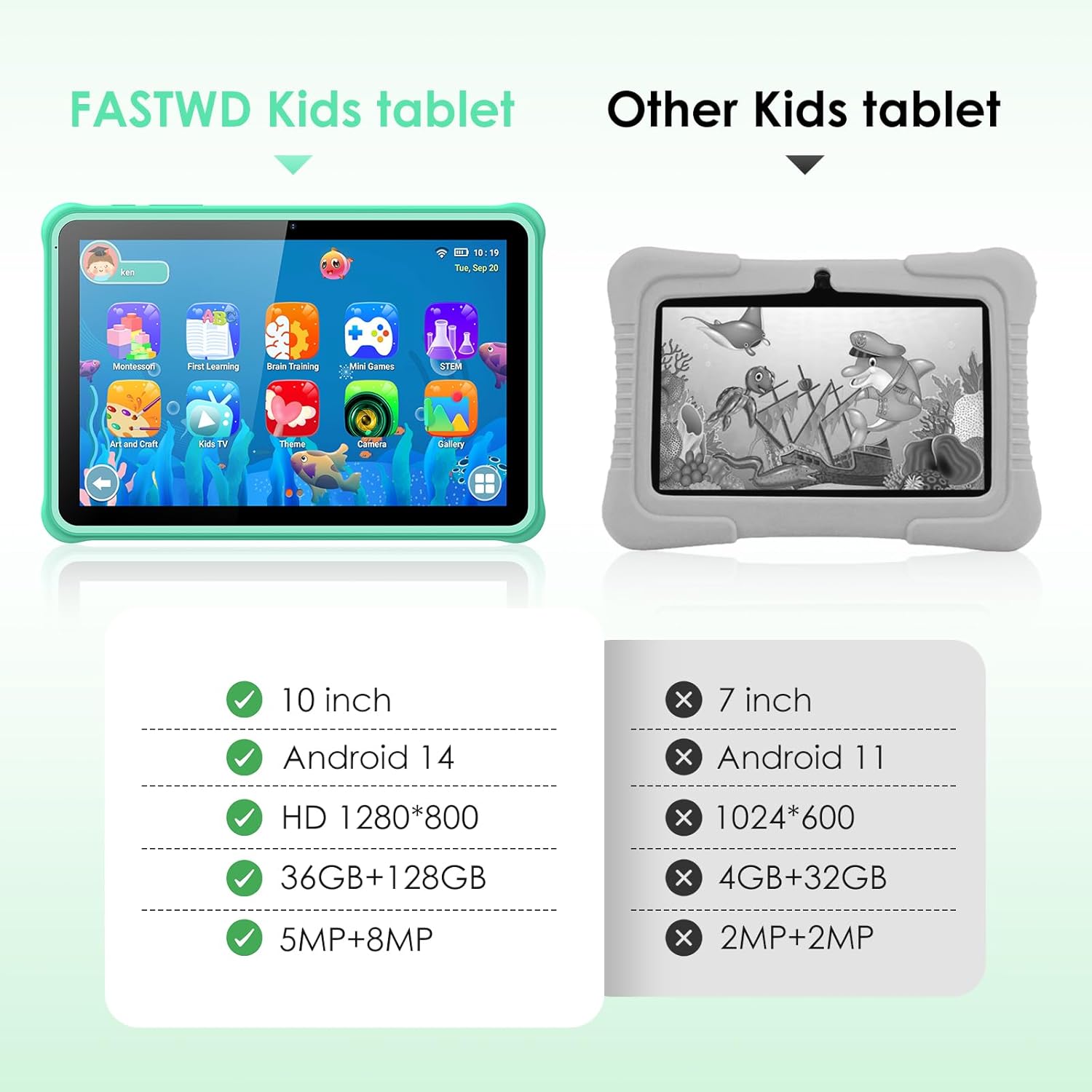
Image: A visual comparison highlighting the superior specifications of the FASTWD Kids Tablet (10-inch, Android 14, HD 1280x800, 36GB+128GB, 5MP+8MP cameras) against a generic "Other Kids tablet" with lower specs.
6. Кепилдик жана колдоо
6.1. Кепилдик маалыматы
The FASTWD Kids Tablet comes with a standard manufacturer's warranty. Please refer to the warranty card included in your product packaging for specific terms and conditions, including warranty period and coverage details. Keep your purchase receipt as proof of purchase for warranty claims.
6.2. Кардарларды колдоо кызматы
For technical assistance, troubleshooting beyond this manual, or warranty inquiries, please contact FASTWD customer support. Contact information can typically be found on the product packaging, the official FASTWD webсайты же сатуучуңуздун колдоо каналдары аркылуу.
When contacting support, please have your tablet's model number (L211-EEA) and purchase details ready.


