1. Киришүү
The Teslong NTS430 is a versatile dual-lens endoscope camera designed for detailed visual inspection in various environments. It features a 4.3-inch HD display, a flexible probe with front and side cameras, adjustable LED illumination, and a durable, waterproof design. This manual provides essential information for the safe and effective use of your NTS430 endoscope camera.

Figure 1: Teslong NTS430 Dual Lens Endoscope Camera with flexible probe.
2. Пакеттин мазмуну
Пакетиңизде бардык буюмдар бар экенин текшериңиз:
- NTS430 Monitor
- Dual Lens Probe (available in 3.3FT, 16.5FT, or 50FT lengths)
- USB заряддоо кабели
- Колдонуучунун Колдонмосу (бул документ)
- Magnet Hook
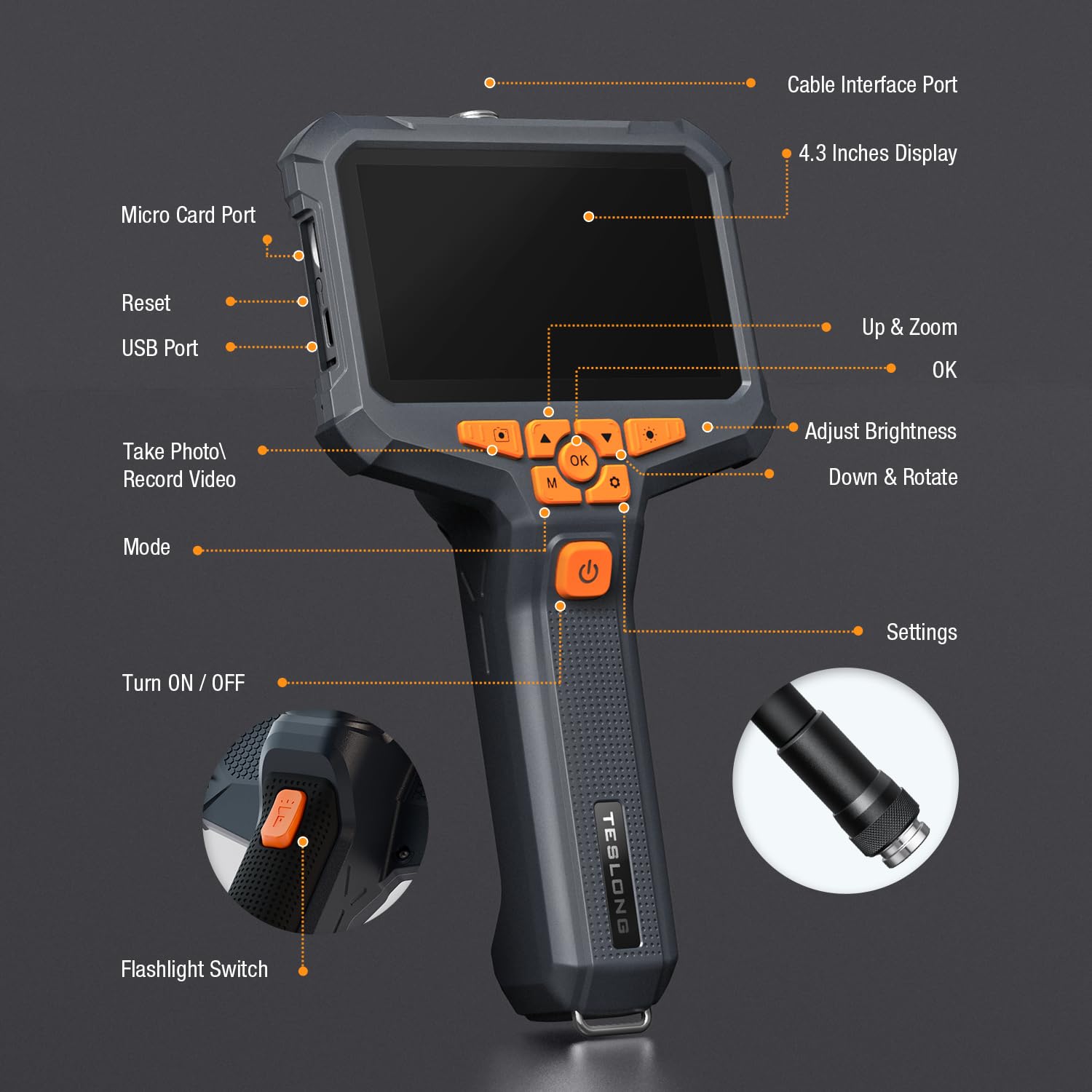
Figure 2: Included components: NTS430 monitor, dual lens probe, USB charging cable, user manual, and magnet hook.
3. Продукт бүтүп калдыview
3.1 Түзмөктүн жайгашуусу

Figure 3: Key components and controls of the NTS430 monitor.
- Cable Interface Port: Connects the flexible probe.
- 4.3 Inches Display: High-definition IPS screen for viewсүрөттөрдү жана видеолорду.
- Micro Card Port: Slot for inserting a Micro SD card for storage.
- Reset Button: Used to reset the device.
- USB Port: For charging and data transfer.
- Up & Zoom Button: Navigates menus upwards and controls digital zoom.
- OK Button: Confirms selections.
- Adjust Brightness Button: Controls the intensity of the LED lights.
- Down & Rotate Button: Navigates menus downwards and rotates images.
- Take Photo / Record Video Button: Captures still images or starts/stops video recording.
- Mode Button: Switches between photo, video, and playback modes.
- Turn ON / OFF Button: Powers the device on or off.
- Settings Button: Accesses system settings.
- Flashlight Switch: Activates the built-in flashlight.
3.2 Dual Lens Probe
The NTS430 features a dual-lens system for comprehensive inspection:
- Алдыңкы камера: Provides a straight-ahead view with 6 adjustable LED lights.
- Каптал камера: Offers a 90-degree side view with 1 additional LED light, ideal for inspecting pipe walls or internal surfaces.

Figure 4: Close-up of the dual-lens probe showing front and side cameras with LED lights.
4. Орнотуу
4.1 Аппаратты заряддоо
Before first use, fully charge the NTS430. Connect the USB charging cable to the device's USB port and to a standard USB power adapter (not included). The 3000mAh battery provides over 4.5 hours of continuous usage when fully charged.
4.2 Микро SD картаны салуу
To save photos and videos, a Micro SD card (not included) is required. Locate the Micro Card Port on the side of the monitor. Gently insert a compatible Micro SD card until it clicks into place. Ensure the card is correctly oriented to avoid damage. The device supports Class 10 Micro SD cards.
Note: Some users have reported difficulty with card insertion or compatibility. Ensure the card is properly aligned and consider trying a different brand if issues persist.
4.3 Зондду бекитүү
Align the connector of the flexible probe with the Cable Interface Port on the NTS430 monitor. Gently push and twist the connector clockwise until it is securely fastened. Ensure a firm connection for stable image transmission.
5. Иштөө нускамалары
5.1 Күйгүзүү/өчүрүү
басып, кармап туруңуз КҮЙГҮЗҮҮ / ӨЧҮРҮҮ button (labeled with a power icon) for a few seconds to power the device on or off.
5.2 Switching Between Lenses (Split Screen View)
The NTS430 allows for simultaneous viewing from both the front and side cameras. To switch between views or activate split-screen mode:
- Бойдок View: баскычын кыска басыңыз Mode button to cycle between Front Camera view and Side Camera view.
- Бөлүнгөн экран View: көпкө басыңыз Сүрөткө тартуу/Видео жаздыруу button to activate the split-screen display, showing both front and side camera feeds simultaneously. Long press again to exit split-screen mode.

5-сүрөт: Мисample of split-screen view showing both front and side camera perspectives.
5.3 Adjusting LED Illumination
The probe's LED lights provide illumination in dark areas. Press the Жарыктыкты жөндөө button to cycle through different brightness levels. The front camera has 6 LEDs, and the side camera has 1 LED.

Figure 6: Illustration of adjustable LED light intensity on the endoscope probe.
5.4 Сүрөттөрдү жана видеолорду тартуу
Ensure a Micro SD card is inserted before attempting to record. In live view режим:
- Сүрөткө тартуу: баскычын кыска басыңыз Сүрөткө тартуу/Видео жаздыруу кыймылсыз сүрөткө тартуу үчүн баскыч.
- Видеону жаздыруу: көпкө басыңыз Сүрөткө тартуу/Видео жаздыруу button to start video recording. Long press again to stop recording.
5.5 Digital Zoom and Image Rotation
- Чоңойтуу: колдонуу Up & Zoom button to digitally zoom in on the image.
- Айлантуу: колдонуу Down & Rotate button to rotate the image on the display.
5.6 Аксессуарларды колдонуу
The included magnet hook can be attached to the endoscope probe for retrieving small metallic objects from inaccessible areas.

Figure 7: The magnet hook accessory attached to the endoscope probe.
6. Техникалык тейлөө
6.1 Тазалоо
The probe is IP67 waterproof. After use in wet or dirty environments, wipe the probe clean with a damp cloth. For the monitor, use a soft, dry cloth. Do not use abrasive cleaners or solvents.
6.2 Сактоо
Store the NTS430 in a cool, dry place away from direct sunlight and extreme temperatures. Ensure the probe is coiled loosely to prevent damage to the cable.
6.3 Батареяга кам көрүү
Батареянын иштөө мөөнөтүн узартуу үчүн, батареяны тез-тез толук зарядсыздандырбаңыз. Эгер узак убакытка сактасаңыз, батареяны бир нече ай сайын болжол менен 50% га чейин заряддаңыз.
7. Кыйынчылыктарды
- Түзмөк күйбөйт: Ensure the battery is charged. Connect the device to a USB power source and try again.
- Экранда сүрөт жок: Check if the probe is securely connected to the monitor.
- Сүрөттүн сапаты начар: Adjust the LED brightness. Clean the camera lenses if they are dirty. Ensure the focus distance (2-8 cm) is appropriate for the object being viewред.
- Cannot take photos/record videos: Verify that a compatible Micro SD card is inserted and has sufficient free space. Reformat the Micro SD card if necessary (this will erase all data).
- Micro SD карта таанылган жок: Ensure the card is inserted correctly. Try a different Micro SD card, preferably a Class 10 card from a reputable brand.
8. Техникалык шарттар
| Өзгөчөлүк | Спецификация |
|---|---|
| Модел | NTS430 |
| Дисплей | 4.3-inch HD IPS Display |
| Камера түрү | Кош линза (алдыңкы жана каптал) |
| Видео тартуунун резолюциясы | 1080p |
| LED жарыктары | 6 (Front) + 1 (Side) adjustable |
| Суу өткөрбөйт рейтинги | IP67 (Зонд) |
| Батарея сыйымдуулугу | 3000mAh |
| Батареянын иштөө мөөнөтү | 4.5 XNUMX сааттан ашык |
| Макро фокустоо диапазону | 2-8 см |
| Атуу режимдери | Кол менен, Автоматтык |
| Экспозицияны башкаруу түрү | Автоматтык кол |
| Түс | Кара |
| Өндүрүүчү | Теслонг |
9. Кепилдик жана колдоо
For warranty information and technical support, please refer to the documentation included with your purchase or visit the official Teslong webсайт. Сиз да зыярат кылсаңыз болот Amazon'догу Teslong дүкөнү кошумча ресурстар үчүн.
Teslong is committed to customer satisfaction and provides support for product inquiries and issues.


