1. Киришүү
This manual provides detailed instructions for the setup, operation, maintenance, and troubleshooting of your Chilkey ND75 LP Low Profile Aluminum Mechanical Keyboard. Please read this manual thoroughly before using the product to ensure proper functionality and longevity.

Figure 1.1: Chilkey ND75 LP Low Profile Aluminum Mechanical Keyboard (Purple variant).
2. Негизги өзгөчөлүктөрү
- Төмөн Проfile Metal Design: Constructed with a full CNC aluminum alloy case, providing durability and a sleek aesthetic.
- 75% Layout with Functional LCD Screen: A compact 75% layout keyboard featuring an integrated LCD screen for displaying custom GIFs, connection modes, battery status, backlight settings, RGB modes, volume, and language.

Figure 2.1: Functional LCD screen displaying keyboard status and customization options.
- Magnetic Quick Release System: Facilitates easy assembly and disassembly for maintenance and customization.

Figure 2.2: Magnetic quick release structure and mounting options.
- Optimized Ergonomic Design: Төмөн профессионалfile keystroke design reduces hand fatigue for extended use.
- Three Unique Typing Styles: Adaptable with a multi-functional wrist rest that can be installed under the keyboard, at the front, or used separately.
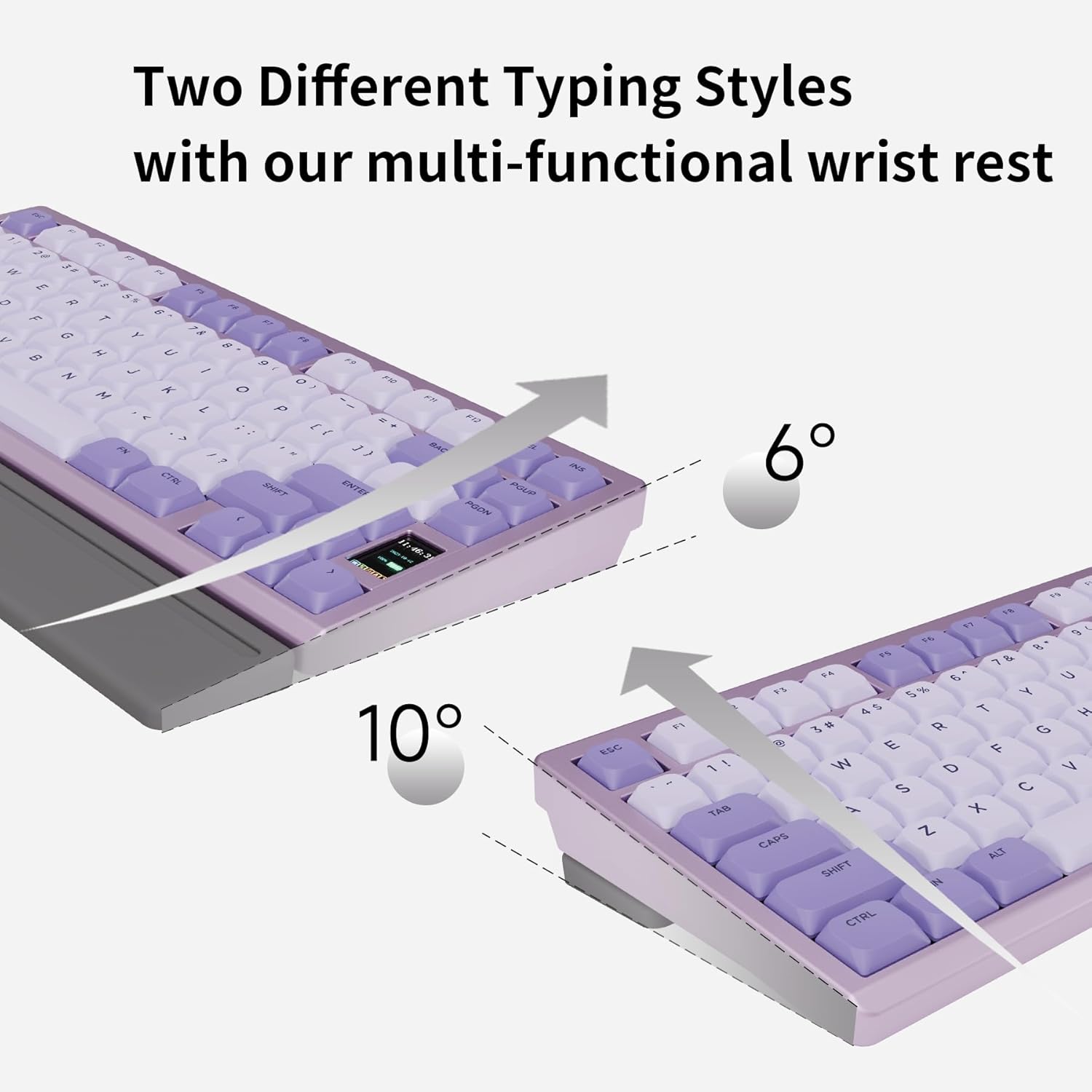
Figure 2.3: Adjustable typing angles with the wrist rest.
- Full POM Switches and Double Shot PBT Keycaps: Features self-developed full POM switches for a smooth typing experience, paired with durable double shot PBT keycaps.

Figure 2.4: Components of the full POM linear switch and keycap.
- Tri-Mode туташуу: Supports USB-C wired, 2.4GHz wireless, and Bluetooth 5.3 connections.

2.5-сүрөт: Үч режимдеги туташуу параметрлери.
- Per-key RGB Backlighting: Customizable RGB lighting with 20 lighting effects.

Figure 2.6: Per-key RGB backlighting and control functions.
- Ысык алмаштырылуучу PCB: Features a 1.2mm non-flex-cut PCB, allowing for switch replacement. Note: Only compatible with specific low-profile өчүргүчтөр.

Figure 2.7: Hot-swappable PCB for switch customization.
3. Орнотуу колдонмосу
3.1. Пакеттин мазмуну
Улантуудан мурун, пакетте бардык элементтер бар экенин текшериңиз:
- Chilkey ND75 LP Mechanical Keyboard
- USB кабели (USB-C)
- Баскыч капкагын тарткыч
- (Optional) Multi-functional Wrist Rest
- (Optional) 2.4GHz Wireless Dongle
3.2. Баштапкы байланыш
The ND75 LP keyboard supports three connection modes: wired (USB-C), 2.4GHz wireless, and Bluetooth 5.3.
- Зымдуу режим:
Connect the provided USB-C cable to the keyboard's USB-C port and the other end to your computer's USB port. The keyboard will automatically switch to wired mode and begin charging.
- 2.4 ГГц зымсыз режими:
Insert the 2.4GHz wireless dongle into an available USB port on your computer. On the keyboard, switch to 2.4GHz mode (refer to the keyboard's function keys or LCD screen for mode selection). The keyboard should connect automatically.
- Bluetooth режими:
Ensure your device's Bluetooth is enabled. On the keyboard, switch to Bluetooth mode (typically by pressing FN + Q/W/E for 3 seconds to pair with up to three devices). The keyboard's LCD screen will indicate pairing status. Select "Chilkey ND75 LP" from your device's Bluetooth settings to connect.
4. Иштөө нускамалары
4.1. Негизги баскычтоп функциялары
The ND75 LP functions as a standard 75% mechanical keyboard. All standard key inputs will work as expected.
4.2. ЖК экран функциялары
The integrated LCD screen provides real-time information and customization options. Navigate through the screen's menus using the designated function keys or knob (if present on your model).
- Туташуу режими: Displays current connection (Wired, 2.4G, BT1, BT2, BT3).
- Батареянын абалы: Батареянын калган пайызын көрсөтөтtage.
- Арткы жарык орнотуулары: Adjust brightness, effect mode, and speed of the RGB lighting.
- RGB режимдери: Cycle through various pre-set RGB lighting effects.
- Үндү көзөмөлдөө: Системанын үнүн тууралоо.
- Тил: Select display language for the screen.
- Ыңгайлаштырылган GIF сүрөттөрү: Upload and display custom animated GIFs (requires software, see Section 4.4).
4.3. RGB арткы жарыкты башкаруу
Control the per-key RGB backlighting using the following key combinations:
| Function Key Combination | Description |
|---|---|
| FN + PGDN | Cycle through 20 kinds of lighting effects. |
| FN + F10 | Switch backlight color. |
| FN + ↑ | Жарыктыкты жогорулатуу. |
| FN + ↓ | Жарыктыкты азайтыңыз. |
| FN + → | Эффекттин ылдамдыгын жогорулатыңыз. |
| FN + ← | Эффекттин ылдамдыгын азайтыңыз. |
| FN + X | Turn On/Off the light. |
4.4. Программалык камсыздоону колдоо
The Chilkey ND75 LP supports an independent driver for advanced customization, including custom RGB backlighting, shortcut key remapping, and macro creation. This software is required for uploading custom GIFs to the LCD screen.
- Please run the driver in wired mode for optimal performance.
- Note: Mac system drivers may not support key remapping, GIF upload, or synchronous time functions.

4.1-сүрөт: Мисample of the keyboard's customization software interface.
5. Техникалык тейлөө
5.1. Баскычтопту тазалоо
- Тазалоодон мурун клавиатураны бардык кубат булактарынан ажыратыңыз.
- Бир аз жумшак, түксүз кездемени колдонуңуз dampened with water or a mild cleaning solution to wipe the aluminum case and keycaps.
- For dust and debris between keycaps, use compressed air or the provided keycap puller to remove keycaps and clean thoroughly.
- Avoid using harsh chemicals, abrasives, or solvents as they may damage the finish.
5.2. Батареяга кам көрүү
- The keyboard is equipped with a built-in 1800 mAh Lithium Polymer battery.
- Charge the keyboard using the provided USB-C cable connected to a standard USB power source.
- Батареянын иштөө мөөнөтүн узартуу үчүн бат-баттан толук зарядсыздануудан качыңыз.
- Эгер клавиатураны узак убакытка сактасаңыз, сактоодон мурун аны болжол менен 50% га чейин кубаттаңыз.
6. Кыйынчылыктарды
| Көйгөй | Мүмкүн себеп | Чечим |
|---|---|---|
| Баскычтоп жооп бербей жатат (Зымдуу) | Бошогон кабель туташуу, туура эмес USB порт, драйвер маселеси. | USB-C кабели коопсуз туташканын текшериңиз. Башка USB портун же кабелин колдонуп көрүңүз. Компьютериңизди өчүрүп күйгүзүңүз. |
| Keyboard not connecting (Wireless/Bluetooth) | Туура эмес режим тандалды, батареянын заряды аз, тоскоолдук, жупташтыруу көйгөйү. | Ensure correct mode (2.4GHz/Bluetooth) is selected on the keyboard. Charge the keyboard. Re-pair the Bluetooth connection or re-insert the 2.4GHz dongle. Move closer to the receiver. |
| Keys repeating or not registering | Software glitch, switch issue, low battery. | Restart the keyboard and computer. Ensure the keyboard is fully charged. If a specific key is problematic, consider hot-swapping the switch (refer to Section 2.9). Update keyboard firmware if available. |
| LCD screen not displaying correctly | Software issue, firmware issue. | Ensure the keyboard is in wired mode when using the customization software. Check for firmware updates. |
| RGB жарыктандыруу иштебейт | Lighting turned off, brightness too low, software conflict. | Press FN + X to toggle lighting. Increase brightness using FN + ↑. Check software settings. |
7. Продукттун спецификациялары
| Атрибут | Деталь |
|---|---|
| Модел | ND75 LP |
| Продукциянын өлчөмдөрү | 12.67 x 5.51 x 1 дюйм (32.18 x 14.00 x 2.54 см) |
| Элемент Салмагы | 2.88 фунт (1.31 кг) |
| Өндүрүүчү | OOCTPK |
| Батареялар | 2 Lithium Polymer batteries (included), 1800 mAh capacity |
| Байланыш технологиясы | 2.4 ГГц зымсыз, Bluetooth 5.3, USB-C зымдуу |
| Keyboard Description | Механикалык |
| Өзгөчөлүктөр | Backlit (RGB), Hot-Swappable, Low-Profile Key, Rechargeable, Wrist Rest |
| Color (Variant) | Кызгылт көк |
| Клавиатура материалы | Double Shot PBT |
| Которуу түрү | Full POM Linear Switches (Aster Low-Profile) |
8. Кепилдик жана колдоо
8.1. Кепилдик маалыматы
For specific warranty details, please refer to the warranty card included with your product or visit the official Chilkey webсайт. Кепилдик шарттары, адатта, нормалдуу колдонууда өндүрүш кемчиликтерин камтыйт.
8.2. Кардарларды колдоо кызматы
If you encounter any issues not covered in this manual or require further assistance, please contact Chilkey customer support through their official website or the retailer where the product was purchased. Provide your product model (ND75 LP) and purchase details for faster service.
кире аласыз Chilkey Store on Amazon көбүрөөк маалымат жана колдоо булактары үчүн.


