Introduction
This manual provides comprehensive instructions for setting up, operating, and maintaining your TOZO NC2 Hybrid Active Noise Cancelling Wireless Earbuds. Please read this guide thoroughly to ensure optimal performance and longevity of your device.
Кутуда эмне бар
- TOZO NC2 Hybrid Active Noise Wireless Earbuds жокко чыгаруу
- Зымсыз кубаттоо кутусу
- Наушниктер (ар кандай өлчөмдөгү)
- USB-C заряддоо кабели
- User Manual
Продукт бүттүview
The TOZO NC2 earbuds feature advanced audio technology for an immersive listening experience. Key functionalities include Active Noise Cancellation, Transparency Mode, and Optical Sensors for smart interaction.

Figure 1: TOZO NC2 Hybrid Active Noise Cancelling Wireless Earbuds shown within their charging case.
Жайгашуу
1. Кулакчындарды жана кутуну кубаттоо
Before first use, fully charge the earbuds and the charging case. The earbuds can last for over 8 hours of playtime on a single charge, with an additional 32 hours provided by the compact charging case.
- Place the earbuds into the charging case. Ensure they are properly seated to initiate charging.
- Connect the USB-C charging cable to the charging case and a power source. The indicator lights on the case will show the charging status.
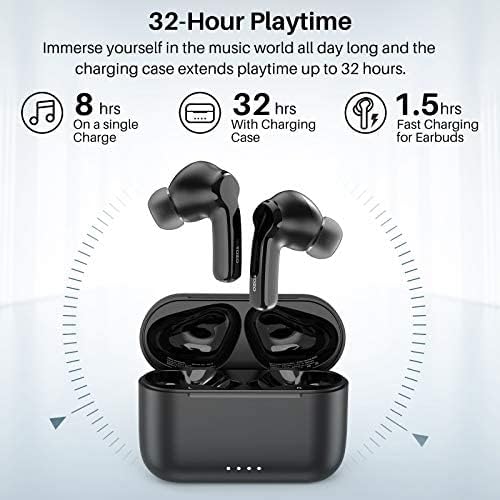
Figure 2: Battery life breakdown, showing 8 hours on a single charge and 32 hours with the charging case.
2. Бир кадамдуу жупташтыруу
The TOZO NC2 earbuds feature one-step pairing for quick and easy connection.
- Заряддоо кутусун ачып, эки кулакчынды алып салыңыз. Алар автоматтык түрдө күйүп, жупташтыруу режимине кирет.
- Мобилдик телефонуңузда же түзмөгүңүздө Bluetooth'ду иштетиңиз.
- Select "TOZO-NC2" from the list of available Bluetooth devices to pair. A voice prompt will confirm successful connection.

Figure 3: Illustration of the one-step pairing process with a smartphone.
3. Кулакчын тагынуу
Үндүн сапатын жана ыңгайлуулугун оптималдаштыруу үчүн, кулакчындарды туура тагынып жатканыңызды текшериңиз.
- Choose the correct size eartips for a secure and comfortable fit.
- Gently insert the earbuds into your ear canals and twist slightly to lock them in place.
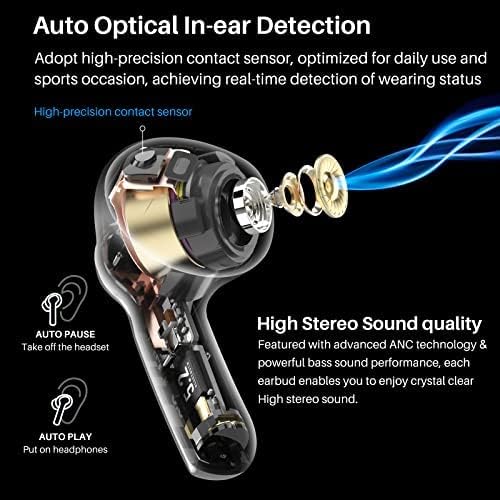
Figure 4: Proper wearing technique for the TOZO NC2 earbuds, demonstrating how they fit in the ear.
Иштөө нускамалары
1. Башкаруу элементтерине тийүү
The TOZO NC2 earbuds feature intuitive touch controls for managing audio and calls.
- Бир жолу таптоо: Аудиону ойнотуу/тындыруу, Чалууга жооп берүү/аяктоо.
- Эки жолу таптаңыз (оң кулакчын): Кийинки трек.
- Эки жолу таптаңыз (Сол кулакчын): Мурунку трек.
- Press and Hold (Right Earbud): Үнүн көтөрүү.
- Press and Hold (Left Earbud): Үнү басылды.
- Сол кулакчын (үч жолу таптоо): Toggle Active Noise Cancellation / Transparency Mode.
2. Активдүү ызы-чууну жокко чыгаруу (ANC)
The hybrid 3-layer Active Noise Cancellation technology reduces environmental noise by up to 35dB, providing a focused listening experience.
- Outward-facing microphones detect external sounds and counter with anti-noise.
- Inward-facing microphones listen inside the ear canal to further reduce remaining noise.
- Ear caps provide passive noise isolation.
- To activate/deactivate ANC, triple tap the left earbud.

Figure 5: Detailed diagram of the Hybrid 3-layer Active Noise Cancellation mechanism.

Figure 6: Active Noise Cancellation in action, reducing lower frequency noises for improved focus.
3. Transparency Mode
Transparency Mode allows you to hear your surroundings while still enjoying your audio, enabling interaction with the world around you without removing the earbuds.
- This mode enhances the voice frequency band.
- To activate/deactivate Transparency Mode, triple tap the left earbud.

Figure 7: Transparency Mode allows users to hear and interact with their environment.
4. Optical Sensors Technology
The earbuds feature optical sensors that detect wearing status, optimizing for daily use and sports occasions.
- Авто тыным: Audio pauses automatically when earbuds are removed from ears.
- Авто ойнотуу: Audio resumes automatically when earbuds are placed back in ears.
Техникалык тейлөө
Туура тейлөө кулакчындардын узак мөөнөттүү иштешин жана жакшы иштешин камсыз кылат.
- Regularly clean the eartips and charging contacts with a soft, dry cloth.
- Кулакчындарды экстремалдык температурага же тике күн нуруна тийгизүүдөн сактаңыз.
- Кулакчындарды коргоо жана кубаттоо үчүн колдонулбаган учурда кубаттоо кутучасында сактаңыз.
- The earbuds are IPX6 waterproof, protecting against sweat and raindrops, but are not designed for submersion.
Проблемаларды чечүү
If you encounter issues with your TOZO NC2 earbuds, refer to the following common solutions:
- Кулакчындар жупташкан жок: Ensure both earbuds are removed from the case and your device's Bluetooth is on. Forget "TOZO-NC2" from your device's Bluetooth list and try pairing again.
- Бир кулакчын иштебей жатат: Place both earbuds back into the charging case, close the lid, then reopen and remove them to reset the connection.
- Заряддоо маселелери: Clean the charging contacts on both the earbuds and the case. Ensure the USB-C cable is securely connected and the power source is functional.
- Батареянын иштөө мөөнөтү аз: Battery degradation can occur over time. Ensure earbuds and case are fully charged before extended use.
Техникалык шарттар
| Модель аты | NC2 |
| Байланыш технологиясы | Bluetooth 5.2 |
| Noise Control | Активдүү ызы-чууну жокко чыгаруу |
| Батареянын иштөө мөөнөтү (наушник) | 8 саат (бир кубаттоо) |
| Батареянын иштөө мөөнөтү (корпусу менен) | 32 саатка чейин |
| Сууга туруктуулук деңгээли | IPX6 суу өткөрбөйт |
| Башкаруу ыкмасы | тийүү |
| Материал | Пластик, силикон |
| Элемент Салмагы | 3.52 унция |
Кепилдик жана колдоо
TOZO products typically come with an 18-month warranty. For detailed warranty information, product support, or to contact customer service, please refer to the official TOZO webсайт же продукт таңгагында көрсөтүлгөн байланыш маалыматы.
Кошумча жардам алуу үчүн, баш багыңыз TOZO Brand Store on Amazon.


