1. Киришүү
This manual provides essential instructions for the safe and efficient operation, setup, and maintenance of your Displays2go Pedestal Display with Digital Sign (Model DF037NLB). Please read this manual thoroughly before using the product and retain it for future reference.
The DF037NLB is a versatile pedestal display featuring a 37-inch stretch LCD advertising screen, designed for indoor use. It includes a rear locking storage compartment for added functionality.
2. Коопсуздук маалыматы
- Бул продукт үчүн арналган үй ичинде гана колдонуу. Do not expose to moisture, rain, or extreme temperatures.
- Агрегаттын оодарылып кетүүсүнө жол бербөө үчүн туруктуу, түз бетке коюлганын текшериңиз.
- Желдетүүчү тешиктерди жаппаңыз.
- Берилген кубат адаптерин гана колдонуңуз.
- Тазалоодон же тейлөөдөн мурун электр энергиясын өчүрүңүз.
- Бул продукт Калифорния штатына рак жана тубаса кемтиктерди же башка репродуктивдик зыян келтирерин белгилүү болгон химиялык заттарды камтышы мүмкүн (65-сунуш боюнча эскертүү).
3. Пакеттин мазмуну
Таңгакта бардык компоненттер бар экенин текшериңиз:
- Pedestal Display Unit (DF037NLB)
- Электр кабели
- Алыстан башкаруу
- Set of Keys (for storage compartment)
- Колдонуучунун Колдонмосу (бул документ)
4. Орнотуу
4.1 Пакеттен чыгаруу жана жайгаштыруу
- Carefully remove the pedestal display from its packaging.
- Place the unit on a flat, stable surface in your desired indoor location. Ensure adequate space around the unit for ventilation.
4.2 Кубат туташтыруу
- Locate the power input port on the rear of the unit.
- Connect the provided power cable to the unit and then to a standard electrical outlet.
- The unit is now ready for initial power-on.
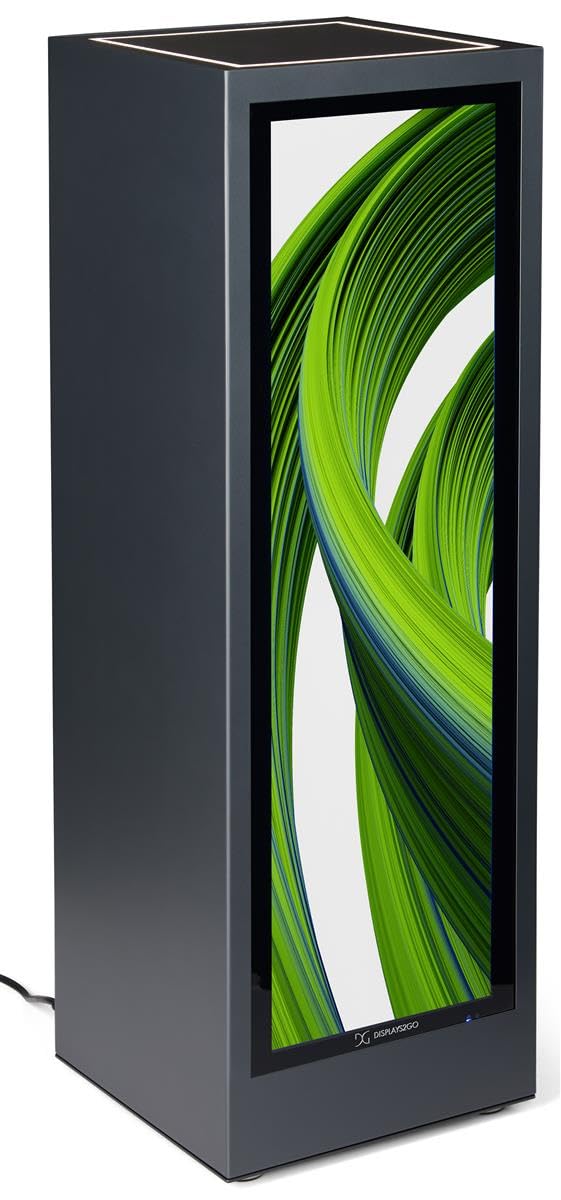
Сүрөт 4.1: Алдыңкы view of the Displays2go Pedestal Display with Digital Sign.
5. Иштөө нускамалары
5.1 Digital Signage Operation
The pedestal display features a 37-inch stretch LCD screen for displaying various media content.
- Content Formatting: For optimal display, format your marketing materials to a resolution of 720 2520 пиксель туурасы x XNUMX XNUMX пиксель бийиктиги.
- USB Content Transfer: Use the USB ports located on the rear of the unit to transfer images, videos, and other content to the display's internal storage.
- Байланыш: The unit supports WiFi and Bluetooth connectivity. This allows for network access, content updates, and connection to external Bluetooth speakers or peripherals like a mouse and keyboard.
- Google Play Access: Access the Google Play app store to download and install business applications directly onto the display.
- Аудио: The display includes two built-in speakers for audio playback.

Image 5.1: The digital display showcasing product advertisements for watches.

Image 5.2: The digital display showcasing product advertisements for headphones.

Image 5.3: The 37-inch diagonal measurement of the stretch LCD screen.
5.2 Rear Locking Storage Compartment
The unit features a rear-accessible storage compartment for securing personal items or product backstock.
- To open the compartment, insert one of the provided keys into the lock and turn.
- To lock, close the door, insert the key, and turn to secure. Remove the key to prevent unauthorized access.
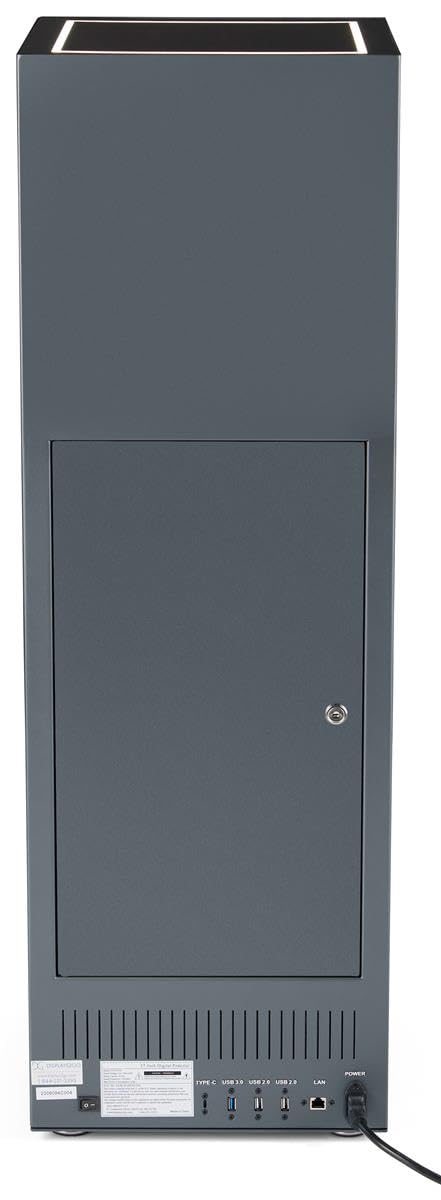
Сүрөт 5.4: Арткы view of the pedestal display showing the closed locking storage compartment and connectivity ports.

Сүрөт 5.5: Арткы view of the pedestal display with the locking storage compartment open, revealing interior space.
5.3 LED жарыктандыруу
The mirrored top surface of the pedestal features LED illumination to highlight products placed on top. This feature is integrated with the main power supply and activates when the unit is powered on.
6. Техникалык тейлөө
6.1 Тазалоо
- Тазалоодон мурун ар дайым электр кабелин сууруп алыңыз.
- Use a soft, dry, lint-free cloth to clean the exterior surfaces of the pedestal.
- For the screen, use a screen-specific cleaning solution and a microfiber cloth. Do not spray liquid directly onto the screen.
- Абразивдүү тазалоочу каражаттардан же эриткичтерден алыс болуңуз, анткени алар бетке зыян келтириши мүмкүн.
6.2 Программалык камсыздоо жаңыртуулары
Periodically check for software updates through the unit's operating system settings to ensure optimal performance and access to the latest features. Refer to the on-screen instructions for update procedures.
7. Кыйынчылыктарды
If you encounter issues with your pedestal display, refer to the following common problems and solutions:
| Көйгөй | Мүмкүн себеп | Чечим |
|---|---|---|
| Дисплей күйбөй жатат | Электр байланышы жок | Ensure power cable is securely connected to the unit and a working outlet. |
| Экранда сүрөт жок | Incorrect input source or no content loaded | Check display settings for input source. Ensure content is properly loaded via USB or network. |
| Динамиктерден үн жок | Үн өтө төмөн же үнсүз | Adjust volume using the remote control or on-screen settings. Check if external Bluetooth speakers are connected and overriding internal speakers. |
| Wi-Fi/Bluetooth менен туташуу мүмкүн эмес | Network issues or incorrect settings | Verify Wi-Fi network is active and password is correct. Ensure Bluetooth device is in pairing mode and within range. |
8. Техникалык шарттар
| Өзгөчөлүк | Деталь |
|---|---|
| Модель номери | DF037NLB |
| Продукт өлчөмдөрү (W x D x H) | 14 x 14 x 43 дюйм |
| Screen Size | 37 дюйм (диагоналдык) |
| Recommended Content Resolution | 720px (width) x 2520px (height) |
| Байланыш | WiFi, Bluetooth, USB ports (Type-C, USB 3.0, USB 2.0), LAN |
| Аудио | Камтылган динамиктер |
| Сактагыч | Rear locking compartment |
| Операция системасы | Access to Google Play App Store |
| Колдонуу чөйрөсү | Ичинде гана колдонуу |
9. Кепилдик жана колдоо
For warranty information, technical support, or service inquiries, please contact Displays2go customer service. Refer to your purchase documentation or the Displays2go official webбайланыш маалыматы үчүн сайт.


