1. Киришүү
This manual provides detailed instructions for the setup, operation, and maintenance of your AceGamer T47 2.4G Wireless Bluetooth Controller. This controller is designed for multi-platform compatibility, offering a versatile gaming experience across various devices.

Image 1.1: AceGamer T47 Wireless Bluetooth Controller and 2.4G wireless receiver.
2. Пакеттин мазмуну
Пакетиңизде бардык буюмдар бар экенин текшериңиз:
- 1x AceGamer T47 Wireless Controller
- 1x USB Type-C маалымат кабели
- 1x 2.4G зымсыз кабыл алгыч
- 1x Колдонуучунун колдонмосу (бул документ)

Image 2.1: Included items in the product package.
3. Controller Layout
Familiarize yourself with the buttons and features of your AceGamer T47 controller:
- Холл эффектисинин джойстиктери: Provide precise and reliable input.
- Аракет баскычтары (A, B, X, Y): Standard gaming input.
- D-Pad: Багыттуу киргизүү.
- Ийин баскычтары (сол, оң) жана триггерлер (ZL, ZR): Top-mounted input.
- Үй баскычы: Power on/off, connection, and system menu access.
- TURBO баскычы: Activates turbo function for rapid input.
- M1/M2 Back Buttons: Ар кандай функциялар үчүн ыңгайлаштырылуучу.
- USB-C порту: Заряддоо жана зымдуу туташуу үчүн.
- RGB жарыктандыруу: Customizable lighting effects around joysticks.
4. Орнотуу жана туташуу
The AceGamer T47 controller supports three connection modes: 2.4G Wireless, Bluetooth, and Wired.

Сүрөт 4.1: Бүттүview үч туташуу режиминин бири.
4.1. 2.4G Wireless Connection (PC, Switch Docked)
- Insert the 2.4G wireless receiver into an available USB port on your PC or Switch dock.
- басып, кармап туруңуз 'A' button, then simultaneously press and hold the 'HOME' button 3 секундга.
- The controller will enter pairing mode, indicated by flashing LED lights.
- Once connected, the LED indicator on the controller will become solid.
4.2. Bluetooth Connection (PC, Switch, iOS, Android)
- басып, кармап туруңуз 'HOME' button for 3 seconds to put the controller into Bluetooth pairing mode. The LED lights will flash rapidly.
- On your device (PC, Switch, iOS, Android), navigate to the Bluetooth settings.
- Издөө new devices and select "AceGamer T47" (or similar) from the list.
- Жупташтырылгандан кийин, контроллердеги LED индикатору туруктуу болуп калат.
4.3. Wired Connection (PC, Switch)
- Connect the USB Type-C end of the data cable to the controller.
- Connect the USB-A end of the data cable to an available USB port on your PC or Switch dock.
- The controller will automatically be recognized by your device.
5. Иштөө нускамалары
5.1. Hall Effect Joysticks
The controller features Hall Effect joysticks, which utilize magnetic sensors for enhanced precision, durability, and reduced drift. This technology ensures accurate and responsive control during gameplay.

Image 5.1: Hall Effect Joystick technology benefits.
5.2. Adjustable Vibration
The dual vibration motors provide haptic feedback, enhancing immersion. The vibration intensity can be adjusted to four different grades (0%, 50%, 80%, 100%) to suit your preference. Refer to the included physical manual for specific button combinations to adjust vibration levels.

Image 5.2: Four-level vibration adjustment.
5.3. Customizable Back Keys (M1, M2)
The controller features two programmable back buttons (M1 and M2). These can be customized to perform single button presses or complex trigger combos, providing additional convenience and strategic options during gameplay. There are also two back button switches for easy access and locking.
To program the back keys, please refer to the detailed instructions in the physical user manual provided with your controller.

Image 5.3: Customizable back keys functionality.
5.4. Турбо функциясы
The Turbo function allows for rapid, repeated input of a button press. The controller supports three turbo speeds: 5 shots/s, 12 shots/s, and 20 shots/s. This can be freely switched between manual and auto TURBO mode.
To activate and adjust the Turbo function, consult the specific instructions in your physical user manual.

Image 5.4: Turbo function speeds.
5.5. RGB жарыктандыруу эффекттери
The controller features RGB lighting around the joysticks, offering 7 color combinations and 5 diverse lighting models (Brightness, Breathing, Colorful, Fade-OFF). This allows for personalization of your controller's appearance.
For detailed instructions on how to change the LED colors and lighting effects, please refer to the physical user manual included with your product.
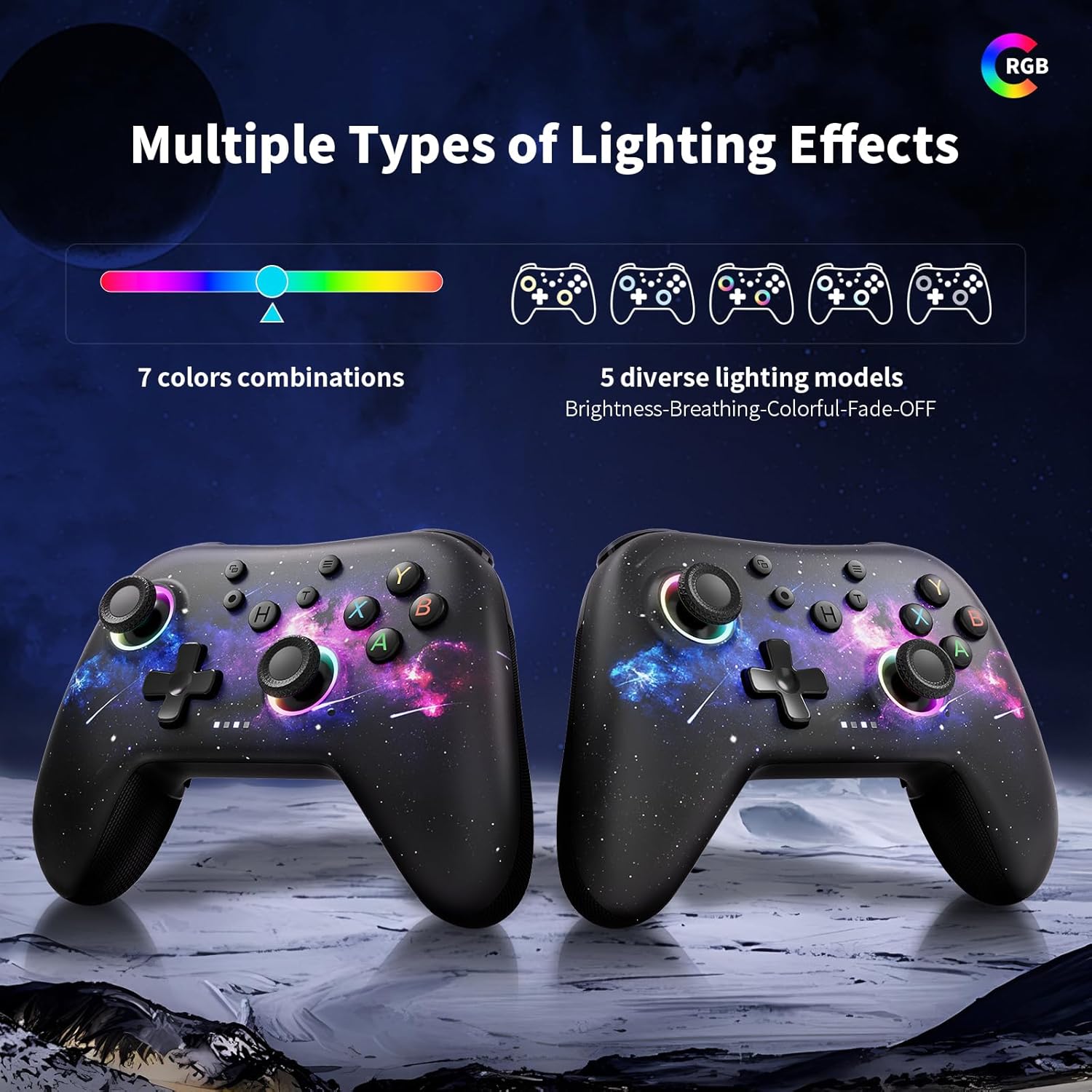
Image 5.5: Multiple types of RGB lighting effects.
6. Заряддоо жана Батарея
The AceGamer T47 controller is equipped with a 1000mAh battery, providing extended playtime on a single charge. The charging time is approximately 2-3 hours, offering up to 8 hours of playing time.
- Connect the USB Type-C data cable to the controller's charging port and the other end to a USB power source (e.g., PC, wall adapter).
- The LED indicators around the joysticks will glow and a four-LED charge level indicator will flash during charging.
- Once fully charged, the LED indicators will typically stop flashing or turn off, depending on the controller's state.

Image 6.1: Battery capacity and charging information.
7. Multi-Platform Compatibility
The AceGamer T47 controller is designed for broad compatibility, supporting various gaming platforms:
- PC: Windows операциялык системалары менен шайкеш келет.
- Nintendo Switch: Connects wirelessly or via wired mode.
- iOS: Compatible with iOS devices.
- Android: Android түзмөктөрүнө шайкеш келет.

Image 7.1: Supported platforms.
8. Кыйынчылыктарды
If you encounter issues with your AceGamer T47 controller, please refer to the following common solutions:
- Контроллер туташпай жатат: Ensure the controller is fully charged. Re-attempt the pairing process for 2.4G or Bluetooth connections. For wired connection, ensure the cable is securely plugged into both the controller and the device.
- Киргизүү кечигүү же ажыратуу: Move closer to the receiver/device to reduce interference. Ensure no other wireless devices are causing interference.
- Баскычтар же джойстиктер жооп бербейт: Try resetting the controller (refer to your physical manual for reset instructions, usually a small pinhole button). Ensure the controller's firmware is up to date if applicable (check manufacturer's webсайт).
- LED lights not changing: Consult the specific instructions in your physical user manual for RGB lighting control. There may be a specific button combination or sequence required.
- Вибрация иштебейт: Check if vibration is enabled in your game settings. Ensure the vibration intensity is not set to 0% on the controller.
If problems persist, please contact AceGamer customer support for further assistance.
9. Техникалык шарттар
| Өзгөчөлүк | Деталь |
|---|---|
| Модель номери | T47 |
| Байланыш | 2.4G зымсыз, Bluetooth, зымдуу (USB-C) |
| Батарея сыйымдуулугу | 1000mAh литий-ион |
| Заряддоо убактысы | 2-3 саат |
| Ойнотуу убактысы | 8 саатка чейин |
| Джойстиктер | Холл эффектинин сенсорлору |
| Вибрация | Dual Rotary Motors, 4 adjustable levels |
| Программалануучу баскычтар | 2 Back Keys (M1, M2) |
| Turbo Speeds | 5, 12, 20 shots/s |
| RGB жарыктандыруу | 7 color combinations, 5 lighting models |
| Салмагы | 9.9 унция (болжол менен 280 г) |
| Өлчөмдөр | 6.93 x 5.43 x 2.83 дюйм (Пакет) |
10. Кепилдик жана колдоо
AceGamer products are designed for quality and reliability. For warranty information, product registration, or technical support, please refer to the warranty card included in your product packaging or visit the official AceGamer webсайт. Кепилдик дооматтары үчүн сатып алганыңыздын далилин сактап коюңуз.


